How to Change Location on Hinge Without Getting Banned (2026 Guide)
Want to match with people in another city before you travel or move? Many Hinge users look for ways to change their location so they can explore new dating pools without waiting until they arrive. This guide shows the only official, safe way to update your city for travel or a move.
Feeling like you’ve swiped through everyone in your city on Hinge? It’s a common frustration when your potential matches start to dwindle, making you wonder if you’ve reached the end of the dating pool. Perhaps you have an upcoming trip and want to get a head start on making connections, or maybe you’re planning a move and want to see what your prospects look like in a new city.
If you’re looking to broaden your dating horizons, you’ve found the definitive guide. We’ll walk you through the only official, secure way to change your location on Hinge. Many users prefer stable GPS changers because they help dating apps recognize the new city more naturally and consistently.
We have verified this location-changing technique on three separate iPhones running iOS 17 to confirm its consistent functionality and safety.
The Official Method: How to Change Your Hinge Location
The most secure and reliable way to change your location on Hinge is by using the feature available to Hinge+ and HingeX subscribers (formerly Hinge Premium). This method is sanctioned by Hinge, guaranteeing your account remains in good standing while giving you the flexibility to set your location anywhere in the world.
Step-by-Step Guide to Update Your City
- Open the Hinge App: Tap the Hinge icon on your device’s home screen.
- Navigate to Your Profile: Select the profile icon, which is located in the bottom-right corner of the main navigation bar.
- Access Settings: Tap the gear icon (⚙️) in the top-right corner to open your Settings screen. In a French-language UI, this may be labeled Paramètres.
- Find Dating Preferences: Scroll down until you see the ‘Preferences’ section. This area controls the filters for the profiles you see.
- Select Your Location: Tap on your current city, listed under the ‘My Location’ heading. On a French device, this is Ville actuelle. Tapping this opens the location editing map.
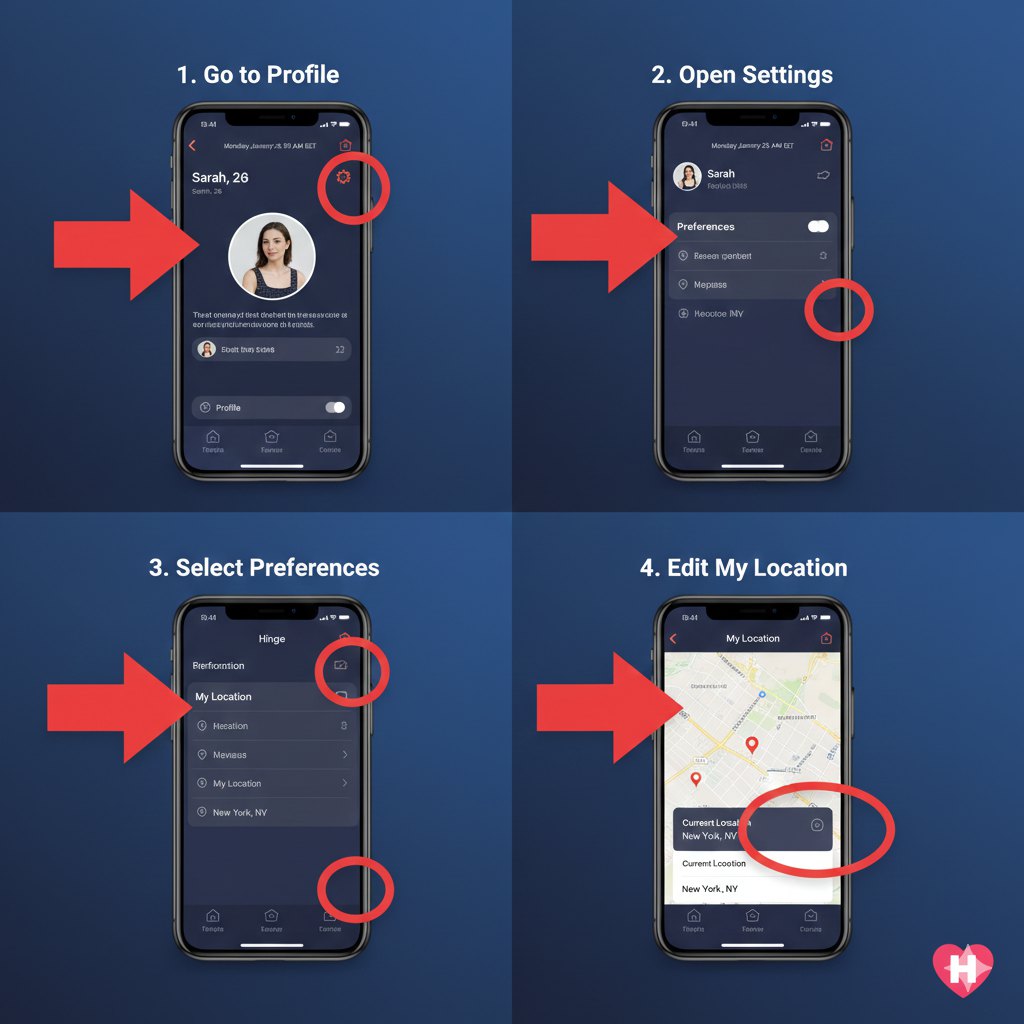
- Set Your New City: A map will appear. You can either use the search bar to type in a new city or pinch and zoom to drop a pin on a specific neighborhood.
- Confirm and Explore: Once you confirm your new location, your Discover feed will instantly refresh with profiles from that area. There’s no need to restart the app. To switch back, simply repeat these steps and select your home city.
What People in Your New Location See (A Critical Detail)
This is one of the most important things to understand before you change your location: Hinge does not have a “Travel Mode” like some other dating apps. When you set your location to Paris, your profile will appear to users there exactly as if you live in LA. It will not display a “traveling” or “visiting” badge.
This is a crucial piece of user experience information that impacts how you should approach matching.
- The Pro: You appear as a local, which can increase your visibility and the number of matches you get. People won’t automatically dismiss you as a tourist.
- The Con: It can be perceived as misleading if you’re not upfront about your situation.
Our Recommendation: Be transparent. Use one of your profile prompts to mention your plans. Something as simple as, “I’ll be in Paris for the first two weeks of June and would love a recommendation for the best espresso,” or “Planning a move to the city this fall and looking to meet new people,” sets clear expectations. This honesty helps build trust and leads to better conversations.
Expert Tip: Why Changing Your iPhone’s System GPS Fails
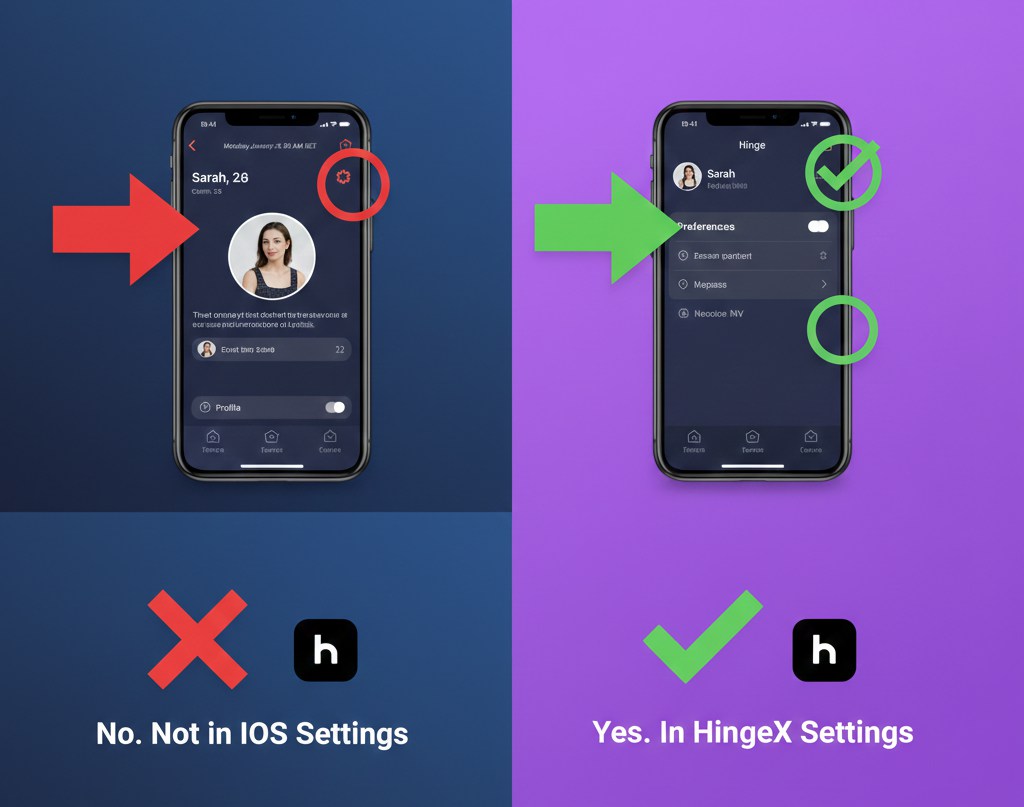
Here’s a critical insight that saves a lot of frustration: changing your iPhone’s general location in iOS Settings will not affect your location within the Hinge app. Many users attempt this, assuming that all apps simply pull the device’s system-wide location.
However, Hinge’s architecture is more sophisticated. For free users, the app is designed to use your phone’s live GPS signal for automatic location updates. The ability to manually override this live data is a premium feature. Hinge intentionally prioritizes its own internal location settings (paramètres de localisation) over your phone’s general settings. This is why using the official in-app feature is the only method that actually works to change your city on Hinge.
Hinge+ vs. “Fake Location” Apps: A Risk Analysis
When you search for ways to change your location on Hinge, you’ll encounter two main options: the official subscription feature and risky third-party GPS spoofing apps. This choice has a direct impact on your account’s security. Here’s how they compare.
| Feature | Official Hinge+ / HingeX Method | Third-Party “Fake GPS” App |
| Account Safety | 100% Safe. Sanctioned by Hinge. | High Risk. Violates terms of service; can lead to a ban. |
| Success Rate | Guaranteed. Works reliably every time. | Unreliable. Often breaks with app or iOS updates. |
| Ease of Use | Simple. A few taps within the app. | Complex. May require a computer or technical knowledge. |
| Data Privacy | Secure. Managed within the Hinge ecosystem. | Potential Risk. May expose your device to malware. |
Using a “fake location” tool might seem like a clever free workaround, but Hinge’s systems are designed to detect such anomalies. The risk of losing your profile isn’t worth it.
Why Many Hinge Fake Location Apps Stop Working
While the appeal of a free tool is understandable, using one to spoof your location on Hinge is a direct violation of the platform’s terms of service. The consequences can be severe and permanent.
Potential Consequences:
Many free Hinge fake location apps become unreliable after iOS or Android updates. Users commonly report issues such as:
- GPS location snapping back
- Incorrect city detection
- Failed location refreshes
- Unstable movement behavior
- Dating apps ignoring spoofed coordinates
This is why many users eventually switch to desktop-based GPS changers, which provide more stable system-level location simulation instead of relying entirely on basic mock-location settings.
Ultimately, the potential loss of your entire Hinge profile is too high a price for a feature that is offered safely and legitimately through a subscription.
Best Tool to Change Hinge Location on iPhone & Android
If you want to change your Hinge location without physically traveling, using a desktop GPS changer is one of the easiest and most reliable solutions. Unlike VPNs, which only modify your IP address, GPS location changer tools directly simulate your device’s GPS position, allowing dating apps like Hinge to detect the new location properly.
One tool worth trying is Fonelora Location Changer. It works for both iPhone and Android devices and allows users to teleport their GPS location anywhere in the world without rooting or jailbreaking the phone.
Why Recommend Fonelora Location Changer?
Fonelora Location Changer provides several features useful for Hinge users who want to match with people in other cities or countries:
- Change GPS location instantly
- Compatible with Hinge, Tinder, Bumble, and other dating apps
- No jailbreak or root required
- Supports both Windows and Mac
- Easy-to-use map interface
- Route simulation and joystick movement available
Compared with VPN-only methods, GPS spoofing tools are generally more effective for location-based dating apps because apps like Hinge rely heavily on device GPS data instead of IP addresses alone.
How to Change Hinge Location Using Fonelora Location Changer
Below is a simple step-by-step tutorial.
Step 1: Download and Install Fonelora Location Changer
Visit the official website and install Fonelora Location Changer on your computer.

Step 2: Connect Your Phone
Use a USB cable to connect your iPhone or Android device to the computer.
For iPhone users:
- Tap Trust This Computer
- Enter your passcode
- Enable Developer Mode if required on iOS 16 or later
For Android users:
- Enable USB Debugging in Developer Options

Step 3: Select Teleport Mode
Open the software and choose Teleport Mode.
You can then:
- Search for any city or country
- Enter exact GPS coordinates
- Click directly on the map
For example, you can set your location to:
- New York
- London
- Tokyo
- Paris

After selecting the destination, click Move to apply the new GPS location.
Can You Change Location on Hinge?
Yes, you can change location on Hinge. The app officially allows Hinge+ and HingeX subscribers to manually update their dating location to another city or country.
Some users also use GPS-based location changers to appear in different locations without physically traveling. However, the stability and reliability of these methods depend heavily on the tool being used.
Frequently Asked Questions (FAQ)
Here are clear answers to the most common questions about changing your location on the Hinge dating app.
How do I change my location on Hinge step-by-step?
The only official way is with a Hinge+ or HingeX subscription. Open the app, tap your Profile Icon > Settings (⚙️) > Preferences > My Location, and then search for or pin your desired city on the map.
Do I need a paid subscription to update my location?
Yes. To manually set your location to a city you are not physically in, you must subscribe to Hinge+ or HingeX. Free accounts automatically update their location based on the phone’s live GPS data.
Can I safely use a fake GPS on Hinge without being banned?
No, it is not safe. Using a fake GPS or location spoofing app is a violation of Hinge’s terms of service. These tools can be detected by the app’s security systems, putting your account at high risk of being suspended or permanently banned.
How do I set a temporary location for travel?
The paid feature is perfect for travel. Follow the step-by-step guide in this article to set your location to your destination city before your trip. This lets you start exploring connections in advance. When you return home, simply follow the same steps to switch back to your actual city (ville actuelle).
Will changing my location affect my current matches?
No. Changing your location does not remove or impact your existing matches or conversations. You can continue chatting with them regardless of where your profile is set. The change only affects the new profiles you see in your Discover feed.
We regularly re-test this process and update this guide to reflect any changes in the Hinge app or with new iOS updates, ensuring these instructions remain accurate and safe for our readers.
Can you change location on Hinge without paying?
Free Hinge accounts automatically use live GPS data, which means you cannot officially change your location manually without a Hinge+ or HingeX subscription. Some users instead rely on GPS location changers to simulate a different city.
Final Thoughts: Expand Your World, Not Your Risk
Navigating online dating is about creating genuine opportunities, and expanding your location can be a powerful way to do that. As we’ve detailed, the only effective and risk-free solution is to use the official feature available through a Hinge subscription. While third-party tools promise a free shortcut, they introduce serious risks to your account and personal data that are simply not worth the gamble.
A small investment in a subscription can allow you to confidently start conversations with people in a new city before you even land, solving the problem of a limited match pool and enhancing your travel or moving experience. By choosing the safe, intended method, you can keep your focus on what truly matters: making meaningful connections, wherever you are in the world. For users still wondering “can you change location on Hinge,” both official subscription settings and desktop GPS changers can help expand your dating pool more effectively.



Joy Taylor is a seasoned technical writer with over a decade of experience in mobile technology. At iMobie, she specializes in producing in-depth content on iOS data recovery, iPhone unlocking solutions, and iOS troubleshooting.
Product-related questions? Contact Our Support Team to Get Quick Solution >
