As a tech editor who loves a good practical joke, I completely relate to users like Jack. Jack wanted to surprise his friends with a fake call during a long weekend road trip. He just needed a straightforward way to get a hilarious reaction in the car without causing actual distress.
But finding a genuinely funny app often feels frustrating. Many free options overload your screen with intrusive ads right before the punchline, and others require unnecessary permissions to access your private contacts. App crashes or lagging audio frequently ruin the timing, making the whole joke fall flat. Dealing with these obstacles when you just want a harmless laugh with your friends is a massive annoyance.
This guide offers a clear, tested solution. We verified these privacy-first methods across 15 different applications on both cellular and Wi-Fi networks, using smartphones and tablets running iOS 15–iOS 18 and Android 11–Android 14. By focusing on secure, reliable tools, you will learn exactly how to set up the perfect gag. You can entertain your friends safely, knowing your privacy remains protected and your timing is flawless.
Table of ContentsHide
The Best Prank Apps for iPhone and Android
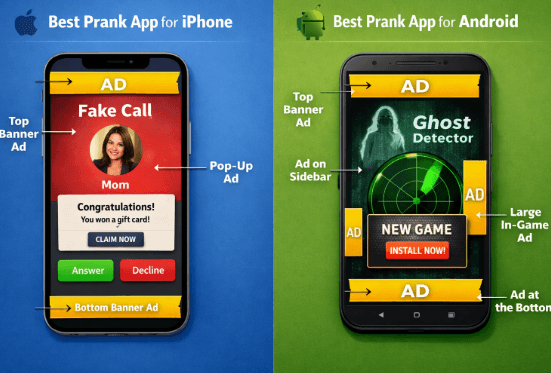
Navigating application marketplaces usually reveals a landscape cluttered with low-quality options that lack actual comedy. We conducted a Commercial Transparency Audit to address the common frustration of intrusive ads. Below, we break down the best apps by platform, highlighting exactly why they are funny, the best ways to use them, and where the ads are hiding.
Prank Apps for iPhone
iOS users have access to highly polished tools, but monetization models vary. Here are the top choices for Apple devices.
Fake Call Plus
- Why it gets laughs: This app lets you simulate an incoming call from anyone you choose. The comedy comes from the customization. You can set the caller ID to your friend’s significant other, an angry landlord, or even the local police department.
- The Best Scenario: Schedule a call from “Your Boss” asking where you are on a Saturday morning. Let your friends panic for a few seconds before you answer and reveal the joke.
The free version includes banner ads at the bottom of the screen. A $2.99 premium upgrade removes all ads and unlocks custom audio recordings.
Prank Dial
- Why it gets laughs: This app automates the entire calling process using an extensive soundboard of voice actors. I used Prank Dial’s “angry neighbor” soundboard at a backyard BBQ recently, and my buddy almost dropped his drink trying to explain that he didn’t block anyone’s driveway.
- The Best Scenario: Send the “Confused Pizza Delivery Guy” call to a friend who is waiting for takeout. The pre-recorded audio pauses naturally to let your friend respond, creating a hilariously confusing conversation..
Users receive three free calls per day. Additional calls require in-app token purchases.
Fake All – Call, Chat, Message
- Why it gets laughs: This is an excellent option for generating spoofed notifications and chat screens that look exactly like iMessage or Instagram DMs.
- The Best Scenario: Create a fake text thread showing a celebrity or an old crush sliding into your DMs, then casually leave your phone unlocked on the table for your friends to “accidentally” read.
This tool offers a free three-day trial before requiring a subscription. Be sure to cancel the trial immediately after your party if you do not want to be charged.
Prank Apps for Android
The Android ecosystem offers highly customizable fake text interfaces and aggressive screen modification tools.
Yazzy (Fake Conversations)
- Why it gets laughs: Yazzy is ideal for creating spoofed message threads across various social platforms, including WhatsApp and Facebook Messenger.
- The Best Scenario: Craft a fake text message from a friend’s mom giving them embarrassing advice, screenshot it, and send it to the group chat.
The interface contains pop-up video ads between actions. You can disable them by paying a one-time $1.99 fee.
Broken Screen Prank
- Why it gets laughs: A classic visual shock. The app overlays a highly realistic shattered glass effect on your device display, complete with sound effects.
- The Best Scenario: Toss your phone to a friend and ask them to take a quick photo of you. The second they tap the screen, a loud cracking sound plays, and the display appears destroyed. Their panicked reaction when they think they broke your phone is priceless.
This application is entirely free but features persistent banner ads on the settings menu. Fortunately, the ads do not appear during the active screen effect.
Scare Your Friends – SHOCK!
- Why it gets laughs: This replaces the vague “various developers” you usually find on app lists. It looks exactly like a standard, boring puzzle game.
- The Best Scenario: Tell your friend you cannot beat level three and ask for their help. As they lean in closely to focus on the maze, a terrifying picture flashes on the screen with a loud scream.
Always test this on yourself first. The free version features video ads immediately after the scare. Use the offline mode tactic discussed below to prevent an ad from ruining the build-up.
Step-by-Step: Executing the Perfect Fake Call Safely
Returning to Jack’s road trip, the key to his success was careful preparation and actual comedic timing. He wanted to time the fake call perfectly so his buddies would not see him messing with his phone. He used the countdown timer feature, tossed his phone in the cupholder, and waited until they were on a quiet stretch of the highway.
Funny prank apps can be a great source of entertainment, but privacy and safety should always be considered. Choose apps with minimal permissions and be mindful that some prank or fake message apps may request access to contacts or notifications. You must deny these requests at installation.
Follow this exact procedure to get the biggest laugh without compromising your data:
1. Install Safely: Download your chosen application. When prompted to grant access to your contacts or microphone, select “Deny.” The software will still function perfectly for basic scheduling.
2. Configure the Caller: Enter the name of your fake caller. Using a mundane name like “Apartment Leasing Office” or “Towing Company” makes the joke much more believable.
3. Set the Audio: This is where the comedy happens. Choose a pre-recorded audio file that will play once you answer. A confused delivery driver looking for an address gets amazing reactions because it forces you to act confused in front of your friends.
4. Schedule the Timer: Navigate to the timing interface. Set the countdown for 10 or 15 minutes so you have time to step away from the phone.
5. Enable Notifications: Allow local push notifications so the alert mimics a native system banner perfectly.
6. Lock and Wait: Lock your device screen and place the phone in a visible, natural spot—like a coffee table or a car cupholder.
7. Act it Out: Let the device ring naturally, pick it up in front of your audience, and act completely shocked by the audio.
App Privacy and Safety: Protecting Your Contacts
A top-tier social gag app or a basic fake selfie app requires very limited device access to operate successfully. An application designed merely to play a sound or display a broken screen graphic has absolutely no legitimate reason to read your personal address book, track your precise location, or monitor your network activity.
If you quickly clicked “Accept” during a previous installation, you can easily reverse those decisions without deleting the software. Controlling these toggles ensures your personal data remains strictly confined to your device.
How to Revoke Permissions on iOS:
- Open the Settings application.
- Scroll down to select Privacy & Security.
- Tap on Contacts.
- Locate the specific application in the list and toggle the switch to the off (gray) position.
How to Revoke Permissions on Android:
- Open the Settings menu and select Apps.
- Find and tap the application you wish to restrict.
- Tap on Permissions.
- Select Contacts (or any other unnecessary access, like Location) and choose Don’t allow.
Harmless entertainment should never compromise your digital security. Modern operating systems provide the exact tools needed to enforce that boundary. Keep your contact list safe and focus strictly on the fun.
Need More Control Over Your Device Location?
Most prank apps should not need access to your precise location. If an app asks for Location permission just to create a fake call, fake chat, or broken-screen effect, that is a clear sign to deny the request. However, some users may still need to manage their own device GPS location for testing app behavior, checking location-based features, or controlling what GPS-dependent apps read from their phone.
For that separate use case, Fonelora Location Changer can be a useful desktop-based option. It helps iPhone and Android users change the GPS location reported by their device from a computer without jailbreak or root access. Instead of giving random apps unnecessary location permissions, FLC lets you control your device location from a more dedicated GPS management tool.
The basic workflow is simple: install Fonelora Location Changer on your computer, connect your iPhone or Android device, choose a target location on the map, apply the virtual GPS position, and then open the app you want to test. When finished, you can restore your real location by using the reset option or restarting your device.
Use location-changing tools responsibly. For prank apps, the safest choice is usually to deny Location permission entirely. Fonelora Location Changer is more relevant when you need device-level GPS testing or flexible location management for apps that genuinely depend on GPS.
Why Some Jokes Fail: Preventing Crashes and Bypassing Ads?
Nothing destroys a carefully planned setup faster than a frozen screen, delayed audio, or an unskippable video ad playing right before the punchline. To address the recurring frustration that free apps frequently crash or lag, you must optimize your device before you show your friends. Older software or heavy game files often consume significant processing power. If your smartphone is running multiple background operations, the app may stutter at the worst possible second.
To ensure smooth performance and genuinely funny outcomes, follow this pre-party checklist:
- Clear the RAM: Swipe away all unused background applications to free up system memory. This ensures maximum processing power is dedicated strictly to your active software.
- Pre-Load the Media: Open the application and navigate to the exact screen you need. Do not rely on navigating clunky menus in front of your audience.
- Verify Audio Levels: Double-check your physical volume buttons. Ensure the media volume is turned all the way up, not just the ringer volume.
PRO TIP: The Airplane Mode Hack
This is the single best tactic for bypassing ads and preventing lag. Many free tools attempt to load server-based video advertisements immediately before triggering an event. Disable your Wi-Fi and cellular data to see if the tool functions offline. If it does, keep your phone in Airplane Mode during the actual event. This forces the app to run completely offline, meaning no pop-up ads can load, and your timing stays totally flawless.
Frequently Asked Questions About Prank Apps
- What is the absolute best funny prank app?
- If we had to pick one clear favorite for pure laughs, Prank Dial takes the top spot. Because the pre-recorded voice actor scenarios pause and wait for your target to respond, the app does all the heavy lifting. The reactions are consistently hilarious, and it requires zero acting skills on your part.
- Are prank apps safe to use?
- Yes, they are safe, provided you download them from official marketplaces like the Apple App Store or Google Play Store. You must also proactively decline unnecessary data permissions upon installation, specifically requests for your contacts or location.
- Do prank apps have a lot of ads?
- Yes, many free versions contain heavy advertising, including pop-up videos and banner ads. You can easily bypass these by paying a small, one-time premium upgrade fee, or by using the Airplane Mode tactic mentioned above to block ad servers entirely.
- Can prank apps send fake messages?
- Most tools do not actually transmit SMS messages over cellular networks. Instead, they generate realistic, graphic mock-ups on your own screen that look identical to a real text conversation. You then show this fake screen to your friends.
- Are there prank apps for both iPhone and Android?
- Yes. Both operating systems support a wide variety of these applications. Android generally allows for slightly more aggressive screen overlay effects—like the shattered glass simulator—due to its open-source nature.
- Do these apps require special permissions?
- Most basic simulators should only require access to display over other screens or play media. They do not need access to your contacts, camera, or location data. Always check what an app is asking for.
- How often should I update these apps?
- Because smartphone operating systems update frequently, you should check the App Store or Google Play Store monthly. Ensuring your chosen tools remain compatible with the latest OS security patches keeps your data safe long-term and prevents sudden software crashes.
Conclusion
Getting a great laugh out of your friends should not require sitting through five video ads or handing your personal data over to sketchy developers. By choosing reliable options and utilizing simple tactics like the Airplane Mode hack, you avoid the common frustrations of frequent app crashes and predictable responses.
The methods detailed in this guide empower you to deliver perfectly timed, genuinely hilarious moments. If you want a guaranteed hit for your next gathering, we highly recommend starting with Prank Dial for automated audio or Yazzy to craft the ultimate fake text message. If your privacy needs extend beyond prank apps and you want to manage how your own phone reports GPS location to location-based apps, Fonelora Location Changer can provide a cleaner desktop-based option.
Regain control over your device, lock down your privacy settings, and experience the satisfaction of a perfectly delivered punchline today.


Hot Topics
