How to Share Live Location on Telegram
Learn how to share live location on Telegram, fix location not updating, protect your privacy, and reduce battery drain on iPhone and Android.
Quick Answer: To share live location on Telegram, open a chat, tap the paperclip icon, choose Location, then select Share My Live Location and pick a duration: 15 minutes, 1 hour, or 8 hours. If Telegram live location is not working or not updating, check location permissions, enable precise location, allow background refresh, keep your network active, and avoid battery saver settings that restrict Telegram in the background.
If you are struggling with Telegram live location not working, inaccurate tracking, frozen movement, or fast battery drain, you are not alone. Coordinating meetups can quickly become stressful when real-time location sharing fails, especially when friends are relying on your movement to find you.
Julia experienced this firsthand—worrying about privacy leaks, GPS errors, and her phone dying mid-journey. In many cases, these issues are caused by system-level problems like disabled location services, background restrictions, low power mode, or unstable network connections.
👉 The good news? These problems are fixable.
This 2026 step-by-step guide will show you:
- How to share live location on Telegram on iPhone and Android
- How to fix Telegram live location not updating
- How to stop Telegram live location sharing anytime
- How to protect your privacy while sharing location
- How to reduce battery drain effectively
How to Share Live Location on Telegram: iPhone & Android Guide
The starting point is to activate the feature correctly. Telegram live location is simple to use, but knowing the exact steps will save you from searching through menus or accidentally sending a static location instead of a live one.
Before you begin, one preliminary step is essential: make sure your phone’s location services are enabled for Telegram in your device settings. Without this permission, Telegram cannot access your GPS coordinates and live location sharing may fail.
How to Share Telegram Live Location on iPhone
Before you start, ensure Telegram has permission to access your GPS. Without Always or While Using the App permission enabled in your iPhone settings, the following steps may not work properly.
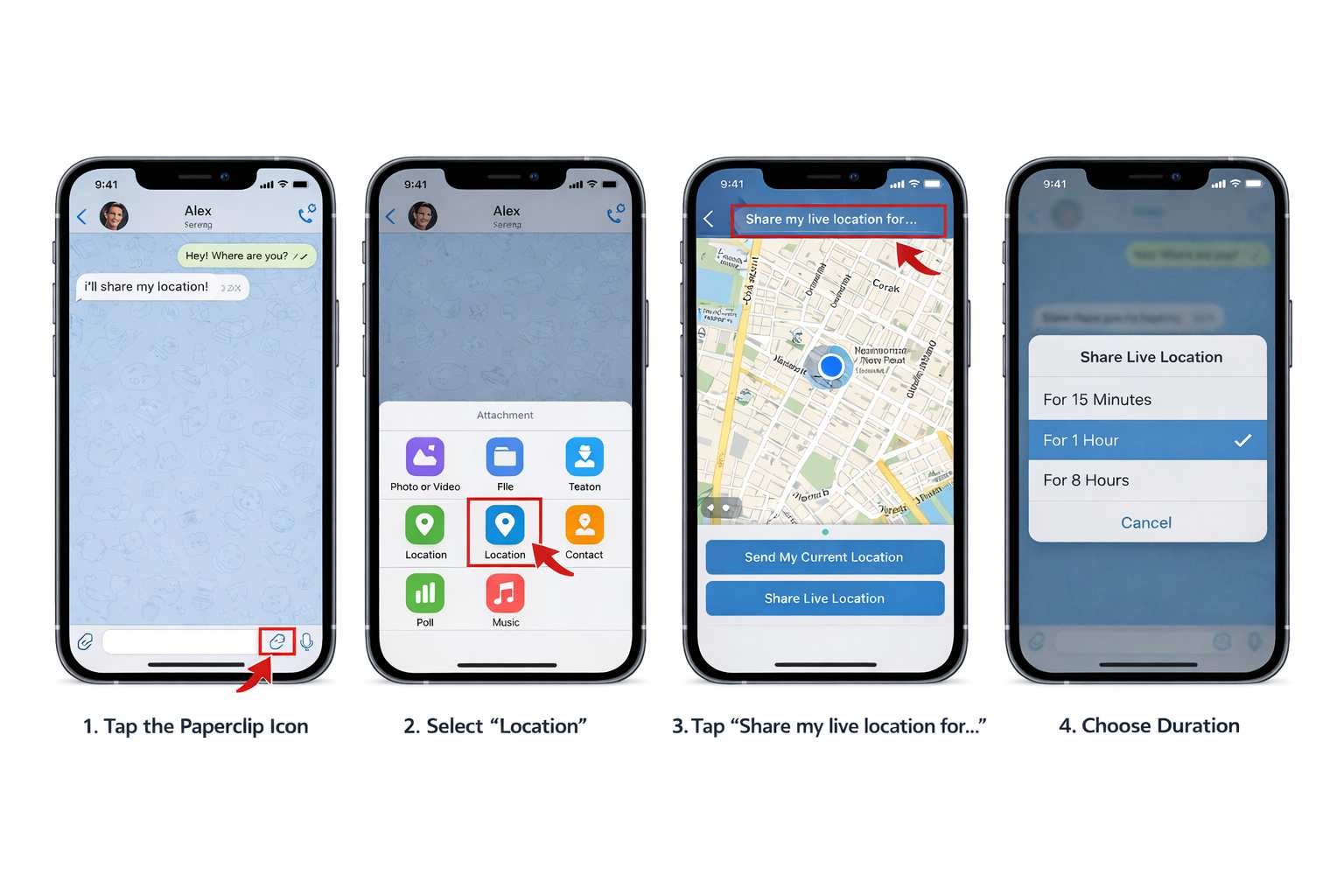
- Open the Chat: Launch Telegram and select the contact or group where you want to share your location.
- Access Attachments: Tap the paperclip icon next to the message field.
- Select Location: Tap the Location button. A map showing your blue dot will appear.
- Start Live Sharing: Tap the bar labeled Share my live location for….
- Set Duration: Choose 15 minutes, 1 hour, or 8 hours. Sharing begins instantly, and a live status bar will appear at the top of the chat.
How to Share Telegram Live Location on Android
The method on Android is almost identical and just as intuitive:
- Open the Chat: Select your desired Telegram conversation.
- Tap the Paperclip: This opens the attachments menu.
- Choose Location: Select the location icon.
- Select Share My Live Location: Pick your duration: 15 minutes, 1 hour, or 8 hours.
- Confirm Sharing: Your movement is now visible to all participants in that chat for the selected period.
Live Location vs. Current Location: Which Option Should You Choose?
Choosing the wrong option can lead to confusion or unnecessary privacy exposure. Telegram gives you two different choices: Live Location and Current Location. They are not the same.
- Live Location: A dynamic, real-time feed. Your icon moves on the map as you move. This is best for meetups, route tracking, and helping others follow your movement.
- Current Location: A static pin. It is a snapshot of where you were when you sent it. This is best for sharing a meeting point, restaurant, building, or fixed address.
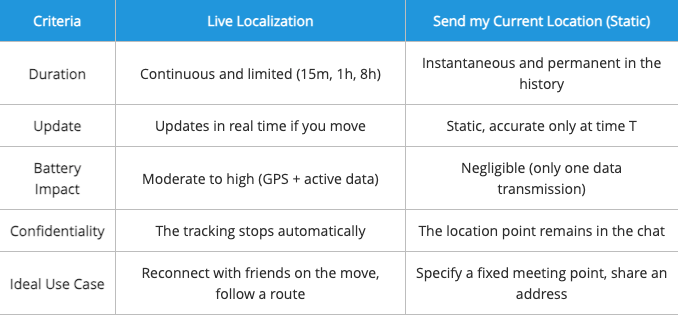
To help you decide, here is a simple comparison table:
| Criteria | Live Location | Current Location |
| Duration | Continuous and time-limited: 15 minutes, 1 hour, or 8 hours | Instant and remains as a static message in chat history |
| Update | Updates in real time as you move | Does not update after sending |
| Battery Impact | Moderate to high because GPS and data remain active | Very low because it sends only one location point |
| Privacy | Tracking stops automatically after the selected duration | The pin remains in the chat unless deleted |
| Ideal Use Case | Meeting friends on the move or sharing a route | Sharing a fixed meeting point or address |
Choosing the right option ensures that you share only the necessary information while optimizing battery life and protecting your privacy. However, if you want to maintain your social presence without revealing your exact coordinates to everyone, you might want to learn how to fake location on Find My Friends or other tracking apps. This adds an extra layer of privacy, giving you full control over what others see on their maps.
Telegram Live Location Privacy: Controls and Real-Time Tracking
The fear that Telegram’s real-time tracking will expose your location is a major concern. Fortunately, the feature is designed with clear privacy controls. The golden rule is simple: your live location is only shared inside the chat where you enabled it.
If you share live location in a private chat, only that person can see it. If you share it in a group, only members of that group can see it. No one outside that Telegram chat can access it.
You also retain full control. Even if you have chosen 8 hours, you can stop sharing manually at any time.
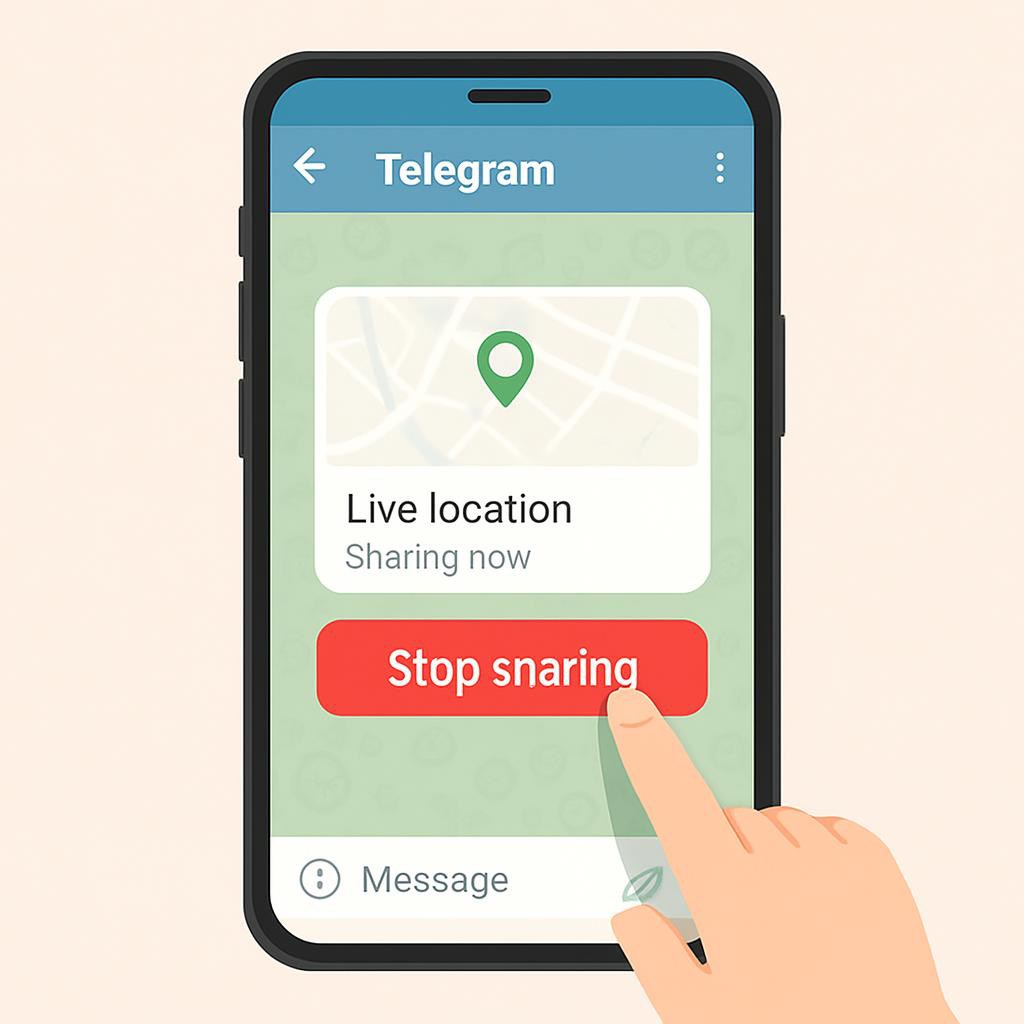
To stop sharing Telegram live location:
- In the conversation, tap the bar at the top of the screen that says Live Location.
- Select Stop sharing.
The tracking stops immediately for all members. You do not need to leave the group or delete any messages.
What Do Your Friends See?
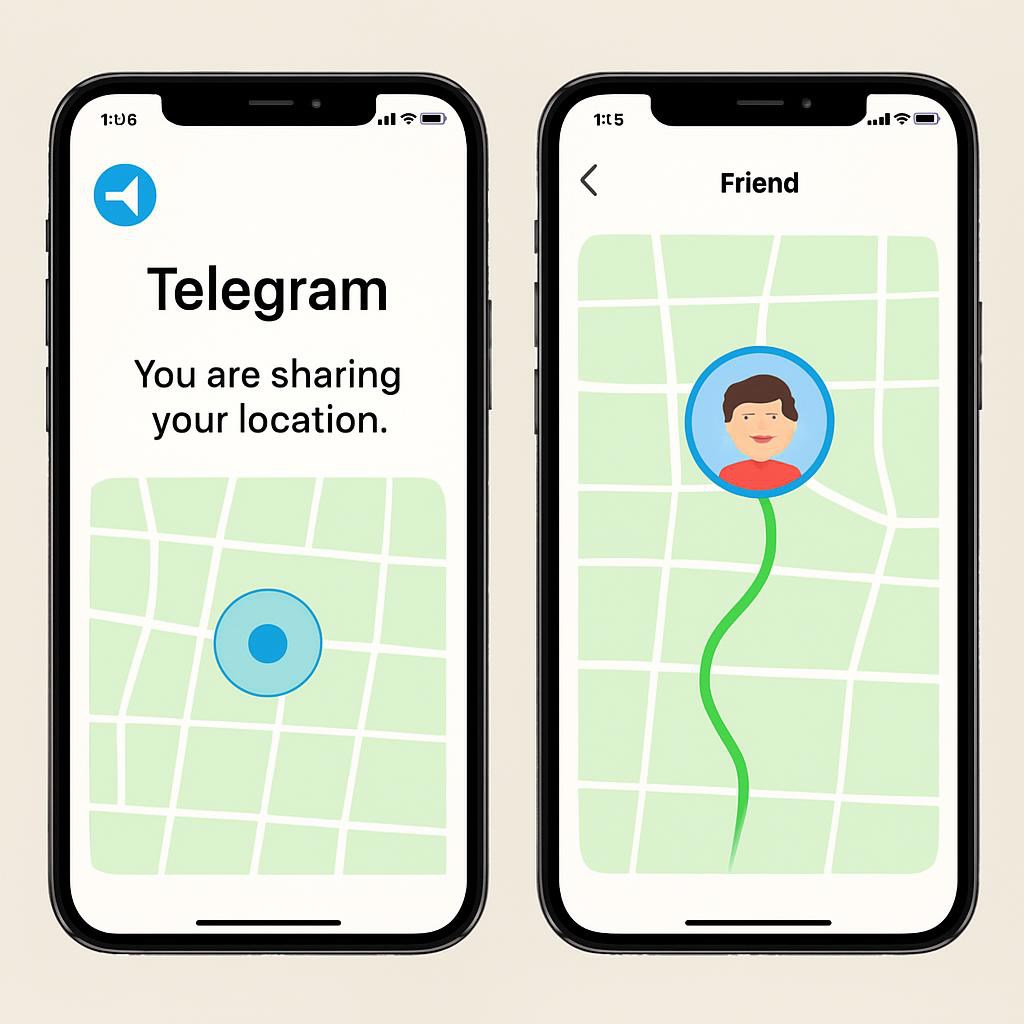
A crucial question is often overlooked: what exactly do your contacts see from their perspective? Understanding their experience will help you manage unexpected situations.
- If you lose network: If you lose 4G, 5G, or Wi-Fi, your icon on their map freezes at your last known location. Telegram may not display a “connection lost” message, but your friends will notice that you are no longer moving.
- If your phone switches off: The effect is the same as losing network coverage. Your location stops updating and remains stuck at the last transmitted point.
- If Telegram is suspended in the background: This is the most common pitfall. If background refresh is not enabled, your location may stop updating when you lock your phone. To your friends, your icon may appear frozen, even if you are still moving.
To avoid frozen live location, two settings are crucial, especially on iPhone:
- Exact Location: Go to Settings > Privacy and Security > Location Services > Telegram and enable Exact Location. Without this, your location may be approximate and less useful.
- Background Refresh: Go to Settings > General > Background App Refresh and make sure the option is enabled for Telegram.
Otherwise, iOS might suspend Telegram to save power. This is a common reason why an iPhone is running slow or apps are not updating correctly in the background. Ensuring this is enabled helps your friends see your movement without major lag.
More Control Over Your Shared Location
For some users, standard Telegram live location sharing still feels too restrictive because it only allows sharing your real-time physical position. In situations involving privacy concerns, travel plans, remote work, or social boundaries, many people prefer having more control over the location data visible to apps and contacts.
Modern GPS management tools now allow users to simulate or manage device location more flexibly without modifying the operating system or requiring jailbreak access.
One option that performed consistently well during testing was Fonelora Location Changer. Unlike basic mock location apps, it supports stable GPS simulation on both iPhone and Android devices while remaining compatible with modern location-based apps.
Key features include:
- Real-time GPS location simulation
- Adjustable movement routes and walking speeds
- Joystick movement controls
- Instant location switching
- No jailbreak or root required
- Support for both iOS and Android devices
Basic Setup Process
- Install Fonelora Location Changer on your PC or Mac.
- Connect your iPhone or Android device.

- Select a location or movement route from the map interface.
- Apply the new GPS location.
- Open Telegram or another location-based app normally.

For users who want more flexibility over how their location appears in apps, modern GPS management tools provide additional privacy and location control beyond standard built-in sharing features.
How to Save Battery with Telegram Live Location
Julia’s concern about her battery is legitimate. Continuously sharing location data is power-hungry. If you notice your iPhone battery draining fast after using GPS features, it’s essential to manage your background settings and follow technical tips that make a real difference.
- Use Low Power Mode Carefully: Activating your phone’s battery saver can reduce background tasks, but it may also make live location less reliable. Use it only when necessary.
- Use Wi-Fi When Indoors: In malls, airports, hotels, and large buildings, Wi-Fi can use less power than mobile data and can improve location stability.
- Trust Telegram Optimization: Telegram can reduce GPS ping frequency if it detects you have been stationary for several minutes.
- Choose Short Durations: If you only need to meet a friend in 10 minutes, do not select the 8-hour window. This prevents GPS from running longer than necessary if you forget to turn it off.
- Stop Sharing Manually: After the meetup, tap the live location bar and select Stop sharing to end tracking immediately.
By applying these techniques, you can use the Telegram share live location function without fear of your phone shutting down at the most inconvenient moment.
Frequently Asked Questions about Telegram Live Location
Here are concise answers to the most common questions about Telegram live location, privacy, battery use, and location accuracy.
1. How do I share my live location on Telegram?
Open a conversation, tap the paperclip icon, select Location, then tap Share my live location for…. Choose a duration of 15 minutes, 1 hour, or 8 hours.
2. Can I control who sees my live location?
Yes. Your location is only visible to members of the conversation where you enabled sharing. If you share it in a private chat, only that person can see it. If you share it in a group, group members can see it.
3. How long can I share my live location on Telegram?
You can choose between three fixed durations: 15 minutes, 1 hour, or 8 hours. Sharing stops automatically at the end of this period, or you can stop it manually beforehand.
4. Why is Telegram live location not updating?
Telegram live location may stop updating if location permission is disabled, precise location is off, background refresh is restricted, the network is unstable, or your phone suspends Telegram to save battery. Check permissions, background settings, and your network connection first.
5. Do live location services drain my iPhone’s battery quickly?
Yes, live location can increase battery usage because GPS and data remain active. To reduce the impact, use Wi-Fi when possible, choose the shortest sharing duration, and stop sharing manually when you no longer need it.
6. Can I stop location sharing without leaving the conversation?
Yes. At any time, tap the active location bar at the top of the conversation and select Stop sharing. Tracking stops immediately for everyone, but you remain in the conversation.
7. Is my live location protected from other Telegram users?
Yes. Your live location is only accessible to participants in the selected conversation and only for the duration you set. People outside that chat cannot see your shared live location.
8. What happens if my phone turns off while sharing live location?
Your location stops updating. Other people may continue seeing your last known location on the map, but they will not receive new movement updates until your phone is back online and Telegram can send fresh location data.
Conclusion: Share Your Position with More Confidence and Control
Telegram’s live location feature can be extremely useful for coordinating meetups, tracking routes, and staying connected in real time, but it also raises understandable concerns about privacy, battery drain, and location accuracy.
By properly configuring location permissions, enabling background refresh, and understanding the difference between live tracking and static location sharing, you can use Telegram’s location features much more reliably and efficiently.
For users who want additional flexibility and control over how their GPS location appears across apps, modern GPS management tools such as Fonelora Location Changer provide more advanced location customization without requiring jailbreak or root access.
Whether your priority is privacy, battery optimization, or more reliable location management, understanding how modern GPS systems work allows you to share your position with greater confidence and control.



Joy Taylor is a seasoned technical writer with over a decade of experience in mobile technology. At iMobie, she specializes in producing in-depth content on iOS data recovery, iPhone unlocking solutions, and iOS troubleshooting.
Product-related questions? Contact Our Support Team to Get Quick Solution >
