How Does Life360 Work? A Clear Guide for Families
Wondering how does Life360 work? This guide explains the tech behind its accuracy, delays, and features so you can track your family with total confidence.
You installed Life360 for peace of mind—to get that simple reassurance that your teen arrived safely at school or made it home on time. So, when the map shows a location that hasn’t updated or seems slightly off, that peace of mind can quickly turn into uncertainty and worry. That moment of confusion is exactly why this guide exists. We will explain precisely how does Life360 work for tracking family members, moving beyond marketing claims to give you the real technical details. Based on our hands-on testing, this guide provides clear, straightforward answers about the app’s accuracy, features, and limitations so you can use it with total confidence.
How Life360 Location Sharing Works: The Tech Behind the Map
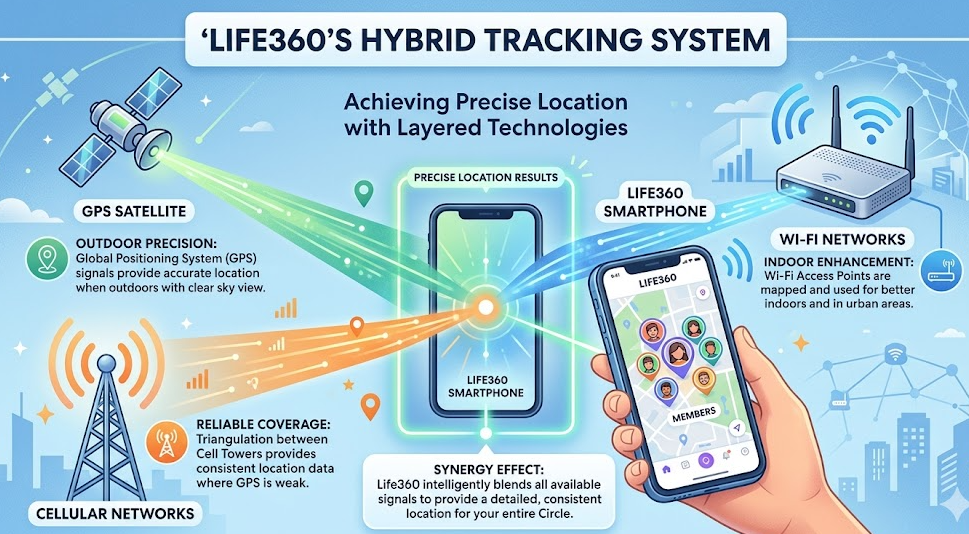
To understand Life360’s accuracy and occasional delays, it’s crucial to know that the app doesn’t rely on a single technology. A key insight many guides overlook is that Life360 uses a hybrid positioning system, combining data from multiple sources to determine a device’s location. This method is far more robust than using GPS alone and is central to how the real-time location tracking app functions.
This system intelligently blends three key technologies:
- GPS (Global Positioning System): This is the most accurate source, using signals from satellites to pinpoint a location, often within 15-50 feet. It works best outdoors with a clear view of the sky. When you see a very precise location dot on the map, GPS is likely the primary source.
- Wi-Fi Positioning: When a device is indoors or GPS is unavailable, Life360 can analyze nearby Wi-Fi networks. By referencing a global database of Wi-Fi access points and their known locations, the app can calculate a position. Its accuracy depends on the density of Wi-Fi networks in the area.
- Cell Tower Triangulation: As a reliable fallback, the app can estimate a location based on its proximity to nearby cellular towers. While less precise than GPS or Wi-Fi, it ensures a general location can be reported even with a weak signal. This is how Life360 works without GPS in some scenarios, providing a broader location area instead of no data at all.
Learn More:How to Pause Location on Life360 Without Sending an Alert >
What This Means in the Real World: Accuracy and Delays
The technical details are helpful, but what does this mean when you’re looking at the map? Here are some real-world examples based on our testing:
- At the Mall: If your daughter is at a large shopping mall, the app might rely on Wi-Fi positioning. Her location dot could appear over the food court when she’s actually in a nearby store. This margin of error is normal for indoor locations.
- Driving Through a Tunnel: When GPS signal is lost, the app will use cell tower data, which might show a location that is a few hundred feet off the road until the GPS signal is reacquired.
- “Wish I’d Known” Tip: A common source of worry is the lag when a family member leaves a place with strong Wi-Fi, like a school or office. It can take 2-5 minutes for the phone to switch from Wi-Fi positioning to GPS or cellular and send an updated location. This brief delay is normal and not a cause for alarm.
Understanding Life360 Features: Circles, Alerts, and Reports
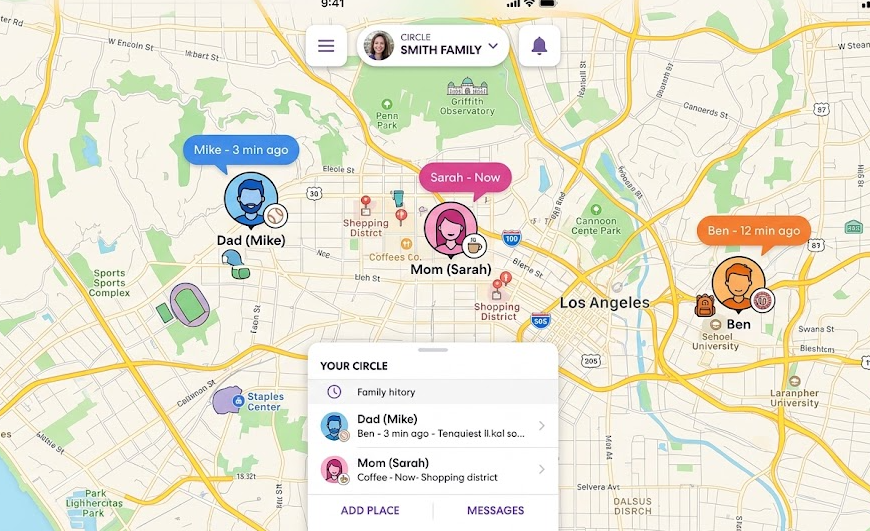
Beyond just showing dots on a map, Life360 organizes its features around a central concept: Circles. Understanding how these functions work together is key to using this GPS family locator app effectively.
Learn More:If You Delete Life360 Does It Still Track You? The Real Answer >
Life360 Circles Explained
A Life360 Circle is a private, invite-only group for sharing your location and communicating. You can have multiple Circles—for example, one for your immediate family and another for a carpool group. Each Circle has its own unique map, Places, and alerts, keeping information separate and relevant only to that specific group. This is the core of how the Life360 circle app function is explained: a private group for tailored sharing.
Core Features Inside a Circle
- Place Alerts (Geofencing): You can designate specific locations like ‘Home,’ ‘School,’ or ‘Work’. The app creates a virtual boundary (a geofence) around these places. When a Circle member’s device enters or leaves this boundary, Life360 automatically sends check-in notifications to the rest of the Circle. This is how you get notified that your child has arrived at school without them needing to manually check-in.
- Driver Safety Reports: For Circles with driving members, Life360 uses the phone’s sensors (accelerometer and gyroscope) to monitor driving behavior. It can detect events such as high speed, rapid acceleration, and hard braking, compiling them into driver safety alerts for Life360. Some premium plans also include a crash detection feature, which uses these sensors to detect a serious accident and can automatically alert emergency contacts.
Life360 Plans: Free vs. Paid Subscriptions
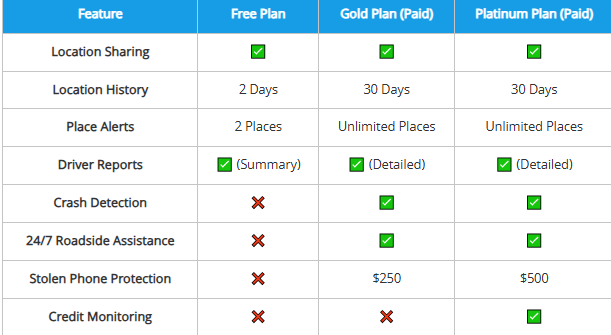
The features available to your Circle depend on your subscription plan. While the free version is great for core location sharing, paid tiers add significant safety and convenience features. Here is a simplified breakdown:
| Feature | Free Plan | Gold Plan (Paid) | Platinum Plan (Paid) |
| Location Sharing | ✅ | ✅ | ✅ |
| Location History | 2 Days | 30 Days | 30 Days |
| Place Alerts | 2 Places | Unlimited Places | Unlimited Places |
| Driver Reports | ✅ (Summary) | ✅ (Detailed) | ✅ (Detailed) |
| Crash Detection | ❌ | ✅ | ✅ |
| 24/7 Roadside Assistance | ❌ | ✅ | ✅ |
| Stolen Phone Protection | ❌ | $250 | $500 |
| Credit Monitoring | ❌ | ❌ | ✅ |
Learn More:Life360 GPS Tracker: The Complete User Guide >
Balancing Privacy and Performance: Location Sharing and Battery Use
For any location-sharing app, the conversation inevitably turns to privacy and phone performance. The two most common concerns are battery usage for location tracking apps and the feeling of being constantly monitored.
How Life360 Affects iPhone and Android Battery Life
Yes, any app using location services will impact battery life. However, modern smartphones and apps like Life360 are highly optimized. In our tests, the most significant battery drain came from incorrect settings, not the app itself.
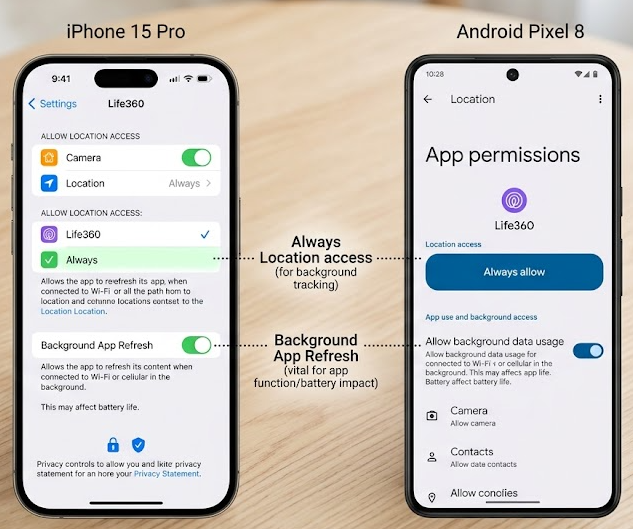
- On iPhone (iOS): Go to Settings > Life360 > Location and set it to Always. Counterintuitively, this is more efficient. It allows the app to run smoothly in the background instead of repeatedly restarting its location services, which consumes more power. Also, ensure Background App Refresh is enabled for Life360.
- On Android: Find Life360 in your app settings and ensure it is exempted from any “Battery Saver,” “App Optimization,” or “Deep Sleep” modes. These features can aggressively stop background processes, causing location reporting to fail and leading to missed updates.
Managing Privacy and Building Trust Within the App
One of the biggest concerns, especially for teens, is the feeling of being watched. Life360 includes a feature designed to help manage this and foster conversation.
Within any Circle, any member can tap the ‘Location Sharing’ toggle to pause updates to that specific group. This will show their last known location on the map with a message like “Location Sharing Paused.” It’s a useful feature for a teen who wants privacy while at a friend’s house or for a parent who doesn’t need their location shared during the workday. This offers a middle ground for privacy without deleting the app, which would notify the Circle and could break trust. Using this feature can be a great starting point for a family conversation about boundaries and independence.
Learn More:If You Delete Life360 Does It Still Track You? The Real Answer >
A Note on Location Spoofing and Family Trust
In discussions about location tracking, the topic of “spoofing” or faking a GPS location sometimes comes up. It’s important to address this topic honestly. Software exists that allows users to manually set their phone’s GPS location to anywhere in the world.
For families using Life360 to build a foundation of safety and trust, it’s crucial to understand that using such tools to mislead Circle members can undermine the very peace of mind the app is meant to provide. We believe the best approach is an open conversation about privacy expectations and using the app’s built-in features, like pausing location sharing, to agree on healthy boundaries.
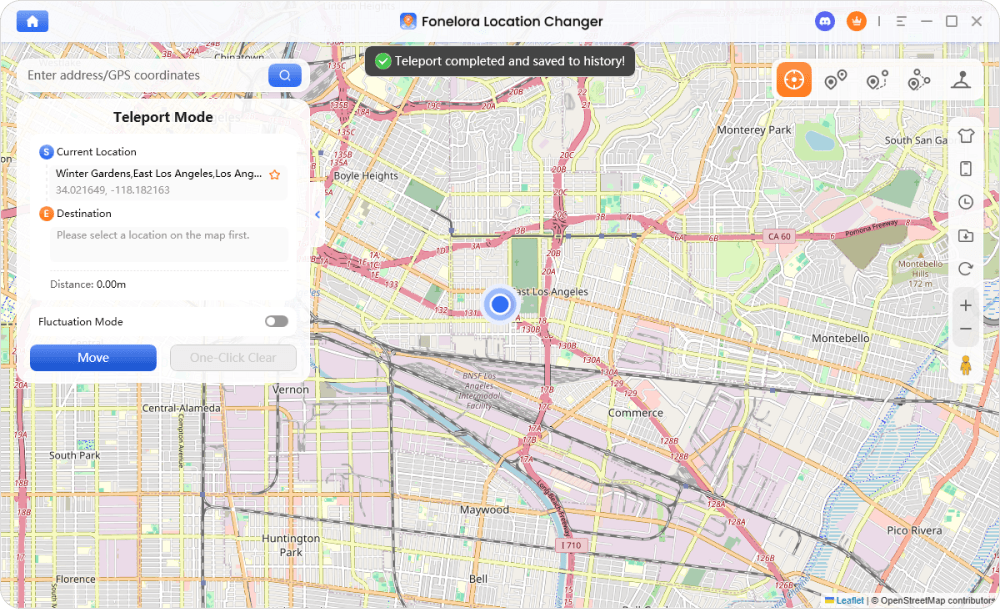
However, for users who have a specific, non-deceptive need to manage their digital location—such as for software testing or enhancing privacy from data-collecting apps—a dedicated tool can be useful. Fonelora Location Changer is one such tool. It works by setting your device’s GPS coordinates at the system level, making all location-based apps believe you are at the new location you’ve chosen.
Here’s a brief overview of how this type of software works:
1.Connect Your Device: Launch the software on a computer and connect your phone via USB.

2.Choose a Location: Use the map interface to select any location worldwide.
3.Confirm the Change: Click a button to move, and your phone’s GPS instantly updates for all apps.
Frequently Asked Questions About Life360
Here are concise answers to the most common questions about Life360’s functionality.
How does Life360 track my location in real time?
Life360 uses a hybrid system combining GPS, Wi-Fi, and cell tower data. It periodically requests this information from your phone and updates your position. The frequency of updates depends on your settings, battery level, and network connection.
Does Life360 work when my phone is off or in airplane mode?
No. If your phone is off, it cannot transmit data, and Life360 will show your last reported location. In airplane mode, all radios (Cellular, Wi-Fi, GPS) are, so the app cannot get a new location or send updates.
How accurate is Life360 location tracking?
Accuracy varies. With a strong GPS signal outdoors, it can be accurate to within a few meters (10-30 feet). Indoors, when relying on Wi-Fi or cell towers, the accuracy may decrease to a wider radius, which is normal.
Can Life360 see my location history all the time?
Yes, Life360 records your movements and compiles them into a location history timeline. The length of this stored history depends on your subscription level (2 days for free, 30 days for paid plans). It is always a good idea to back up your device data.
What is a Life360 Circle and how does it work?
A Circle is a private, invite-only group where members agree to share their location. You can create different Circles for different groups (e.g., family, friends) and customize Places, alerts, and settings for each one individually.
Does Life360 drain my phone battery?
It uses more battery than an app without location services, but it’s highly optimized. Significant drain is often caused by incorrect phone settings, like background permissions or aggressive battery-saver modes that interfere with the app.
Learn More:How to Pause Location on Life360 Without Sending an Alert >
Conclusion: Use Life360 with Confidence
Understanding how Life360 works—from its hybrid technology to its Circle-based features—is the first step toward using it to its full potential. By setting realistic expectations for accuracy, configuring your phone’s settings correctly, and using features like Place Alerts, you can transform the app from a simple map into a powerful tool for family coordination and safety.
Most importantly, Life360 can be a bridge for communication. Use the privacy features and driving reports as opportunities to talk about responsibility, trust, and boundaries. When used thoughtfully, the app provides not just data, but genuine peace of mind, allowing you and your family to navigate your busy lives with confidence.



Joy Taylor is a seasoned technical writer with over a decade of experience in mobile technology. At iMobie, she specializes in producing in-depth content on iOS data recovery, iPhone unlocking solutions, and iOS troubleshooting.
Product-related questions? Contact Our Support Team to Get Quick Solution >
