The Short Answer: You Must Be at a PokéStop
Quick Answer: You cannot use a Lure Module directly from your Item Bag. To activate a Lure Module in Pokémon GO, you must physically walk to a PokéStop, tap on it to open the photo disc screen, and insert the module into the white, pill-shaped slot at the top.
If you try tapping the item in your bag, the game will simply give you an error message. It is a common beginner frustration, but the rule is strict: Lure Modules belong to PokéStops. Once deployed, a standard Lure Module lasts for 30 minutes (though official game events sometimes extend this duration) and will spawn Pokémon for anyone nearby.
Step-by-Step: How to Attach a Lure Module to a PokéStop
Deploying a Lure Module is easy once you know exactly where to look on the screen. Many players miss the specific UI button required to attach the item.
Follow these exact steps to use your Lure Module:
-
Walk to a PokéStop: Approach a nearby PokéStop until you are close enough that it falls within your avatar’s pulsing interaction ring.
-
Open the PokéStop: Tap on the blue PokéStop cube on your map to open its photo disc screen.
-
Locate the Module Slot: Look just above the circular photo disc but below the PokéStop’s name. You will see a small, white, pill-shaped icon. Tap this slot.
-
Select Your Lure: A pop-up menu showing your available Lure Modules will appear from the bottom of the screen. Tap the specific Lure Module you want to use.
-
Confirm and Observe: Confirm your selection. You will immediately see pink, confetti-like petals or special elemental effects falling around the PokéStop on the main map, indicating the Lure is active.
Special Lure Modules and Their Specific Evolutions
While a standard Lure Module attracts a random mix of common Pokémon, special Lure Modules serve a dual purpose: they attract specific elemental types and act as mandatory requirements for certain Pokémon evolutions.
To evolve Pokémon like Magneton or Eevee into specific forms, you must be standing within the radius of an active special Lure, either deployed by you or another player.
Here is how each special Lure Module works:
| Lure Name | Attracted Types | Specific Evolutions Triggered |
|---|---|---|
| Glacial Lure | Ice and Water types | Evolves Eevee into Glaceon |
| Mossy Lure | Bug, Grass, and Poison types | Evolves Eevee into Leafeon |
| Magnetic Lure | Electric, Steel, and Rock types | Evolves Magneton into Magnezone, Nosepass into Probopass |
| Rainy Lure | Water, Bug, and Electric types | Evolves Sliggoo into Goodra |
| Golden Lure | N/A (Turns stop into a Golden PokéStop) | Drops Gimmighoul Coins, occasionally attracts Roaming Form Gimmighoul |
Troubleshooting: Why Isn’t My Lure Module Working?
Even if you follow the steps correctly, you might run into frustrating game errors. Here is a troubleshooting flow for the most common Lure Module issues:
Symptom 1: “Item cannot be used here” error
-
The Cause: You are trying to activate the item directly from your Item Bag.
-
The Fix: Close your bag, tap on a PokéStop on the map, and use the white pill-shaped slot above the photo disc.
Symptom 2: The Lure is active, petals are falling, but zero Pokémon spawn
-
The Cause: Your phone’s internal clock is slightly out of sync with the Pokémon GO servers. This “time-sync bug” completely prevents lured Pokémon from appearing on your screen.
-
The Fix: Go to your phone’s central Settings app > Date & Time. Find the toggle for “Set Automatically” on iOS or “Automatic Network Time” on Android. Turn this setting off, wait five seconds, and turn it back on. Restart Pokémon GO, and spawns should immediately appear.
Symptom 3: Pokémon spawn from the Lure but flee instantly after one ball
-
The Cause: You may be under a soft ban or speed lock. If you were recently traveling at highway speeds or experienced severe GPS drift, the game prevents you from catching anything until a cooldown period passes.
-
The Fix: Wait in a stationary location for a few minutes until your GPS stabilizes and you satisfy the required Pokémon GO cooldown rules. Once the lock lifts, you can catch Pokémon again.
The Rural Player Problem: Having Lures but No PokéStops
Because Lure Modules physically require a PokéStop to function, they often become a major frustration for rural players or those temporarily stuck at home.
If you live miles away from the nearest town center or park, you might find your Item Bag filling up with Lure Modules awarded from research tasks and level-ups. Since you cannot use them from your bag, these premium items effectively become dead weight taking up valuable inventory space.
Traditionally, the only official fixes are to travel to a populated area, or—if you are Level 37 or higher—submit new PokéStop nominations via the Wayfarer system and wait for approval.
However, if traveling isn’t an immediate option and you want to use the items you’ve earned, players sometimes look for practical workarounds to virtually navigate their character to a local stop.
How to Reach a PokéStop Virtually with Fonelora Location Changer
For users who have Lure Modules but no physical access to a PokéStop, a guided GPS location changer can provide a practical workaround. Fonelora Location Changer allows players on supported iOS and Android devices to simulate movement and change location in Pokémon GO, helping you virtually walk to the nearest town center or park to deploy your items.
By using Fonelora’s Game Mode, you can bypass the physical limitation and access PokéStops right from your desktop client.
Fonelora Location Changer
Realistic GPS movement simulation, flexible route control, easy no-modification setup, and support for gaming, social, privacy, and location-based testing in one platform.
Here is how the workflow operates:
-
Connect Your Device: Connect your supported iPhone or Android phone to your computer and open Fonelora Location Changer.

-
Select Game Mode: Choose the game-oriented setup to ensure your movement is mapped properly for location-based games.
-
Use Joystick or Teleport Mode: Enter the location of the nearest known PokéStop, or use the Joystick feature to naturally walk your character down the street.
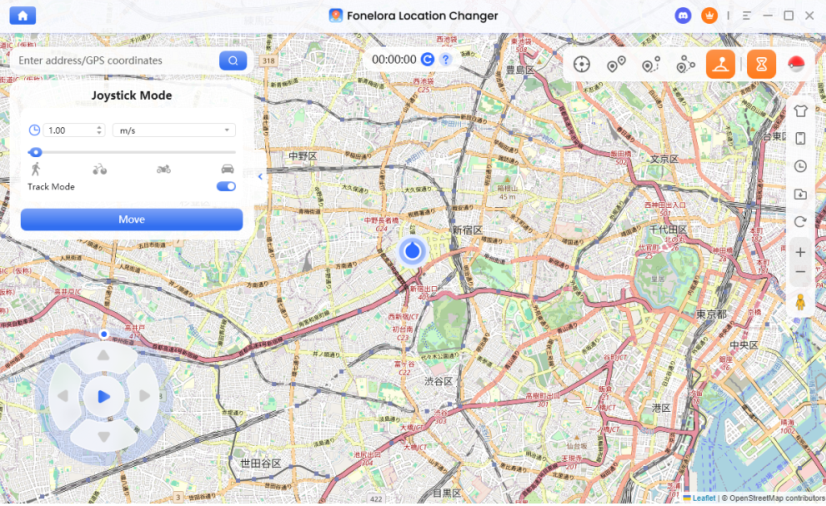
-
Deploy Your Lure: Once your avatar is within range of the virtual PokéStop, tap the stop in-game and deploy your Lure Module as normal.
Using a GPS location changer violates the official terms of service for Pokémon GO and carries account risks. Fonelora Location Changer is not 100% immune to bans. If you jump to a distant PokéStop, you must strictly respect the software’s built-in Cooldown Timer before spinning the stop or catching Pokémon, otherwise you will trigger a soft ban.
Frequently Asked Questions
- What is the difference between Incense and a Lure Module?
- Incense is an item that attaches directly to your character, spawning Pokémon exclusively for you as you walk around. A Lure Module attaches to a fixed PokéStop and spawns Pokémon that can be seen and caught by everyone in the vicinity.
- Do I have to stay at the PokéStop to use my Lure?
- Yes. While you don’t have to stand exactly on top of the stop, you must stay within its interaction radius. If you walk too far away, the Pokémon attracted by the Lure will no longer spawn on your screen.
- Can other players catch the Pokémon from my Lure?
- Absolutely. Lured spawns are public. Anyone who approaches the PokéStop while your Lure is active can catch the Pokémon it generates.
- Can I put a Lure Module on a Gym?
- No. Lure Modules only work on standard PokéStops. Gyms do not have the pill-shaped slot required to insert a Lure.
- How do I know if a PokéStop already has a Lure?
- You will see visual cues on the main game map. A standard Lure generates falling pink, confetti-like petals. Special Lures have unique animations, like falling snowflakes for Glacial Lure or green leaves for Mossy Lure.
Final Thoughts: Making the Most of Your Lures
Lure Modules are powerful items for catching Pokémon and triggering special evolutions, but they come with strict rules. Remember the golden rule: you can never activate a Lure directly from your Item Bag. You must walk to a PokéStop, tap the disc, and use the specific module slot.
If your Lure is active but you aren’t seeing any spawns, always check your phone’s automatic network time setting to fix the time-sync bug.
Finally, if you are stuck at home or in a rural area with a bag full of useless Lures, a guided virtual movement tool like Fonelora Location Changer can serve as a practical workaround. And if you decide to explore virtually, finding the best Pokémon GO spoofing locations can help you discover areas already filled with lured PokéStops—provided you understand the platform rules, respect game cooldowns, and use the software responsibly.

Fonelora Location Changer
- Bluetooth Hardware Simulation for Safer GPS Spoofing
- Realistic Movement & Route Simulation
- No Root or Jailbreak Required
- All-in-One Solution for Games, Social Apps & Privacy
More Related Articles



