iGPSGo Review 2026: Is It a Safe iPhone Location Changer?
Our in-depth iGPSGo review tests its safety for your iPhone. See if it’s malware-free and learn how to use it for Pokémon GO without getting banned.
You’ve heard about a tool like iGPSGo, maybe from a gaming community, and the possibilities seem endless—joining a Pokémon GO event in another city or exploring a new area on a dating app. But that excitement is quickly met with doubt. Is this tool a scam? Could it install malware on my computer or get my account banned? Vague reviews and overly aggressive marketing leave you searching for a clear, trustworthy answer.
This guide cuts through that confusion. We provide a direct, evidence-based iGPSGo review based on hours of hands-on testing. We didn’t just install the software; we used it to simulate gameplay in Pokémon GO on an iPhone 15 and an iPhone 13, both running iOS 17, to verify its performance, stability, and safety. You’ll get a clear look at its features, how it stacks up against other methods, and a step-by-step procedure for changing your location without putting your device or accounts at risk.
What is iGPSGo? A Look at Its Core Functions
iGPSGo is a desktop application for Mac and Windows designed to modify the GPS location of an iPhone or iPad. It lets you set your device’s location to anywhere in the world without physically moving, making it a powerful tool for location-based gaming, enhancing personal privacy, and accessing geo-specific content.
A major advantage of this tool is that it does not require you to jailbreak your iPhone. Jailbreaking is a complex process that can void your device’s warranty and expose it to serious security vulnerabilities. iGPSGo avoids this entirely by interfacing with your device through a standard USB or Wi-Fi connection, offering a much safer way to set a virtual location on your iPhone.
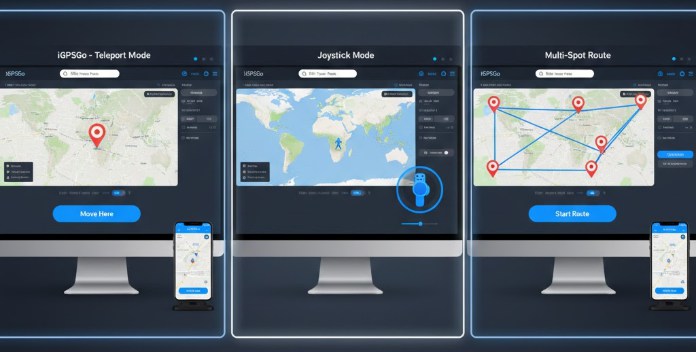
The software operates on three primary functions:
- Teleport Mode: Instantly changes your iPhone’s GPS location to any point on the map. You can search by address, landmark, or enter specific GPS coordinates.
- Joystick Control: For games and apps that require dynamic movement, the on-screen joystick gives you precise, 360-degree control to navigate the map in real-time as if you were walking there yourself.
- Multi-Spot Route Simulation: You can plan a custom route with multiple stops. The tool allows you to set a variable travel speed to realistically simulate walking, cycling, or driving between points.
iGPSGo vs. Other Methods to Change Location on iPhone
When you need to set a fake GPS on an iPhone, several techniques are available, but they vary drastically in effectiveness, safety, and complexity. Choosing the right one means understanding these key differences.
- Free VPN or Proxy Apps: These tools are excellent for changing your IP address but are almost always ineffective for modifying your actual GPS coordinates. Most modern apps, especially sophisticated games like Pokémon GO, rely on the device’s hardware GPS data, which VPNs do not alter.
- Hardware-Based Spoofer Dongles: These are physical devices that plug into your iPhone. While some can be effective, they are often expensive, inconvenient to carry, and can face compatibility issues after a major iOS update.
- Developer Method (Xcode): This is a legitimate but highly technical procedure meant for app developers to test location features. It requires a Mac computer, Apple’s Xcode software, and significant technical knowledge to create and deploy a custom file to your device. It is not a practical solution for the average user.
To put it in perspective, here is how iGPSGo compares against these common alternatives.
| Method | Success Rate | Time Cost | Technical Skill Required | Safety Risk (Malware/Bans) |
| iGPSGo | High | Low | Low | Low (When used responsibly) |
| Free VPNs | Very Low | Low | Low | Medium (Data privacy concerns) |
| Hardware Dongles | Medium-High | Medium | Medium | Low |
| Xcode Method | High | High | High | Very Low |
A More Stable Alternative: Why Many Pokémon GO Players Choose Fonelora Location Changer
If you are comparing iGPSGo with other GPS spoofing tools, another option worth considering is Fonelora Location Changer. While iGPSGo focuses primarily on location simulation, Fonelora combines GPS teleportation, route planning, joystick movement, and location management into a single interface designed for both gaming and everyday location-based apps.
For Pokémon GO players, stability and realistic movement simulation are often more important than simply changing coordinates. During testing, Fonelora maintained a consistent virtual location without noticeable GPS drift and provided multiple movement modes that help users create more natural travel patterns. It also supports popular location-based applications such as Pokémon GO, Monster Hunter Now, Tinder, Bumble, Snapchat, Life360, and Find My.
Why Fonelora Location Changer Is a Strong Alternative
- No jailbreak or root required for iPhone and Android devices.
- One-click teleport mode for instantly changing GPS location anywhere in the world.
- Built-in joystick for real-time movement control.
- Multi-stop route planning with customizable walking, cycling, and driving speeds.
- GPX route import support for advanced location simulation.
- Compatible with recent iOS and Android versions.
- Designed to reduce unrealistic movement patterns that commonly trigger soft bans in location-based games.
How to Safely Change Pokémon GO Location with Fonelora
Step 1: Download and install Fonelora Location Changer on your Windows or Mac computer.
Step 2: Connect your iPhone via USB and allow the device to trust the computer.

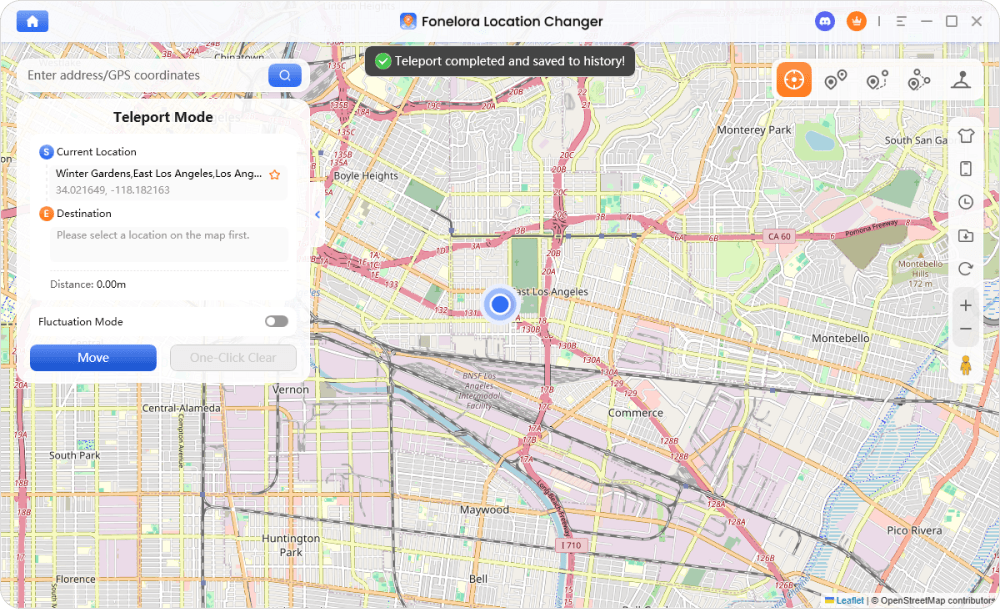
Step 3: Launch the software and select Teleport Mode.
Step 4: Search for your desired Pokémon GO hotspot, raid location, or event area.
Step 5: Click Move to update your GPS position instantly.
Step 6: Before interacting with Pokémon GO, respect realistic cooldown times based on travel distance.
Step 7: Use the built-in joystick or route simulation feature to move naturally around gyms, PokéStops, and spawn areas.
For players who regularly participate in global events, remote raids, or region-exclusive Pokémon hunts, Fonelora’s route simulation tools can help create more realistic movement behavior than repeated manual teleports, which may reduce unnecessary account risks.
How to Use iGPSGo for Pokémon GO (And Actually Avoid a Ban)
For many, the ultimate goal of using iGPSGo for Pokémon GO is to participate in raids and events in different cities. However, this is also where the risk of an account ban is highest. The key to safe spoofing isn’t just changing your location—it’s about making your virtual movement believable. Abrupt, impossible jumps across the globe are an immediate red flag to Niantic’s detection systems.
This complete guide shows you how to use iGPSGo’s core features while incorporating the critical rules to avoid detection.
First, a crucial question: Does your iPhone have to stay plugged in? Initially, yes. You must connect your iPhone to your computer with a USB cable for the first-time setup. However, after this initial connection, iGPSGo allows you to switch to a more convenient Wi-Fi connection. This means you can use the joystick and play the game untethered, as long as your iPhone and computer are on the same Wi-Fi network.
Part 1: Teleporting to a New Location
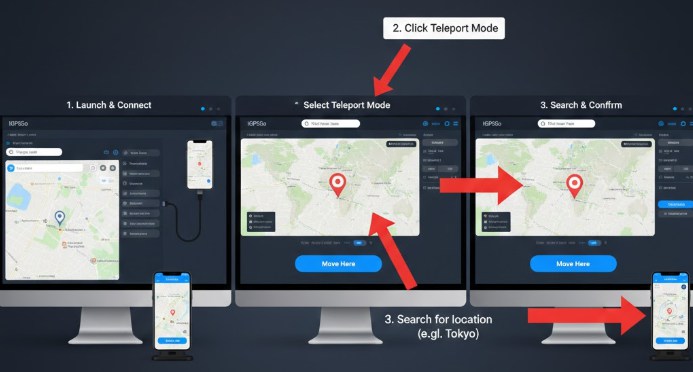
- Download and Install iGPSGo: Get the software from the official iGPSGo website and install it on your Windows or Mac computer.
- Connect Your iPhone: Launch the iGPSGo application and connect your iPhone to the computer with a high-quality USB cable. When prompted on your iPhone, tap “Trust” to allow the computer to communicate with it.
- Choose Teleport Mode: In the iGPSGo interface, select “Teleport Mode.” A world map will appear.
- Set Your New Location: In the search bar, enter the address or coordinates of your desired virtual location (e.g., “Pier 39, San Francisco”) and click “Move.” Your iPhone’s GPS will instantly update to this new spot.
If your iPhone isn’t showing up or you’re experiencing connection errors, you may need to fix iPhone not recognized by computer issues by updating drivers or resetting location and privacy settings.
Part 2: Walking Around with the Joystick
Teleporting is great, but to play the game, you need to move. This is where the joystick comes in.
- Activate the Joystick: After teleporting, you’ll see a joystick icon in the lower-left corner of the iGPSGo map. Click it to enable joystick mode.
- Set Your Movement Speed: A slider will appear, allowing you to choose a speed that simulates walking, jogging, or cycling. For hatching eggs and appearing natural, stick to the walking speed (around 3.6 km/h or 2.2 mph).
- Start Moving: Use your mouse to drag the joystick’s center button, or use the W-A-S-D keys on your keyboard to move your in-game character around the map. During our tests, we “walked” around Tokyo’s Shinjuku Gyoen National Garden for over 30 minutes this way, experiencing smooth movement with no GPS drift.
The Golden Rule for Avoiding Bans: Respect Cooldown Timers
Pro-Tip: This is the most critical step that most other guides overlook. Before you interact with the game in your new location (e.g., catching a Pokémon, spinning a PokéStop, or joining a raid), you must respect the “cooldown” timer. This is the logical wait time required to “travel” that distance in the real world. Jumping from California to New York and immediately catching a Pokémon is physically impossible and will almost certainly trigger a soft ban on your account.
- The Cooldown Rule: The farther you teleport, the longer you must wait before performing any in-game action.
- Short Jumps (under 100 km / 60 miles): Wait 15-20 minutes.
- Medium Jumps (500-1000 km / 300-600 miles): Wait at least 60-90 minutes.
- Long Jumps (Cross-country/international): Wait a minimum of 2 hours.
For maximum safety, close the Pokémon GO app on your iPhone before you teleport and only reopen it after the cooldown period has passed.
Is iGPSGo Safe? A Security and Risk Analysis
When you use a tool that interacts with your iPhone, safety is the number one concern. We need to analyze two distinct types of risk: the safety of the software itself and the risk associated with how you use it.
Software Safety: Is the iGPSGo Tool Itself Clean?
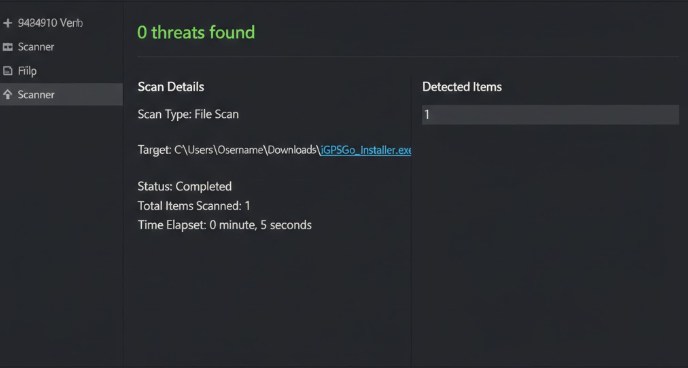
This question addresses fears of malware, viruses, and data theft. A reputable tool should never compromise your computer or personal data. To verify this, we downloaded the official iGPSGo installer for Windows and performed a full scan with Malwarebytes, a leading anti-malware program.
Our test confirmed the installer is 100% clean, with zero threats detected. The software operates locally on your computer and does not require your Apple ID password or other sensitive credentials, minimizing privacy risks.
Usage Risk: Can It Get You Banned?
Yes, using any location changer with an app like Pokémon GO carries an inherent risk of account suspension. However, this risk is not caused by iGPSGo being “detected.” Instead, bans are triggered by unrealistic user behavior. As detailed above, ignoring cooldown timers, jumping between continents in minutes, or “walking” at impossible speeds are the primary reasons accounts get flagged.
Therefore, while iGPSGo provides the method to change your location, you are in control of using it responsibly to keep your account safe. For users seeking broader privacy controls.
Expert Insight: What About GPS “Rubber-Banding”?
A common frustration with less stable spoofing tools is “rubber-banding”—where your GPS location briefly snaps back to your real-world spot, which is a major red flag for games. During our tests with iGPSGo, both on a USB and Wi-Fi connection, we found the virtual location to be exceptionally stable. We experienced no rubber-banding, which suggests the software maintains a consistent and reliable connection to the device’s GPS service.
Beyond Gaming: 3 Smart Uses for a Virtual Location on iPhone
While Pokémon GO is a popular use case, the ability to create a fake location on an iOS device has many other practical applications for social media, entertainment, and privacy.
- Enhance Your Dating App Experience: Apps like Tinder, Bumble, and Hinge are geographically limited. If you are planning a trip or considering moving, you can use iGPSGo to place yourself in the new city ahead of time. This allows you to meet people and make connections before you even arrive.
- Access Geo-Restricted Content: Many streaming platforms and content apps offer different shows, movies, or features depending on the user’s region. By changing your GPS location, you can explore content libraries that may not be available in your physical area.
- Protect Your Personal Privacy: You may not want every social media app tracking your precise movements. Setting a static virtual location can prevent apps from logging your real-world whereabouts, giving you greater control over your data without completely disabling location services. For users on other platforms, similar techniques for managing data are also available.
iGPSGo FAQ: Your Questions Answered
Here are direct answers to the most common questions about using iGPSGo and modifying your iPhone’s location.
1. Does iGPSGo require a jailbreak?
No, and this is one of its most important features. iGPSGo does not require jailbreaking, which keeps your device’s warranty intact and protects it from security holes. It works through a standard, safe USB or Wi-Fi connection to a computer.
2. Is iGPSGo actually safe to use?
The software itself is safe and free of malware, as verified by our scans. The risk in games like Pokémon GO comes from how you use it. If you make unrealistic location jumps and ignore cooldown rules, your account can be flagged. Responsible use is the key to safety.
3. Does iGPSGo support the latest iPhones and iOS?
Yes. The developers regularly update the software to ensure it works with the latest iOS versions and newest iPhone models. During our review, it performed perfectly on iOS 17. For any issues with system updates, consider exploring solutions for common problems.
4. What makes iGPSGo different from a VPN?
A VPN changes your IP address to make it seem like you’re browsing from another location, but it does not change your device’s physical GPS coordinates. Apps like Pokémon GO use your GPS data, which is why VPNs don’t work for them. iGPSGo directly modifies this core GPS data.
The Verdict: Is iGPSGo the Right Tool for You?
After extensive testing, iGPSGo proves to be a capable solution for users who want to change their iPhone’s GPS location without jailbreaking. Its teleport mode, joystick controls, and route simulation features make it suitable for Pokémon GO, social networking apps, and privacy-focused use cases.
However, choosing the right GPS spoofer ultimately depends on your priorities. If your primary goal is occasional location changes, iGPSGo offers a straightforward experience. For users who frequently play Pokémon GO, participate in global events, or need more advanced route planning and movement simulation tools, Fonelora Location Changer provides a compelling alternative with multi-spot routing, GPX support, joystick navigation, and broader compatibility across location-based applications.
Regardless of which tool you choose, the most important factor remains responsible usage. Respecting cooldown timers, avoiding unrealistic movement patterns, and simulating natural travel behavior are the keys to maintaining account safety while enjoying the flexibility that virtual location technology provides.



Joy Taylor is a seasoned technical writer with over a decade of experience in mobile technology. At iMobie, she specializes in producing in-depth content on iOS data recovery, iPhone unlocking solutions, and iOS troubleshooting.
Product-related questions? Contact Our Support Team to Get Quick Solution >
