Is LocaChange Safe? Real Risks, Safer Use Tips & Best Alternative
Is LocaChange safe for iPhone, Android, Pokémon GO, and privacy? Learn the real risks, safe-use checklist, and why Fonelora is a smarter GPS changer alternative.
Quick Answer: LocaChange may be safe to install if you download it from the official source and use it correctly. However, that does not mean every use case is risk-free. GPS location changers can still create account risks in apps that prohibit spoofing, especially location-based games, tracking apps, dating apps, and social platforms.
If you are asking “is LocaChange safe?”, you are probably not asking only one question. You may want to know whether it is malware, whether it works on iPhone or Android without jailbreak/root, whether it can get your app account banned, whether it stores your location data, or whether there is a more reliable alternative.
This guide breaks down the real safety risks behind LocaChange, explains when a GPS location changer can and cannot be considered safe, and introduces Fonelora Location Changer as a safer and more flexible alternative for iOS and Android users who want realistic GPS control without jailbreak or root.
Is LocaChange Safe? The Short Verdict
LocaChange is generally positioned as a GPS location changer for iPhone and Android users. If you download the official version from the official website, avoid cracked copies, and follow basic safety rules, it is not the same as downloading a random fake GPS APK from an unknown forum.
However, the more accurate answer is this: LocaChange may be safe as a tool, but your use case may still be risky.
For example, changing your GPS for app testing, travel simulation, or privacy control is different from using a GPS changer aggressively in a game that has anti-spoofing rules. A tool can be clean from a device-security perspective while still creating account-ban risk inside specific apps. If you are new to how GPS spoofing works on Apple devices, this iPhone location spoofing guide can help you understand the basic concepts before choosing any tool.
In simple terms:
- Device safety: The official version is safer than cracked versions or unknown APKs.
- Privacy safety: You should still check what data the tool collects and whether it asks for unnecessary permissions.
- App-account safety: Location-based apps may detect unnatural movement or policy violations.
- Payment safety: You should review pricing, renewal, cancellation, and refund terms before subscribing.
What “Safe” Really Means for a GPS Location Changer
Most users search for “is LocaChange safe” because they are close to downloading or paying for a GPS location changer. But the word “safe” can mean several different things. A strong review should not give a simple yes or no. It should separate the risks clearly.
1. Is It Safe for Your Device?
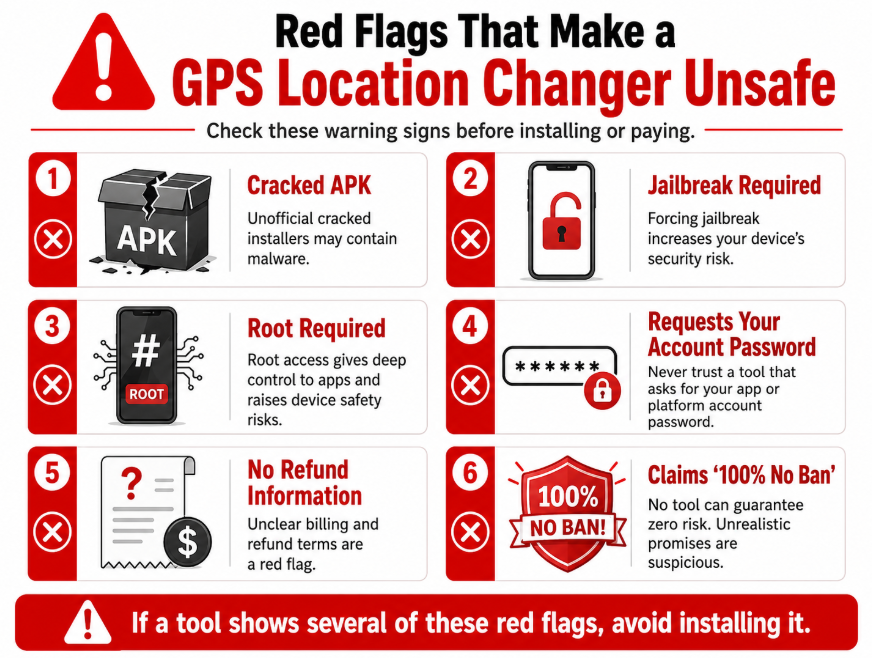
A GPS location changer should not require you to jailbreak your iPhone, root your Android phone, disable core system protection, or install suspicious configuration profiles. Any tool that asks you to weaken your device security just to change GPS location should be treated carefully.
For iPhone users, no-jailbreak support matters because jailbreaking can expose your device to system instability, app compatibility problems, and security risks. For Android users, no-root support is also important because rooting can interfere with banking apps, games, device warranty, and system updates.
2. Is It Safe for Your Data?
A trustworthy GPS changer should not ask for your Apple ID password, Google password, Instagram login, Life360 login, or game account password. If a so-called location tool asks for your social media or game credentials, it is a major red flag.
3. Is It Safe for Your App Account?
This is where many users get confused. A GPS location changer can be technically safe to install but still risky inside apps that prohibit location spoofing. Games and location-based services may flag unnatural movement, repeated teleporting, impossible travel speed, or suspicious routes.
4. Is It Safe to Pay For?
Before subscribing to any GPS changer, users should check cancellation rules, refund terms, trial limitations, support channels, and renewal policy. Many safety complaints online are not about malware; they are about billing confusion, unclear subscriptions, or poor support experience.
| Safety Layer | What to Check | Main Risk | Best Practice |
| Device Safety | No jailbreak, no root, official download | System instability or malware | Use only official installer |
| Privacy Safety | No account passwords requested | Credential theft or data exposure | Never enter social or game logins |
| App Account Safety | Cooldown, realistic routes, app rules | Soft ban, strike, account restriction | Use natural movement and avoid abuse |
| Payment Safety | Subscription, refund, support | Unexpected renewal or refund issues | Read terms before purchase |
LocaChange Risks and Limitations You Should Know
LocaChange may work for users who need a GPS changer, but it is not risk-free. If your goal is to protect your phone, avoid account bans, and manage your location more naturally, you should understand the main risks before using it.
Risk 1: Cracked Versions Are Not Safe
Many users search for free license keys, cracked APKs, patched installers, or unofficial downloads. This is where the real danger begins. A cracked location changer may contain malware, spyware, adware, or hidden scripts that steal data from your device.
If you decide to test LocaChange or any other GPS tool, avoid unofficial download pages, Telegram files, modded APK stores, and “premium unlocked” versions. These are not safe substitutes for the official product.
Risk 2: No GPS Changer Can Promise Zero Ban Risk
If a GPS tool promises “100% no ban,” be careful. Apps that rely on real-time GPS data may have their own detection systems. This is especially important for location-based games. Even if the software itself works, unnatural behavior can still trigger soft bans, errors, or account restrictions.
Common risky behaviors include:
- Jumping from New York to Tokyo within seconds.
- Changing locations repeatedly without realistic cooldown intervals.
- Using an impossible walking, cycling, or driving speed.
- Keeping the app open while switching locations too aggressively.
- Using a modded version of the target app instead of the official app.
Risk 3: GPS Errors Can Still Happen
Some users report location errors when the GPS changer fails to sync correctly with the target app. This can happen because of system updates, app updates, weak connection, permission conflicts, or unstable movement routes. For Pokémon GO users, the most common warning sign is a location detection issue such as failed to detect location on Pokémon GO, which usually means the app is receiving missing, inaccurate, or suspicious GPS data.
The safest approach is to test your new GPS location in a neutral app first, such as Apple Maps or Google Maps, before opening a sensitive location-based app.
Risk 4: Safety Depends on Your Exact Use Case
Using a GPS changer for QA testing, privacy control, or travel simulation is very different from using it to bypass platform restrictions or violate app terms. The same tool may be low-risk in one scenario and high-risk in another.
Why Fonelora Is a Safer LocaChange Alternative
If you are not fully comfortable with LocaChange, or if you want a more flexible and realistic GPS changing experience, Fonelora Location Changer is a strong alternative for iPhone and Android users.
Fonelora is an all-in-one GPS location changing solution designed for users who want to control their device location without jailbreak or root. It allows you to change your GPS coordinates anywhere in the world with just one click, while also offering advanced movement simulation for users who need more realistic location behavior. For a broader overview of how this type of software works, you can also read this guide on how to use a change your location app on iPhone and Android.
Why Fonelora Stands Out
- No Jailbreak or Root Required: Fonelora works with iOS and Android devices without requiring risky system modifications.
- Five Movement Modes: You can choose simple teleportation, joystick control, two-spot movement, multi-spot routing, or more advanced movement simulation depending on your needs.
- Safe Game Mode: Fonelora includes realistic movement simulation designed to reduce risks such as soft bans, location errors, or suspicious jumps in location-based games.
- Cooldown Timer: The built-in cooldown timer helps you track safer movement intervals, which is especially useful when switching between distant locations.
- 360° GPS Joystick: The joystick gives you real-time control over movement, while keyboard controls make desktop navigation smoother.
- Route Saving and GPX Support: You can save frequently used routes and import/export GPX files for more advanced simulation.
- Multi-Device Control: Fonelora can manage multiple smartphones from a single computer, making it useful for families, testers, and advanced users.
Instead of only changing your location once, Fonelora gives you more control over how your location changes. This matters because realistic movement is often safer and more natural than random teleporting.
How to Use Fonelora Location Changer Safely
Fonelora is easy to use and does not require jailbreak, root, or risky mobile plugins. You only need a Windows or Mac computer and your iPhone or Android device.
Step 1: Connect Your Device
Download and launch Fonelora Location Changer on your computer. Connect your iPhone or Android via USB, Wi-Fi, or Bluetooth, then follow the on-screen setup instructions.

Step 2: Choose a Location Mode
Select the mode that fits your goal: Teleport Mode for instant location changes, Multi-Spot Mode for natural routes, Joystick Mode for real-time control, or Safe Game Mode for more realistic movement in location-based games.
Step 3: Change Your GPS Location
Enter a destination, address, or GPS coordinates, then click Move. Your device location will update across supported location-based apps.

Step 4: Use Cooldown and Restore Location
For long-distance moves, use the cooldown timer and realistic speed settings to avoid suspicious jumps. When finished, restore your real location and confirm it in Apple Maps or Google Maps.
LocaChange vs. Fonelora: Which One Should You Choose?
If you are comparing LocaChange and Fonelora, the right choice depends on what kind of safety and control you need. LocaChange may be enough for users who only need basic GPS spoofing. But if you want more advanced route simulation, safer movement behavior, cooldown support, and multi-device control, Fonelora offers a stronger overall package.
| Feature | LocaChange | Fonelora Location Changer |
| iOS and Android Support | Yes | Yes |
| No Jailbreak / No Root | Generally supported by official versions | Yes, designed for no jailbreak and no root use |
| Teleport Location | Yes | Yes |
| Realistic Movement Modes | Available depending on version | Five movement modes for flexible simulation |
| Safe Game Mode | May depend on feature set | Yes, designed to simulate safer movement behavior |
| Cooldown Timer | May vary | Built-in cooldown timer for safer intervals |
| Joystick Control | Available in some GPS tools | 360° GPS joystick with keyboard control |
| GPX Import / Export | May vary | Supported for advanced route control |
| Multi-Device Control | May vary | Supported for managing multiple devices |
| Best For | Basic GPS spoofing users | Users who want safer, more realistic, and more flexible GPS control |
For users who are asking “is LocaChange safe” because they are worried about device security, account risk, or unreliable movement, Fonelora Location Changer gives a more complete safety-focused workflow.
Safe GPS Spoofing Checklist for iPhone and Android
Whether you choose LocaChange, Fonelora, or another GPS location changer, you should follow a safety checklist. This helps reduce device risks, privacy risks, and app-account issues.
Before Downloading
- Use the official website: Avoid cracked installers, APK mirrors, Telegram files, and unknown download buttons.
- Check system requirements: Make sure the tool supports your iOS, Android, Windows, or macOS version.
- Read refund and subscription terms: Confirm cancellation rules before paying.
- Avoid tools that ask for account passwords: A GPS changer should not need your Instagram, Google, Apple, Life360, or game password.
Before Changing Location
- Test in a map app first: Confirm the virtual location appears correctly before opening other apps.
- Use realistic movement: Avoid jumping long distances repeatedly.
- Respect cooldown intervals: Wait an appropriate amount of time when moving between distant places.
- Do not use modded target apps: Official apps are generally safer than modified apps.
After Changing Location
- Close and reopen the target app: This helps the app read the updated GPS position.
- Restore your real location when done: Restart your phone if your GPS does not return immediately.
- Review app permissions: Remove unnecessary location access from apps you no longer use.
If your main concern is family tracking or privacy apps, you can also compare your options with this guide on how to change location on Life360. It helps explain the difference between stopping updates, changing permissions, and sending active GPS data.
For users comparing multiple GPS tools, it may also be useful to review another safety-focused article such as Is iAnyGo safe, because the same logic applies: tool safety and app-account safety are not the same thing.
FAQ About LocaChange Safety and Fonelora
Here are direct answers to the most common questions users ask before choosing a GPS location changer.
Q1: Is LocaChange safe to download?
LocaChange may be safe to download if you use the official source and avoid cracked versions. However, unofficial installers, modded APKs, and fake download pages can be unsafe. Always verify the download source before installing any GPS location changer.
Q2: Is LocaChange a virus?
The official version is not generally positioned as a virus. The bigger risk comes from fake or cracked versions pretending to be LocaChange. If you download from a third-party site, you may expose your device to malware or unwanted software.
Q3: Can LocaChange get my Pokémon GO account banned?
Any GPS changer can create account risk in games that prohibit spoofing. The risk depends on how you use it. Unnatural teleporting, ignoring cooldown intervals, moving at impossible speeds, or using modded apps may increase the chance of errors, soft bans, or account restrictions.
Q4: Does LocaChange require jailbreak or root?
Official GPS changer tools typically promote no-jailbreak and no-root workflows. Still, you should verify the current version’s requirements before installing. Avoid any tool that asks you to jailbreak your iPhone or root your Android phone unless you fully understand the risks.
Q5: Is Fonelora safer than LocaChange?
Fonelora is a strong alternative because it focuses on no-jailbreak/no-root operation, realistic movement simulation, Safe Game Mode, cooldown tracking, joystick control, route saving, GPX support, and multi-device management. These features make it a more flexible option for users who want safer GPS control.
Q6: Can Fonelora guarantee zero ban risk?
No GPS location changer can honestly guarantee zero ban risk across every third-party app. Fonelora’s Safe Game Mode, cooldown timer, and realistic movement features are designed to reduce suspicious behavior, but users should still follow app rules and avoid aggressive spoofing.
Q7: Is Fonelora safe for iPhone?
Yes, Fonelora is designed for iPhone users who want to change GPS location without jailbreak. It works through a desktop connection and does not require you to modify the iOS system at a deep level.
Q8: Is Fonelora safe for Android?
Fonelora supports Android devices and does not require root for normal use. Android users should follow the setup instructions carefully and avoid downloading unrelated fake GPS APKs from unofficial websites.
Q9: Can Fonelora change my location across all apps?
Fonelora changes your device-level GPS coordinates, so many location-based apps can read the updated position. However, some apps may use additional checks such as IP address, account region, Wi-Fi data, or anti-spoofing detection. Results can vary by app.
Q10: What is the safest way to use a GPS location changer?
The safest approach is to use an official tool, avoid cracked copies, test your location in a map app first, use realistic movement, respect cooldown intervals, avoid impossible jumps, and restore your real location when finished.
Final Verdict: Is LocaChange Safe, and Should You Use Fonelora Instead?
So, is LocaChange safe? The most accurate answer is: it can be safe to install from the official source, but safety depends heavily on how you use it. If you use cracked installers, ignore cooldown rules, jump between distant countries repeatedly, or use it in apps that prohibit spoofing, you can still run into serious risks.
For users who want more control, better movement simulation, and a clearer safety-focused workflow, Fonelora Location Changer is a smarter alternative. It supports iOS and Android, requires no jailbreak or root, offers five movement modes, includes Safe Game Mode, provides a cooldown timer, supports joystick control, allows GPX import/export, and can manage multiple devices from one computer.
If your goal is not just to change your GPS once, but to simulate a more realistic and controllable location experience, Fonelora gives you the flexibility LocaChange users are often looking for. Use it responsibly, follow safe movement practices, and you can take better control of your digital location without unnecessary device risks.



Joy Taylor is a seasoned technical writer with over a decade of experience in mobile technology. At iMobie, she specializes in producing in-depth content on iOS data recovery, iPhone unlocking solutions, and iOS troubleshooting.
Product-related questions? Contact Our Support Team to Get Quick Solution >
