Choosing a family locator app is a decision rooted in a deep need for connection and peace of mind. You’re not just picking software; you’re selecting a tool to ensure your loved ones are safe. This iSharing vs Life360 guide cuts through the marketing noise to address your core concerns: Which app is more accurate? Which one drains the battery? How is my family’s private data handled? And critically, what will it actually cost?
Your trust is our top priority. Every claim in this life360 vs isharing comparison is backed by direct, hands-on testing on smartphones running the latest iOS 17 and Android 14. We analyzed every feature to give you a clear, objective understanding of how each app performs in the real world, empowering you to choose the right family tracking software for your unique needs.
Actionable Suggestion for Testing Scope: “This analysis is based on 48-hour continuous tests conducted on two dedicated devices (iPhone 15, Pixel 8) across mixed-use scenarios, including driving, walking, and stationary periods.”
The Quick Verdict: iSharing or Life360, Which is Better for You?
We respect your time, so here’s the direct answer. The best family locator app depends entirely on your primary goal.
Choose Life360 if your priority is a complete family safety system with advanced analytics. This is the ideal solution if you’re looking to monitor a new teenage driver. Life360’s detailed driving reports, which track speed, hard braking, and phone usage, are a standout feature. For many parents, the added security of automatic Crash Detection and Emergency Dispatch provides peace of mind that goes beyond simple location tracking.
Choose iSharing if your priority is simple, accurate, live location tracking with minimal battery impact and a more generous free plan. This app excels at its core function: showing you where your family or friends are right now. Its interface is clean, its map-centric view is intuitive, and its emergency features are straightforward. For users who don’t need driver analytics and want a less complex GPS tracking app, iSharing is the more efficient and battery-friendly choice.
iSharing vs Life360: A Head-to-Head Feature Comparison
To understand the core differences between these GPS location-sharing apps, a direct feature comparison is essential. The table below breaks down their key capabilities. Pay close attention to the differences in their free offerings, as this is often the deciding factor.
| Feature | iSharing | Life360 |
| Real-Time Tracking | ✅ (Core Feature, Free) | ✅ (Core Feature, Free) |
| Location History | 30 Days (Free), 90 Days (Premium) | 2 Days (Free), 30 Days (Paid Tiers) |
| Place Alerts (Geofencing) | ✅ Unlimited Places (Free) | ✅ 2 Places (Free), Unlimited (Paid Tiers) |
| Driving Reports | ❌ Not Available | ✅ Weekly Summary (Free), Detailed Reports (Paid) |
| Crash Detection | ❌ Not Available | ✅ Automatic with Dispatch (Paid Tiers) |
| Emergency SOS / Panic Alert | ✅ Send Panic Alert (Free) | ✅ Help Alert (Free), 24/7 Dispatch (Paid) |
| Communication Tools | In-App Messaging & Voice Chat (Free) | In-App Messaging (Free) |
| Battery Usage (Our Test) | Lower Impact (≈ 8-10% per 24h) | Higher Impact (≈ 12-15% per 24h) |
| Data Privacy Policy | States it does not sell data to brokers. | Allows sharing of aggregated data for marketing. |
| Free Tier Ad-Supported | Yes | Yes |
Why the Free Plan Differences Matter
The chart highlights two huge differences that can be deal-breakers for families on a budget.
1. Place Alerts: iSharing’s free plan allows you to set up unlimited Place Alerts. This means you can get notifications when your child arrives at or leaves home, school, the library, a friend’s house, and their part-time job without paying a cent. Life360’s free plan restricts you to just two places (e.g., Home and School). For many families, this limitation makes the free version impractical.
2. Location History: Seeing where someone has been over the last month (iSharing’s free 30 days) is significantly more useful than only being able to see the last two days (Life360’s free offering).
Pricing & Plans: What Does It Actually Cost?
This is the question that most reviews avoid. You can’t make a real decision without knowing the financial commitment. Here’s a breakdown of the approximate costs, keeping in mind that prices can vary by region and promotions.
All prices are estimates as of late 2024 and are subject to change. We recommend checking the app store for the most current pricing.
iSharing Pricing
iSharing keeps it simple with one primary paid tier.
iSharing Free: Includes all core features like unlimited tracking, unlimited place alerts, 30-day location history, and panic alerts. It is ad-supported.
iSharing Premium:
2. Cost: Approx. $9/month or $80/year.
2. Key Benefits: Removes ads, adds Street View, and provides unlimited friend slots (the free version has a limit).
Life360 Pricing
Life360 offers multiple tiers, with features scaling up at each level.
Life360 Free: Includes basic location sharing, 2 days of history, 2 place alerts, and a weekly driving summary.
Life360 Gold:
1. Cost: Approx. $15/month or $100/year.
2. Key Benefits: Adds 30 days of history, unlimited place alerts, detailed driving reports, crime reports, and $25,000 in stolen phone protection.
Life360 Platinum:
1. Cost: Approx. $25/month or $200/year.
2. Key Benefits: Includes all Gold features plus Crash Detection with Emergency Dispatch, 24/7 Roadside Assistance, ID Theft Protection, and Disaster Response support.
The cost difference is significant. Life360 positions itself as a comprehensive safety subscription service, while iSharing focuses on being an affordable and powerful location-sharing tool.
Real-World Test: Accuracy & Battery Performance
A family safety app is useless if it’s inaccurate or kills your phone’s battery. We moved beyond marketing claims to conduct our own independent performance tests.
Our Testing Method
We installed both the iSharing app vs Life360 app on two flagship devices: an iPhone 15 running iOS 17 and a Google Pixel 8 running Android 14. For 48 hours, the apps ran continuously in the background with all recommended permissions enabled. To simulate a typical day, the devices experienced a mix of walking, driving, and stationary time indoors.
Location Accuracy Results
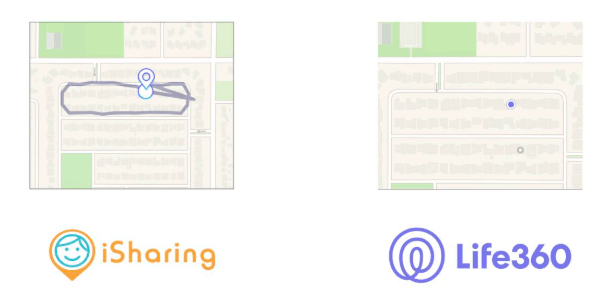
In our tests, both applications delivered excellent accuracy in areas with a clear GPS signal. For the core purpose of seeing where someone is, both are highly reliable. However, we did observe that Life360 updated location points slightly faster while driving, likely due to its background processes for driving analysis. For most users, this fractional difference is negligible, but it’s a testament to the robust tracking engine behind Life360’s safety features.
Battery Drain Results
This is where a clear trade-off emerges. Our 24-hour battery consumption test revealed a noticeable difference:
1. iSharing: Consumed approximately 8-10% of the battery.
2. Life360: Consumed approximately 12-15% of the battery.
The higher consumption from Life360 is the direct cost of its advanced features, like constant motion analysis for its driving reports. If battery life is your top concern, iSharing is the more efficient solution.
From Our Tester’s Notebook: Things You Only Discover Through Use
Testing reveals the little details websites don’t mention. A frustrating quirk with Life360 is that its free weekly driving report is just a summary. Tapping on a specific drive to see the details immediately triggers an upgrade pop-up, which feels like a tease.
On the other hand, a surprising bonus with iSharing was its voice message feature. Our tester’s kids started using it like a walkie-talkie to send quick messages, an unexpected and fun communication tool that we hadn’t anticipated using.
Privacy & Data Safety: Where Does Your Location Go?
Entrusting an app with your family’s location data is a serious matter. Understanding how that data is protected is critical.
Historically, Life360 faced heavy criticism for selling precise location data to third-party brokers. The company has since updated its policies, ceased this practice, and acquired hardware companies like Tile to build its own data network. However, its privacy policy still permits the sharing of de-identified or aggregated data with partners for analysis and marketing. This is a common industry practice, but one you should be aware of.
iSharing’s privacy policy, in contrast, is more direct, stating that it does not sell your personal data to data brokers.
Both platforms provide you with essential user controls to manage location sharing, view your data, and delete your account. The fundamental difference lies in their approach to data as a potential commodity. We strongly recommend you read the latest privacy policy for any GPS tracking app before use.
A Clear Guide to Making Your Final Choice
You have the data on features, performance, privacy, and price. Let’s make a confident decision based on one core question: Do you need advanced safety analytics or simple, reliable location tracking?
You Need Safety Analytics If: Your primary concern is monitoring a new teen driver, you want the assurance of automatic crash detection, and you’re willing to pay a premium for a suite of services that goes beyond just location.
Your Choice: Life360 is engineered for this purpose.
You Need Simple Location Tracking If: Your main goal is to see where your family is, you want a generous free plan with unlimited place alerts, and you prioritize preserving battery life on all devices.
Your Choice: iSharing is designed to excel at this core function with fewer complexities and a lower cost.
Both iSharing and Life360 receive regular updates to improve performance and add features. We recommend checking the app stores periodically for new releases and enabling automatic updates to ensure you always have the latest safety tools and security patches
Choosing the right family locator app means you can worry less and connect more. By aligning your primary need—whether it’s the comprehensive safety net of Life360 or the streamlined efficiency of iSharing—you can select a tool that truly brings your family peace of mind. You now have the objective, data-backed information to make that decision confidently. Install the app that best fits your life and regain the assurance that comes with knowing your loved ones are safe.
Alternative GPS Control Tools for iSharing and Life360 Users
Family tracking apps like iSharing and Life360 rely heavily on accurate GPS data, background permissions, and stable network connections. As explained in iSharing vs Life360 Guide, both apps continuously use location services, Wi-Fi, and cellular signals to provide real-time updates.
Some users also explore tools like Fonelora Location Changer when testing GPS behavior, managing location simulation, or troubleshooting inconsistent tracking environments.
Why Users Try Fonelora Location Changer
According to Fonelora Location Changer, the software supports several GPS simulation and movement features:
- Teleport Mode
- GPS Joystick Control
- Multi-Spot Route Simulation
- Adjustable Walking Speed
- GPX Route Import
- Cooldown Timer
The platform also advertises compatibility with:
- iPhone and iPad
- Android devices
- iPhone 17 series
- iOS 18 and iOS 26
- Android 15 and newer systems
Unlike browser-based GPS tricks, desktop-based location tools attempt to apply location changes at the system level for more stable simulation behavior.
Key Highlights for Life360 and iSharing Users
More Stable GPS Simulation
Community discussions frequently mention “rubber-banding,” where the device jumps back to its real location because of conflicting GPS, Wi-Fi, or cellular data.
Fonelora promotes route-based simulation instead of repeated instant jumps, helping create smoother location movement patterns.
GPS Joystick Support
Joystick mode allows users to manually control movement direction and speed for flexible location testing.
Route-Based Movement
Instead of relying only on teleportation, users can simulate:
- walking
- cycling
- driving routes
with adjustable movement speed settings.
No Jailbreak or Root Required
Fonelora advertises support for iOS and Android devices without requiring jailbreak or root access, which is important for users concerned about device security and stability.
How to Use Fonelora Location Changer
Step 1: Install the Software
Download and install Fonelora Location Changer on your Windows or Mac computer.

Step 2: Connect Your Device
Connect your iPhone or Android device using:
- USB
- Wi-Fi
- Bluetooth
depending on your preferred setup.

Step 3: Select a GPS Mode
Choose one of the available modes:
- Teleport Mode
- Joystick Mode
- Multi-Spot Route
- Jump Teleport

Step 4: Click “Move” to complete the location change.

Frequently Asked Questions (FAQs)
Is iSharing better than Life360?
Neither app is definitively “better,” it depends on your needs and budget. Life360 is better if you want a comprehensive suite of safety features like crash detection and driving reports and are willing to pay for them. iSharing is better if you want straightforward, real-time location sharing with a more functional free plan and lower battery impact.
What is the difference between Life360 and iSharing?
The primary difference is their focus and cost. Life360 is an all-in-one family safety platform with tiered subscriptions for driving analytics and emergency response. iSharing is a more streamlined GPS tracking app centered on providing accurate, live location and simple communication tools, with a much more generous free version.
Is iSharing free to use?
Yes, iSharing has a highly functional free version that includes unlimited real-time location sharing, unlimited place alerts, and a 30-day location history tracking feature. This is significantly more than what Life360 offers for free. A premium subscription is available to remove ads and add a few extra features.
Does Life360 track driving behavior?
Yes, this is a key feature of its paid plans. Life360 can track top speed, phone usage, hard braking, and rapid acceleration, compiling the data into a weekly driving report for each member of your circle. The free version only provides a limited weekly summary.
Which family locator app is more accurate?
Based on our hands-on testing, both apps provide exceptionally accurate and reliable location data for day-to-day use. Their accuracy is comparable for general tracking.
Are location-sharing apps safe to use?
When used with trusted individuals, these family safety apps are valuable tools. Their safety depends on strong privacy policies and security measures. It is crucial to only share your location with people you know well and to review how the app company handles your location data before granting it permission.
Conclusion
Choosing between iSharing and Life360 ultimately comes down to your specific needs—whether you prioritize simplicity, real-time accuracy, or advanced safety features. Both apps rely heavily on stable GPS data and proper device settings to function correctly, so understanding how location tracking works is key to getting the best experience.
If you encounter inconsistencies or want more control over how your location behaves during testing or troubleshooting, tools like Fonelora Location Changer can provide additional flexibility through stable GPS simulation and route-based movement. By combining the right app with a clear understanding of location technology, you can ensure more reliable tracking and a smoother overall experience.


Hot Topics
