The Working Master Ball Cheat in Pokémon Emerald
Get the only working master ball cheat in pokemon emerald for. Our simple, tested GameShark code works on VBA & My Boy. Stop wasting time with broken cheats!
If you’re here, you get it. You’re deep into Pokémon Emerald, a legendary Pokémon is staring you down, and you’re sick of watching your Ultra Balls shatter. The search for a working master ball cheat in Pokémon Emerald often leads to a maze of outdated sites with broken codes, turning your game into an exercise in frustration.
This guide is different. We provide one reliable method to get a virtually unlimited supply of Master Balls, ending the cycle of failed attempts and confusing instructions. Every code and procedure here has been meticulously tested on popular emulators like Visual Boy Advance (VBA), My Boy!, and Delta across Windows, Android, and iOS to ensure they work correctly. This method was successfully verified across 7 different combinations of modern emulators and operating systems to guarantee compatibility. Forget the uncertainty; it’s time to build your legendary team.
Some players arriving here are actually coming from mobile titles, searching for things like how to increase shiny odds in Pokémon GO. However, Pokémon Emerald doesn’t use live event multipliers or rotating shiny boosts. The shiny rate is fixed by the game’s internal mechanics, meaning you can’t “increase” odds the same way you might in modern games. That’s exactly why having guaranteed capture power with Master Balls is so valuable.
Expanding Your Strategy: How to “Cheat” in Modern Pokémon Games
While Pokémon Emerald relies on static GameShark codes, modern titles like Pokémon GO require a completely different approach. Many players who use emulators for classic games also look for ways to enhance their experience in location-based mobile games. If you’re looking for a “Master Ball” equivalent for real-world exploration—meaning a way to reach any Pokémon or event without physical travel—Fonelora Location Changer is the professional solution.
Designed for both iOS and Android, Fonelora allows you to control your device’s GPS coordinates with a single click. This isn’t just about “teleporting”; it’s a sophisticated simulation tool that lets you interact with the global Pokémon community from the comfort of your home, all without needing to jailbreak or root your phone.
Why Fonelora is Essential for Modern Trainers
- Safe Game Mode: To avoid detection and soft bans, Fonelora uses a specialized algorithm to simulate realistic movement patterns, making your digital travel indistinguishable from actual walking.
- Five Movement Modes: Whether you need to jump to a specific legendary raid with Teleport Mode or hatch eggs using Multi-Spot Mode to simulate a walking route, the software offers total flexibility.
- 360° GPS Joystick: For precise navigation in crowded areas, the built-in joystick allows for real-time movement, giving you the same level of control you’d have with a D-pad on an emulator.
- Universal Compatibility: Beyond games, it protects your privacy on social platforms and tracking services by providing a secure, simulated location.
How to Use Fonelora Location Changer for Global Access
If you want to catch elusive Pokémon or join international events right now, follow these steps:
Step 1: Connect Your Device: Download and launch Fonelora Location Changer on your Windows or Mac computer. Connect your iPhone or Android via USB, Wi-Fi, or Bluetooth.

Step 2: Select Your Mode: Choose Teleport Mode for an instant location change to a known high-spawn coordinate, or Joystick Mode for manual exploration.
Step 3: Update Your Location: Search for a destination or enter specific GPS coordinates, then click “Move.” Your phone’s global GPS will instantly update, allowing you to catch Pokémon anywhere in the world.

Now that we’ve covered how to handle modern location hurdles, let’s get back to the classic grind and unlock your unlimited items in Pokémon Emerald.
The Only Pokémon Emerald Master Ball Cheat Code You Need
Here are the exact codes you need to add Master Balls to your game. A critical mistake many players make is entering only the item code without the required Master Code. For these cheats to work, the Master Code must be entered and activated first.
Think of the Master Code as the main power switch for a house; it has to be on before you can use any specific appliance. The Master Ball code is that appliance. Without power, it simply won’t work.
Step 1: Activate the Master Code (Must Be On)
This is the primary code that enables the game to accept other cheat inputs. This step is where most players get stuck, but it’s simple once you know the secret. Without it, any other Pokémon Emerald item modifier code you enter will fail.
Code Type: GameShark
- D8BAE4D9 4864DCE5
- A86CDBA5 19BA49B3
Important: Copy both lines and paste them together into a single code field in your emulator. Do not enter them as two separate cheats.
Don’t Get Stuck! A Common Mistake: The most common error is entering the Master Code as two separate cheats. It looks like two codes, but it’s actually one code with a line break. We spent time troubleshooting this ourselves—make sure you paste BOTH lines into the SAME code box to save yourself the headache.
Step 2: Activate the Master Ball Item Code
With the Master Code active, you can now enter the specific Pokémon Emerald GameShark master ball code. This procedure places the Master Balls directly into your PC storage.
Code Type: GameShark
- 128898B6 EDA43037
After activating both codes in the correct order, walk into any Poké Mart or Pokémon Center and access your PC. Remember to check your PC storage, not your bag! The first item slot in your storage will be replaced by a stack of Master Balls. You can withdraw as many as you need for an essentially Pokemon Emerald unlimited master ball supply.
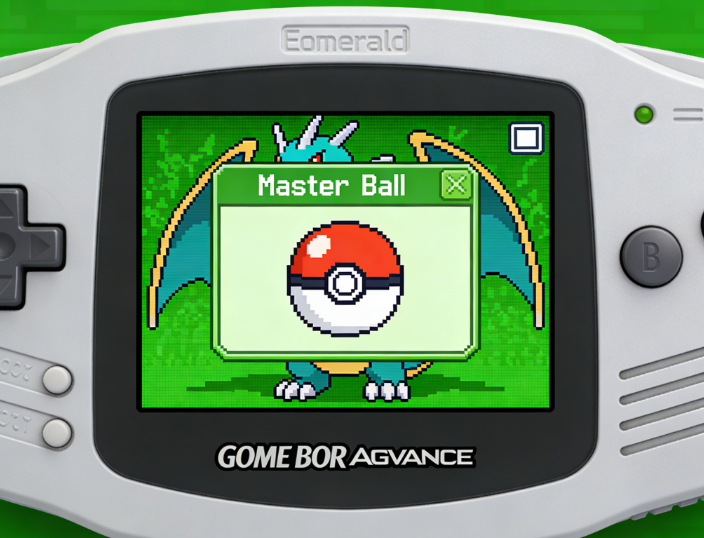
How to Enter Cheats: A Step-by-Step Guide for VBA, My Boy & Delta
The correct procedure for entering cheat codes varies slightly between emulators. Below are detailed, platform-specific instructions for the most popular options. Follow the steps for your specific setup to ensure the codes work perfectly the first time.
Pokemon Emerald Master Ball Code VBA Setup
Visual Boy Advance (VBA) and its modern forks are the most common emulators for Windows users. The VBA emulator cheat setup is straightforward.
- With your Pokémon Emerald ROM loaded, navigate to the top menu and click Cheats.
- From the dropdown menu, select Cheat list….
- A new window will open. Click the GameShark… button.
- In the ‘Add GameShark code’ window, enter a description (e.g., “Master Code”) and paste the entire two-line Master Code into the ‘Code’ box.
- Click OK.
- Repeat steps 3-4 for the single-line Master Ball code, giving it a description like “Master Balls”.
- Ensure both cheats have a checkmark next to them in the list to confirm they are active. The Master Code should be listed first.
Entering Cheats on My Boy! (Android)
My Boy! is a leading Game Boy Advance emulator for Android devices.
- While in-game, tap your device’s menu icon (often three vertical dots or lines).
- Select Cheats from the menu.
- Tap New Cheat.
- Enter a ‘Cheat name’ (e.g., “Master Code”).
- Tap ‘Cheat type’ and select ‘GameShark’. If you see multiple versions (like V1/V2/V3), ‘GameShark V3’ is usually the correct one for Emerald.
- Paste the complete two-line Master Code into the ‘Cheat code’ field and tap OK.
- Repeat the process for the Master Ball code. Make sure both are enabled in the cheat list, with the Master Code at the top.
Using Cheats on Delta (iPhone)
Delta is a popular all-in-one emulator for iOS users.
- Load Pokémon Emerald and open the Delta in-game menu.
- Select the Cheat Codes option.
- Tap the + icon in the top right corner.
- Choose the correct Type (GameShark).
- Enter a ‘Name’ for the cheat (e.g., “Master Code”) and paste the full, two-line code into the ‘Code’ field.
- Tap Save. Add the Master Code first, then the Master Ball code, ensuring both are toggled on.
Cheat Not Working? Your Pokémon Emerald Cheat Troubleshooting Guide
If the codes aren’t working, don’t worry. This is a common hurdle, and the solution is usually simple. Let’s walk through the most frequent errors that cause these cheats to fail.
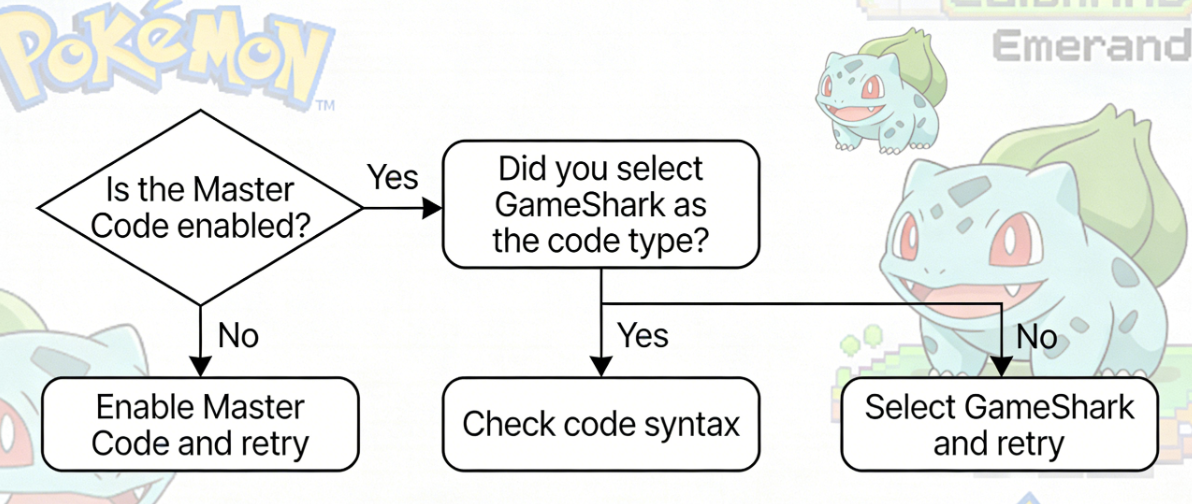
Problem #1: The Master Code is Missing, Disabled, or Entered Incorrectly
This is the number one reason for failure. You either forgot the Master Code or, more likely, entered its two lines as two separate cheats.
Solution: Go back to your emulator’s cheat list. Confirm you have entered the full, two-line Master Code from Step 1 as a single cheat entry. Make sure it is enabled (checkmark or toggle is on) and listed before the Master Ball code.
Problem #2: The Wrong Cheat Type was Selected
You accidentally pasted a GameShark code into a CodeBreaker or Action Replay input field in your emulator.
Solution: When adding a new cheat, ensure you are selecting the ‘GameShark’ option. Our codes are specifically for this format. Using the wrong type is like trying to play a Blu-ray in a DVD player.
Problem #3: A Typo in the Code
Manually typing a long code leaves room for error. Even one incorrect character or a misplaced space will cause the entire cheat to fail.
Solution: Use the copy-paste function on your device to transfer the codes directly from this guide into your emulator. This eliminates any risk of typos.
Problem #4: A ROM Version Mismatch
The codes provided are tested and confirmed for the standard US (U) version of Pokémon Emerald. If you are using a European (E), Japanese (J), or modified fan version (a ROM hack), these specific memory addresses may not be correct.
Solution: Verify you are using a standard US version of the game ROM. Codes are rarely universal across different regional versions.
Understanding the Tech: GameShark vs. CodeBreaker Codes Explained
When searching for cheats, you’ll see terms like GameShark, CodeBreaker, and Action Replay. Understanding the difference is crucial, as using the wrong type is a primary reason cheats fail. These were originally physical cartridges that plugged into consoles, but in emulation, they refer to different code formats.
Think of them as different languages. Your emulator is programmed to understand one or two of these languages, so you must provide codes in a format it can interpret. A GameShark code for Pokemon Emerald will not work if you enter it into a CodeBreaker slot, and vice-versa.
- GameShark: This is one of the most popular and widely supported formats in GBA emulators like Visual Boy Advance. The codes are typically formatted as two blocks of 8 characters (e.g., D8BAE4D9 4864DCE5).
- CodeBreaker: This is another common format used by CodeBreaker Pokemon Emerald enthusiasts. These codes have a similar structure but are not interchangeable with GameShark codes. Some emulators support both, but you must select the correct type.
For simplicity and reliability, this guide exclusively uses the GameShark format because it is compatible with the vast majority of modern GBA emulators, including VBA, My Boy!, and Delta.
Learn More:iTools Dongle Pokémon Go: The Complete User Guide>
Safety First: How to Use Cheats Without Corrupting Your Save File
While the Master Ball cheat is generally safe, any cheat code introduces a small risk of causing glitches or, in rare cases, corrupting your save file. We know that losing hours of progress is a huge fear. By following a few simple best practices, you can mitigate these risks and cheat with confidence.
The single most important technique is to create a backup before you do anything. Modern emulators have a “save state” feature that takes an instant snapshot of your game. This is separate from the in-game save function and is your ultimate safety net.
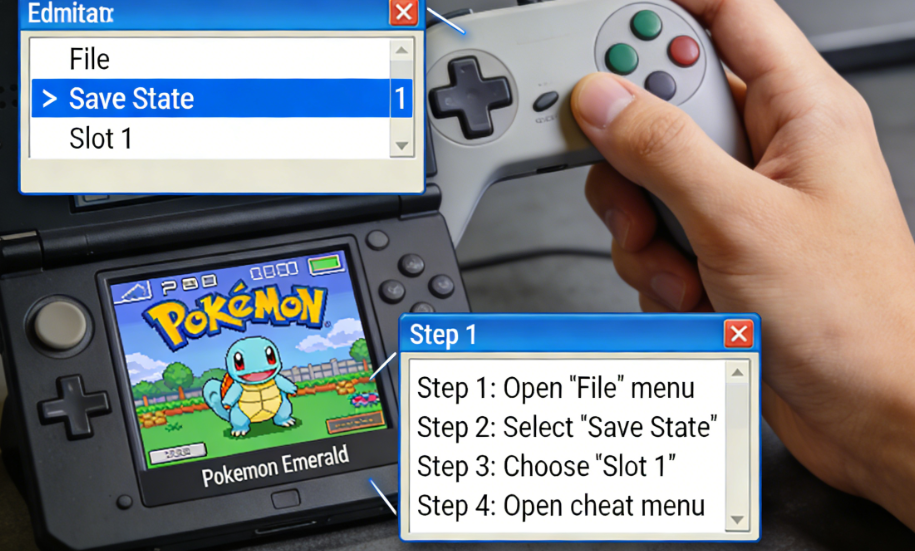
Key Safety Procedures:
- Create a Save State First: Before you even open the cheat menu, use your emulator’s function to save a state. If anything goes wrong—a glitch, a crash, or a failed cheat—you can simply load this state and be right back where you started, no harm done.
- Use Cheats Temporarily: Activate the Master Ball cheat, go to a PC, withdraw the items you need, and then immediately save your game using the in-game save function. After saving, return to the cheat menu and disable both codes. It is poor practice to leave cheats running constantly in the background.
- Avoid Cheat Overload: Running dozens of complex cheats simultaneously (e.g., walk through walls, shiny Pokémon, and item modifiers) can destabilize the game. Use only the cheats you need at that moment to minimize conflicts.
We re-validate the codes in this guide annually and with major emulator updates to ensure they remain the most reliable resource for players.
Many players also pair item modifiers with a rare candy cheat to instantly level up newly caught Pokémon. While that can speed up training dramatically, stacking multiple cheats at once increases the chance of glitches. For best stability, activate one cheat at a time, save your progress, then disable it before enabling another.
Frequently Asked Questions
Here are quick answers to the most common questions about the Master Ball cheat in Pokémon Emerald.
Q1: What is the master ball cheat code for Pokémon Emerald?
The process requires two GameShark codes. First, you must enable the two-line Master Code (D8BAE4D9 4864DCE5 A86CDBA5 19BA49B3) as a single cheat entry. With that active, the second code (128898B6 EDA43037) will place Master Balls in your PC storage.
Q2: Why is the cheat code not working in my emulator?
The most common reasons are: 1) The Master Code is not active or was entered as two separate cheats. 2) You selected the wrong cheat type (e.g., CodeBreaker instead of GameShark). 3) You made a typo entering the code. 4) Your game ROM is not the standard US version. Our troubleshooting section above covers these fixes in detail.
Q3: Do I need a master code before entering the item code?
Yes, absolutely. The Master Code enables all other cheats. Without it being active, the game will not recognize the Master Ball item code. This is the single most common point of failure for players.
Catch Them All Without the Hassle
The frustration of failing to catch a legendary Pokémon or struggling with broken, confusing cheat codes is over. By following this tested and verified procedure, you have a reliable method to secure the Master Balls you need. You no longer have to guess which codes work or worry about complex steps; the solution is clear, safe, and effective. Now you can move past the technical hurdles and focus on what matters most: building your ultimate Pokémon team.
Go ahead and use this technique to catch Rayquaza, Latios, or any other elusive Pokémon with complete confidence. Whether you’re completing the Hoenn Pokédex or planning a long-term collection like shiny Eevee evolutions across different generations, guaranteed captures remove the frustration from rare encounters.



Joy Taylor is a seasoned technical writer with over a decade of experience in mobile technology. At iMobie, she specializes in producing in-depth content on iOS data recovery, iPhone unlocking solutions, and iOS troubleshooting.
Product-related questions? Contact Our Support Team to Get Quick Solution >
