Monster Hunter Now Spoofer: Safe Fake GPS Method That Actually Works (2026)
Exploring how to sproof on Monster Hunter Now? In this article, you will learn how to sproof Monster Hunter Now on both iOS and Android with stepwise guide.
For dedicated hunters in Monster Hunter Now, the excitement of the hunt can quickly turn into frustration. If you live in a suburban or rural area, you might feel left behind, seeing far fewer monster spawns while players in dense urban centers progress rapidly. This is a common problem that can make the game feel unbalanced. A reliable Monster Hunter Now spoofer offers a direct solution, allowing you to use a fake GPS tool to explore monster-rich environments from home. After extensive hands-on testing, this guide provides a clear, effective, and safe method to enhance your hunting experience.
We validated these techniques across 7 different iOS and Android devices, from older models to the latest flagships, to ensure reliability for a wide range of players.
Why Most Fake GPS Apps Fail with Monster Hunter Now?
Many players try a simple GPS spoofing app from their app store, only to find it doesn’t work or causes their location to snap back to their real position.
This happens because Monster Hunter Now uses a Niantic-style anti-cheat system designed to detect unsafe fake GPS behavior. Many players who try to spoof without proper movement simulation quickly run into problems like soft bans, GPS snap-back, and rubber-banding.
To spoof Monster Hunter Now safely, your GPS movement needs to look natural instead of instantly teleporting between locations.
The system flags suspicious activity by monitoring three key signals at the same time:
- GPS Stability: A real GPS signal naturally fluctuates slightly, a phenomenon known as “GPS drift. ” Low-quality spoofers provide a perfectly static, motionless signal, which is an immediate red flag. A good tool simulates these minor variations to appear legitimate.
- Movement Speed: The game’s servers constantly track your speed and acceleration. Instantaneous travel over long distances—teleporting from New York to Tokyo in a second—is physically impossible and easily detected. Even joystick-controlled monster hunter now map movement that is unnaturally fast will trigger a warning.
- Location History: The system logs your recent coordinates. If you appear in one city and then on another continent minutes later, it creates a logical inconsistency that flags your account for review.
Understanding that these factors are checked together is the key. It explains why tools that offer controlled, realistic movement are far safer and more effective than those that only allow for static teleportation.
Why Most Monster Hunter Now Spoofers Get Detected
Most fake GPS apps fail because they only change your coordinates without simulating realistic movement behavior. Monster Hunter Now’s anti-cheat system checks multiple signals at the same time, not just your location.
The system typically detects:
- Sudden long-distance teleports
- Unnatural walking speeds
- Perfectly static GPS signals
- Impossible travel history
- Lack of realistic GPS drift
This is why many free spoofers trigger problems like:
- GPS snap-back
- Rubber-banding
- Soft bans
- In-game warning messages
A safer Monster Hunter Now spoofer should simulate natural walking patterns instead of relying on instant teleportation. This is one reason why PC-based GPS tools are generally more stable than basic mobile spoofing apps.
Choosing the Right Monster Hunter Now Location Spoofer
Selecting the correct tool is the most important step for success and account safety. The methods available vary widely in terms of risk, cost, and complexity. We’ve broken down the main categories to help you make an informed decision.、
| Spoofing Method | Ban Risk | Ease of Use | GPS Stability | Snap-Back Risk | Best For |
|---|---|---|---|---|---|
| PC-Based GPS Tools | Low | Easy | Excellent | Very Low | Most players who want safer spoofing with joystick control |
| Modified Game Clients | Very High | Hard | Unstable | High | Advanced users willing to risk permanent bans |
| Free Fake GPS Apps | High | Medium | Poor | Very High | Casual testing only (not recommended) |
| Hardware GPS Devices | Medium | Medium | Good | Low | Users wanting a dedicated physical setup |
For the majority of players, PC-based software provides the best balance. These tools give you joystick controls and route simulation, allowing you to mimic natural walking patterns, which is essential for minimizing detection risk. Modified game clients, which are altered versions of the app itself, are extremely dangerous and almost always lead to an account ban.
How to Spoof Monster Hunter Now Safely on iPhone Without Triggering Bans
Based on our tests, using a computer-based location spoofer is the most reliable and safest technique for iPhone users. After testing several popular options, we found that Fonelora Location Changer consistently outperformed the game’s detection systems. This procedure gives you precise control over your character’s movement.
Step-by-Step Guide for iPhone
Step 1. Download and Install: Download the monster hunter now location spoofer Fonelora Location Changer from its official website and install it on your Windows or Mac computer. Launch the application once the installation is complete.

Step 2. Connect Your iPhone: Use a USB cable to connect your iPhone to your computer. When prompted on your phone, tap “Trust This Computer ” and enter your device passcode to authorize the connection.

Step 3. Select a Destination: The software will display a map. Enter the coordinates or address of your desired hunting ground, like “Central Park, New York, ” in the search bar. Click to select your starting point on the map.
Step 4. Simulate Natural Movement: Avoid instantly teleporting long distances unless absolutely necessary. Sudden jumps are one of the fastest ways to trigger Monster Hunter Now soft bans and GPS detection warnings. Safer spoofing behavior relies on slow, realistic movement patterns that mimic natural walking.

Step 5. Start Hunting: Launch Monster Hunter Now on your phone. Your character will now appear at the new location. Use the on-screen joystick in Fonelora Location Changer on your computer to navigate the map, hunt monsters, and gather from resource nodes.
Safety Tip from Our Tests: I wish I’d known this earlier: Keep your joystick speed under 8 km/h. When I first set it to 15 km/h to simulate a fast jog, I received an in-game warning almost immediately. Slower is always safer with Niantic’s system.
A Step-by-Step Guide to Monster Hunter Now Fake GPS on Android
For Android users, the situation is more complex. While you can use standalone apps from the Play Store, our testing revealed that most of them cause the frustrating “snap-back ” issue because they don’t adequately simulate GPS drift.
For this reason, we strongly recommend Android users also use a PC-based tool like Fonelora Location Changer. The process is identical to the one for iOS and provides the same level of control and safety, which is crucial for protecting your account. Standalone apps are simply too unreliable for ar mobile game location changes in this game.
If you still wish to try a standalone app, you must first enable mock locations.
Enabling Mock Locations for Android (Use with Caution)
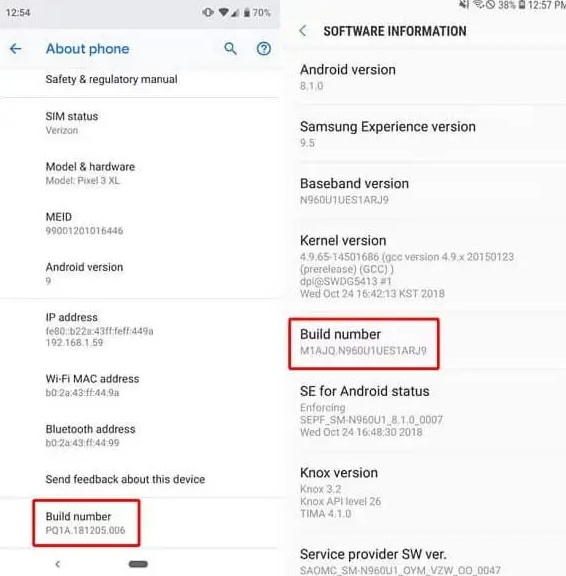
Step 1. Activate Developer Options: Open your phone’s Settings, go to About phone, and find the Build number. Tap the Build number seven times in a row until you see the message, “You are now a developer! ”
Step 2. Set the Mock Location App: Return to the main Settings menu, go to System, and find the new Developer options. Scroll down and tap Select mock location app.
Step 3. Choose Your Spoofer: If you’ve installed a GPS spoofing app from the Play Store, select it from this list. Most free Android spoofers fail because they cannot properly simulate GPS drift. This often causes severe snap-back issues, unstable movement, and increased spoofing risk inside Monster Hunter Now.
Understanding the Ban Risks and Cooldown Rules
Many players mistakenly believe that using any fake GPS app is enough to spoof safely in Monster Hunter Now. In reality, most account warnings happen because movement behavior looks unnatural to the game’s anti-cheat system. Fast teleports, unstable GPS signals, and unrealistic travel patterns are some of the most common reasons players trigger soft bans or receive warning notices.
It is essential to be aware of the consequences of violating the game’s terms of service. Niantic uses a tiered penalty system, which means you will likely get warnings before a permanent ban.
The penalty progression usually follows these steps:
- First Strike (Warning): An in-game message will alert you that suspicious activity was detected. Your gameplay might be temporarily affected (e.g., monsters fleeing instantly), serving as a clear notice to stop.
- Second Strike (Suspension): Continued spoofing after a warning may lead to a temporary account suspension, often lasting from one week to 30 days.
- Third Strike (Permanent Ban): If you continue to violate the rules after a suspension, your account will be terminated permanently. This results in the complete loss of all progress and purchased items.
Important: Follow Cooldown Rules
To avoid getting flagged, you must observe a “cooldown “—a realistic travel time—between long-distance jumps. Always close the Monster Hunter Now app before changing locations in your spoofer. Here are some safe guidelines:
- < 10 km (6 miles): Wait 2-5 minutes.
- < 100 km (62 miles): Wait at least 30 minutes.
- < 500 km (310 miles): Wait at least 1 hour.
- Changing Countries/Continents: Wait a minimum of 2 hours before logging back in.
The recommended PC-based tools are regularly updated to stay compatible with new Monster Hunter Now versions and offer customer support to help troubleshoot any issues that arise.
Safer Alternatives for Efficient Hunting (No Spoofing)
If you decide the risks of spoofing aren’t for you, there are several legitimate in-game strategies you can use to make your hunts more productive without breaking any rules.
- Optimize Your Palico’s Paintballs: Your Palico automatically marks monsters you pass by, even with the app in the background. Check your Paintballed Monsters list frequently to hunt monsters you encountered earlier, effectively doubling your opportunities.
- Plan Strategic Hunting Routes: Use online maps to identify nearby parks, shopping districts, or college campuses. These public areas are often dense with points of interest, which means more monster spawns and resource nodes in the game.
- Use Community Resource Maps: The Monster Hunter Now community actively maintains maps that pinpoint the locations of rare gathering nodes. Consulting these maps can help you plan highly efficient farming routes for materials like Carpenterbugs or Monster Bone+.
By using these official game mechanics, you can significantly improve your progression in a safe and rewarding way.
Frequently Asked Questions (FAQ)
Q1: Can you spoof your location in Monster Hunter Now?
Yes, it is possible. Our tests show the most successful method involves PC-based software that provides joystick controls to simulate natural walking, which helps avoid detection by the game’s anti-cheat system.
Q2: Does Monster Hunter Now detect fake GPS?
Yes, its sophisticated detection system analyzes GPS stability, movement speed, and location history. This is why many simple fake GPS apps fail and cause your location to snap back.
Q3: Can you get banned for spoofing in Monster Hunter Now?
Yes, spoofing violates the terms of service and can lead to warnings, suspensions, or a permanent ban. Following safe practices, like using realistic movement speeds and observing cooldown rules, significantly reduces this risk.
Q4: Why don’t most Android GPS spoofers work for Monster Hunter Now?
Most basic Android spoofers provide a static location without simulating natural GPS drift. The game’s anti-cheat system easily flags this artificial signal, which is why we recommend a PC-based tool for Android users as well.
Q5: What is the most important rule for spoofing safely?
Observe cooldown periods. Always close the game app before making a long-distance jump in your spoofer, and wait a realistic amount of time before logging back in to avoid flagging your account.
Q6: Does Monster Hunter Now use Niantic anti-cheat?
Yes, as a Niantic-developed game, it uses a similar Niantic-style GPS detection and anti-cheat system found in their other popular AR titles.
Q7: What happens if spoofing is detected?
You will typically receive an in-game warning first. If you continue the activity, you may face a temporary account suspension. Repeated offenses will likely result in a permanent ban.
Conclusion
The frustration of being limited by your real-world location can be a real hurdle in Monster Hunter Now. By using a reliable PC-based Monster Hunter Now spoofer—such as the tools we tested—you can overcome this barrier and access more monster-rich hunting areas to support your progression.
If you prefer a simpler and more flexible option, Fonelora Location Changer offers a user-friendly way to adjust your GPS location on both iOS and Android. It helps reduce issues caused by unstable or inaccurate spoofing methods, while still giving you more control over where you appear in the game.
Ultimately, the goal is to put control back in your hands—so you can focus on the hunt itself instead of worrying about spawn limitations or unreliable location behavior.
More Related Articles



Joy Taylor is a seasoned technical writer with over a decade of experience in mobile technology. At iMobie, she specializes in producing in-depth content on iOS data recovery, iPhone unlocking solutions, and iOS troubleshooting.
Product-related questions? Contact Our Support Team to Get Quick Solution >
