Quick Answer: Seeing “No Location Found” on Find My typically means the tracked device cannot be reached due to technical reasons, such as being offline, having a dead battery, or being in airplane mode.
If you are feeling anxious because a friend or family member’s location suddenly disappeared, take a deep breath. In most cases, a “No Location Found” error is just a temporary technical glitch. It rarely means the person intentionally blocked you or stopped sharing their location. When someone deliberately turns off their location sharing, Apple devices usually display a completely different message. Understanding this technical difference is the first step to reducing your tracking anxiety.
“No Location Found” vs. “Location Not Available”: Understanding the Difference
To clear up the confusion, it helps to look at the two most common location error messages side-by-side. While they sound almost identical, they mean very different things regarding the other person’s phone and their intentions.
| Feature | “No Location Found” | “Location Not Available” |
|---|---|---|
| Primary Meaning | The device cannot communicate with Apple’s servers. | The device is online, but location sharing is actively. |
| Device Status | Usually powered off, dead battery, or has no internet connection. | Usually powered on and connected to a network. |
| Intentionality | Almost always an unintentional technical glitch or dead zone. | Usually an intentional choice to stop sharing location. |
| What You See | A blank status or an outdated location timestamp. | A specific “Location Not Available” label under their name. |
As the table shows, “No Location Found” is fundamentally a connection issue. If you are worried that they turned off their location settings to hide from you, that action would typically trigger the “Location Not Available” message instead.
Why Does My iPhone Say “No Location Found” When Their Phone is On?
It can be incredibly frustrating to see a “No Location Found” error when the person you are tracking insists their phone is on and in their hand. If the phone isn’t dead, why is Find My failing to sync?
Here is a troubleshooting checklist of the most common technical causes:
- Airplane Mode is Enabled: Even if the phone is on, Airplane Mode cuts off all cellular and Wi-Fi connections, making the device unreachable by GPS servers.
- Cellular or Wi-Fi Dead Zones: If the device is in a remote area, a concrete building, or an elevator, it cannot transmit its GPS coordinates back to Apple.
- Find My Background Refresh Glitch: Sometimes, iOS simply lags. The Find My app relies on Background App Refresh to update seamlessly. If the system pauses this process to save battery, the location will stall.
- Incorrect Date and Time Settings: If the tracked device has its date and time set manually and it falls out of sync with network servers, location sharing will frequently break.
What to Do If You Are Tracking Someone Else:
If the error is on a friend or family member’s phone, you cannot fix it remotely. However, you can ask them to take a few quick real-world actions to force a connection refresh:
- Ask them to open Apple Maps or Google Maps: Opening a navigation app forces the phone’s GPS to ping the nearest satellite, which often updates their Find My status immediately.
- Have them toggle Airplane Mode: Asking them to turn Airplane Mode on and off quickly resets their network connection.
- Check their battery level: Even if the phone is on, Low Power Mode can sometimes severely restrict background location updates.
Apple’s syncing can sometimes just experience a random delay. Validate your frustration: it isn’t always user error. If this glitch is happening on your own phone, toggling Location Services off and back on, checking your network, or restarting the device often forces the connection to reset.
The Privacy Dilemma: What Happens When You Turn Off Your Own Location?
Learning about these tracking errors often triggers a realization for many users: if Find My sends obvious alerts when a phone disconnects, how do you manage your own location privacy?
The major gap in native iOS and Android settings is that they do not allow for silent privacy. If you want some personal time and simply turn off your GPS, Location Services, or the Find My feature natively, your device will immediately broadcast a “Location Not Available” or a blank “No Location Found” status to your friends and family.
This creates a frustrating privacy dilemma. Instead of getting peace and quiet, triggering these obvious tracking errors often causes unwanted questions, suspicious texts, or anxious check-ins from family members or partners. You are left choosing between giving up your personal location boundaries or dealing with the fallout of an obvious error message.
How to Hide Your Location Without Triggering a “No Location Found” Alert
If you want to take control of your own privacy without raising alarms, the solution is to maintain an active location status rather than going offline. This is where a guided iOS virtual location tool like Fonelora Location Changer becomes highly relevant for supported iOS and Android devices.
Instead of turning off your GPS—which causes the dreaded “No Location Found” error—Fonelora Location Changer allows you to display a realistic, continuous virtual location. Furthermore, because Fonelora is a secure desktop software (for Windows and Mac), it avoids the frequent crashes and security risks associated with unstable mobile-only spoofing apps.
Scenario Example: Unplugging Without the Panic
Imagine you want to stay home and unplug for the weekend, but you know your family will worry if your location suddenly goes blank or jumps offline. By connecting your device to the Fonelora desktop client, you can set your virtual location to your workplace or another expected area. Your Find My status remains fully active, broadcasting the virtual coordinates continuously. Because the app thinks your phone is online and transmitting normally, family members see a stable location and have no reason to send anxious check-in texts.
Fonelora Location Changer is designed strictly as a personal privacy management tool to help you set boundaries gracefully. It cannot fix another person’s phone if it is genuinely dead or offline, and it does not guarantee that location changes are 100% undetectable by all apps.
Fonelora Location Changer
Realistic GPS movement simulation, flexible route control, easy no-modification setup, and support for gaming, social, privacy, and location-based testing in one platform.
Step-by-Step: Setting a Virtual Location with Fonelora
Setting up a virtual location to protect your privacy is straightforward. Instead of relying on unstable fake GPS apps that frequently crash and trigger the exact errors you are trying to avoid, Fonelora uses a secure, guided Mac or Windows desktop client.
Here is how to set a stable virtual location and avoid a blank tracking status:
- Connect Your Device: Connect your supported iPhone or Android phone to your computer using a USB cable or Wi-Fi, and open Fonelora Location Changer.

- Select Teleport Mode: On the main interface, choose Teleport Mode. This is the best option for setting a fixed, stable location without complex movement.
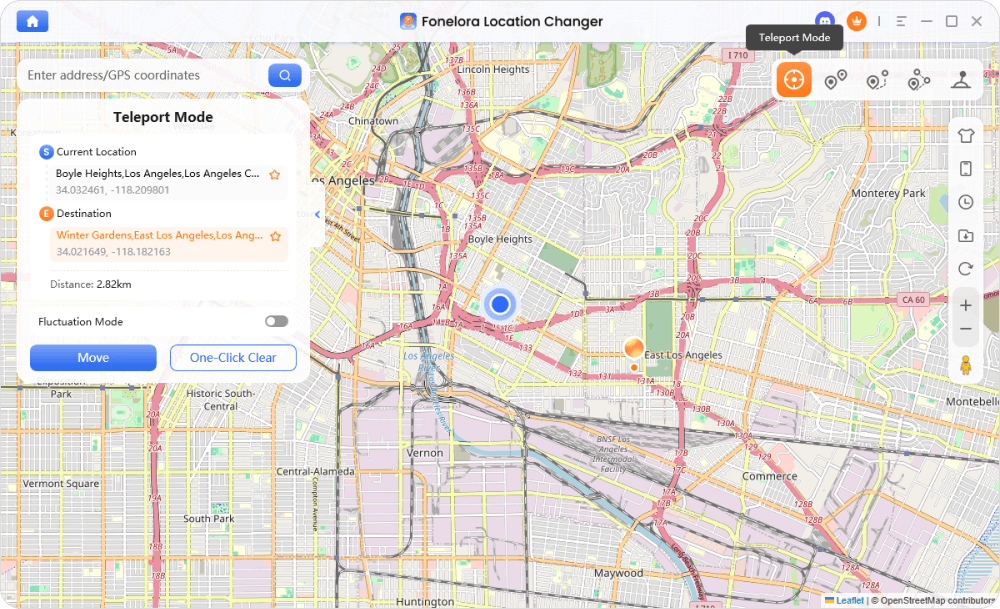
- Choose Your Virtual Location: Search for a realistic destination (such as your office, a local café, or a previous neighborhood) using the map or search bar.
- Apply the Location: Click to apply the new coordinates to your device.
Your phone will now broadcast this virtual location to your location-sharing apps. Because the GPS signal is active and stable, your friends and family will see your chosen location naturally, completely avoiding the suspicious “No Location Found” alert. Always check compatibility and app rules before proceeding.
Frequently Asked Questions
- Can airplane mode cause the No Location Found error?
- Yes. Airplane mode immediately cuts off cellular and Wi-Fi connections. Without a network connection, the phone cannot transmit its GPS data to Apple’s servers, resulting in a “No Location Found” status.
- Did they turn off their location if it says No Location Found?
- Usually, no. If someone intentionally turns off their location sharing natively in Find My, the app typically displays “Location Not Available.” “No Location Found” almost always indicates a dead battery, a network dropout, or a turned-off device.
- How to fix the No Location Found error message?
- If you are tracking someone else’s phone, you cannot fix this error remotely. You simply have to wait for them to reconnect to a network, charge their battery, or ask them to open Apple Maps to force a GPS ping. If the error is happening on your own device, try toggling Airplane mode on and off to reset the network, ensure your battery is charged, check that Background App Refresh is enabled for location apps, or simply restart your phone.
- Does a virtual location changer work for Life360 as well as Find My?
- Yes. Under supported conditions, tools like Fonelora Location Changer adjust the GPS data at the system level. This means if you ever need to change location on Life360 or other family-sharing apps, the virtual coordinates will carry over seamlessly without sending an offline alert.
- Will they be notified if I use a virtual location?
- No obvious error notification is sent. Unlike turning off native GPS settings (which immediately triggers an alert or a blank status), using a virtual location keeps your status active and transmitting, which helps avoid raising suspicion.
Final Thoughts on Location Tracking and Privacy
Seeing a “No Location Found” message on a tracking app can be stressful, but it is almost always the result of a simple technical glitch, a dead battery, or a bad network connection—not an intentional block. There is rarely a need to panic.
However, understanding how these errors work highlights just how limited native Apple and Android privacy settings truly are. Relying on default options means that whenever you want a moment of privacy, you are forced to broadcast an obvious “Not Available” alert to everyone tracking you.
If you want to take control of your own location sharing gracefully, consider using Fonelora Location Changer. By maintaining a stable, continuous virtual location on supported devices, you can set your own personal boundaries and protect your privacy without ever triggering the suspicious errors that cause unwanted questions.

Fonelora Location Changer
- Bluetooth Hardware Simulation for Safer GPS Spoofing
- Realistic Movement & Route Simulation
- No Root or Jailbreak Required
- All-in-One Solution for Games, Social Apps & Privacy
More Related Articles



