Lure Modules in Pokémon GO are special items placed on physical PokéStops to increase Pokémon spawn rates around that specific location. Unlike Incense, which primarily benefits the player using it while moving, a Lure Module helps all players who are nearby. Standard lures typically last for 30 minutes, though special events often extend this duration up to three hours. To benefit from a Lured PokéStop, players must physically remain within the interaction radius of that stop.
Over the years, the game has introduced several specialized Lure Modules designed to attract specific types of Pokémon. Despite their different visual effects, all special modules—including the highly sought-after Golden Lures—act identically in terms of location tracking and virtual movement compatibility when you are exploring comprehensive Pokémon GO guides and advanced gameplay resources.
| Lure Type | Attracted Pokémon & Special Features |
|---|---|
| Standard Lure Module | Attracts a wide variety of local Pokémon. |
| Glacial Lure Module | Attracts Water and Ice-type Pokémon. Required to evolve Eevee into Glaceon. |
| Magnetic Lure Module | Attracts Electric, Steel, and Rock-type Pokémon. Required to evolve Magneton and Nosepass. |
| Mossy Lure Module | Attracts Bug, Grass, and Poison-type Pokémon. Required to evolve Eevee into Leafeon. |
| Rainy Lure Module | Attracts Water, Bug, and Electric-type Pokémon. Required to evolve Sliggoo into Goodra. |
| Golden Lure Module | Drops Gimmighoul Coins and attracts Roaming Form Gimmighoul. Extremely rare and highly beneficial for item farming. |
The Geographic Problem: Why Rural Players Waste Lures
While Lure Modules are a core mechanic for catching rare Pokémon, they heavily favor players living in densely populated urban areas. For rural or homebound players, Lures often become a source of frustration rather than excitement.
The core pain point lies in the geographical friction of the game mechanics. Because you must remain near the physical PokéStop to spawn and catch Pokémon, rural players who drop a Lure often have to wait around isolated locations for a full 30 minutes. If they have to walk away or go home, the paid Lure is essentially wasted.
Furthermore, players outside of major cities miss out entirely on massive “Lure Parties” during Community Days, where hundreds of PokéStops are lured simultaneously. They also rarely encounter Golden Lures, which are typically dropped by active communities in busy downtown areas. This geographic limitation means that without a way to virtually bridge the distance, rural players are effectively locked out of the game’s most lucrative farming opportunities.
Top Global Coordinates for 24/7 Lure Parties
If you are tired of empty nearby radars and want to maximize your catch rates, major global hubs host active Lure Parties around the clock. At these famous coordinates, PokéStops are so dense that players constantly drop standard and Golden Lures, creating endless spawn clusters. These are some of the best Pokémon GO spoofing locations to find active lures anytime.
Scenario 1: The Ultimate Farming Cluster
- Location: Zaragoza, Spain
- Coordinates: 41.6616, -0.8946
- Why it is valuable: Zaragoza is arguably the most famous location for Pokémon GO players worldwide. The cluster of PokéStops here is so tightly packed that you can stand in one spot and spin dozens of Lured stops, making it perfect for rapid item farming and constant spawns.
Scenario 2: The High-Traffic Park
- Location: Ibirapuera Park, São Paulo, Brazil
- Coordinates: -23.5841, -46.6530
- Why it is valuable: A massive park famous for hosting incredible Community Day events. It is almost always lit up with Lures and serves as an excellent location for hunting rare regional Pokémon and participating in massive 20-player raid lobbies.
Scenario 3: The Coastal Hotspot
- Location: Pier 39, San Francisco, USA
- Coordinates: 37.8086, -122.4098
- Why it is valuable: A historic hotspot since the game launched. Pier 39 offers incredible density, frequent Golden Lures, and plenty of water-type spawns.
To participate in these global Lure Parties and take advantage of the constant spawns without booking a physical flight, players require a controlled virtual location tool.
How to Safely Access Global Lure Clusters from Home
When rural players realize they need a virtual location tool to reach these 24/7 Lure clusters, many mistakenly turn to modified mobile apps. However, relying on the wrong method can easily compromise your account.
Mobile-based modified apps alter the unofficial game client directly on the phone. Because they rely on a third-party, hacked version of the game, they are frequently detected by the developer’s anti-cheat systems, leading to massive ban waves and permanent account closures.
A safer alternative is using a desktop-tethered guided workflow, such as Fonelora Location Changer. Designed for supported iOS and Android devices, Fonelora allows you to change your GPS location at the system level using your official game app, rather than hacking the app itself.
Fonelora Location Changer
Realistic GPS movement simulation, flexible route control, easy no-modification setup, and support for gaming, social, privacy, and location-based testing in one platform.
| Feature Focus | Modified Mobile Apps (e.g., PGSharp) | Desktop-Tethered GPS (Fonelora Location Changer) |
|---|---|---|
| Client Integrity | High risk (modifies the core game client). | Safer (uses the official game app, changes device GPS). |
| Account Risk | Frequently targeted by ban waves. | Reduced risk via Game Mode and built-in Cooldown Timer.* |
| Cluster Navigation | Varies by app, often unstable. | Smooth, natural navigation using Joystick Mode. |
| Setup Difficulty | Often requires risky sideloading or jailbreaking. | Guided desktop connection via USB, Wi-Fi, or Bluetooth. |
While desktop-tethered setups provide a much more controlled environment, no tool guarantees 100% immunity from soft bans or Error 12. Safe usage requires strict adherence to cooldown rules and realistic movement settings.
Step-by-Step: Using Fonelora to Teleport and Catch
Navigating a dense cluster of Lured PokéStops requires more than just teleporting—you need to move naturally between them to catch everything spawned. For players using supported iOS and Android devices, Fonelora Location Changer provides a structured workflow to change location in Pokémon GO, reach famous locations like Zaragoza, and walk around them safely.
Here is how to teleport and catch using Fonelora:
- Connect your device to the computer: Launch Fonelora Location Changer on your Mac or PC and connect your phone via USB or Wi-Fi.

- Enter Teleport Mode: Once successfully connected, select “Teleport Mode” from the top right menu. Enter the exact coordinates of a global Lure cluster (for example, 41.6616, -0.8946 for Zaragoza) and click to move your virtual location instantly.
- Switch to Joystick Mode: After arriving at the cluster, do not jump wildly from stop to stop. Switch to “Joystick Mode” to simulate natural walking. You can use your keyboard or on-screen arrows to stroll smoothly between the active Lures.
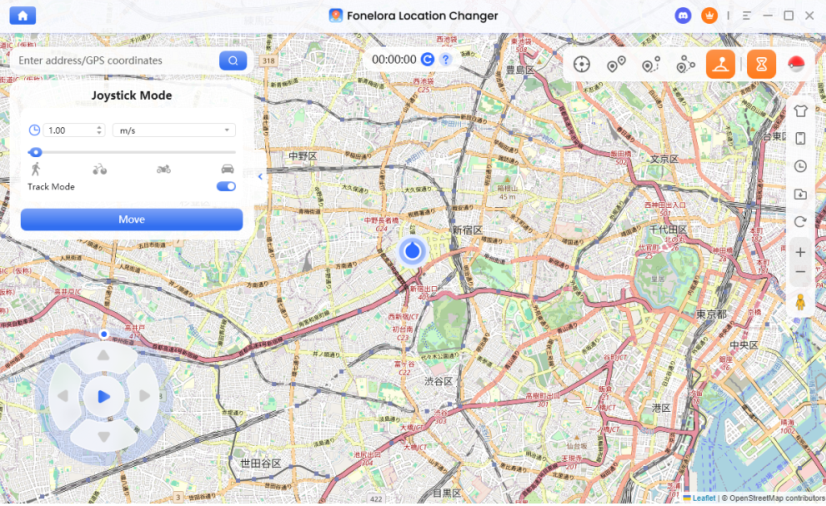
- Monitor the Cooldown Timer: Before you spin a Lured stop or throw a Poké Ball, always check Fonelora’s built-in Cooldown Timer to ensure your account remains safe from sudden distance-jump penalties.
Crucial Cooldown Rules When Teleporting to Lures
The absolute fastest way to ruin a Lure Party is by triggering a “Soft Ban.” A Soft Ban happens when the game detects that you have traveled a massive distance faster than is physically possible. When soft-banned, every single Pokémon you try to catch will flee instantly, and Lured PokéStops will not drop any items when spun.
To safely use Fonelora Location Changer and interact with new Lures, you must respect strict Pokémon GO cooldown rules based on your teleport distance.
Before you catch or spin, check this cooldown checklist:
- Understand the timer: The cooldown starts from your last in-game action (catching a Pokémon, spinning a stop, throwing a berry, dropping a Lure). If you teleport after an action, you must wait before performing another action at the new location.
- Respect distance wait times: 1 to 5 kilometers: Wait 1 to 2 minutes; 10 to 25 kilometers: Wait 10 to 15 minutes; 100 kilometers: Wait 45 minutes; over 1,500 kilometers, such as global Lure hubs, wait a maximum of 2 hours.
- Use Fonelora’s built-in timer: Always check the Cooldown Timer in the Fonelora interface before interacting with your new Lured location.
- Lures do not travel with you: Remember that teleporting while a Lure is active near your old location does not bring that active Lure to your new location. You are simply traveling to existing Lures at the new coordinates.
Frequently Asked Questions (FAQs)
- How do you use a lure in Pokemon Go?
- To use a Lure, tap on a physical PokéStop on your map, click the white slot above the PokéStop’s photo disc, and select the Lure Module you want to activate. It will immediately begin spawning Pokémon for everyone in the vicinity.
- Do you have to walk for a lure module to work?
- No. Unlike Incense, which requires physical movement to maximize spawn rates, Lure Modules work perfectly while you are standing still near the PokéStop. However, if there is a dense cluster of multiple Lured stops, using a tool with Joystick Mode helps you walk smoothly between them to catch everything.
- How long do lures last in Pokemon Go?
- Normally, a Lure Module lasts for 30 minutes. During special events like Community Days, Niantic often extends this duration to 3 hours.
- Is it safe to use a location changer for Pokemon Go lures?
- Desktop-tethered tools like Fonelora Location Changer reduce risks compared to modified mobile apps because they do not alter the official game client. However, users must strictly respect cooldown timers and platform rules. No tool provides 100% immunity from soft bans or Error 12.
- Can I see Golden Lures dropped by other players?
- Yes. You can see, spin, and benefit from Golden Lures placed by anyone in the world, as long as you are physically or virtually at those coordinates.
Final Thoughts: Maximizing Your Pokémon GO Lure Experience
Pokémon GO Lures are fantastic tools for farming items, hunting specific evolutionary types, and finding rare Golden Lure drops. Unfortunately, for players living in rural or isolated areas, geographic limitations often turn this core game mechanic into a frustrating waste of resources.
You no longer need to miss out on massive Community Day Lure Parties or the endless spawn clusters found in cities like Zaragoza and San Francisco. By stepping away from risky modified mobile apps and choosing a guided, desktop-tethered workflow, you can bridge the geographical gap securely.
Using a tool equipped with Joystick Mode and built-in Cooldown reminders is the most practical way to navigate these dense clusters naturally. If you are ready to access 24/7 Lure hubs and start catching without leaving your home, download Fonelora Location Changer today and explore the best global coordinates on your own terms.

Fonelora Location Changer
- Bluetooth Hardware Simulation for Safer GPS Spoofing
- Realistic Movement & Route Simulation
- No Root or Jailbreak Required
- All-in-One Solution for Games, Social Apps & Privacy
More Related Articles



