How to Share Live Location on Snapchat: The Complete Guide
Tired of a frozen Bitmoji on the Snap Map? Learn how to share live location on Snapchat for accurate, real-time tracking. Our step-by-step guide shows you how.
Trying to meet friends at a crowded festival or a busy park can feel impossible. You see their Bitmoji on the Snap Map, but it hasn’t moved in twenty minutes, even though they swear they’re on their way. This common confusion between Snapchat’s passive map and its true live sharing feature is a major pain point. If you’re searching for how to share live location on Snapchat, you need a method that offers real-time, accurate tracking. This guide provides the definitive solution.
We’ll walk you through the correct procedure, clarify the crucial privacy settings, and explain the key differences in Snapchat’s location features, ensuring you can connect with friends without the guesswork. This is the only method that provides continuous, active tracking, similar to the live location features in apps like iMessage or WhatsApp.
How to Send Your Live Location on Snapchat (Step-by-Step)
Finding the correct feature in the app is often the biggest hurdle. This simple, direct procedure works for sharing your live location with an individual friend. The interface is nearly identical on both iOS and Android devices.
First, A Quick Permissions Check
Before you start, it’s important to get your phone’s settings right. For live sharing to work—especially when Snapchat is running in the background—it needs permission to access your location at all times.
If this is your first time using the feature, Snapchat will show a pop-up asking you to adjust your location permissions on iPhone or Android to “Always Allow” or “Allow all the time.” This is a standard and necessary step. Don’t worry, this doesn’t mean your location is always being broadcast; it simply gives the app the ability to share it when you manually choose to.
The Exact Steps to Share Your Location
Here is the exact send live location Snapchat step by step procedure:
- Open a Chat with a Friend: Launch the Snapchat app and swipe right to your Chat screen. Tap on the conversation with the friend you want to share your location with.
- Access the Friendship Profile: Inside the chat, tap your friend’s Bitmoji or profile icon in the top-left corner. This opens your “Friendship Profile” with them.
- Locate the Snap Map Section: Scroll down until you see the “Snap Map” section within the profile. You will find an option clearly labeled “Share My Live Location.” This is the button you’re looking for.
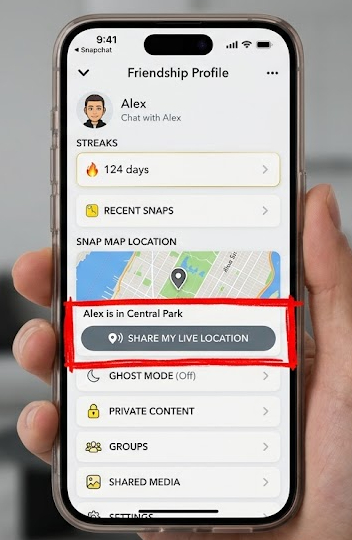
- Choose a Sharing Duration: Tap “Share My Live Location.” A menu will appear asking you to select how long you want to share for: 15 minutes, 1 hour, or 8 hours.
- Confirm and Start Sharing: After selecting a duration, your live location will begin sharing. A small, interactive map tile will appear in your chat. Your friend will receive a notification that you’ve started sharing and can tap this map tile to see your real-time movements.
Learn More:Bug Snapchat : Solutions Rapides pour Réparer l’Application >
Understanding Snapchat Location Sharing Settings: Duration & Privacy
Sharing your location requires trust. Fortunately, Snapchat provides several key controls to ensure you remain in charge of your snapchat privacy settings. Unlike your general visibility on the Snap Map, the live location feature is always a manual, one-to-one action with a specific friend you choose.
Location Sharing Duration Explained
When you initiate sharing, you must choose a time limit. This is one of the most important snapchat safety features built into the system, as it prevents indefinite tracking.
- 15 Minutes: Best for quick meetups and pinpointing an exact spot.
- 1 Hour: A great option for coordinating during an event or activity.
- 8 Hours: Useful for longer activities like day trips or for letting a trusted contact know your whereabouts for safety.
The timer begins the moment you start sharing and will automatically stop when the selected duration expires.
A Heads-Up From Our Testing: Using live location for the full 8 hours can be a significant battery drain. If you’re at an all-day event and running low on power, we recommend using the 15-minute or 1-hour options only when you actively need to find someone.
How to Stop Sharing and Who Gets Notified
A common concern is whether you can share your location secretly. The answer is a clear no, which is a good thing for privacy.
- Notifications are Automatic: Snapchat immediately notifies your friend when you start sharing your live location with them. A system message and a map tile appear in your chat.
- How to Stop Sharing Manually: You are always in control. To stop sharing your location at any time, simply return to the Friendship Profile with that person. The button will now say “Stop Sharing.” Tap this to immediately end the session, no matter how much time was left on the timer.
Learn More:How to Add a Location in Snapchat: The Complete Guide >
Snap Map vs. Live Location: The Critical Difference
Here’s the expert insight that solves the most common user frustration: Snap Map and Live Location are two completely different systems. Misunderstanding this is why friends can appear stuck in one place on the map. Relying on the main Snap Map to share snap map location with friends for a real-time meetup is a flawed strategy.
Snap Map: Passive and Intermittent Updates
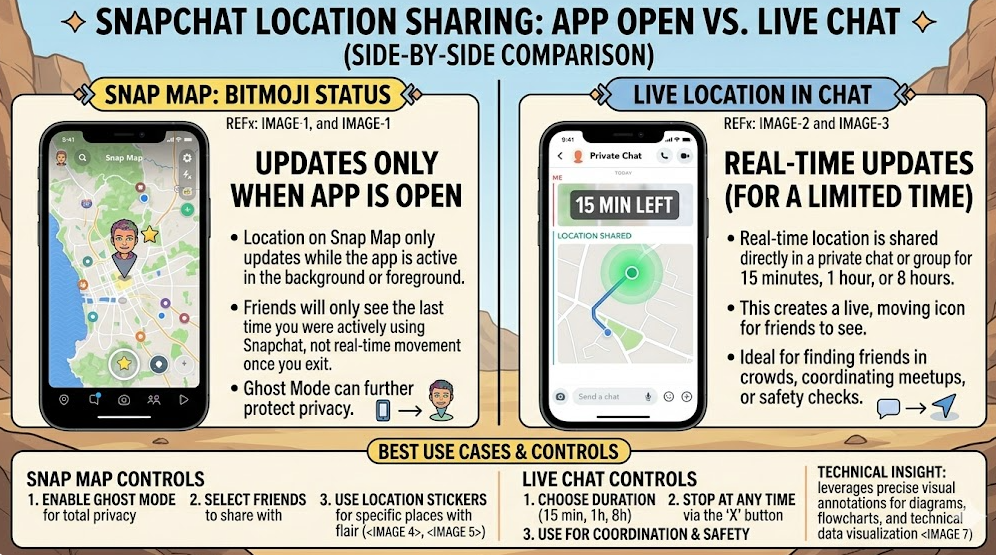
Your location on the general Snap Map (the one you see when you pinch out from the camera screen) is passive. It only updates your position when you open and use the Snapchat app. If you close the app, your Bitmoji remains frozen at that last known location for several hours before disappearing. It is designed for general, non-urgent awareness of where friends have been recently, not for real-time tracking.
Live Location: Active and Continuous Tracking
The Live Location feature we detailed above is active. When you enable it with a friend, it works just like live location sharing on iMessage or WhatsApp. You grant Snapchat permission for background location tracking, broadcasting your GPS coordinates to them continuously for the set time. This works even if the app is closed. It provides true, real-time updates, making it the only correct tool for coordinating an active meetup.
Learn More:How to Stop Sharing Location Without Notifying on iMessage >
Troubleshooting: Snapchat Location Sharing Not Working?
If you’ve followed the steps and the feature still isn’t working, the problem usually lies with device settings or connectivity. Here is a checklist of common issues and how to fix them.
1. Incorrect App Permissions
This is the most frequent cause. Live sharing requires Snapchat’s location permission to be set to “Always Allow” or “Allow all the time.”
- Solution: Go to your phone’s Settings > Apps > Snapchat > Permissions > Location. Ensure it is set to “Always Allow” (iOS) or “Allow all the time” (Android). On some Android devices, you may also need to enable the “Use precise location” toggle.
2. Poor GPS or Network Signal
Snapchat needs a strong GPS signal and a stable internet connection (Wi-Fi or cellular) to update your location accurately. If you are indoors, underground, or in a remote area, the signal may be too weak.
- Solution: Move to an area with a clearer view of the sky or connect to a reliable Wi-Fi network. You can also try toggling your phone’s Airplane Mode on and then off to reset your network connections.
3. Outdated Snapchat App
An old version of the app can contain bugs that cause features to malfunction.
- Solution: Open the App Store (iOS) or Google Play Store (Android) and search for Snapchat. If an “Update” button is available, tap it to install the latest version, then restart the app.
4. Your Friend’s Settings
The feature requires both users to have proper settings. Your friend also needs location services enabled and a stable connection to view your live location.
- Solution: Ask your friend to quickly run through the same checks on their device.
Advanced Option: A Note on Location Privacy Tools
For users who want to explore location control beyond Snapchat’s built-in features, specialized tools exist that work at the device level. While Ghost Mode can hide you from the Snap Map, it doesn’t prevent the app itself from knowing your true GPS data.
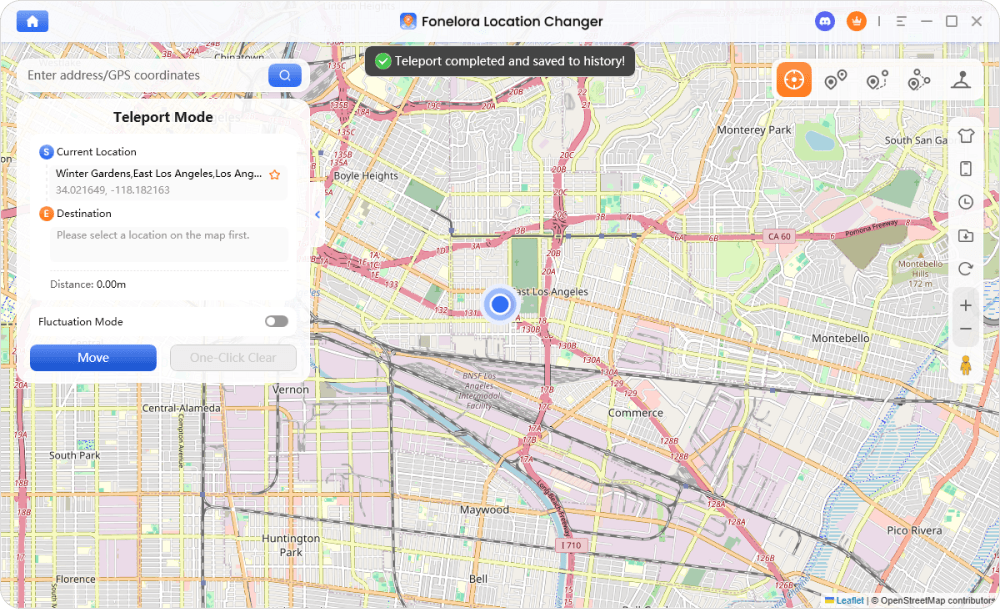
For those interested in this level of control, one example is Fonelora Location Changer. This type of software allows you to set your device’s GPS coordinates to any location in the world, and all apps that use location data will report this new position.
If you choose to explore such a tool, the general process is:
- Connect Your Device: Launch the location changing software on your computer and connect your iPhone or Android.

- Choose a Location: Use the map interface to search for any address or drop a pin.
- Apply the Change: After confirming, your phone’s GPS will instantly update. Snapchat will then show this new location to the app.
Fonelora receives regular updates to maintain compatibility with the latest iOS and Android versions and offers dedicated customer support for any technical questions.
Learn More:How to Hide & Manage Your Location on Snapchat: The Complete Guide >
Frequently Asked Questions (FAQ)
How do I share my live location on Snapchat?
Open a chat with a friend, tap their profile icon at the top, scroll to the Snap Map section, and select “Share My Live Location.” You will then need to choose a duration of 15 minutes, 1 hour, or 8 hours.
Does Snapchat have real-time location sharing?
Yes. The snapchat real time location feature is called “Share My Live Location” and is found within individual chats. It provides continuous, active updates and is separate from the main Snap Map, which only updates passively when you open the app.
How long does Snapchat location sharing last?
You decide the location sharing duration when you begin. The options are 15 minutes, 1 hour, or 8 hours. Sharing stops automatically when the timer expires, or you can stop it manually at any time.
Can I choose who sees my live location?
Yes. Live location sharing is strictly a one-to-one feature. You can only share with one specific friend at a time within your chat with them. It is not a broadcast to all your friends.
Does Snapchat notify someone when I share my location?
Yes. Your friend receives an immediate notification and a new map element in your chat the moment you start sharing your live location with them. There is no way to share your live location secretly.
What is the difference between Snap Map and live location?
Snap Map shows a passive location that only updates when you open the Snapchat app. Live location is an active, real-time stream of your GPS coordinates shared in a chat for a set period, which continues to update even when the app is closed.
How do I stop sharing my location on Snapchat?
Go back to the Friendship Profile of the person you are sharing with and tap the “Stop Sharing” button located in the Snap Map section. This ends the live session immediately.
Is Snapchat location sharing safe?
The feature is designed with strong safety controls. Mandatory time limits, clear notifications to your friend, and an easy “Stop Sharing” button are crucial safety elements. However, its safety ultimately depends on your usage. You should only ever share your live location with people you explicitly know and trust.
Conclusion: Share with Confidence and Control
Navigating Snapchat’s location features doesn’t have to be a source of confusion. By using the correct “Share My Live Location” tool within a chat, you can reliably connect with friends for meetups. Understanding that you control the timer and that your friend is always notified gives you the power to share safely and on your own terms. For those who prioritize an additional layer of privacy, knowing that device-level tools like Fonelora Location Changer exist provides another option. Ultimately, you are in the driver’s seat of your digital footprint. Stop the guesswork and start sharing your location with confidence.



Joy Taylor is a seasoned technical writer with over a decade of experience in mobile technology. At iMobie, she specializes in producing in-depth content on iOS data recovery, iPhone unlocking solutions, and iOS troubleshooting.
Product-related questions? Contact Our Support Team to Get Quick Solution >
