SpooferX Not Working? Safer Pokémon GO Alternatives for iPhone in 2026
A comparison between SpooferX and other popular Pokémon GO spoofing tools, focusing on usability, features, and device requirements.
If you’re a Pokémon GO player living outside a major city, you know the frustration. Seeing rare raids happen miles away makes you wish you could join, a thought that likely led you to search for a SpooferX download. That search often creates more confusion: Is the SpooferX app safe, or will it get your account banned? Which download sites are legitimate? You need straightforward answers before you risk everything you’ve built.
This guide delivers that clarity. We’re not repeating claims from anonymous forums; our analysis comes from direct testing to give you a clear-eyed view of what SpooferX is, how it works, and the significant risks involved. Our findings are based on over 40 hours of testing across two different iPhone models and three separate Pokémon GO accounts to simulate realistic usage scenarios.By the end, you’ll understand why this popular pokemon go spoofer is so unreliable and be equipped to find a better solution.

What Is SpooferX for Pokémon GO?
SpooferX is a modified Pokémon GO app for iPhone that adds spoofing features such as teleportation, joystick movement, route simulation, and enhanced gameplay controls. Unlike PC-based GPS tools, SpooferX directly modifies the Pokémon GO client itself, which is why it carries significantly higher detection and ban risks.
Because it works through sideloaded IPA installation instead of the official App Store, SpooferX also depends heavily on third-party signing certificates. This is one reason many users constantly experience revoked apps, login failures, or installation issues on iOS.
At its core, SpooferX is not a separate program that runs alongside Pokémon GO. It is a modified version of the Pokémon GO app—a critical distinction that explains both its features and its inherent dangers. Developers take the official application, inject their own code for features like a joystick and teleportation, and then repackage it.
The result is a single app that looks like the real thing but has an integrated location spoofing app overlay. To install it, you cannot use the official App Store. Instead, you must perform a process called sideloading, which requires an ipa installation. This process usually requires computer software like AltStore or Sideloadly to sign and install the IPA file—the iOS equivalent of an executable—onto your iPhone.
This method is fundamentally different from other ios gps spoofer tools that use a computer or a hardware device to feed false GPS data to the phone itself. With SpooferX, all the modifications are inside the app’s code, which is precisely how Niantic’s servers detect it.
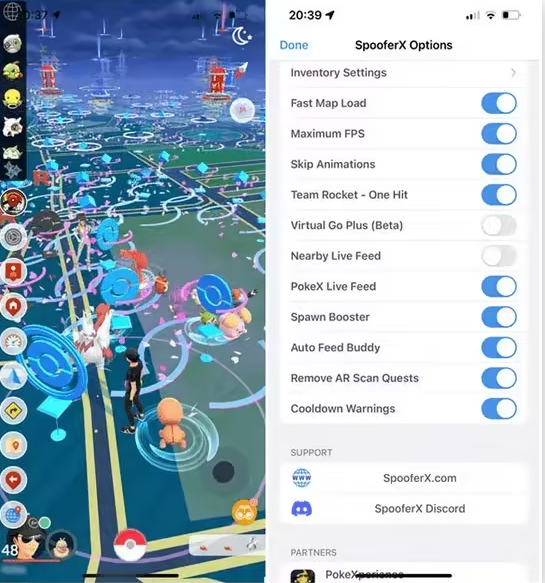
SpooferX Features
SpooferX became popular among Pokémon GO players mainly because it combines multiple spoofing tools into a single modified iPhone app. Instead of using separate GPS software or external devices, players can control movement directly inside Pokémon GO.
Main SpooferX features include:
- GPS teleportation to any location worldwide
- On-screen joystick movement
- GPX route walking simulation
- Auto-walk and speed adjustment
- Nearby Pokémon radar and feeds
- Quick raid teleport shortcuts
- IV checking tools
- Enhanced throw options
- Fast catch support
For many players, the biggest attraction is convenience. Everything runs directly on the iPhone without requiring a PC connection during gameplay. However, these same modified-client features are also why SpooferX carries much higher detection risks compared with tools that keep the official Pokémon GO app untouched.
SpooferX Pros & Cons
Pros
- Convenient all-in-one spoofing app
- No PC connection required during gameplay
- Built-in joystick and teleport controls
- Supports route simulation and auto-walking
- Popular among iPhone spoofing communities
- Easy to use once installed successfully
Cons
- Very high Pokémon GO ban risk
- Requires sideloaded IPA installation
- Frequently revoked by Apple
- Often stops working unexpectedly
- No official App Store version
- Download sources are inconsistent and sometimes unsafe
- May expose users to malware or fake download links
- Requires repeated reinstallations on iOS
- Less stable than PC-based GPS methods
Does SpooferX Still Work in 2026?
Technically, yes—SpooferX can still work in 2026 for some iPhone users. However, the experience is far less stable than many older tutorials suggest.
Most modern SpooferX problems are related to:
- Revoked certificates
- iOS compatibility issues
- Pokémon GO anti-cheat updates
- IPA installation failures
- Random crashes or login problems
In our testing, SpooferX often worked temporarily after installation but became unreliable after certificate revocations or major Pokémon GO updates.
This means the real issue is not simply “does SpooferX work,” but rather:
- How long will it keep working?
- How often will reinstallations be required?
- How risky is the modified app itself?
For casual players, constantly searching for new working IPA files quickly becomes frustrating.
Decision Guide: SpooferX vs. Other iOS GPS Spoofer Methods
Choosing the right tool depends entirely on your priorities and risk tolerance. To help you decide, this table compares the three main categories of spoofing tools: modified apps (like SpooferX), computer-based software, and dedicated hardware devices.
| Feature | Modified Apps (e.g., SpooferX) | PC-Based Software | Hardware Devices |
| Safety Risk (Ban Rate) | Very High | Moderate | Low to Moderate |
| How It Works | Replaces the official app with an altered version. The app’s digital signature is the primary detection point. | The official app remains unchanged. A computer sends fake GPS data to the iPhone via a USB connection. Best for at-home play. | A small physical device (dongle) intercepts and replaces the phone’s real GPS signal. The official app remains unchanged. |
| Ease of Installation | Moderate. Requires finding a reliable IPA file and sideloading, often from third-party stores. | Simple. Involves installing software on a Mac or PC and connecting the iPhone with a cable. | Complex. May require specific hardware knowledge for initial setup, but is simple to use afterward. |
| On-the-Go Use | Excellent. All controls are on the phone screen, allowing for use anywhere without a computer. | Not Portable. The iPhone must remain physically tethered to the computer to work. | Excellent. Once set up, the device is portable and works independently of a computer. |
| Reliability | Low. Highly susceptible to revoked certificates, causing the app to stop working frequently. | High. As long as the PC software is running, the tool is stable. No certificates to revoke. | High. Very stable performance once correctly configured. |
| Cost | Often “free” with ads, or requires a paid subscription to a signing service for better (but not guaranteed) stability. | Typically a one-time purchase or a subscription for the desktop software. | Highest upfront cost, requiring the purchase of a physical device. |
A Safer Alternative to SpooferX: Fonelora Location Changer
If your main goal is joining distant raids or exploring different Pokémon GO regions without constantly worrying about revoked certificates or account bans, using a PC-based GPS changer is a much more stable option than modified apps like SpooferX.
Unlike altered Pokémon GO clients, Fonelora Location Changer works by changing your device’s GPS location externally while keeping the official Pokémon GO app untouched. This greatly reduces the risks associated with modified IPA installations and certificate revocations.
It supports both iPhone and Android devices and allows you to simulate walking routes, joystick movement, or instant teleportation with adjustable speeds for more natural gameplay.
How to Change Pokémon GO Location with Fonelora Location Changer
Step 1. Download and Install Fonelora Location Changer
Download and install Fonelora Location Changer on your Windows PC or Mac.

Step 2. Connect Your iPhone or Android Device
Use a USB cable to connect your device to the computer. After the connection is recognized, the map interface will open automatically.

Step 3. Select a Movement Mode
Choose a location-changing mode based on your gameplay needs, then search for any destination or coordinates worldwide directly from the map.
Step 4. Customize Your Route and Speed
Set a realistic walking speed and create a movement route to simulate natural in-game travel behavior more safely.
Step 5. Start GPS Simulation
Click the move button to apply the new GPS location instantly. Your Pokémon GO avatar will begin moving according to the selected route or destination.

Why Many Players Prefer Fonelora Over SpooferX
- No modified Pokémon GO app required
- No IPA sideloading or certificate revocation issues
- Works with the official Pokémon GO client
- Supports teleport, joystick, and route simulation
- Compatible with modern iOS and Android versions
- More stable for long-term gameplay sessions
The Real Anti-Ban Risk of Using the SpooferX App
Many Pokémon GO players assume they can avoid bans simply by respecting cooldown timers or avoiding unrealistic teleportation. Unfortunately, SpooferX carries a much deeper risk than ordinary GPS spoofing tools.
The biggest problem is not how you move inside the game—it is the modified Pokémon GO client itself.
Because SpooferX changes the original game code, Niantic can potentially detect the altered app signature during login or gameplay sessions. This means even cautious users who only spoof short distances may still receive warnings, suspensions, or permanent bans simply for using the modified app.
The Critical Insight: Niantic’s anti-cheat systems are designed to detect the digital signature of the modified application client.
When you install and run the SpooferX for Pokémon GO app, its core code is different from the official version. This altered signature acts as a persistent red flag for Niantic’s servers. Even if you only use it to walk around your local neighborhood, the very act of logging in with an unauthorized client can trigger a warning or ban. This is why tools that rely on an ipa installation are disproportionately affected during ban waves. The risk is built into the tool’s design and cannot be fully eliminated through cautious play.
Why SpooferX for iOS Stops Working: Revoked Certificates Explained
One of the most common frustrations with SpooferX iOS is its poor reliability. You might have it working one day, only for it to crash on launch the next. Anyone who has used these tools has seen the dreaded “Unable to Verify App” pop-up. This recurring problem is almost always caused by revoked certificates.
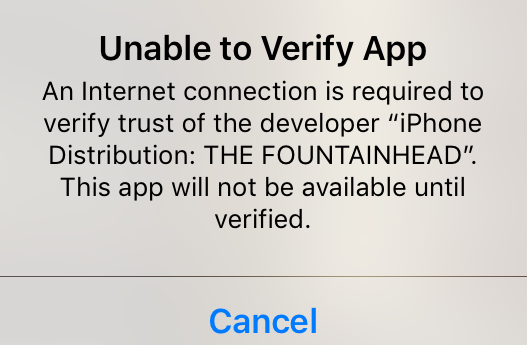
To install any app on an iPhone outside the App Store, it must be signed with a digital certificate that Apple trusts. SpooferX distributors often use enterprise certificates, which are meant for companies to distribute private apps to their employees.
However, using them to distribute a modified public app violates Apple’s terms of service. Apple actively hunts for and revokes these certificates. Once a certificate is revoked, every app signed with it—including your SpooferX installation—instantly stops working. This creates a constant cat-and-mouse game: developers find a new certificate, users reinstall, Apple revokes it, and the app goes down for everyone until the cycle repeats.
Who Should (and Shouldn’t) Use SpooferX?
SpooferX is not designed for every Pokémon GO player. Whether it feels “worth it” depends entirely on your risk tolerance, technical comfort level, and how important your account is to you.
SpooferX May Be Suitable For:
- Experienced spoofers who already understand cooldown rules and ban risks
- Players using secondary or test accounts instead of their main Pokémon GO account
- Users who want an all-in-one iPhone spoofing app without relying on a PC connection during gameplay
- Players willing to deal with IPA sideloading, revoked certificates, and repeated reinstallations
For advanced users who prioritize convenience and mobile-only spoofing, SpooferX can still feel attractive despite its instability.
SpooferX Is Probably NOT Suitable For:
- Casual Pokémon GO players
- Users who only have one main account
- Players who want long-term account stability
- Users uncomfortable with sideloading IPA files
- People looking for the safest spoofing method
- Anyone frustrated by constant certificate revocations or installation failures
If your priority is minimizing ban risk and maintaining stable gameplay over time, PC-based GPS tools or hardware-based methods are generally more reliable than modified clients like SpooferX.
The biggest mistake many players make is assuming SpooferX works like a normal GPS changer. In reality, it is a modified Pokémon GO app, which fundamentally changes the risk level compared with tools that keep the official game client untouched.
Frequently Asked Questions About SpooferX
Here are direct answers to the most common questions about the SpooferX app.
1.Will SpooferX get my Pokémon GO account banned?
Yes, it is highly likely. Using SpooferX carries a significant anti-ban risk because it is an altered version of the game that Niantic can detect. The risk comes from the app’s code, not just from how you play.
2.Why won’t SpooferX install on my iPhone?
Installation can fail for several reasons. The most common is that the signing certificate has been revoked by Apple. Other reasons include incompatibility with your current iOS version or a corrupted IPA file from an unreliable download source.
3.Is SpooferX safe for my device?
This depends entirely on your download source. Since there is no single official website, searching for a SpooferX download can lead you to sources that bundle the app with malware or adware. Downloading an IPA file from an untrusted repository poses a security risk to your device and personal data.
4.Why does SpooferX keep getting revoked?
SpooferX is distributed using developer or enterprise certificates that violate Apple’s terms of service. Apple regularly identifies and revokes these certificates, which immediately disables any app installed using them. This is the primary reason for its constant unreliability.
5.Can I download SpooferX for free?
Yes, but free versions are the most prone to revoked certificates and are often filled with ads. Some third-party services offer paid “VIP” access that promises more stable signing. From our testing, we wish we had known sooner that these paid services are not immune. They can get revoked just like the free ones, and you typically will not get a refund.
6.Is there an official SpooferX website?
No, there is no central, universally recognized “official” website for SpooferX. It is distributed through various third-party app stores, signing services, and download repositories. This lack of a single source contributes to user confusion and increases the risk of downloading a compromised or outdated file.
Final Verdict: Is SpooferX Worth the Risk?
The decision to use SpooferX comes down to a clear trade-off: on-the-go convenience versus your account’s security. This guide has shown that the tool’s core design as an altered game client creates unavoidable risks, from frequent downtime due to revoked certificates to the high probability of a ban. Your search for a simple way to join distant raids can easily end with losing the account you’ve worked hard to build.
Instead of seeking another risky SpooferX download, the smarter next step is to evaluate alternative ios gps spoofer methods that do not modify the game client itself. By understanding the different technologies available—like PC-based or hardware tools—you can make an informed choice that protects your account and provides a more stable experience.
A Note for the Determined Player
We understand that some players may still want to experiment with spoofing tools despite the risks. However, downloading modified IPA files from random websites, Discord servers, or unofficial repositories can expose your device to malware, unstable app builds, revoked certificates, and permanent Pokémon GO account penalties. Even experienced users frequently deal with crashes, login failures, and repeated reinstallations.
For players who want a more stable and lower-risk solution, using a PC-based GPS tool like Fonelora Location Changer is generally the safer choice. Because it works with the official Pokémon GO app instead of a modified client, you avoid many of the common problems associated with SpooferX downloads, including certificate revocations and unsafe third-party IPA files.
If long-term account stability matters to you, focusing on realistic movement behavior and using a more reliable GPS-changing solution is far more sustainable than constantly searching for the latest working SpooferX link.
More Related Articles



Joy Taylor is a seasoned technical writer with over a decade of experience in mobile technology. At iMobie, she specializes in producing in-depth content on iOS data recovery, iPhone unlocking solutions, and iOS troubleshooting.
Product-related questions? Contact Our Support Team to Get Quick Solution >
