Facing a missing device or being unable to reach a family member when you need them most triggers immediate anxiety. You urgently need to track the phone’s location to ensure your data or your loved ones are safe, without falling victim to hidden fees or fake phone tracker websites.
The good news is that you do not need to install unknown software or risk your privacy. This guide walks you through tested, reliable techniques using the tools already built into your device to locate a phone quickly. Crucially, we will show you exactly how to bypass the frustrating Two-Factor Authentication (2FA) traps that leave many users stranded during an emergency.
Table of ContentsHide
Immediate Solutions: Find Your Phone Using Built-In Tools
When a phone goes missing, your first instinct should be to use the native services provided by mobile operating systems: Apple Find My and Google Find My Device. Both major platforms include these natively. You do not need to download a new app to find a lost device, provided the feature was active before the phone went missing.
For iOS Devices (Apple Find My iPhone)
If you are looking for an iPhone, Apple’s built-in tool is the fastest method. However, if your phone is missing, how do you log in without it texting a Two-Factor Authentication (2FA) code to the very device you lost?
Method 1: The Browser Bypass
- Access iCloud Find: Open a browser on a computer or another device and go directly to iCloud.com/find to view the map.
- Log In to Your Apple ID: Sign in using the Apple ID associated with the missing iPhone.
- Select Your Device: Choose your device from the “All Devices” dropdown menu at the top of the screen.
Method 2: Using a Friend’s iPhone (Recommended)
- Use a Friend’s Device: Ask a friend to open the Find My app on their iPhone.
- Go to “Me” Tab: Tap the Me tab at the bottom right of the screen.
- Select “Help a Friend”: Scroll down and tap “Help a Friend”.
- Sign In via Web Portal: A web portal will open, allowing you to sign in with your Apple ID without triggering a 2FA prompt to your missing device.
Once located, you can immediately Play Sound (even if on silent), activate Lost Mode (locks the device and displays a contact number), or Erase Device to protect your privacy.
For Android Devices (Google Find My Device)
For Android users, Google offers an equally effective technique. Similar to Apple, navigating the 2FA trap is the most important step.
Method 1: Using a Trusted Device
- Access Find My Device: Visit android.com/find using a web browser on a computer or tablet where your Google account is already logged in.
- Handle 2FA Verification: If prompted, use one of your saved Google backup codes to complete verification.
- Select Your Device: Choose the lost device from the menu at the top of the screen.
Method 2: Using the App as a Guest (Recommended)
- Use a Friend’s Android Device: Ask a friend to open the Find My Device app on their Android phone.
- Sign In as Guest: Instead of logging out of their account, tap “Sign in as guest”.
- Enter Your Credentials: Log in with your Google account to quickly access your device during an emergency.
How to Enable “Find My” Before Your Phone Goes Missing
To ensure these built-in tools work during an emergency, you must verify that location tracking is enabled on your device right now. It only takes a few seconds.
For iPhone Users:
- Open Apple ID Settings: Open your Settings app and tap your name at the top.
- Go to Find My: Tap “Find My”, then select “Find My iPhone”.
- Enable All Features: Ensure “Find My iPhone”, “Find My network”, and “Send Last Location” are all turned on.
For Android Users:
- Open Security Settings: Open your Settings app and tap “Security & privacy” (or just “Security” depending on your device).
- Access Device Finders: Tap “Device finders” and select “Find My Device”.
- Enable Find My Device: Toggle on “Use Find My Device” and ensure location services are active in your main settings.
Comparing Tracking Methods: Built-in vs. Professional Solutions
Once the immediate panic is handled, you might wonder if you should download a third-party app to keep a closer eye on your devices. Choosing the right solution requires understanding the differences between native features, professional tools, and consumer apps.
A common obstacle with third-party tracking services is the “freemium” model. Many tools allow you to download the app and set up an account for free, but suddenly require a paid subscription to actually view the GPS data.
When evaluating your options, consider these key criteria:
| Feature | Native OS Tools (Apple/Google) | Third-Party “Freemium” Apps | Professional Family Safety Apps |
|---|---|---|---|
| Cost | 100% Free | Hidden fees to view location | Monthly/Yearly Subscription |
| Success Rate | High (Deep OS integration) | Moderate (Often killed by battery optimization) | High (Requires extensive permissions) |
| Technical Skill | Beginner (Pre-installed) | Intermediate (Requires installation) | Advanced (Complex setup) |
| Safety Risk | Low (Official, secure data) | High (Potential data privacy risks) | Low to Moderate (Depends on brand trust) |
For almost all users, native tools are the safest and most reliable method. They bypass the bait-and-switch tactics of “free” third-party apps, require no additional installations, and provide highly accurate data.
The Expert Truth: Tracking by Phone Number
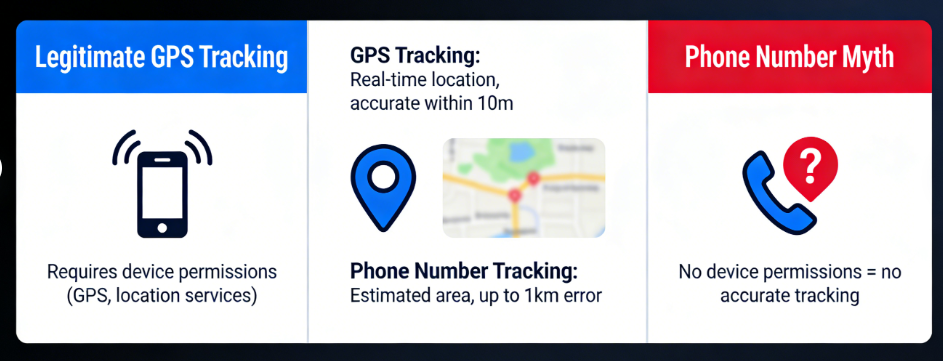
🚨 WARNING: The Phone Number Tracking Scam
A prevalent myth is that a phone can be tracked using only a phone number. In reality, this is not technically possible for the general public. Accurate location tracking requires either device-level permissions, location sharing apps, or a previously enabled native tracking service (like Find My).
Websites claiming to track a phone purely by its number are almost always scams designed to harvest your personal information or sign you up for unwanted premium SMS subscriptions.
Legitimate lost phone tracking relies on the device communicating its GPS coordinates to a trusted, authenticated account. By understanding this reality, you can avoid falling victim to scams and focus on the secure, permission-based tools that actually work.
Need to Manage Your Own Device GPS Location?
The methods above are designed for finding a lost phone or setting up consent-based family location sharing. They are not meant to secretly track someone by phone number or bypass another person’s privacy. However, there is a different situation many users run into: they need to control, test, or correct the GPS location reported by their own iPhone or Android device.
For example, you may want to test how a location-based app responds in another city, check whether your phone is reporting the wrong GPS position, or manage your own location privacy without installing random mobile GPS apps. In that case, a desktop GPS tool is more relevant than a phone tracker.
Fonelora Location Changer is designed for this type of device-level GPS management. It helps iPhone and Android users change their phone’s GPS location from a computer without jailbreak or root access. Instead of claiming to track another person’s phone, it focuses on the location your own device reports to apps that rely on GPS.
Using it is straightforward: install Fonelora Location Changer on your computer, connect your iPhone or Android device, choose a target location on the map, and apply the virtual GPS location. When finished, you can restore your real location by restarting your device or using the reset option in the tool.
Use the right tool for the right purpose. Apple Find My and Google Find My Device are for locating your own lost device or devices shared with consent. Fonelora Location Changer is for managing the GPS location of your own device, not for tracking someone else without permission.
Safe Setup for Family and Parents
If your goal isn’t finding a lost device, but proactively ensuring the safety of a family member—such as a teenager starting to commute alone—setting up ongoing location sharing is the best approach. Tracking a person requires transparency and consent to respect privacy boundaries, and establishing these permissions beforehand ensures safety is handled ethically.
Setting Up Apple Family Sharing
For iOS households, Apple provides an excellent, built-in solution for family location sharing.
- Open Settings: Open the Settings app on the parent’s iPhone.
- Access Family Sharing: Tap your name at the top, then select “Family Sharing”.
- Enable Location Sharing: Tap “Location Sharing” and turn on the feature.
- Invite Family Members: Send invitations via Messages.
- View Devices: Once accepted, family members’ devices will continuously appear in the Find My app under the “People” tab.
Setting Up Google Family Link
For Android households, Google Family Link operates seamlessly within the Google ecosystem.
- Download Family Link: Install the Google Family Link app on the parent’s device.
- Link Child’s Account: Follow the on-screen prompts to connect your child’s Google account.
- Set Up Location: Navigate to the Location card within the app and select “Set Up”.
- Enable Location Services: Ensure the child’s device has location services turned on in its main settings.
Troubleshooting: How to Track an Offline or Dead Phone
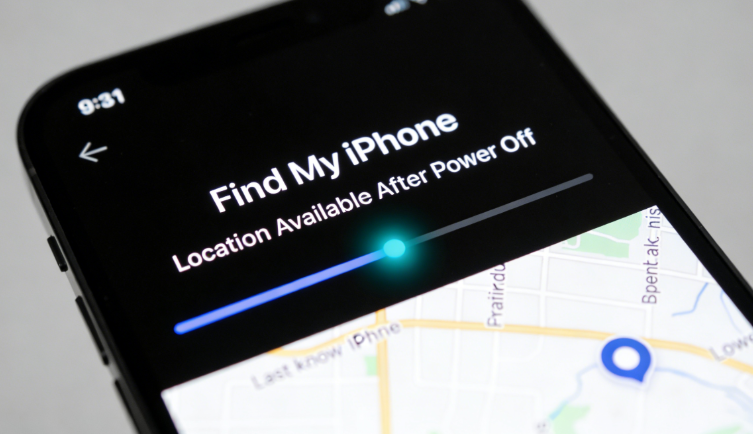
The most anxiety-inducing scenario is trying to track a device when it is disconnected from the internet, powered off, or out of battery. When a phone loses its cellular or Wi-Fi connection, standard GPS tracking fails. Fortunately, modern devices have built-in workarounds.
If an iPhone is running iOS 15 or later, it relies on the Apple Find My network. This is a crowdsourced network of hundreds of millions of Apple devices that use Bluetooth Low Energy (BLE) to detect missing devices nearby.
But what happens when the battery hits 0%?
Modern iPhones maintain a tiny “Power Reserve” specifically for this feature. Even if the screen is black and the phone won’t turn on, it can continue to emit a secure Bluetooth signal for up to 24 hours. Other nearby Apple devices pick up this signal and relay the location back to your iCloud account securely and anonymously. Android offers a similar technique through its recently updated Find My Device network, though the duration an Android phone remains trackable after dying varies by manufacturer.
Despite these limitations, this remains the absolute best solution for finding an offline device.
Frequently Asked Questions
Even after understanding the primary methods, you might still have specific questions about securing your devices. Here are clear answers to the most common queries.
- Can I track a cell phone location for free?
- Yes. The safest and most effective tool is the native software built directly into your device’s operating system: Apple’s Find My and Google’s Find My Device.
- Can I track a phone using just the phone number?
- No. Publicly available tools cannot track a phone’s exact GPS location using only a phone number. Legitimate tracking requires account authentication and prior device permissions. Sites offering to do this for free are generally scams.
- What is the best free phone location tracker?
- The best tool depends entirely on your phone’s operating system. For iPhones, the Find My app is the optimal solution. For Android devices, Google’s Find My Device is the premier choice. Avoid third-party apps that claim to be free, as they almost always hide their most crucial features behind a paid subscription or compromise your personal data privacy.
Conclusion
Regaining control of a lost device or ensuring your family’s safety should not require navigating freemium scams, confusing software, or dead-end login screens. By utilizing official device locator services and knowing exactly how to bypass emergency 2FA prompts, you establish a reliable safety net. Whether you are recovering a misplaced phone or checking a teenager’s commute, these native features resolve your anxiety in minutes without compromising your wallet or data.
If your need is not phone tracking but managing the GPS position of your own device for testing, privacy control, or location-based app use, Fonelora Location Changer can provide a more suitable desktop-based option.
Take a few moments today to verify your location sharing settings, ensure your operating system is up to date, and gain lasting peace of mind. Empower yourself with the right procedures, and you will never feel helpless during a location emergency again.


Hot Topics
