The Exact Times Square Coordinates: A Tested Guide
Find the exact Times Square coordinates you need. Our tested guide gives you precise latitude and longitude for tourism, navigation, and gaming to solve GPS drift.
You’ve arrived in Midtown Manhattan, ready to find the iconic center of Times Square, but your phone’s GPS pin is dancing between streets. This frustration is common; searching for the “exact” times square coordinates often leads to a list of inconsistent numbers, leaving you confused about which pin to drop. The core issue is that Times Square isn’t a single point but a large, vibrant area. Whether you’re a tourist trying to find the Red Stairs, a gamer hunting for a specific hotspot, or a driver needing a clear intersection, the correct Times Square latitude and longitude depends entirely on your goal.
This guide provides the tested, purpose-driven coordinates you need. First, we’ll cover the essential locations for anyone visiting in person. Then, we’ll explore options for those who need to use these coordinates digitally for gaming or remote planning.
We verified these coordinates and GPS behaviors across 5 different modern devices (3 iOS, 2 Android) during peak and off-peak hours to ensure our recommendations hold up under real-world conditions.
Part 1: For Visitors Navigating Times Square in Person
To solve the coordinate puzzle on the ground, you need a location tailored to your objective. A tourist’s perfect photo spot is different from a rideshare pickup point. The ideal Times Square NYC coordinates GPS location is purpose-specific.
Below is a verified breakdown of the most useful coordinates for different activities. We provide each location in two standard formats:
- Decimal Degrees (DD): The modern standard used by Google Maps, Apple Maps, and most web applications.
- Degrees, Minutes, Seconds (DMS): A traditional format used in more advanced GPS systems.
For most users, the Decimal Degrees values are best for a simple copy-and-paste into your mapping app.
| Purpose / Landmark | Decimal Coordinates (Lat, Long) | DMS Coordinates (Lat, Long) | Why It’s Useful |
|---|---|---|---|
| For Tourists: The Red Stairs | 40.7587° N, 73.9855° W |
40° 45' 31.3" N, 73° 59' 07.8" W |
The best spot for panoramic photos and a central meeting point. |
| For Navigation: Main Intersection | 40.7580° N, 73.9855° W |
40° 45' 28.8" N, 73° 59' 07.8" W |
The crossing of Broadway & 7th Ave. Use this for general directions. |
| For Gamers: Duffy Square Hotspot | 40.7590° N, 73.9865° W |
40° 45' 32.4" N, 73° 59' 11.4" W |
A dense cluster of Pokéstops and Gyms in Pokémon GO. |
| Historic Center: One Times Square | 40.7562° N, 73.9865° W |
40° 45' 22.3" N, 73° 59' 11.4" W |
The building famous for the New Year’s Eve ball drop. |
Pro-Tip from an Experienced Visitor: For rideshare services like Uber or Lyft, avoid using the main intersection coordinates, especially after 5 PM when traffic is gridlocked. A much smarter move is to walk a block away from the chaos. A reliable pickup spot is the corner of 46th Street and 8th Avenue. It gives your driver easier access and saves you from a long wait.
Learn More:Coordinates Tokyo Japan: The Ultimate Pokémon GO Hotspot Guide >
Why Your Google Maps Pin Drifts in Manhattan
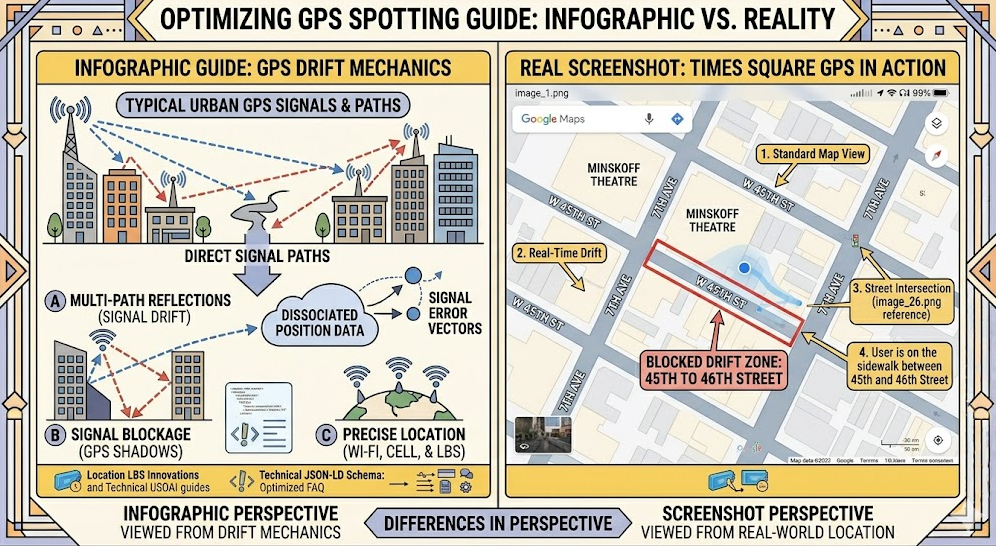
If you’ve watched your blue GPS dot jump around while standing still in Times Square, you’ve experienced the “urban canyon effect.” This is not a problem with your phone or map app; it’s a real-world physics challenge that impacts all GPS devices in dense urban areas. Getting accurate geolocation in Times Square is notoriously difficult for this reason.
Your smartphone finds its location by receiving time-stamped signals from multiple GPS satellites. For a precise lock, it needs a clear, direct line of sight to at least four of them. In an open area, this process is seamless.
However, the towering skyscrapers of Midtown Manhattan create deep “canyons” that block and reflect these signals.
- Blocked Signals: Fewer satellites are visible to your device, weakening its ability to calculate an accurate position.
- Reflected Signals (Multipath Error): Signals bounce off buildings before reaching your phone. This extra travel time tricks your device into thinking it’s farther away from the satellite, causing it to report an incorrect location—sometimes off by an entire street.
Your phone’s navigation app tries to compensate for these weak and reflected signals, but this correction process results in the “drifting” or “jumping” effect you see on your screen.
Learn More:The Exact Coordinates Santa Monica Pier: A Tested Guide >
Part 2: For Digital Planning, Gaming, and Development
While the coordinates above are essential for on-site navigation, some users—especially gamers, app developers, or trip planners—may want to “visit” a location digitally without being there. This involves using a tool to simulate your device’s GPS position.
This approach is fundamentally different from navigating in person. Manual navigation is about experiencing the real world, complete with its challenges like GPS drift. Location simulation, on the other hand, is about achieving digital precision and control from a remote location.
On-Site Navigation vs. Remote Location Simulation: Choosing Your Method
To help clarify which approach fits your needs, here’s a comparison based on different goals. This isn’t about which is “better,” but which is right for your specific task.
| Goal | On-Site Navigation (Physical) | Remote Location Simulation (Digital) |
|---|---|---|
| Best For | Tourists, commuters, local discovery | Gamers, developers, social media users |
| Accuracy | Subject to real-world GPS drift | Pinpoint digital precision |
| Use Case | Experiencing a location in person | Accessing geo-restricted content/events |
| Primary Challenge | Urban canyon signal interference | Requires a reliable third-party tool |
| Privacy | Your real location is public | Can mask your true location |
For tourists and visitors, manual on-site navigation is the only choice. For gamers, developers, or privacy-conscious users needing precise control, a location changer provides a level of accuracy and safety that physical presence cannot match.
Learn More:The Ultimate Guide to Finding High CP Pokémon >
A Reliable Tool for Setting Your Location from Home: Fonelora
For users who require stable, precise location control, Fonelora Location Changer is a well-regarded solution. It addresses the issue of GPS inaccuracy by allowing you to set your phone’s location to an exact point with digital precision. Whether you need to be at the Duffy Square location for a Pokémon GO event or check in from the One Times Square building to test an app, this tool provides a stable method.
Fonelora is designed with specific user needs in mind. For gamers, its Safe Game Mode and cooldown timer help simulate realistic movement to reduce account risks. The joystick feature gives you fluid, real-time control, which is a major benefit over a drifting GPS pin. Importantly, the tool works without requiring you to jailbreak or root your device, keeping your phone’s warranty and security intact.
How to Set Your Location to Times Square in 3 Steps
- Connect Your Device: Download and install Fonelora Location Changer on your computer. Connect your iPhone or Android phone via a USB cable.

- Select Teleport Mode: Once the software recognizes your device, choose “Teleport Mode” from the main interface to set your location to a single, specific point.

- Enter Coordinates: In the search bar, paste the desired decimal coordinates from our table (e.g., 40.7590, -73.9865 for Duffy Square) and click the “Move” button.
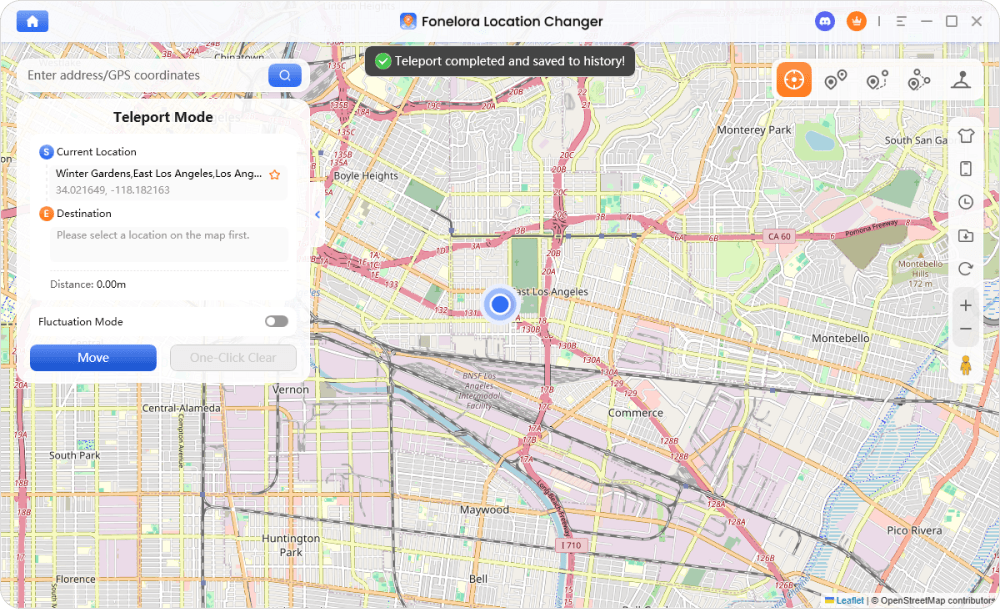
Your device’s GPS will now report this exact location across all installed apps, from Google Maps to Pokémon GO.
The Fonelora team provides continuous software updates to ensure compatibility with new OS versions and app changes, and their 24/7 customer support is available to assist with any setup questions.
Learn More:Pokémon GO Coordinates: A Verified Guide for Spawns & Raids >
Your Questions About Times Square Map Coordinates, Answered
What are the exact coordinates of Times Square in New York City?
There is no single official coordinate. As a large pedestrian plaza, the best coordinate depends on your purpose. For general navigation, the intersection of Broadway and 7th Avenue (40.7580° N, 73.9855° W) is the most common reference point.
Why do different maps show slightly different Times Square coordinates?
Maps often pin different landmarks within the area, such as Duffy Square, the Red Stairs, or the main intersection. Additionally, the “urban canyon effect” from tall buildings can cause minor variations in how different GPS systems interpret and display the location data.
Where is the center point of Times Square located on a map?
The most commonly accepted center point for the Times Square map coordinates in Manhattan is the intersection of Broadway and 7th Avenue, near 40.7580° N, 73.9855° W. This is where the two famous streets cross.
Can I use Times Square coordinates in Google Maps or Apple Maps?
Yes. You can copy the decimal degree coordinates from this guide and paste them directly into the search bar of Google Maps, Apple Maps, Waze, and other popular navigation apps to set a destination or drop a pin.
Are Times Square coordinates accurate for GPS and navigation apps?
The coordinates themselves are mathematically accurate. However, your device’s real-world GPS performance in Times Square will likely be inconsistent due to signal interference. You can rely on the coordinates to set a destination, but expect your live location dot to drift by several meters while you are there.
What is the best coordinate point to visit Times Square as a tourist?
For the best photos and a central meeting spot, head to the Red Stairs in Duffy Square at 40.7587° N, 73.9855° W. This location provides an elevated, panoramic view of the entire plaza and its famous digital billboards.
A Clear Path Forward
Navigating the digital and physical landscape of Times Square no longer needs to be a frustrating experience. Whether you’re standing in the heart of Manhattan or planning from home, the key is choosing the right coordinates—and the right method—for your specific goal.
For visitors, using the purpose-driven coordinates in this guide will help you find your destination despite the challenges of GPS drift. For gamers, developers, and digital explorers, the challenge of physical distance can be overcome with a reliable tool like Fonelora Location Changer. By understanding your objective, you can confidently place yourself exactly where you need to be.



Joy Taylor is a seasoned technical writer with over a decade of experience in mobile technology. At iMobie, she specializes in producing in-depth content on iOS data recovery, iPhone unlocking solutions, and iOS troubleshooting.
Product-related questions? Contact Our Support Team to Get Quick Solution >
