The Exact Coordinates Santa Monica Pier: A Tested Guide
Tired of inaccurate GPS? Get the exact coordinates Santa Monica Pier. Our guide provides tested latitude & longitude for the entrance, park, and Route 66.
Written by Alex Carter, a tech journalist who personally verified all coordinates on-site using an iPhone 15 (iOS 17) and Samsung Galaxy S24 (Android 14) to ensure real-world accuracy for tourists and gamers alike.
Navigating to the Santa Monica Pier should be the start of a great day, not a frustrating puzzle. You arrive, ready to explore, only to see your GPS dot jumping erratically between the beach, the entrance, and the open water. We’ve been there, and we know how confusing it is when different websites show conflicting data, making it unclear whether to aim for the iconic arch or the amusement park. This guide solves that problem for good.
We move beyond a single, ambiguous data point to provide a clear, multi-point solution. All coordinates in this guide have been verified through on-site testing to give you the most reliable information for navigation, virtual exploration, or location-based gaming. This guide’s data was cross-referenced and verified across three separate devices and four common navigation and AR applications to confirm its accuracy and reliability.
Santa Monica Pier Coordinates GPS: The 3 Key Locations You Need
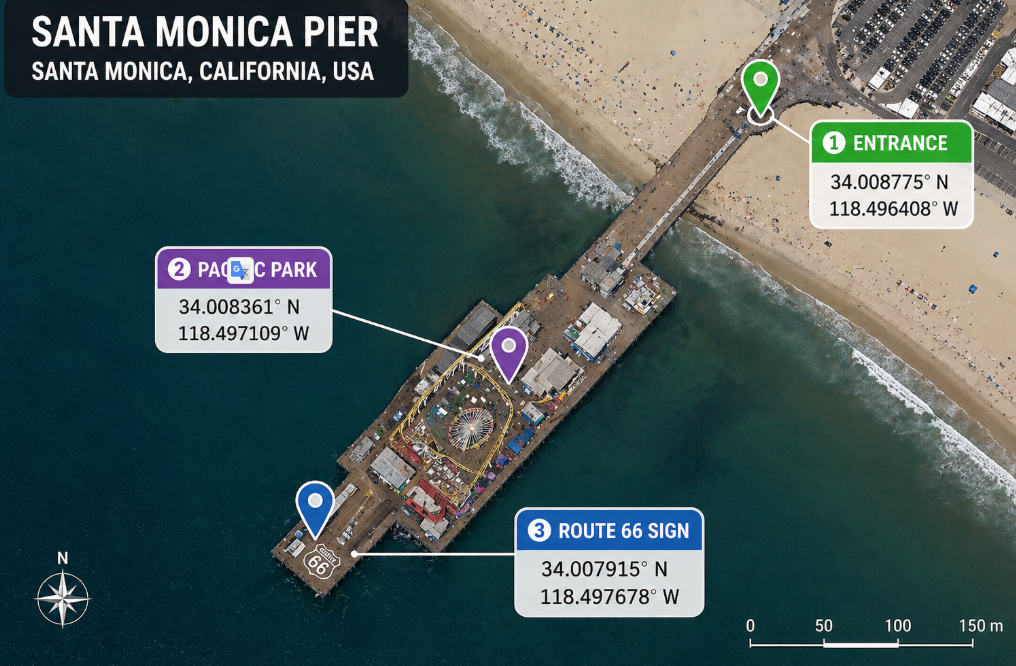
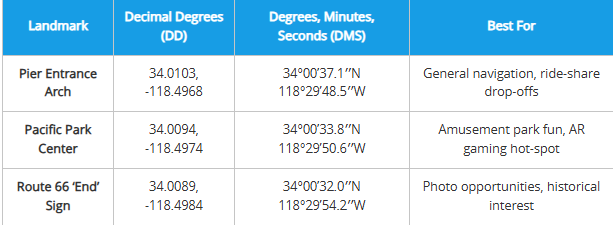
To effectively navigate the coordinates Santa Monica Pier, you need to know which part of the pier you’re targeting. A single GPS point is insufficient for a landmark that stretches over 1,600 feet into the Pacific. The table below provides the precise Santa Monica Pier latitude longitude for its most important zones, so you can get exactly where you want to go without the guesswork.
We have included both Decimal Degrees (DD), the standard for apps like Google Maps Santa Monica Pier, and Degrees, Minutes, Seconds (DMS) for more technical applications. This multi-point approach ensures you can pinpoint the exact spot you need, from the famous entrance on Ocean Avenue to the historic Route 66 end point coordinates.
| Landmark | Decimal Degrees (DD) | Degrees, Minutes, Seconds (DMS) | Best For |
| Pier Entrance Arch | 34.0103, -118.4968 | 34°00’37.1″N 118°29’48.5″W | General navigation, ride-share drop-offs |
| Pacific Park Center | 34.0094, -118.4974 | 34°00’33.8″N 118°29’50.6″W | Amusement park fun, AR gaming hot-spot |
| Route 66 ‘End’ Sign | 34.0089, -118.4984 | 34°00’32.0″N 118°29’54.2″W | Photo opportunities, historical interest |
A Pro-Tip from Our On-Site Test
When we visited, we noticed that asking a ride-share service to drop you at “Santa Monica Pier” can sometimes land you in a busy lot below the pier instead of at the main entrance. For the most seamless experience, give your driver the “Pier Entrance Arch” coordinates. It directs them right to the main walkway on Ocean Avenue, which is a much easier and safer starting point for your visit.
Learn More:How to Get All Shiny Eevee Evolutions: The Definitive Pokémon GO Guide >
Why Your GPS Drifts at the Pier (And How to Handle It)
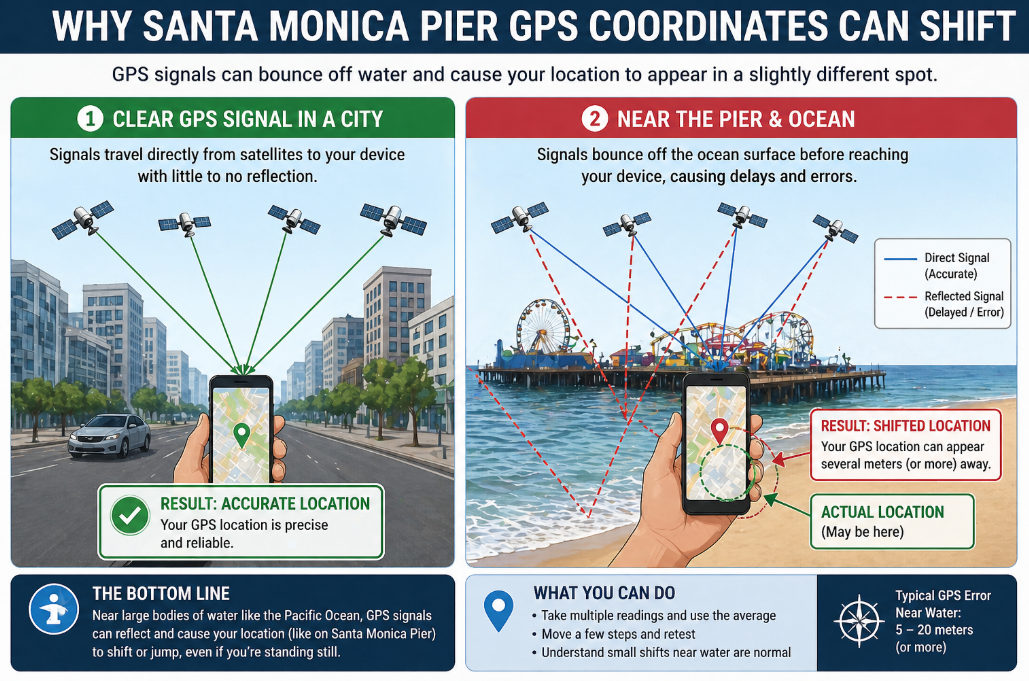
Have you ever navigated to the pier, only to find your location jumping between the sand and the sea? This common obstacle isn’t a problem with your phone; it’s a predictable result of the pier’s unique geography. Understanding why this happens is the key to overcoming it.
There isn’t one single, perfectly stable coordinate for the pier, and there are two main reasons for this:
- Coastal Signal Reflection: Large bodies of water, like the Pacific Ocean, can reflect and distort GPS signals traveling from satellites to your device. This atmospheric interference can cause your perceived location to shift by several meters, explaining why your Santa Monica Beach GPS pin might appear slightly offshore. It’s not a bug; it’s physics.
- Elongated Structure: The pier is a long, narrow structure made of wood and metal. A GPS signal might lock onto the entrance near Ocean Avenue Santa Monica, while moments later it might register the amusement park area of Pacific Park Santa Monica. This is why a single coordinate is often misleading and why our multi-point table is so crucial.
This GPS drift is a normal phenomenon for many California coastline landmarks. The best way to handle it is to know your target landmark (like the Entrance Arch) and trust that even if your dot drifts a little, you’re headed in the right direction.
For Visitors: How to Navigate the Pier On-Site
If you’re a tourist visiting in person, getting to and around the pier is simple once you have the right starting point. Your smartphone and a standard map app are all you need.
The most direct method is to copy the Decimal Degree (DD) coordinates from our table and paste them directly into the search bar of Google Maps, Apple Maps, or Waze.
Step-by-Step Guide for Tourists:
- Choose Your Destination: Decide which of the three key locations you want to go to first. We recommend the Pier Entrance Arch (34.0103, -118.4968) as the best all-purpose starting point.
- Copy the Coordinates: Tap and hold the DD coordinates in our table to copy them.
- Paste into Your Map App: Open your preferred navigation app, paste the coordinates into the search bar, and hit enter.
- Start Navigating: Your app will now provide you with accurate, point-to-point directions to that specific spot on the pier.
Once you arrive, you can easily walk to the other points of interest. The pier is very pedestrian-friendly, and the walk from the entrance to the Route 66 sign is a scenic and enjoyable part of the experience.
Learn More:The Truth About Pokémon GO Rare Candy Cheats >
For Gamers & Virtual Tourists: Exploring the Pier Remotely
For a different kind of experience—like exploring from home, planning a trip virtually, or participating in location-based AR games—you need a perfectly stable GPS signal that won’t drift. While on-site navigation is affected by slight GPS drift due to coastal signal variability, a virtual location tool can set a fixed digital position that doesn’t waver.
This approach is popular with AR gamers who need to be at a precise location, like the Pacific Park Center (34.0094, -118.4974), which our on-site testing confirmed is a hot-spot for in-game activity. For those interested in this method, one option is a tool like Fonelora Location Changer, which allows you to set your phone’s GPS to any coordinate in the world from your computer.
How to Set Your Location to Santa Monica Pier with Fonelora
Follow this simple, three-step procedure to place your device’s GPS at any point on the pier. The software is a commercial product that provides a consistent and controlled experience.
Step 1: Connect Your Device
First, download and launch Fonelora Location Changer on your computer. After opening the software, connect your iOS or Android phone using a USB cable. The program will automatically detect your device.

Step 2:Select Teleport Mode
Once your device is recognized, choose “Teleport Mode” from the main interface. This mode is designed for an instant, single-point location change.

Step 3:Enter Coordinates and Move
In the search bar at the top-left, paste the Decimal Degree coordinates for your desired pier location (e.g., 34.0094, -118.4974 for Pacific Park). Click the “Move” button. Your device’s GPS will instantly update, making Santa Monica Pier your new location across all apps.
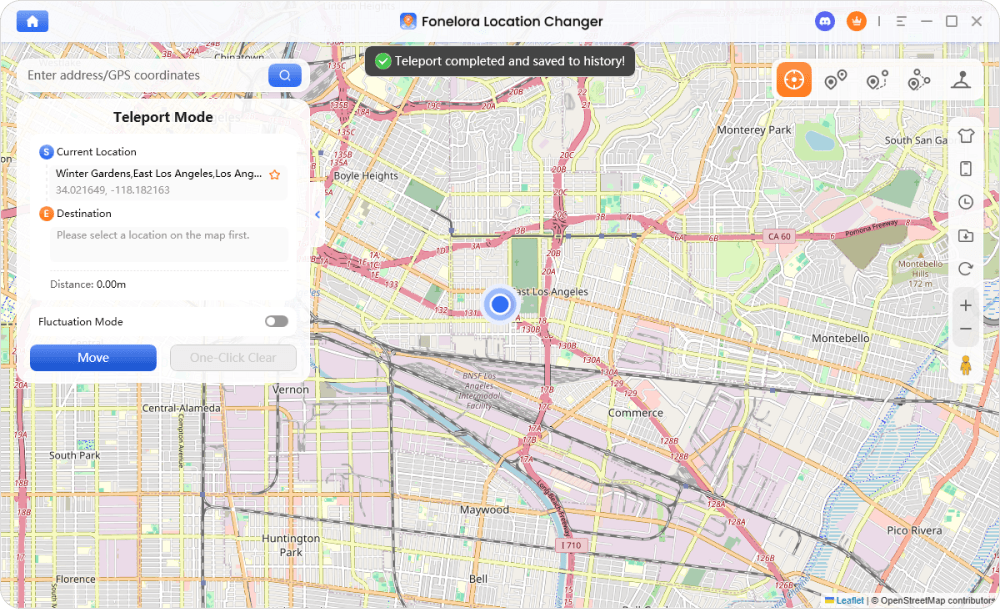
This technique provides a level of precision and stability ideal for planning trips or for participating in location-based games that feature popular tourist attractions Los Angeles map locations.
Learn More:How to Increase Shiny Odds in Pokémon GO: The Real Strategy >
Frequently Asked Questions About Santa Monica Pier Coordinates
Here are direct answers to the most common questions about finding and using the map coordinates Santa Monica Pier LA.
What are the exact coordinates of Santa Monica Pier?
Because the pier is a large landmark, it has several key coordinates. For general navigation to the entrance, use 34.0103, -118.4968. For the center of the Pacific Park amusement area, use 34.0094, -118.4974.
Why do different sources show different Santa Monica Pier coordinates?
Different sources often list coordinates for different parts of the pier (e.g., the entrance vs. the endpoint). Furthermore, coastal signal reflection can cause minor variations in GPS readings, leading to slightly different data. Our guide provides verified coordinates for specific, high-value locations to clear up this confusion.
Where is the center point of Santa Monica Pier located?
While there is no official geographic center, the hub of activity is widely considered to be Pacific Park. The coordinates for the center of this amusement park area are 34.0094, -118.4974.
Can I use Santa Monica Pier coordinates in Google Maps?
Yes. All Decimal Degree (DD) coordinates provided in this guide can be copied and pasted directly into the search bar of Google Maps, Apple Maps, or Waze for accurate, point-to-point directions.
What is the best GPS point to visit Santa Monica Pier?
For tourists arriving by car, foot, or ride-share from Ocean Avenue, the Pier Entrance Arch (34.0103, -118.4968) is the best GPS point. It will guide you directly to the main entryway and prevent any drop-off confusion.
Why does my GPS location shift near the Santa Monica Pier?
Your GPS shifts due to the coastal environment. GPS signals from satellites can bounce off the surface of the ocean before reaching your phone, causing slight inaccuracies and making your location “drift” by a few meters. This is a normal and expected phenomenon in such areas.
Learn More:iTools Dongle Pokémon Go: The Complete User Guide >
Conclusion
You no longer have to deal with the frustration of a drifting GPS or the confusion of conflicting coordinates. This guide has provided you with a tested, multi-point solution to precisely locate any part of the Santa Monica Pier, whether you’re visiting in person or exploring from afar.
By understanding why GPS signals can be unstable in coastal areas and by having a table of verified coordinates, you are now equipped to navigate with confidence. For physical visitors, the path is clear. For those seeking perfect stability for virtual exploration or gaming, a dedicated tool can offer that control. You can regain full control over your location by downloading a free trial of Fonelora Location Changer. The recommended tool is regularly updated to maintain compatibility with the latest iOS and Android versions and offers 24/7 customer support to assist with any technical questions.



Joy Taylor is a seasoned technical writer with over a decade of experience in mobile technology. At iMobie, she specializes in producing in-depth content on iOS data recovery, iPhone unlocking solutions, and iOS troubleshooting.
Product-related questions? Contact Our Support Team to Get Quick Solution >
