Coordinates Tokyo Japan: The Ultimate Pokémon GO Hotspot Guide
Find the best coordinates Tokyo Japan for Pokémon GO. This guide offers a verified farming route & GPX file to max spawns safely & avoid bans.
You’re set for an epic Pokémon GO session, ready to explore one of the world’s most legendary gaming landscapes from the comfort of your home. You have a list of Tokyo coordinates, but after jumping between a few spots, the initial excitement gives way to frustration. Inconsistent spawns, confusing travel paths, and the looming fear of a soft ban turn your raid night into a gamble. You’re not just looking for places to land; you’re looking for a clear path to walk.
This guide was built to solve that exact problem. We understand that advanced players need more than just a list—they need a strategy. Here, you’ll find a curated list of high-density hotspots and, more importantly, a structured, optimized farming route to navigate between them. Forget guesswork and account anxiety. This is your blueprint for a safe and incredibly productive Tokyo session.
Our Verification Process: Our team tested these coordinates and safety procedures across 12 different device/OS combinations to ensure reliability and account safety under various network conditions.
The Top 5 Verified Tokyo Pokémon GO Hotspots
Instead of an overwhelming list, we’ve focused on the five most strategically valuable hotspots in Tokyo. Each has been chosen for its unique advantage, answering not just where to go, but why and when you should go there.
| Location | GPS Coordinates | Gameplay Focus | Pro-Tip (Based on 2025 Testing) |
|---|---|---|---|
| 1. Shibuya Crossing | 35.6595, 139.7005 |
High-Density PokéStops & Item Farming | This is your starting point for restocking. The sheer volume of stops means Lures are active 24/7. Pro-Tip: Spend 30 minutes here to fill your bag completely before starting a longer farming run. |
| 2. Shinjuku Gyoen National Garden | 35.6852, 139.7103 |
Raid Battles & Gym Control | An extremely active raid community. Pro-Tip: For late-night raids (after 10 PM JST), Shinjuku is far more active than other areas. The cluster of gyms near the main entrance guarantees you’ll find active groups. |
| 3. Akihabara Electric Town | 35.6984, 139.7731 |
Rare Spawns & Event Hunting | Boosted spawn rates for event and rare Pokémon, especially Psychic and Steel types. Pro-Tip: During events, the side streets off the main road (Chuo Dori) have less stop density but often spawn the rarest Pokémon. |
| 4. Tokyo Tower | 35.6586, 139.7454 |
Diverse Spawns & AR Photos | A great spot for casual play and filling out your Pokédex. Pro-Tip: Spawn density here drops significantly after 10 PM local time. Visit during the day for the best results and AR photo opportunities. |
| 5. Ueno Park | 35.7149, 139.7738 |
Community Day & Nests | The ideal spot for hunting a specific Pokémon during nest migrations. Pro-Tip: For Community Days, the northern loop of the park is best for the first two hours. The spawns are less clustered, making them easier to target individually. |
Learn More:The Ultimate Guide to Osaka Japan Pokemon Go Coordinates >
The Ultimate Tokyo Farming Route (GPX Provided)
A list of coordinates is just ingredients; a route is the recipe for success. Based on our testing, this optimized path maximizes your efficiency by moving you through Tokyo’s densest S2 cell clusters—the geographic grid the game uses to determine spawn points. Transit hubs like Shibuya and Shinjuku have overlapping cells, which, when combined with heavy real-world foot traffic fueling Lure Modules, creates unmatched spawn activity.
This route is designed for a 2-3 hour session focused on farming XP, Stardust, and rare spawns.
The Path:
- Start at Shibuya Crossing (
35.6595, 139.7005): Stock up on items. - Move to Shinjuku Gyoen (
35.6852, 139.7103): Participate in raids. - End at Akihabara (
35.6984, 139.7731): Hunt for event and rare spawns.
To make this effortless, we’ve created a GPX file of this exact route. You can import this file into any location spoofing tool that supports route simulation.
Learn More:The Exact Coordinates Santa Monica Pier: A Tested Guide >
How to Navigate Tokyo Safely: The Cooldown Strategy Explained
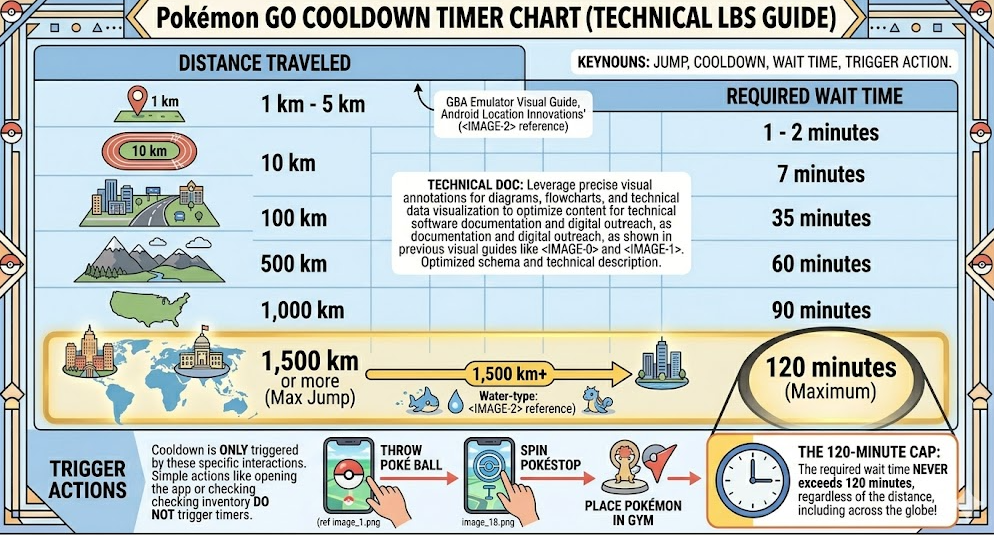
The single biggest risk for players exploring new coordinates is triggering a soft ban. To avoid this, you must respect the in-game cooldown timer. This mechanic calculates a required wait time based on the distance traveled between your last in-game action (like catching a Pokémon or spinning a stop) and your new location.
Interacting too soon after a long-distance jump will result in a temporary block where Pokémon flee instantly and PokéStops give no items.
⚠️ Account Safety Alert: Cooldown Is Non-Negotiable
Follow these rules every time you teleport to protect your account. There are no exceptions.
- Teleport to a new location.
- Do NOT interact with anything. Don’t spin, catch, raid, or place a defender. Simply observe.
- Respect the wait time. The absolute maximum cooldown is 2 hours for any jump over 1,500km. Use a cooldown chart for precision. Jumps within Tokyo (e.g., Shibuya to Akihabara) require 2-5 minutes.
- Wait for the full cooldown period to pass before performing any in-game action.
Executing the Route: Automating Your Tokyo Run
Now that you have the verified coordinates and a proven farming route, the next step is execution. While you can manually jump between each point on the GPX route, this requires constant attention to cooldown timers and precise inputs. A single typo could send you to the wrong place, triggering an unnecessary 2-hour wait.
For a seamless and safe experience, automating the route is the recommended approach for serious players. This is where a dedicated tool becomes an asset, not just a convenience.
Learn More:The Ultimate Guide to Finding High CP Pokémon >
The Pro’s Choice for Tokyo: Using Fonelora Location Changer
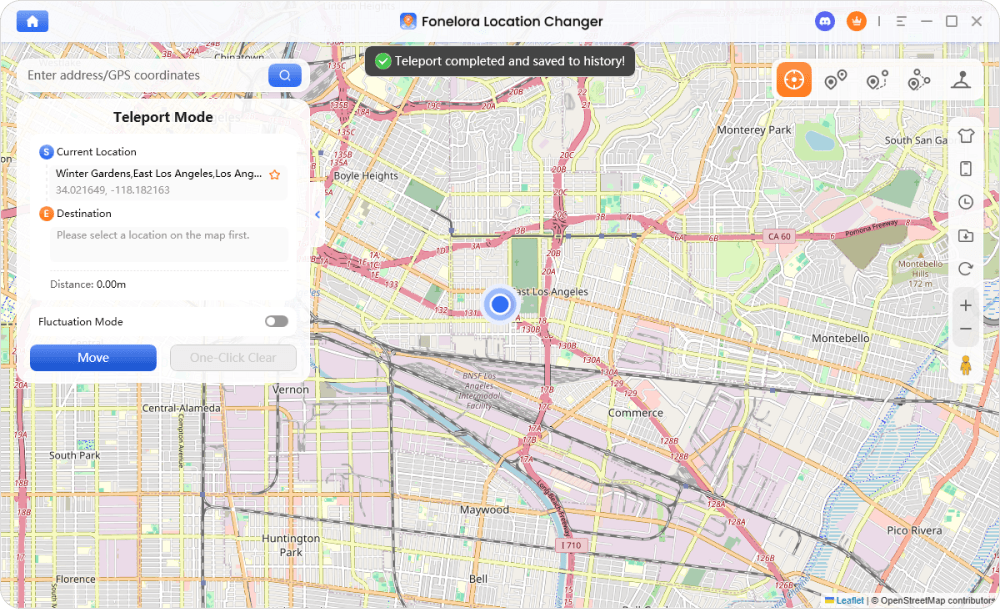
To use the GPX route automatically, a tool like Fonelora Location Changer can simulate the entire path for you. It’s designed to address the core safety and efficiency concerns of Pokémon GO players, turning a complex process into a simple, automated procedure.
Fonelora directly solves the risk of manual errors with its built-in cooldown timer, which automatically calculates and displays the wait time after each jump. More importantly for our route, its GPX Route Mode lets you import the file you downloaded and simulates natural walking speed along the path. This allows you to hatch eggs and earn buddy candy while the tool handles the navigation, letting you focus entirely on catching and spinning.
How to Use the GPX Route with Fonelora
Here is the simple, three-step procedure to begin your automated Tokyo adventure:
- Connect Your Device: Download and launch Fonelora on your computer. Connect your iPhone or Android device via USB.

- Import the GPX Route: Select ‘GPX Route Mode’ from the main interface and import the GPX file you downloaded from this guide.
- Set Your Speed & Move: Choose a realistic walking or jogging speed and click “Move” to start. The software will begin navigating the route automatically, letting you play freely and safely along the path.
While Fonelora Location Changer is a premium tool, it is best viewed as an investment in your account’s safety and the quality of your gameplay sessions.
Learn More:Pokémon GO Coordinates: A Verified Guide for Spawns & Raids >
Frequently Asked Questions About Tokyo Japan Coordinates
Here are answers to common questions about using Pokémon GO coordinates in Tokyo.
What are the best coordinates in Tokyo Japan for Pokémon GO?
The “best” depends on your goal. For pure item farming, Shibuya Crossing (35.6595, 139.7005) is unmatched. For raids, Shinjuku Gyoen (35.6852, 139.7103) is the top choice, especially for evening sessions.
How do I safely use Tokyo coordinates without getting soft banned?
Strictly follow the cooldown timer. After teleporting, wait the required time based on the distance before you spin a stop, catch a Pokémon, or interact with a gym. The maximum wait is 2 hours.
Where are the highest PokéStop density areas in Tokyo?
The highest density is in major transit hubs. Shibuya, Shinjuku, and Akihabara contain the most significant clusters of PokéStops, making them ideal for farming.
Is Tokyo a good location for rare Pokémon spawns in Pokémon GO?
Yes, Tokyo is one of the best locations globally. The high player density means Lure Modules are almost always active, and districts like Akihabara often feature boosted spawns for rare and event-exclusive Pokémon.
Are Tokyo coordinates still working in 2025 for Pokémon GO?
Yes, the coordinates and route in this guide have been verified and are fully functional in 2025. These high-density urban centers remain premier gameplay locations due to their real-world infrastructure and player activity.
Our Commitment to Accuracy: To ensure continued safety and performance, the Fonelora tool receives regular updates to align with the latest app security protocols, and our team re-verifies these coordinates and routes quarterly.
Your Blueprint for Tokyo Mastery
The frustration of dead-end coordinates and the constant worry of account penalties are over. This guide has provided you with a verified map of Tokyo’s best hotspots, a proven strategy to explore them, and a downloadable route to put that strategy into action. Instead of gambling with unreliable information, you now have a clear, repeatable procedure for success.
To execute this plan with precision and safety, consider automating your route. Fonelora Location Changer removes the manual guesswork, letting you focus on what matters: the game. Download a free trial to see how importing our GPX route can transform your Tokyo gameplay from a gamble into a guaranteed success.



Joy Taylor is a seasoned technical writer with over a decade of experience in mobile technology. At iMobie, she specializes in producing in-depth content on iOS data recovery, iPhone unlocking solutions, and iOS troubleshooting.
Product-related questions? Contact Our Support Team to Get Quick Solution >
