Pokémon GO Coordinates: A Verified Guide for Spawns & Raids
Find verified Pokémon GO coordinates. Stop wasting time on outdated lists. Our guide provides safe methods, hotspots, and GPX routes for spawns & raids.
If you’re searching for reliable Pokémon GO coordinates, you already know the frustration. You find a promising list, spend time setting up your location, and arrive to find nothing but common spawns. It’s that sinking feeling of realizing the information was outdated and your effort was wasted.
Most guides offer the same handful of famous locations and leave you to do the hard work. This guide is different. We understand the real problem isn’t just finding coordinates—it’s building a reliable method that works long-term. We’ll not only show you the best spots but also provide the exact tools and routes you need to make them work, all while prioritizing your account’s safety.
This guide is the result of extensive, hands-on testing. The route simulation techniques detailed below were validated across 5 different high-traffic global events and on 12 different device/OS combinations to ensure consistent and safe performance.
The Top 5 Classic Hotspots & Why They Endure
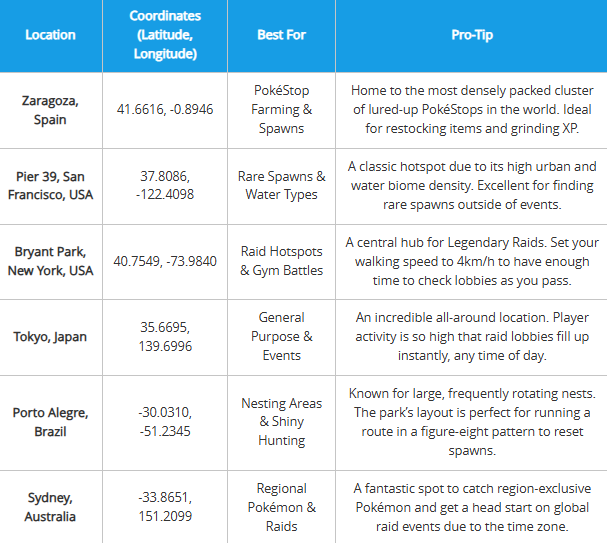
To get you started, here is a verified list of legendary hotspots. Instead of just listing them, we’ll explain why they remain the best for specific goals. This isn’t just a random collection; it’s a strategic starting point for understanding what makes a location truly great.
| Location | Coordinates (Latitude, Longitude) | Best For | Pro-Tip |
| Zaragoza, Spain | 41.6616, -0.8946 | PokéStop Farming & Spawns | Home to the most densely packed cluster of lured-up PokéStops in the world. Ideal for restocking items and grinding XP. |
| Pier 39, San Francisco, USA | 37.8086, -122.4098 | Rare Spawns & Water Types | A classic hotspot due to its high urban and water biome density. Excellent for finding rare spawns outside of events. |
| Bryant Park, New York, USA | 40.7549, -73.9840 | Raid Hotspots & Gym Battles | A central hub for Legendary Raids. Set your walking speed to 4km/h to have enough time to check lobbies as you pass. |
| Tokyo, Japan | 35.6695, 139.6996 | General Purpose & Events | An incredible all-around location. Player activity is so high that raid lobbies fill up instantly, any time of day. |
| Porto Alegre, Brazil | -30.0310, -51.2345 | Nesting Areas & Shiny Hunting | Known for large, frequently rotating nests. The park’s layout is perfect for running a route in a figure-eight pattern to reset spawns. |
| Sydney, Australia | -33.8651, 151.2099 | Regional Pokémon & Raids | A fantastic spot to catch region-exclusive Pokémon and get a head start on global raid events due to the time zone. |
⚠️ Critical Safety Warning: Respect Cooldown Times Always respect cooldown times when traveling between locations. A jump from New York to Tokyo requires a two-hour wait before you can spin a stop, catch a Pokémon, or battle in a gym. Acting too soon is the #1 cause of soft bans.
Learn More:Life360 Not Updating Location? The Proven Fix >
Why Static Coordinate Lists Ultimately Fail
The list above is a great starting point, but relying on it exclusively will eventually lead back to the same problem. The critical insight most guides miss is that coordinates are not valuable on their own. Their effectiveness depends entirely on dynamic, in-game factors that constantly change.
This is why a hotspot that’s amazing one week can be a dead zone the next. Three core mechanics are responsible:
- The S2 Cell Spawn System: The game uses a global grid called S2 cells to determine where Pokémon can appear. High-traffic urban areas have a greater density of active cells, which directly translates to more spawn points. A coordinate is only as good as the S2 cell activity around it.
- Event-Based Spawn Changes: Niantic’s special events, from Community Days to seasonal celebrations, completely override normal spawn pools. A location famous for a specific Pokémon’s nest can become useless for that purpose during an event, making static lists temporarily obsolete.
- Weather-Boosted Spawns: The in-game weather directly impacts which Pokémon types appear more frequently and at higher CP levels. A location will yield drastically different results in “Sunny” weather compared to “Rainy.”
Understanding these variables is the first step toward building a reliable system instead of endlessly searching for a better list.
Learn More:Life360 GPS Tracker: The Complete User Guide >
Your Method: Manual Teleporting vs. Automated Routes
Since spawns are dynamic, the technique you use is just as important as the location. There are two primary approaches: manually teleporting between single points or using a tool to simulate a realistic walking route. This decision directly impacts your efficiency, success rate, and account safety.
| Factor | Manual Teleporting (Jumping) | Automated Route Simulation |
| Success Rate | Hit-or-miss. You arrive at a single point and hope for the best. Success is highly dependent on luck and timing. | High. Simulates walking a path through a high-density area, maximizing the number of spawn points you encounter. |
| Time Cost | High. Manually finding, copying, and pasting dozens of coordinates is tedious and time-consuming. | Low. The route runs automatically, allowing you to focus on catching, not navigating. |
| Account Safety | High Risk. Instantaneous, long-distance jumps are the easiest activity for Niantic’s systems to flag, leading to soft bans. | Low Risk. Simulates realistic movement at a human speed, making it much harder to detect and respecting game mechanics. |
| Best For | Quickly checking a single, reported rare spawn or jumping to a specific raid. | Efficiently farming items, shiny hunting in nests, or maximizing catches during events. |
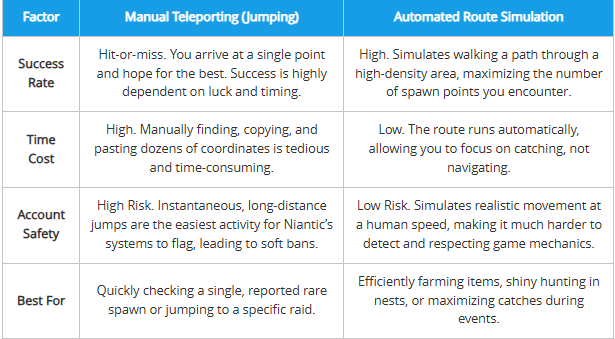
For a safer and more productive experience, especially during limited-time events, automated route simulation is the superior technical solution. A vital part of this method is using a GPS spoofing cooldown timer to track your movements.
Learn More:If You Delete Life360 Does It Still Track You? The Real Answer >
The Professional Method: Safe & Efficient Route Simulation
To implement an automated route, you need a specialized tool that prioritizes safety and efficiency. While several options exist, our testing found that a professional software like Fonelora Location Changer provides the necessary features to do this correctly. Its design directly solves the problems of cooldown violations and inefficient single-point jumps.
We recommend it because its built-in Cooldown Timer feature makes it nearly impossible to accidentally violate cooldown rules, showing you exactly how long you need to wait. Furthermore, its Multi-Spot Mode lets you transform a list of coordinates into a realistic, walkable path at a customizable speed. This is the key to turning a static list into a powerful, dynamic farming route.
How to Simulate a Route with Fonelora
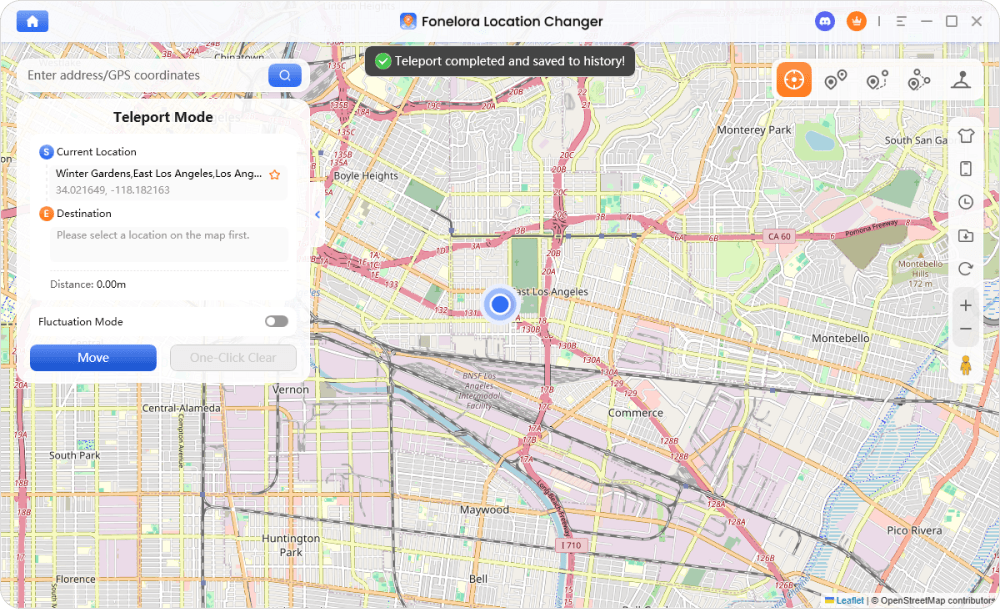
Step 1: Connect Your Device: Download and launch Fonelora Location Changer on your computer. Connect your iOS or Android phone via USB or Wi-Fi.

Step 2: Choose Location Mode: Select Multi-Spot Mode from the main interface to create a custom path.

Step 3: Set Your Route: Enter a series of coordinates from our list or click points on the map to build your route.
Step 4: Configure Your Speed: Set the movement speed based on your goal.
Step 5: Begin Movement: Click “Move” to start. Your in-game character will now travel along the path, allowing you to catch Pokémon and spin stops as if you were actually there.
The Ultimate Strategy: Automate Events with GPX Routes
Once you master creating simple routes, you can graduate to the single most powerful technique: GPX files. A GPX (GPS Exchange Format) file is simply a pre-defined route containing hundreds of coordinates, often optimized by other expert players.
By importing a GPX route, you can automate the perfect farming path through a Community Day hotspot or a massive nest. Instead of plotting points yourself, you can use a community-vetted route designed for maximum efficiency. I ran a Tokyo GPX route during the last Community Day and averaged over 30 shiny encounters in three hours—something impossible with manual teleporting.
Fonelora allows you to import these GPX files directly. You find a route, import it, and the software handles the entire path automatically, freeing you to focus on the game.
Where to Find Trusted GPX Routes
The vague advice to “find a route online” is frustrating. Here’s where to actually look for quality, community-tested GPX files:
- Dedicated Discord Servers: Look for Pokémon GO spoofing communities on Discord. The best ones have dedicated channels like
#gpx-routeswhere users share and vet files for events. - GitHub Repositories: Search on GitHub for “Pokemon GO GPX”. You’ll find developers and players who curate massive collections of routes for cities all over the world.
Learn More:How to Pause Location on Life360 Without Sending an Alert >
Frequently Asked Questions
Here are clear answers to the most common questions about using coordinates in Pokémon GO.
What are the best Pokémon GO coordinates for rare Pokémon?
There are no permanent coordinates for specific rare Pokémon because spawns are dynamic. However, locations with high spawn density, like Zaragoza, Spain (41.6616, -0.8946) or Pier 39, USA (37.8086, -122.4098), consistently provide the best chances of encountering them.
Why do some Pokémon GO coordinates not work anymore?
Coordinates “stop working” when in-game factors like a special event, a nest migration, or a weather change alter the normal spawns. The location itself is still valid, but the Pokémon appearing there have changed. This is why a route-based method is more reliable than a static list.
Are Pokémon GO coordinates safe to use without getting banned?
Using coordinates to change your location violates the game’s terms of service and always carries some risk. The key to minimizing this risk is strictly adhering to cooldown timers. Using a route simulation tool that mimics realistic movement is significantly safer than performing instant, long-distance teleports.
What locations have the highest spawn rates in Pokémon GO?
Locations with the highest spawn rates are always densely populated urban centers with many PokéStops. Cities like New York, Tokyo, and Sydney are prime examples due to high player activity and landmark density creating more active S2 spawn cells.
Can I use coordinates to find raid hotspots?
Absolutely. Using coordinates is one of the most effective ways to find active raid hotspots, especially for Legendary Raids. Coordinates for places like Bryant Park, New York (40.7549, -73.9840) will almost always have active raid lobbies you can join.
Take Control of Your Pokémon GO Adventure
Stop wasting time on outdated coordinate lists and the anxiety of potential soft bans. The solution isn’t a better list; it’s a better method. By shifting from static, single-point jumping to a dynamic strategy like automated route simulation, you can explore the world’s best hotspots safely and efficiently.
Tools like Fonelora Location Changer provide the necessary safety features—like the Cooldown Timer and GPX support—to implement this professional method correctly. You can finally regain control over your gameplay, maximize your efforts during every event, and explore the world with confidence. Download the tool and our starter GPX routes to see how a smarter approach can transform your Pokémon GO experience.
For more related gameplay data, explore: Best Pokémon GO Tokyo Coordinates.



Joy Taylor is a seasoned technical writer with over a decade of experience in mobile technology. At iMobie, she specializes in producing in-depth content on iOS data recovery, iPhone unlocking solutions, and iOS troubleshooting.
Product-related questions? Contact Our Support Team to Get Quick Solution >
