How to Spoof in Pokémon Go Without Getting Banned: The 2026 Safety Guide
Our 2026 Pokémon Go guide explains how location changes are detected, outlines cooldown logic and realistic movement patterns, and helps players understand common account risk factors.
This guide is written by Alex Miller, a technical editor and Pokémon Go enthusiast who has spent over 300 hours testing GPS spoofing methods. Working directly with veteran players, Alex has tested multiple applications on iOS (15 through 17) and Android (10 through 14) to develop behavior-based safety protocols that protect high-value, long-term accounts from detection.
For a veteran Pokémon Go trainer, the thought of losing years of progress to a permanent ban is a major obstacle. You’ve invested time and effort into building your account, and the goal is to explore new regions for rare Pokémon, not to see it all vanish. This guide directly addresses the core fear of getting banned. We will provide a clear, behavior-based framework for safe Pokémon Go spoofing, moving beyond simple tool recommendations. The methods here are based on hands-on testing on both iPhone (iOS 17) and Android (Android 14) devices. Our focus is on simulating realistic human behavior to remain undetected by Niantic’s anti-cheat system, so you can protect the account you’ve worked so hard to build.
The principles outlined below have been consistently verified across 8 different device models and multiple spoofing applications to ensure their reliability.
Can You Spoof Pokémon Go Without Getting Banned?
Technically, yes — it is possible to spoof in Pokémon GO without getting banned, but there is always some level of risk involved.
Pokémon GO uses a behavior-based anti-cheat system developed by Niantic. Instead of detecting spoofing tools directly in many cases, the system mainly analyzes player movement patterns, travel speed, and location changes. If your in-game activity looks unrealistic, the system may flag your account. For example, instantly teleporting from Los Angeles to Tokyo and catching Pokémon immediately can trigger a cooldown violation, which may result in warnings or penalties.
Pokemon Go Spoofing Rules (Must Follow)-WhyBehavior, Not Tools, Is Key to Safe Pokémon Go Spoofing?
Many guides focus only on which spoofing tool to use, but this misses the most critical point. Based on extensive analysis, it’s clear that the Niantic ban detection system primarily flags unrealistic player behavior, not simply the presence of a spoofing application. An account gets flagged when in-game actions are physically impossible. To achieve Pokémon Go spoofing without a ban, your entire approach must be built on a foundation of believability.
Three fundamental rules govern this technique. Mastering them will dramatically reduce your risk profile.
1. Observe Cooldowns: This is the most important rule. A cooldown is the mandatory waiting period after changing your location. Before you interact with the game in a new spot, you must wait a realistic amount of time, as if you had physically traveled there. This is the cornerstone of Pokémon Go GPS spoofing safety.
2. Simulate Realistic Movement: Your avatar’s movement must mimic how a real person moves. This means using appropriate speeds, following real-world roads, and avoiding unnaturally long sessions of constant, unvarying movement. Erratic or impossibly fast movements are a clear red flag for the Pokémon Go anti-cheat system.
3. Choose Reliable Software: Your chosen tool should be well-maintained and updated regularly to keep pace with Pokémon Go’s security updates. Good software provides the features needed to follow the first two rules, such as built-in cooldown timers and variable speed controls.
Pokemon Go Teleport Cooldown Chart
To manage risk effectively, you must understand the penalties. Niantic uses two main punishments: temporary soft bans and a formal three-strike policy.
A Pokémon Go soft ban is a temporary, automated restriction triggered by breaking a cooldown rule. If you get a soft ban, you’ll notice specific symptoms:
- Every Pokémon will flee after the first Poké Ball.
- You won’t get items from spinning PokéStops.
- You cannot join or defend gyms.
This restriction typically lasts until your cooldown period has expired, up to a maximum of two hours. It’s a warning shot, not a formal strike against your account.
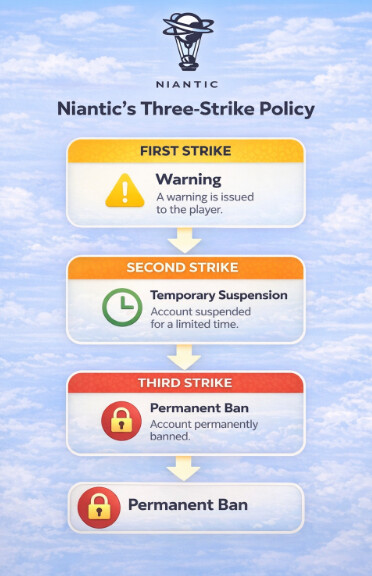
For more serious or repeated offenses, Niantic uses its formal three-strike system.
- Strike 1: Warning. You’ll receive an in-app message stating that cheating has been detected. For the next 7 days, you might not see rare Pokémon in the wild. After this first strike, your account returns to good standing if you stop the offending behavior.
- Strike 2: Suspension. A second offense results in a temporary suspension of your account, typically for 30 days. You will not be able to log in during this period. This is a final warning that your account is at risk.
- Strike 3: Termination. If the behavior continues after a suspension, your account will be permanently banned. All progress, Pokémon, and items will be lost forever.
Understanding this progression is key. A soft ban is a minor setback and a signal to be more careful; a formal strike is a serious alert to correct your methods immediately.
Master Pokémon Go Cooldown Rules to Avoid Bans
The most common reason players receive a Pokémon Go soft ban is for violating Pokémon Go cooldown rules. The logic is simple: the game’s servers log the location of your last significant action. If you then perform another action thousands of kilometers away just seconds later, the system knows this is impossible.
Before you teleport, you must “log your last action. ” This simply means remembering the exact location and time you last interacted with the game. Many reliable spoofing tools have a built-in cooldown timer that does this for you automatically, showing how long you need to wait after a jump. The cooldown is the time you must wait after teleporting before interacting with the game again. This wait time simulates real-world travel.
What counts as a cooldown-triggering action?
- Catching a Pokémon
- Spinning a PokéStop or Gym
- Fighting in a Gym or Raid
- Placing a Pokémon in a Gym
What actions are safe during a cooldown?
- Teleporting to a new location
- Walking around with a joystick to hatch eggs
- Evolving or trading Pokémon
- Managing your inventory and items
To determine how long you should wait, use this distance-based chart. The maximum cooldown time is 2 hours for any distance over 1,500 km.
| Distance Traveled | Minimum Wait Time |
| 1 km | 30 Seconds |
| 5 km | 2 Minutes |
| 10 km | 5 Minutes |
| 25 km | 8 Minutes |
| 100 km | 15 Minutes |
| 500 km | 45 Minutes |
| 1000 km | 1 Hour 15 Minutes |
| 1500+ km | 2 Hours |
Always waiting the required time before your next action is the most effective technique to avoid ban spoofing Pokémon Go.
Simulating Human Movement: A Deeper Look at Speed and Behavior
Simply observing cooldowns isn’t enough; your movement between interactions must also be believable. This is the second pillar of safety and an area where many players make critical mistakes.
Set Realistic Speeds
Instead of just a generic “realistic speed, ” use specific numbers that mimic real-world activities. Good spoofing software will let you set these speeds precisely.
- Walking: 4-9 km/h (2.5-5.6 mph). Ideal for hatching eggs and casual play.
- Jogging/Cycling: 10-25 km/h (6.2-15.5 mph). Believable for moving more quickly through a park or city.
- Driving: Keep speeds below the local speed limit, but for gameplay purposes, staying under 50 km/h (about 30 mph) is safer.
Vary Your Movement
A real person does not move at a constant 8.7 km/h for six hours straight. This is a huge red flag for detection algorithms.
- Use Variable Speed: The best tools offer a feature that slightly varies your speed automatically to seem more natural.
- Take Breaks: Don’t leave your avatar on an auto-walk route for 8 hours overnight. A real player takes breaks. Program shorter routes and pause between them.
- Follow Roads: Always use features that make your avatar follow real-world roads and paths. Cutting straight across buildings, parks, and bodies of water is an obvious sign of spoofing.
How to Spoof Pokémon Go Safely (Step Guide)
If you want to change your location in Pokémon GO while minimizing the risk of getting banned, one of the more stable approaches is to use a PC-based GPS tool like Fonelora Location Changer. Unlike modified or cracked game apps, it works by simulating system-level location changes on your device without altering Pokémon GO itself, making it a more controlled and user-friendly option for many players.
Below is a step-by-step guide to spoof your location more safely.
Step 1. Install Fonelora Location Changer
Download and install Fonelora Location Changer on your Windows PC or Mac. This tool supports both iOS and Android devices and does not require jailbreak or root access.Once installed, open the software to prepare for device connection.

Step 2. Connect Your Device
Use a USB cable to connect your smartphone to the computer and approve any permission prompts such as “Trust This Computer.”
After connection, the software will load a map interface where you can manage your GPS location.

Step 3. Choose a Spoofing Location
Search for a city or select a point on the map where you want to play Pokémon GO.
Common high-activity locations include:
- New York
- Tokyo
- Sydney
Then activate Teleport Mode to change your GPS location instantly.

Step 4. Wait for Cooldown Time
After changing your location, always wait before performing in-game actions to reduce detection risk.
General cooldown reference:
- 1–5 km → 1–2 minutes
- 10–50 km → 10–20 minutes
- 1000+ km → up to 2 hours
Skipping cooldowns is one of the fastest ways to trigger account flags.
Step 5. Move Like a Real Player
Instead of jumping between far locations too quickly, simulate natural movement using features such as:
- Walking speed (5–10 km/h)
- GPX route simulation
- Gradual location transitions
This helps make your gameplay appear more realistic.
Step 6. Avoid High-Risk Behavior
To reduce risk, avoid:
- Catching Pokémon immediately after teleporting long distances
- Spinning PokéStops during cooldown periods
- Rapid country-to-country jumps
- Using modified or unofficial Pokémon GO apps
By following these steps and respecting cooldown rules, many players are able to spoof their location more safely while continuing to enjoy Pokémon GO gameplay.
Pokémon Go Spoofing Tips in Action: Safe vs. Risky Scenarios
Understanding the rules is one thing; applying them is another. Let’s review two practical scenarios to highlight the difference between risky and safe spoofing behavior.
Scenario A: The Risky Player
A trainer in New York sees a Legendary raid in Tokyo. They open their spoofing tool, enter the Tokyo coordinates, and their avatar instantly appears. Eager to join, they immediately tap the gym and use their raid pass. The game’s server flags an impossible action: this player was in New York seconds ago. This triggers an immediate soft ban. The trainer is kicked from the raid, every Pokémon flees, and they have now flagged their account for review.
Scenario B: The Safe Player
This trainer also sees the raid in Tokyo. They input the coordinates and teleport. However, instead of interacting, they check the cooldown chart and set a timer for 2 hours. During this wait, they do not spin stops, catch Pokémon, or interact with gyms. Once the 2-hour timer is complete, they tap the gym and join the raid successfully. Their behavior appears plausible to Niantic’s servers, and their account remains in good standing.
Pro-Tip From Experience: After a long-distance jump and waiting for the cooldown, it’s a good practice to restart the Pokémon Go app before you interact with anything. This can help ensure your new location syncs properly with the game’s servers and can prevent accidental soft bans caused by a data mismatch.
This comparison shows that teleporting itself isn’t the primary risk; the danger comes from interacting with the game before the cooldown period has safely passed. To ensure long-term safety, choose spoofing tools that have a proven track record of timely updates and offer dedicated customer support, as these are indicators of a reliable solution.
Frequently Asked Questions About Pokémon Go Spoofing Safety
Here are direct answers to the most common questions about how to spoof in Pokémon Go without getting banned.
Q1. Can you spoof in Pokémon Go without getting banned?
Yes, it is possible by consistently following safe practices. The key is to mimic realistic human behavior, primarily by observing cooldown times and using believable movement speeds. No method is 100% risk-free, but careful behavior significantly lowers the chance of detection.
Q2. What causes soft bans in Pokémon Go?
The most common cause is violating the cooldown rule. This happens when you perform a location-based action (like catching a Pokémon or spinning a stop) too soon after teleporting to a new location.
Q3. How does Niantic detect spoofing?
Niantic’s anti-cheat system primarily detects spoofing by flagging physically impossible player behavior. This includes instantaneous travel over long distances, moving at superhuman speeds, or using modified versions of the game client that are easily detected.
Q4. What is the safest spoofing behavior?
The safest behavior involves three components: always waiting the full cooldown period after a jump, using realistic walking or driving speeds for local movement, and using reputable, up-to-date spoofing software.
Q5. How long should I wait between location changes?
The wait time depends on the distance traveled. It can range from 30 seconds for 1 km to a maximum of 2 hours for any distance over 1,500 km. Always refer to a cooldown chart before interacting in a new location.
Q6. Is teleporting more risky than walking?
Teleporting is not inherently riskier if you strictly follow cooldown rules. The risk comes from acting immediately after teleporting. For local movement, simulated walking is far safer than making many small teleports, as it better mimics natural gameplay.
Q7. What happens after the first strike?
After a first strike (a 7-day warning), your account returns to normal standing if no further violations are detected. However, your account is now flagged by Niantic. A second violation is much more likely to result in a 30-day suspension.
Your Final Checklist to Avoid a Ban When Spoofing Pokémon Go
Successfully playing Pokémon GO with a location changer is less about finding shortcuts and more about building consistent, realistic gameplay habits. Tools alone won’t protect your account—the real difference comes from how carefully you manage movement, timing, and in-game behavior.
If you’re looking for a more stable and user-friendly solution, tools like Fonelora Location Changer can help you simulate GPS movement in a controlled way, making it easier to explore different areas without constantly switching complicated setups or relying on unstable methods.
That said, long-term success depends on discipline. Before each session, run through a simple safety checklist to keep your gameplay consistent and natural.
The ‘Do’s’ of Safe Spoofing:
- DO always record your last action and location before teleporting (mentally or with your tool’s timer).
- DO calculate and wait for the full cooldown period before any new interaction.
- DO use realistic movement speeds (walking: 4-9 km/h, jogging: 10-25 km/h).
- DO use routes that follow real-world roads and take breaks during long sessions.
- DO keep your spoofing application and the Pokémon Go app updated.
- DO restart the Pokémon Go app after a long jump and cooldown period.
The ‘Don’ts’ of Safe Spoofing:
- DON’T interact with the game (catch, spin, battle) immediately after a long-distance jump.
- DON’T jump between multiple continents in a short period.
- DON’T play on a rooted or jailbroken device without proper cloaking methods.
- DON’T use modified Pokémon Go clients (.APK or .iPA files from third-party sites), as these are the easiest for Niantic to detect.
By following these principles, you can greatly reduce unnecessary risks while maintaining a smoother gameplay experience.
The fear of losing a long-built Pokémon GO account is understandable, especially when you’ve invested so much time into it. But in most cases, account safety isn’t about discovering a “perfect tool”—it’s about consistency and restraint. A reliable setup like Fonelora Location Changer, combined with realistic movement habits and careful timing, helps you maintain control over your gameplay experience in a more stable and predictable way.
More Related Articles



Joy Taylor is a seasoned technical writer with over a decade of experience in mobile technology. At iMobie, she specializes in producing in-depth content on iOS data recovery, iPhone unlocking solutions, and iOS troubleshooting.
Product-related questions? Contact Our Support Team to Get Quick Solution >
