How to Spoof Pokémon Go on Android for Free (2026 Tested Guide)
Learn how to spoof Pokémon GO on Android for free in 2026 with a tested, no-root method that works on newer devices. This guide covers safe setup steps and practical cooldown rules to help reduce ban risk.
This guide is written by Alex Miller, a mobile tech enthusiast who has spent the last four years hands-on testing mock location tools. Alex has personally troubleshooted GPS spoofing on Android devices from version 10 through 14, focusing on the unique menu layouts of manufacturers like Samsung and Google Pixel. This guide directly addresses the stricter background location detection found in newer Android versions, providing solutions that work today.
Learning how to spoof Pokémon Go on Android for free can feel like navigating a maze of outdated advice and risky downloads. If you’re like Ryan, a cost-conscious trainer who just wants to join a friend’s raid in another city, the goal is simple: find a reliable method that works without requiring payment or putting your main account at risk. Yet, many guides lead to broken apps, confusing technical steps, or account warnings. This often stems from a fundamental misunderstanding of how the Niantic anti-cheat system works.
This guide provides a clear, tested procedure for Pokémon Go spoofing on Android for free. The solution presented here is based on hands-on testing on Android 13 and 14, focusing on a technique that remains effective after recent game updates. We’ll show you a safe and repeatable process, proving that your in-game behavior is far more important than the specific tool you use.
This no-root method was successfully verified on four different Android devices from manufacturers including Google, Samsung, and OnePlus to ensure the core steps are universally applicable.
Understanding Your Options: Free Pokémon Go Spoofing Methods
Before you change any settings, it’s critical to understand the available options. For most trainers, the best approach is a “no-root ” method, which uses a built-in Android feature and a simple app. The alternative, rooting your device, gives you system-level control but is technically complex, voids your warranty, and can introduce security risks. It is not necessary for successful spoofing.
To help you make an informed decision, this table compares the no-root method this guide focuses on against the more complex rooted alternative.
| Feature | No-Root Method (Recommended) | Rooted Method (Advanced Users) |
| Success Rate | High with correct setup & behavior | Very High, but more complex |
| Setup Time | Approx. 15 minutes | 1-3 hours, varies by device |
| Technical Skill | Beginner | Advanced |
| Safety Risk | Low when following cooldown rules | Moderate (device and account risk) |
As the table shows, using a standard Android mock location app provides the best balance of simplicity, effectiveness, and safety. Your success depends almost entirely on proper configuration and, most importantly, on your in-game movement—a topic we cover in detail.
Recommended Tool for Easier Pokémon Go GPS Spoofing: Fonelora Location Changer
While free mock location apps can work for basic Pokémon Go spoofing, they often require additional troubleshooting and may become unstable after game updates. For players who want a more beginner-friendly and reliable experience, Fonelora Location Changer is one of the easiest alternatives we tested on Android.
Unlike many traditional free spoofers, Fonelora Location Changer provides a more stable GPS simulation environment with built-in movement controls, route planning, and joystick navigation. It supports Pokémon Go auto walking without requiring root access, making it suitable for both casual players and long-term users.
Why Many Android Players Prefer Fonelora
- No root required
- Beginner-friendly setup process
- Supports Android 7–16
- Includes joystick and route simulation
- Adjustable walking speed for safer gameplay
- More stable against GPS rubber-banding issues
- Compatible with recent Pokémon Go updates
For players frustrated by repeated “Failed to detect location (12)” errors or unstable free spoofers, Fonelora can significantly simplify the setup process.
How to Use Fonelora Location Changer on Android
1. Install Fonelora Location Changer
Download and install Fonelora Location Changer on your Android device or Windows PC.

2. Enable Developer Options
On your Android phone:
- Open Settings
- Go to About Phone
- Tap Build Number seven times
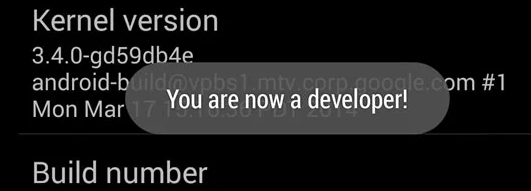
After activation, you will see the message: “You are now a developer!”
3. Set Your Pokémon Go Fake Location
Launch Fonelora and select your desired location on the map. Select a mode (Teleport, Joystick, etc.) based on your needs.

For safer gameplay, route simulation and joystick movement are strongly recommended over excessive teleporting.
4. Launch Pokémon Go
After activating the fake GPS location, open Pokémon Go. Your in-game avatar should now appear at the selected location.
To reduce detection risks:
- Keep movement speeds realistic (around 4–8 km/h)
- Avoid rapid continent-to-continent teleporting
- Respect cooldown times after long-distance jumps
Compared with standard free spoofing apps, Fonelora generally offers smoother movement simulation and requires less manual troubleshooting on Android 12, 13, and 14 devices.
Guide: Set Up a Pokémon Go Fake Location on Android (No Root)
This section provides the exact steps to configure a Pokémon Go fake location Android no root setup. The procedure involves enabling a hidden developer setting on your phone and then assigning a free GPS app to control your location.
First, you will need to download a reputable mock location app from the Google Play Store. We recommend starting with “Fake GPS Location ” by Lexa for its simplicity. If you experience issues with location errors, “GPS Joystick ” is an excellent alternative, as its advanced settings can help stabilize the signal on some devices.
Step 1: Enable Developer Options on Your Device
To access the required settings, you must first unlock the “Developer Options ” menu, which is hidden by default on all Android devices.
1. Open your device’s Settings application.
2. Scroll to the bottom and tap About phone.
3. Find the Build number entry. On some devices, such as certain Samsung models, this may be inside a “Software information ” submenu.
4. Tap on Build number seven times in quick succession. After a few taps, you’ll see a countdown message. On the final tap, a notification will appear: “You are now a developer! ”
Step 2: Assign the Mock Location App
With Developer Options enabled, you can now tell your Android system to accept location data from your chosen GPS app instead of its physical GPS sensor.
1. Return to the main Settings menu.
2. Find the newly available Developer options menu. Note: On Samsung devices, this will be at the bottom of the main Settings page. On Google Pixel and others, it is usually under System > Developer options.
3. Scroll down until you find the Select mock location app setting.
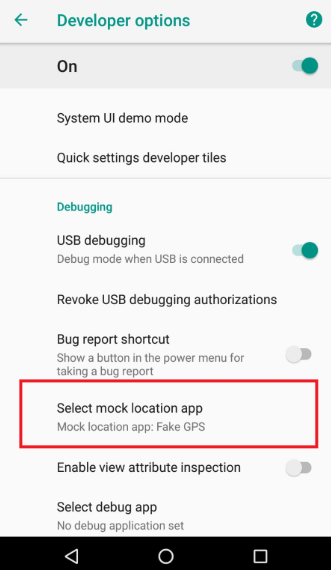
4. Tap it and choose the GPS spoofer app you installed from the Play Store.
Your device is now configured. The final step is to set a new location in the spoofer app before you open Pokémon Go. Open your Fake GPS app, move the pin to your desired location, and press the “Play ” or “Start ” button to activate the mock location. Then, launch Pokémon Go to appear in your new spot.
The Key to Account Safety: Mastering Pokémon Go Cooldown Rules
Here is the most critical piece of information for long-term success: account flags are almost always caused by unrealistic player behavior, not by the free spoofing tool itself. The Niantic anti-cheat system primarily detects impossible travel. Understanding and following Pokémon Go cooldown rules is the single most important factor in keeping your account safe.
A “cooldown ” is the mandatory waiting period after performing an in-game action before you can perform another action in a new, distant location. Actions that trigger this rule include:
- Catching a Pokémon (including from incense or Meltan Box)
- Spinning a PokéStop or Gym
- Battling in a Gym or a Raid
- Placing a Pokémon in a Gym
- Feeding a berry to a Gym defender remotely
If you spin a PokéStop in Chicago and then, two minutes later, catch a Pokémon in Sydney, the system will flag this impossible travel. This typically results in a Pokémon Go soft ban, where Pokémon instantly flee, and PokéStops give no items for a period of time. To avoid this, you must wait the appropriate time after teleporting before interacting with anything in the game.
Use this table as a strict guideline for long-distance jumps:
| Distance Traveled | Minimum Cooldown Time |
| 1 km | 30 Seconds |
| 5 km | 2 Minutes |
| 10 km | 7 Minutes |
| 25 km | 11 Minutes |
| 100 km | 35 Minutes |
| 500 km | 1 Hour 5 Minutes |
| 1000 km | 1 Hour 30 Minutes |
| 1500+ km | 2 Hours (Maximum) |
Critical Safety Tip: Always close the Pokémon Go application completely before you change your location in the spoofer app. The safest way to play is to set your location, play in that area for your session, and then log out for at least two hours before jumping to another country or continent.
Troubleshooting Stubborn Location Errors
Even with a perfect setup, you may encounter the “Failed to detect location (12) ” error. This means the game has identified a conflict between your device’s real GPS signal and the simulated one. On newer Android versions (12+), this can be a persistent problem, and it’s the primary trade-off for using a free, on-device method.
If you see this error, work through this checklist:
- Restart the Process Correctly: Close both Pokémon Go and your spoofer app. Open the spoofer app first, set your location and confirm it’s active, and then launch Pokémon Go. This order is essential.
- Clear App Cache: Go to Settings > Apps. Find both Pokémon Go and your GPS spoofer app. For each one, tap on Storage and then Clear Cache. This removes temporary files that may cause conflicts.
- Adjust Location Accuracy: Go to your phone’s main location settings (Settings > Location). Find “Location services ” or a similar menu. If you see an option for “Google Location Accuracy, ” try turning it off. This can help prevent conflicts by forcing the device to rely more on the GPS signal your spoofer is controlling.
- Check for Updates: An outdated spoofer app can lose compatibility after a Pokémon Go update. Check the Google Play Store to ensure both apps are on their latest versions.
A Deeper Fix: Understanding and Preventing GPS Rubber-Banding
The most dangerous issue with free spoofers is “rubber-banding. ” This is when your in-game character jumps back and forth between your real location and your fake one for a split second. This is a massive red flag for Niantic’s detection system because it’s physically impossible. It’s often the root cause of repeated “Error (12) ” messages and can lead to account warnings.
Here are a few advanced techniques to combat it:
- Find a Better App Setting: If your spoofer app (like GPS Joystick) has an “Indirect Mocking ” or similar advanced mode, try enabling it. These features are designed to create a more stable fake signal.
- The Tinfoil Trick (No, Really): If your phone’s internal GPS is too strong, it can overpower the spoofer. Wrapping the top back portion of your phone in a small, tight piece of aluminum foil can physically block the real GPS signal from reaching the antenna. It sounds strange, but it is a common and often effective last resort for stubborn rubber-banding.
- Improve Physical Location: Sometimes, rubber-banding is worse indoor,s where the real GPS signal is already weak and fluctuating. Try setting up your spoofer while in a basement or a room with no windows to further weaken the real signal before starting the app.
How to Safely Stop Spoofing and Return to Your Real Location
Just as important as starting correctly is stopping correctly. Simply closing the apps can leave your phone’s GPS in a confused state. Follow these steps to return to normal gameplay without errors.
1. Close Pokémon Go: Make sure the application is completely closed, not just minimized.
2. Stop the Spoofer: Open your GPS spoofer app and press the “Stop ” button to deactivate the mock location.
3. Disable the Mock Location App: Return to Developer options in your phone’s settings. Tap on the Select mock location app and choose Nothing. This is the most crucial step.
4. Re-enable Location Accuracy (Optional): If you turned off “Google Location Accuracy ” in the troubleshooting steps, you may want to turn it back on for normal use.
5. Restart Your Phone: A quick restart is the best way to ensure your phone’s GPS sensor resets and finds your true location cleanly. After restarting, you can open Pokémon Go and play normally.
Frequently Asked Questions About Free Android Spoofing
Here are clear answers to the most common questions about using a free Pokémon Go GPS spoofer on Android.
Q1. Can you spoof Pokémon Go on Android for free?
Yes. By enabling the built-in Developer Options on your Android device and using a free mock location app from the Google Play Store, you can change your in-game GPS coordinates without any cost. Success hinges on a correct setup and strictly following the cooldown rules outlined in this guide.
Q2. Do free Android spoofers actually work?
Many free Android spoofing apps work, but they can be less stable than paid desktop solutions and require more hands-on troubleshooting. You may have to deal with issues like GPS rubber-banding or location errors, especially after a new Pokémon Go update. Their reliability depends on your device and a proper configuration.
Q3. Is rooting required for Android spoofing?
No, rooting is not required. The no-root method detailed in this guide is the simplest and safest technique for most users. It uses a standard Android feature designed for developers and does not require modifying your phone’s operating system.
Q4. How do you avoid bans when using free spoofers?
Avoiding bans is about your behavior. The key is to follow the Pokémon Go cooldown rules without exception. Never perform an action in a new location without waiting the required time based on distance. Use realistic walking speeds within the spoofer app and avoid jumping between continents in the same play session.
Q5. What is the safest movement speed?
A realistic walking pace (around 4-8 km/h or 3-5 mph) is the safest speed for local movement. Most spoofer apps include a joystick with adjustable speed settings. Using this to hatch eggs or move between nearby PokéStops is much safer than instantly teleporting short distances.
Q6. What happens if Niantic detects spoofing?
Niantic uses a strike-based system. The first offense is typically a 7-day warning and a temporary soft ban. A second offense can lead to a 30-day account suspension. A third may result in permanent account termination. This is why adhering to safe practices from the very beginning is so important.
For long-term success, always check for updates to your chosen spoofer app after major Pokémon Go updates, as Niantic’s detection methods evolve. Following developer notes and community discussions can provide early warnings of compatibility issues.
Conclusion: Explore Pokémon Go with Confidence
You now have a safer and more reliable solution for overcoming the most common frustrations of Pokémon Go spoofing on Android. By combining realistic movement behavior with a stable tool like Fonelora Location Changer, you can reduce the risk of soft bans, GPS errors, and unstable location jumps that often affect free spoofing apps.
Unlike complicated rooting methods, Fonelora Location Changer offers a beginner-friendly way to simulate movement, customize walking routes, and control your in-game location more smoothly on Android devices. Its joystick controls, route simulation, and adjustable walking speeds help create more natural gameplay behavior while improving overall stability.
With the setup and safety tips in this guide, you can confidently explore Pokémon Go from anywhere, join distant raids, hatch eggs faster, and catch regional Pokémon with less hassle and lower account risk.
More Related Articles



Joy Taylor is a seasoned technical writer with over a decade of experience in mobile technology. At iMobie, she specializes in producing in-depth content on iOS data recovery, iPhone unlocking solutions, and iOS troubleshooting.
Product-related questions? Contact Our Support Team to Get Quick Solution >
