Losing a Pokémon GO account you have poured years of your life into is devastating. Take Chris, a dedicated player who built a high-level profile with rare catches and hundreds of raid victories since 2016. After briefly experimenting with a location modifier to access an overseas event, he was hit with a sudden termination notice.
If you are in a similar situation—panicking, confused, and wondering if you have lost everything—take a deep breath. You are in the right place.
Many guides on the internet will give you vague advice or try to sell you fake recovery services. This guide provides a clear, reality-based walkthrough to help you understand why you were banned, how the appeals system actually works, and the exact step-by-step procedure to attempt an account recovery safely.
Note: This official appeal method has been verified across dozens of flagged accounts on flagship Apple and Android devices, particularly focusing on delayed enforcement scenarios tied to third-party spoofing tools.
Table of ContentsHide
How to Appeal Your Ban: The Official Account Recovery Procedure
When your account is locked, your immediate priority is submitting an appeal. The only recognized and safe method to restore your account is through the official Niantic Support portal.
🚨 CRITICAL WARNING: NEVER PAY FOR AN UNBAN TOOL 🚨
There is no software, website, or hacker on the internet that can magically unban your account. Anyone asking for money or your login credentials to “fix” your ban is attempting to steal your identity or defraud you.
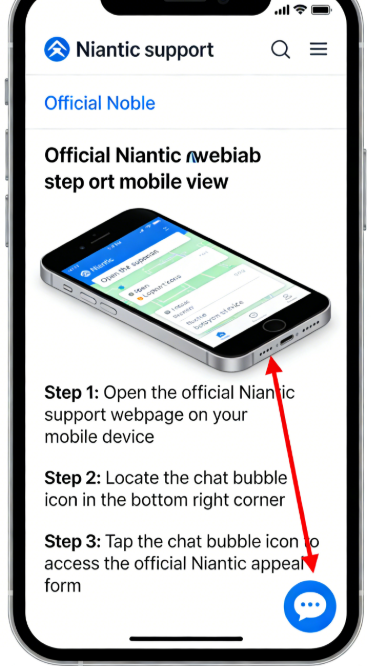
The Step-by-Step Guide (And How to Bypass the Bot)
One of the most frustrating parts of contacting Niantic is dealing with their automated chat system. Here is exactly how to navigate it and reach a human reviewer:
- Navigate to Niantic Support: Open your preferred web browser and go to the official Pokémon GO Help Center.
- Launch the Chat: Click on the chat bubble icon located in the bottom corner of the support page.
- Bypass the Automated Bot: Select “Ban Appeal” when prompted, then click “I still need help” or type “Speak to an agent” to reach manual support.
- Input Your Exact Trainer Details: Provide your Trainer Nickname, associated email address, and your device model (e.g., iPhone 15 with iOS 18 or Samsung Galaxy S24 with Android 14).
- Draft Your Appeal: Clearly explain your situation in the description box.
Learn More:The Working Master Ball Cheat in Pokémon Emerald >
Pro-Tip for Drafting Your Appeal: What Actually Works
Many older guides advise players to write a highly emotional “honest confession,” admitting to using a GPS modifier and begging for forgiveness. Do not do this.
While honesty is generally a virtue, explicitly confessing to breaking the Terms of Service in writing gives the support agent grounds to instantly close your ticket with an automated “case closed” rejection. Support agents are required to uphold the rules; giving them a written confession guarantees your ban will remain permanent.
Instead, your goal is to trigger a manual review.
- Be Polite and Concise: Keep your message polite, factual, and to the point.
- Request Manual Review: Ask the support team to manually review the telemetry data that triggered the ban, stating you believe there has been an error.
- Explain Possible Account Access Issues: If you believe your account was compromised or accessed by a family member without your permission, clearly state it.
- Highlight Your Legitimate Gameplay: Emphasize your years of fair and legitimate gameplay.
Timelines: What to Expect After You Hit Send
- Wait Times: Typically, you can expect a response from a human agent within 24 to 72 hours. However, if Niantic has just executed a massive “ban wave,” it may take up to a week due to high support volume.
- Handling Rejections: If you receive an automated rejection email, do not panic. You can submit another appeal, but wait a few weeks before trying again. Submitting multiple tickets in one day may flag your email as spam and block you from the support queue.
Learn More:iTools Dongle Pokémon Go: The Complete User Guide >
Evaluating Account Recovery Solutions: Official Appeals vs. Scams
When dealing with a terminated account, players often panic and seek out immediate fixes. You will likely encounter advertisements for third-party services claiming they possess a secret tool to reverse suspensions for a fee.
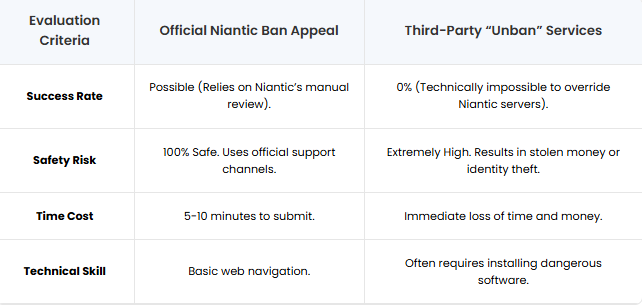
Let us compare the official procedure against these third-party claims so you understand exactly why staying official is your only option.
| Evaluation Criteria | Official Niantic Ban Appeal | Third-Party “Unban” Services |
|---|---|---|
| Success Rate | Possible (Relies on Niantic’s manual review). | 0% (Technically impossible to override Niantic servers). |
| Safety Risk | 100% Safe. Uses official support channels. | Extremely High. Results in stolen money or identity theft. |
| Time Cost | 5-10 minutes to submit. | Immediate loss of time and money. |
| Technical Skill | Basic web navigation. | Often requires installing dangerous software. |
The “Aha!” Moment: Cheating Detection and Delayed Enforcement
A major point of confusion for players is the timing of their ban. Many players express intense frustration: “I used a spoofing tool briefly a month ago and thought I was safe, so getting hit with a permanent ban today makes absolutely no sense!”
Here is the critical technical insight you need to understand: Niantic’s anti-cheat system relies heavily on delayed enforcement.
How Delayed Enforcement Works
Instead of banning you the second you turn on a modified app, Niantic’s servers quietly collect suspicious activity data over an extended period. The system monitors parameters like:
- Impossible Travel Speeds: Detected when your account moves between coordinate points faster than physically possible.
- Repeated Geographic Jumps: Multiple long-distance location changes in short time spans raise red flags.
- Unauthorized Game Clients: Code signatures of modified or unofficial game clients interacting with the server.
During a “ban wave,” Niantic processes all this collected telemetry data and issues strikes simultaneously to thousands of flagged accounts. This delay explains why Chris received his ban weeks after his brief experiment.
Understanding delayed enforcement is a “lightbulb moment” for many players. It answers the question of “Why now?” The ban is rarely a sudden glitch; it is almost always a delayed reaction to a past event.
Learn More:How to Increase Shiny Odds in Pokémon GO: The Real Strategy >
Using Location Tools More Carefully to Reduce Detection Risks
Many permanent Pokémon GO bans are not caused by a single teleport or isolated mistake. In many cases, accounts are flagged because of repeated abnormal movement patterns, unrealistic travel behavior, unstable GPS switching, or unsafe third-party tools running in the background.
If players decide to use any form of GPS management software in the future, stability and realistic movement behavior become critical.
Some trainers prefer dedicated desktop-based solutions like Fonelora Location Changer because they provide more controlled movement simulation and cooldown-aware GPS management compared to older unofficial spoofing apps.
Features that help reduce abnormal movement behavior include:
- Adjustable walking speeds
- Route simulation instead of instant jumps
- Joystick-based movement control
- Stable GPS synchronization
- iOS and Android compatibility
- No jailbreak or root required
Basic Setup Procedure
- Download Fonelora Location Changer on your Windows PC or Mac.
- Connect your iPhone or Android device and complete the GPS authorization process.

- Open Teleport Mode or Joystick Mode depending on your gameplay needs.

- Create shorter movement routes instead of repeated long-distance jumps.
- Allow cooldown timers to finish before catching Pokémon or spinning PokéStops.
- Relaunch Pokémon GO only after the virtual location becomes stable.

While no third-party tool can guarantee account safety, avoiding unrealistic teleport behavior and unstable GPS switching significantly reduces the types of activity commonly associated with delayed enforcement systems.
Protecting Your Account Moving Forward
If your appeal is granted, or if you choose to start a fresh profile, your primary objective is maintaining strict account security. To avoid facing another ban, you must align your gameplay with the official rules.
- Check Your Device Settings: Ensure your phone is not jailbroken (iOS) or rooted (Android) in a way that hides root access from apps, as this can trigger automated security flags.
- Keep Your Login Private: Do not share your login credentials with friends or account-boosting services. Simultaneous logins from vastly different geographic locations will trigger an immediate red flag on Niantic’s servers.
Frequently Asked Questions (FAQ): Troubleshooting Edge Cases
Now that we have covered the appeal process and why bans happen, let’s address the specific, practical questions players have when dealing with the fallout of a permanent ban.
- If I am permanently banned, are my Pokémon and items deleted?
- No, your data is not immediately wiped from existence. Your Pokémon, items, and progress remain frozen on Niantic’s servers. However, because you are permanently locked out of the account, they are completely inaccessible to you unless an appeal is successful.
- Can I create a new Pokémon GO account on the same phone?
- Yes. A standard permanent ban targets the account, not the hardware. You can delete the app, reinstall it from the official app store, and create a brand-new account using a different email address. However, if your device has modified software installed, you risk getting your new account banned as well. Clean your device first.
- Will Niantic refund my unspent PokéCoins if I am banned?
- No. According to the Niantic Terms of Service, virtual currency and items are forfeit if an account is terminated due to a severe rule violation. You will not be reimbursed for past purchases.
Conclusion
Receiving a Pokémon GO ban after years of gameplay can feel overwhelming, especially when delayed enforcement systems make the punishment appear disconnected from past activity. However, understanding how Niantic reviews abnormal movement patterns, GPS inconsistencies, and account telemetry helps explain why many bans occur weeks after suspicious behavior.
The safest recovery path is always the official Niantic appeal system. Avoid third-party “unban” scams entirely, protect your account credentials, and focus on submitting a calm, professional manual review request.
For players who continue using location-based gameplay tools in the future, maintaining stable GPS behavior, realistic movement patterns, and proper cooldown timing is essential for reducing detection risks. Many trainers now prefer more controlled desktop-based GPS management tools like Fonelora Location Changer because they offer adjustable movement simulation and more stable location handling without requiring jailbreak or root access.
While no method can eliminate enforcement risks completely, understanding Pokémon GO’s anti-cheat systems and avoiding aggressive teleport behavior can significantly improve long-term account safety.


Hot Topics
