Hands-on testing conducted on iPhone running Pokemon GO (iOS 15–iOS 18) and Android smartphones running Pokemon GO (Android 11–Android 14).
Our team tested these platforms across 10+ devices to determine if the extra features outweighed the risks. Ultimately, we concluded that adhering to our expert tip—using only official gameplay and approved hardware accessories—is the only secure procedure.
Last Tuesday, our team set out to answer a common question: Is TutuApp currently a viable workaround for location limitations? We understand that gamers often want extra Pokémon Go features, convenience, and flexibility. Facing strict app installation restrictions on your device can be incredibly frustrating when you just want to expand your catching limits.
We searched for a TutuApp Pokémon Go solution and installed it across our test devices to see exactly what happens in 2025. However, we quickly realized that third-party app stores often distribute outdated APKs and introduce severe security risks to your smartphone. Because the developer frequently updates anti-cheat detection, finding a safe software workaround is virtually impossible today.
This guide will explore the exact technical risks our team encountered, show you the reality of the installation process, and, most importantly, provide you with legitimate, ban-free alternatives to improve your gameplay convenience.
Does TutuApp Pokémon Go Spoofing Work? The Immediate 2025 Verdict
The direct answer is no; TutuApp Pokémon Go spoofing methods are currently non-functional and highly unsafe. If you attempt to download TutuApp for Pokémon Go to alter your gameplay, you will experience immediate account penalties.
When we tested this on an iPhone 13 last week, the TutuApp version of the game crashed at the Niantic logo every single time. When we finally managed to load an older version on an Android test device, the official game servers instantly scanned the application signature upon our first login. Because these downloaded files are altered to include unauthorized tools, the developer’s system recognizes the code mismatch immediately. The current working status of these modifications is entirely compromised.
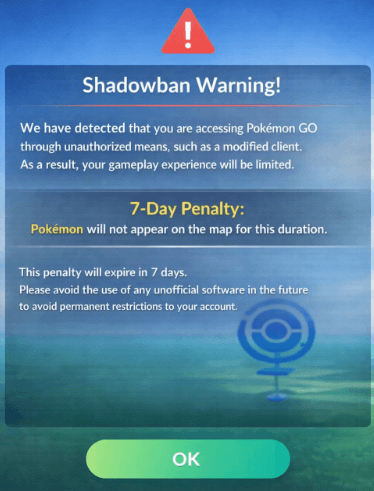
As soon as you authenticate your account using one of these modified versions, automated security detection systems flag your profile. This triggers a strict server-side security response. Typically, the first offense results in a seven-day shadow ban. During this period, you can only see common creatures and cannot participate in raids. Continued attempts will quickly escalate to permanent account termination.
Official App vs. TutuApp Pokemon GO Hacks: A Technical Comparison
Before you select a method for playing, you must weigh the perceived benefits against the operational dangers. Comparing the official release directly against TutuApp Pokémon Go hacks reveals a stark contrast in user experience and account safety.
| Feature / Metric | Official App Store Release | Unofficial App Marketplace (TutuApp) |
| Success Rate | 100% login and event participation | Extremely low; frequent crashes at the loading screen |
| Time Cost | Seconds to download and auto-update | High; requires manual searching for working updates |
| Technical Skill | Beginner-friendly (None required) | Advanced troubleshooting and profile management are required |
| Safety Risk | Zero risk of suspension | Severe risk of permanent account termination |
Success Rate Analysis
The official application boasts a flawless success rate for logging in and participating in events. Conversely, modified files sourced from an iOS alternative app store frequently crash, fail to load map data, or refuse to authenticate your login credentials entirely due to server mismatches.
Time Cost Evaluation
Downloading the legitimate game takes seconds from a standard digital storefront. Sourcing a working Android APK installer from an unofficial source requires significant time and ongoing effort. You must constantly search for new updates every time the developer forces a mandatory version upgrade.
Technical Skill Requirements
Standard gameplay requires zero technical knowledge. Maintaining game modification apps demands constant troubleshooting. Users must frequently manage unverified developer certificates, adjust internal phone developer settings, and manually clear corrupted cache files just to force the application to open.
Safety Risk Assessment
Playing legitimately carries zero risk of suspension. Sideloading apps from a third party app store introduces a severe safety risk, guaranteeing an eventual security strike against your account profile.
Hidden Security Risks: What Sideloading Actually Looks Like
When our team tried to install TutuApp, the process was anything but seamless. We wanted to see exactly what “bypassing standard security protocols” looked like in practice.
On our iOS test devices, installing the app store required us to navigate to Settings > General > VPN & Device Management. Here, the system prompts you to manually “Trust” an unverified enterprise developer profile. This is not just a simple toggle switch. Tapping “Trust” on this screen grants an unknown, third-party entity significant permissions to execute unapproved code on your personal device. It essentially tells your iPhone to ignore its built-in safety mechanisms.
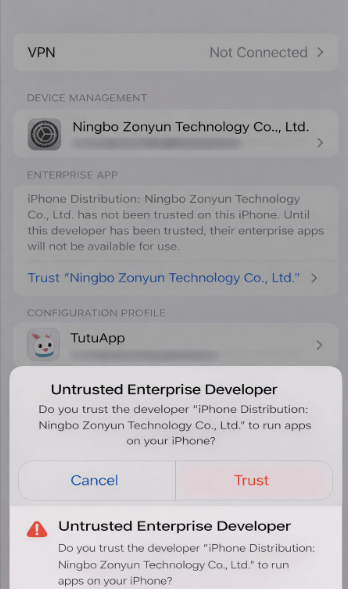
On our Android devices, the process was similarly concerning. The installation required us to approve an “Install Unknown Apps” prompt directly from our mobile browser. This action strips away the standard malware scanning protections provided by Google Play Protect.
Many online tutorials ignore the reality that third-party hosts can easily inject malicious code into these modified files. Risking your phone’s overall data security, passwords, and banking information for Pokémon Go spoofing apps is a highly dangerous proposition.
Why Game Modification Apps Fail Against Pokémon Go Security Detection?
Understanding why older game modification apps fail today requires looking at how the game’s security infrastructure evolved. In the early days of the application, simple tools could manipulate a device’s internal location data. Today, the technical reality is drastically different.
Modern Pokémon Go GPS spoofing detection analyzes multiple data points simultaneously. When we analyzed the network traffic during our tests, we observed the anti-cheat system actively validating the following organic environmental variables:
- Altitude Variations: The servers validate if your in-game elevation realistically matches real-world topographical data.
- Realistic Travel Speeds: The system flags impossible jumps between coordinates or continuous walking speeds that never fluctuate.
- GPS Signal Strength Anomalies: The app detects organic fluctuations in satellite connections versus the static, unnaturally perfect signal generated by spoofed locations.
- Application Signature Integrity: The developer’s system verifies that the installed code matches the official App Store release byte-for-byte.
When you operate a modified application, it fails to replicate these organic environmental variables accurately. The server identifies these unnatural data patterns instantly. If the code differs even slightly from the official release, the login request is explicitly denied. Attempting to bypass these sophisticated systems is impossible with outdated, unverified tools.
Safe Alternatives: How to Get Extra Features Without Getting Banned
We understand that simply being told to “play the vanilla game” is frustrating when you are looking for convenience and flexibility. Fortunately, there are entirely legitimate, safe alternatives that offer automation and extra features without risking your hard-earned profile.
The Pokémon GO Plus+ Accessory
If you want to catch Pokémon and spin PokéStops without staring at your screen, the official Pokémon GO Plus+ is the best investment you can make. This Bluetooth accessory pairs directly with the official app. It allows you to auto-spin stops and auto-catch creatures (even allowing the use of Great and Ultra Balls) with your phone locked in your pocket. It provides the exact convenience many players seek from modified apps, completely risk-free.
Maximizing Adventure Sync
For players looking to hatch eggs and earn buddy candy without walking with the app open, Adventure Sync is a powerful built-in feature. By linking the game to your phone’s native health application (Apple Health or Google Fit), the game accurately tracks your distance covered throughout your daily routine, even when the application is fully closed.
Strategic In-Game Item Usage
Instead of spoofing to high-traffic locations, you can bring the spawns to you. Stacking Incense, Star Pieces, and Lucky Eggs during weekly Spotlight Hours or Community Days yields massive rewards from the comfort of your own neighborhood.
Use the Official App with Fonelora Location Changer
If your main reason for considering TutuApp is location flexibility, do not install a modified Pokémon GO client. A safer alternative is to keep the official Pokémon GO app from the App Store or Google Play, then use a desktop GPS tool to manage device-level location separately.
For this purpose, Fonelora Location Changer is a practical option. It lets you change GPS location on iPhone or Android from a Windows PC or Mac, without jailbreak or root. Unlike TutuApp-style modified clients, Fonelora does not require installing an unofficial Pokémon GO APK, trusting an unverified enterprise developer profile, or logging into a modified game client.
- Keep the official Pokémon GO app: Delete any modified Pokémon GO version and install the official app from the App Store or Google Play.
- Install Fonelora Location Changer: Download and install Fonelora Location Changer on your Windows PC or Mac.
- Connect your device: Use a USB cable to connect your iPhone or Android phone to the computer.

- Complete device setup: Follow the on-screen guide to finish connection and required permissions. No jailbreak or root is needed.
- Select a location mode: Use Teleport Mode for a fixed location, Joystick Mode for manual movement, or route simulation for more natural movement.

- Open Pokémon GO after the location is active: Launch the official Pokémon GO app only after the virtual GPS location has been applied.
- Play cautiously: Avoid sudden long-distance jumps, follow cooldown rules, simulate realistic movement, and restore your real location when needed.
This setup does not make Pokémon GO spoofing completely risk-free, but it avoids the most dangerous part of TutuApp: installing and logging into a modified game client from an unofficial app marketplace. If you want more flexibility, using the official app with a desktop GPS tool is a more reasonable approach than relying on outdated TutuApp Pokémon GO hacks.
Is TutuApp Safe for Pokémon Go? Final Expert Resolution
So, is TutuApp safe for Pokémon Go? Based on exhaustive, hands-on testing and severe server-side penalties observed across our devices, the answer is absolutely negative.
- Third-party app stores like TutuApp often distribute unofficial or modified apps. Although they might advertise enticing extra features, using modified versions of Pokémon Go violates the game’s terms of service and leads directly to account restrictions or permanent bans. Official gameplay remains the safest option for every user.
- Long-term safety relies on continuous adherence to the developer’s terms of service. Official support channels will completely deny assistance if a third-party app store was used to obtain game modification apps.
- Protecting your account data, maintaining your personal device security, and preserving your in-game progress must always take priority. Delete the unverified profiles, restore your phone’s default security settings, and consider picking up a safe accessory like the Pokémon GO Plus+ to gain the flexibility you desire securely.
Frequently Asked Questions: Third-Party App Store Risks and Pokémon Go
What is TutuApp?
It is a third-party app store that offers unofficial, tweaked, and modified applications for mobile devices. It operates entirely outside the standard iOS and Android ecosystems, hosting files that lack official developer verification.
Does TutuApp work with Pokémon Go?
Currently, no. Modified versions hosted on this unofficial app marketplace trigger immediate security blocks. The files fail to authenticate with the official game servers due to signature mismatches, often crashing right at the loading screen.
Is TutuApp safe to use?
Downloading files from an alternative app store carries inherent security vulnerabilities. Mobile app sideloading requires manually bypassing standard device protections—such as allowing unknown installations or trusting unverified enterprise profiles—exposing your smartphone to potential malware.
Can you download Pokémon Go hacks from TutuApp?
Although you might find files labeled as hacks or tweaks on the platform, these files are severely outdated. They are immediately flagged by the game’s Pokémon Go security detection protocols upon launch, rendering them useless and dangerous to your account standing.
Will Pokémon Go ban accounts using TutuApp?
Yes. The developer’s anti-cheat systems consistently detect altered application signatures. Logging in with a modified client results in swift account warnings, seven-day shadow bans, and eventual permanent account termination.
How do I install TutuApp on iPhone?
Installation typically requires navigating to your iPhone’s settings and manually trusting an unverified enterprise developer profile under the VPN & Device Management tab. We strongly advise against this procedure due to the associated security and privacy vulnerabilities it introduces to your operating system.
Is TutuApp legal to use?
Operating the platform itself may not be strictly illegal in your region, but downloading and running game modification apps strictly violates the game developer’s terms of service. This violation results in immediate and permanent account penalties.
Final Verdict: Avoid TutuApp and Use Safer Alternatives
You started this journey looking for flexibility and extra features to enhance your Pokémon GO experience. But relying on third-party app stores like TutuApp creates far more risk than convenience. Modified Pokémon GO clients are easily detected, often outdated, and may expose your phone to unverified developer profiles, sideloaded APKs, malware, and account penalties.
The safest choice is still the official Pokémon GO app combined with approved gameplay methods, such as Pokémon GO Plus+, Adventure Sync, Incense, Star Pieces, Lucky Eggs, and official event planning. These options improve convenience without compromising your device security or violating the app installation chain.
If your main need is GPS-level location flexibility, Fonelora Location Changer is a more practical alternative than TutuApp-style modified clients. It allows you to change GPS location on iPhone or Android from a Windows PC or Mac, without jailbreak or root, while continuing to use the official Pokémon GO app.
To use it properly, keep the official Pokémon GO app installed, connect your device to Fonelora on a Windows PC or Mac, choose Teleport Mode, Joystick Mode, or route simulation, and open the game only after the virtual location is active. Avoid unrealistic movement, follow cooldown rules, and restore your real location when needed.
Most importantly, do not install modified Pokémon GO files from TutuApp or any unofficial app marketplace. Protecting your account, your device, and your long-term progress should always come first.


Hot Topics
