If you are trying to figure out how to play Pokémon when restricted by a school network or stuck indoors, you generally have two main paths depending on the exact barrier you face.
Quick Answer:
- For school networks (like Chromebooks): You can use retro browser-based games to bypass firewalls without downloading software, though these frequently lose your save files when IT clears the cache.
- For physical location barriers (stuck indoors or in rural areas): You can use virtual location workflows on your personal smartphone to “unblock” movement in modern mobile titles like Pokémon GO.
Whether you are trying to sneak in some classic gameplay during a study break or keep your Pokémon GO streak alive while stuck at a desk, this guide breaks down how both methods work, the critical limitations of browser saves, and how to simulate location safely.
How to Play Retro Pokémon Games on a School Chromebook
When students search for unblocked Pokémon games for a school Chromebook, they are almost always looking for browser-based emulators. These web portals run classic versions of the game entirely within your internet browser, bypassing the strict software installation blocks set by school IT administrators.
Because they do not require you to download executable files or install local apps, they often slip right past standard network firewalls. Players typically find these web-based games on dedicated unblocked gaming sites, legitimate classic gaming archives, or GitHub repositories hosted by other fans.
However, playing directly in a browser means your gaming experience relies entirely on your current session state and a stable internet connection. If the Wi-Fi drops, the tab closes, or the browser crashes, the web portal might refresh unexpectedly, which leads directly to the biggest downside of this method.
The Big Catch: Why Browser Emulators Lose Your Save Files
While browser-based games offer a quick fix for restricted networks, they come with a critical flaw: permanent save files are rarely guaranteed. School IT administrators frequently configure Chromebooks to wipe the browser cache automatically upon log out, restart, or tab closure. When that cache is cleared, your local game data is instantly deleted.
Here is a quick breakdown of the browser game experience:
Pros:
- Bypasses most school network firewalls.
- Requires zero software installation or admin rights.
- Easy to open and close quickly during breaks.
Cons:
- Extremely high risk of losing save files due to IT cache wipes.
- Prone to freezing on unstable Wi-Fi connections.
- Limited to playing older retro titles rather than modern games.
Losing hours of progress in an RPG is incredibly frustrating. This unreliability often makes players wonder if they should just stick to official mobile titles with cloud saves, like Pokémon GO. But what if you want to play official mobile games, and are blocked by your physical location instead of a network firewall?
Unblocking Pokémon GO: Overcoming Physical Location Barriers
Unlike retro web portals, official mobile games like Pokémon GO save your progress safely in the cloud, meaning you never have to worry about a cleared cache deleting your Pokémon. However, they introduce a completely different kind of restriction: the physical location barrier.
If you are stuck in a classroom, working a long shift at a desk, recovering indoors, or living in a rural area with zero PokéStops, your lack of physical movement essentially “blocks” you from playing the game. Because Location-Based Service (LBS) games require real-world walking to find encounters and spin stops, stationary players are left at a massive disadvantage.
To unblock these mobile games, many players turn to GPS simulation—often called virtual movement. By relying on Pokémon GO spoofing resources and specific software workflows on personal, user-owned iOS or Android devices, players can simulate walking and GPS changes. This allows them to interact with the game map and keep their streaks alive even when they cannot physically step outside.
Important Rules and Account Risks for Location Games
Before attempting to simulate movement in mobile location games, it is crucial to understand the platform rules and potential account risks. Niantic’s Terms of Service strictly prohibit spoofing or changing your location. If you attempt virtual movement blindly without understanding how the game detects unnatural behavior, you risk account penalties.
Here are the critical risks you must check before proceeding:
- Terms of Service Violation: Acknowledge that changing your location officially breaks the game’s rules and carries inherent ban risks.
- The ‘Soft Ban’ System: If the game detects you teleporting instantly across the globe, it will issue a temporary soft ban where Pokémon always flee and PokéStops yield no items.
- Respecting Cooldown Timers: Location games track the time and distance between your actions. Understanding Pokémon GO cooldown rules is essential. You must wait a realistic amount of time (the cooldown) before catching a Pokémon in a new location after a long jump.
- Movement Realism: Instant teleportation is highly unnatural. Consistent, reasonable movement speeds are less likely to trigger immediate automated red flags than constant jumping.
Understanding these limits is the mandatory baseline for anyone exploring virtual movement workflows on their devices.
How to Play Pokémon GO Without Walking Using Fonelora Location Changer
For players who understand the risks and need a practical way to bypass physical indoor barriers, using a dedicated desktop-to-mobile workflow offers much more control than unstable mobile apps. Fonelora Location Changer is a guided desktop Pokémon GO location changer designed to help you manage and change the GPS location on supported iOS and Android devices, allowing you to simulate walking without physically moving.
Before you start, note that this workflow requires a Windows or Mac computer to run the software, alongside a compatible iOS or Android mobile device.
Here is how the workflow operates to unblock LBS games:
Connect Your Device: Open Fonelora Location Changer on your computer and connect your supported iPhone or Android device via USB or Wi-Fi.

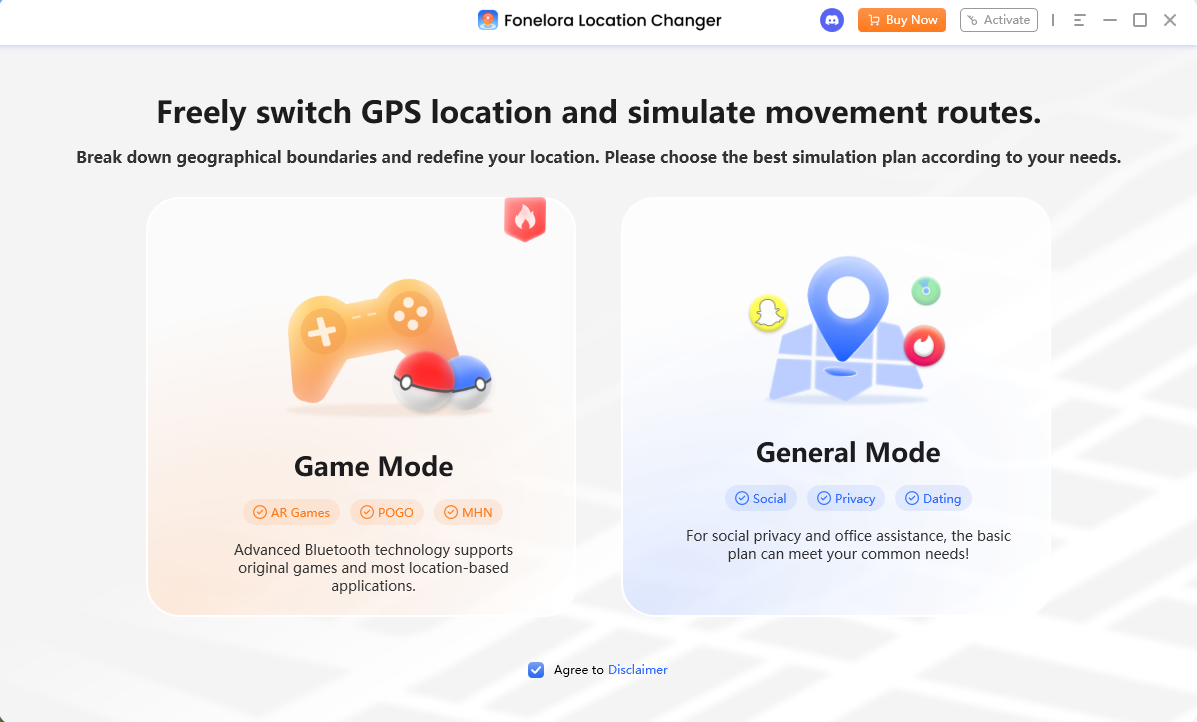
Select the Scenario: Choose Game Mode to load the game-oriented setup specifically tailored for LBS apps.
Pick a Movement Mode: Select from options like Teleport Mode for a one-time location change, or Joystick Mode to manually control your virtual walking direction in real-time.
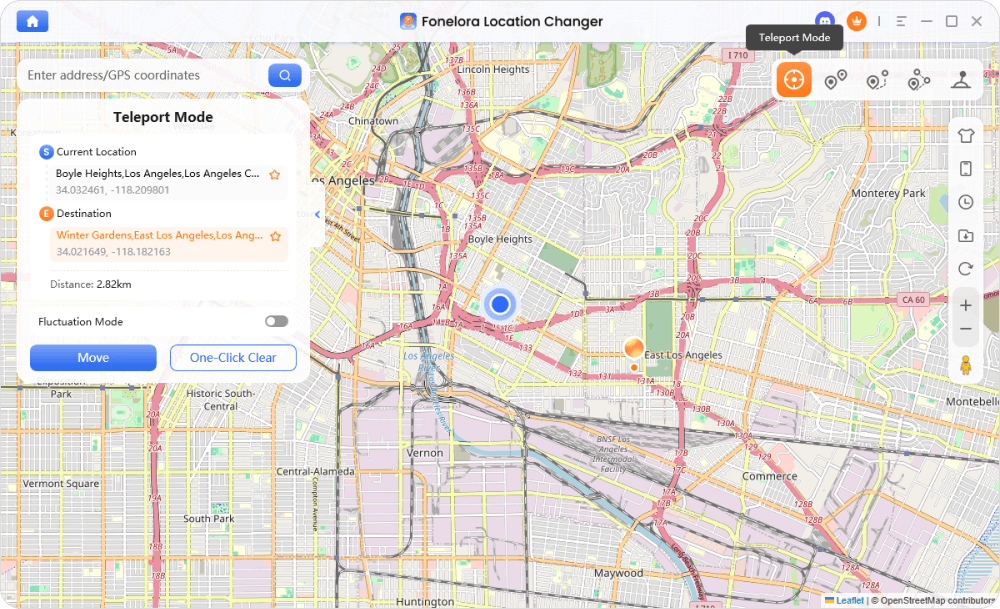
Simulate Movement: Start your virtual route. Your phone’s GPS will reflect this movement, allowing you to walk to nearby stops on the game map while staying comfortably at your desk.
This desktop-driven setup solves the problem of being stuck indoors while ensuring you keep your official, cloud-saved game progress.
Managing Account Risk: Using Game Mode and Cooldown Reminders
While no tool can guarantee a completely undetectable or zero-risk experience, Fonelora Location Changer includes specific features designed to help you manage the risks associated with virtual movement under supported conditions.
When you launch Game Mode, the software is optimized for LBS scenarios. One of the most critical safety features built into this mode is the Cooldown Timer. If you jump a significant distance on the map, the timer calculates exactly how long you should wait before spinning a PokéStop or catching a Pokémon. This reminder is vital for helping users avoid accidental soft bans caused by human error and impatience.
Additionally, the software offers Realistic Mode, which varies your simulated walking speed automatically within a selected range. Instead of moving at an exact, mechanical pace, the speed naturally fluctuates, making your virtual stroll look much more like a real human walking down the street. By combining these tools and relying on reputable virtual location resources, players can make their stationary gaming sessions much safer, though they must still practice responsible in-game behavior.
Frequently Asked Questions
Q1: How can I play Pokémon on a school Chromebook?
You can generally play retro titles by accessing browser-based games on unblocked web portals. These require no software downloads and bypass most network restrictions, though they rely entirely on a stable internet connection.
Q2: Are there unblocked Pokémon games that save progress?
While browser games can save progress temporarily, your data will be permanently deleted if your school IT department clears the Chromebook’s browser cache. Official mobile titles like Pokémon GO are the only way to guarantee permanent cloud saves.
Q3: Can I play Pokémon GO without walking?
Yes. Players who are physically restricted by being indoors, at work, or in rural areas can use desktop-to-mobile virtual location tools on their personal phones to simulate GPS movement.
Q4: Are virtual location tools safe from account bans?
No tool is 100% risk-free. Changing your location violates Niantic’s Terms of Service. However, using tools with cooldown timers and realistic movement fluctuation can help manage that risk under supported conditions.
Q5: How does a cooldown timer work in Pokémon GO?
A cooldown timer calculates the mandatory real-world time you must wait after interacting with the game in one location before you can safely interact with it in a new, distant location. Ignoring this timer frequently results in a soft ban.
Final Thoughts: Choose the Right Way to Play
When searching for unblocked Pokémon games, your best choice ultimately depends on what is actually blocking you. If you are dealing with a strict school firewall and just want a quick, temporary gaming session, retro browser-based games offer an instant, no-download fix—provided you accept the high risk of losing your save data when the cache clears.
However, if you want the reliability of permanent cloud saves and the modern experience of official mobile games, your primary barrier is physical location. If you are stuck at a desk, indoors, or living in a rural area without accessible PokéStops, simulating virtual movement on your personal device is often the most practical solution. For those needing a guided, risk-aware approach, using Fonelora Location Changer provides the necessary cooldown reminders and realistic walking simulations to help you play mobile LBS games responsibly while staying exactly where you are.

Fonelora Location Changer
- Bluetooth Hardware Simulation for Safer GPS Spoofing
- Realistic Movement & Route Simulation
- No Root or Jailbreak Required
- All-in-One Solution for Games, Social Apps & Privacy



