How to Bypass Netflix DRM and Watch Offline in 2025
Netflix uses Digital Rights Management (DRM) to protect its content from piracy, restricting offline viewing and screen recording. With tools like Keeprix Video Downloader, you can bypass these restrictions and download Netflix shows in high quality for offline enjoyment. This guide explains Netflix DRM and provides a step-by-step process to watch your favorite content anytime, anywhere.
Netflix is a leading streaming platform offering a vast library of movies, TV shows, and series. However, its DRM policies prevent users from downloading videos for offline viewing without permission. This guide details how to bypass Netflix DRM using reliable tools, enabling you to enjoy Netflix content offline with ease.
Part 1. Does Netflix Have DRM?
Yes, Netflix has DRM. This is a model that uses different secure systems, such as Google Widevine and Apple FairPlay, for the encryption of its videos.
On top of that, Netflix DRM restricts access to the content and prevents people from downloading or recording shows and movies without permission. It even prevents screenshots or video recording of the screen, replacing it with a black screen. On the whole, Netflix DRM helps the company protect its videos against piracy and makes the services available to paying subscribers only.
Part 2: How Does Netflix DRM Work?
Netflix DRM combines advanced encryption technologies to secure its videos:
- Encryption: Videos are encrypted with systems like Widevine, FairPlay, or PlayReady, requiring digital keys for playback.
- License Verification: When a user plays a video, their device requests a license key from Netflix’s server. The key specifies permissions, such as playback duration and output controls (e.g., HDCP for HD playback).
- Adaptive Streaming: Netflix uses Common Encryption (CENC) to ensure compatibility across devices while maintaining security.
- Additional Controls: Technologies like Content Decryption Module (CDM) and Encrypted Media Extensions (EME) enhance protection by managing secure key exchanges.
This multi-layered approach ensures only authorized subscribers can access content, preventing unauthorized copying or distribution.
Part 3. Bonus. How to Bypass Netflix DRM and Watch Offline?
To bypass Netflix DRM, you need a tool that can remove the privacy restrictions and encryption from Netflix videos without impairing the quality of the video. Of all the tools that you can use for DRM removal, the Keeprix Video Downloader can be singled out.
This software can download any Netflix show or movie in high quality, so you can watch them without the need for an internet connection. Moreover, its interface is quite user-friendly, so that even a simple person can access videos from the platform.
Now, let’s have a look at the key features of this tool:
- Downloads Netflix movies and shows in up to 1080p HD.
- Saves videos as DRM-free files for flexible playback.
- Supports multiple audio tracks and subtitles.
- Enables batch downloading of episodes or movies.
- Offers a user-friendly interface with customizable settings.
- Support for both Windows and Mac downloads.
Step-by-Step Guide to Using Keeprix Video Downloader:
Step 1: Download the software and install it. You can install the tool on both Windows and Mac.
Step 2: On Open Keeprix Downloader, choose Netflix from the given options. You can also paste the URL in the search bar of the video to directly access it.
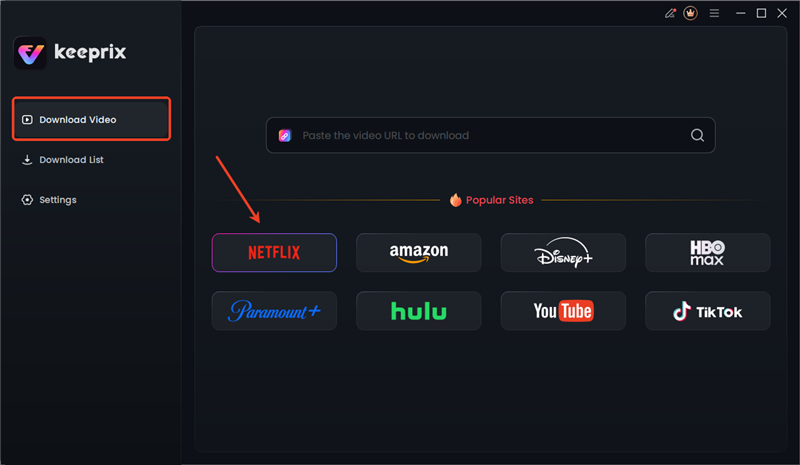
Choose Netflix in Keeprix
Step 3: Log in to the platform using your credentials. Keeprix Video Downloader ensures security and doesn’t share your credentials with any other site.
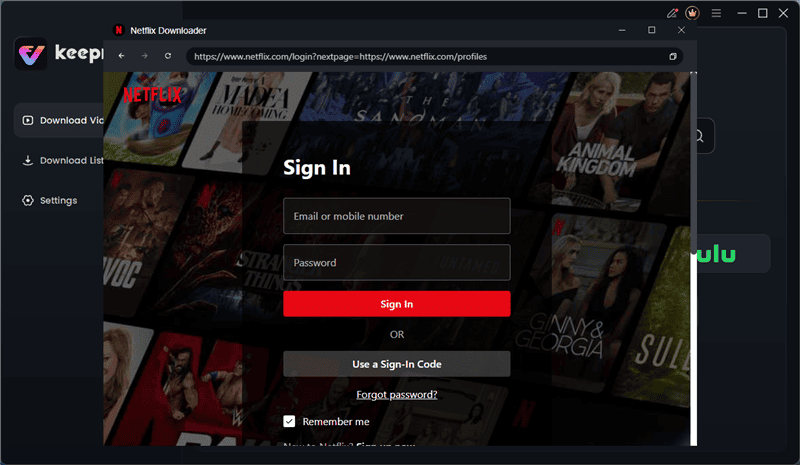
Log in to Netflix in Keeprix
Step 4: On the next screen, choose your favorite show/movie and choose the download button in the bottom right corner.
Step 5: Adjust the final settings, such as video quality, subtitles, or download folder, and click the download button. The video will get saved in your download folder.
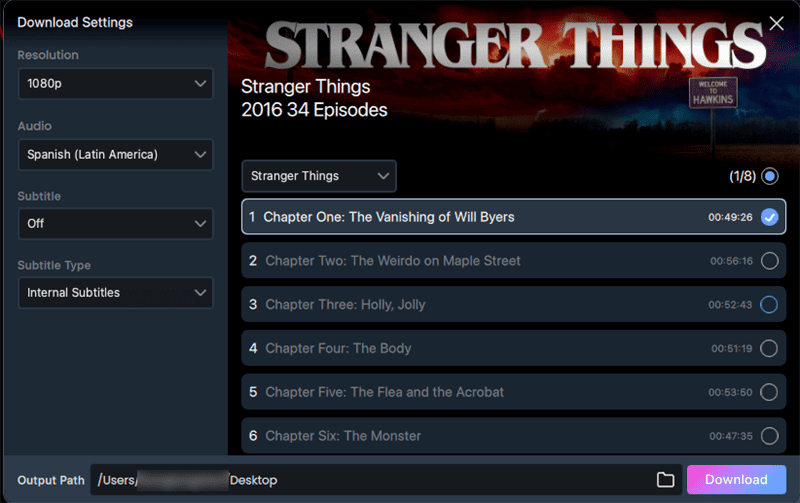
Download Netflix Video in Keeprix
This solution will allow you to watch Netflix content offline without DRM limitations and full control over playback.
Part4. Common Issues Caused by Netflix DRM
The general DRM problems at Netflix are:
1. Black Screen When Screen Recording
One of the biggest issues is that when you try to record the screen during playback, it appears black due to the DRM protection of Netflix. Netflix does this intentionally, making it impossible to copy and redistribute unauthorized copies by inhibiting the video capture software when playing the video.
2. Playback Errors
A problem with Netflix DRM is that it can lead to playback problems. These include the inability of videos to load or stream when the device or application cannot properly validate the DRM license or decryption keys. It may occur because of network errors, license expirations, or incompatibility of a device with a DRM system.
3. Offline Downloads Won’t Play
DRM also limits the playback of even those videos that you have downloaded to watch offline via the official app. And if the license expires or the device is offline, Netflix also stops the playback of the videos.
4. Streaming Quality Limits
Netflix DRM also sets limits on the streaming, depending on the device on which the video is being played. For example, it can prevent playback in HD or 4K on devices that are not certified or are not HDCP-compliant, resulting in streams of reduced quality.
Part 5. Conclusion
To conclude, Netflix has high DRM systems to protect its content, which leads to such problems as black screens in cases of recording and playback restrictions. To bypass the issues caused by DRM, you can use reputable tools such as Keeprix Video Downloader. This software allows you to download any Netflix show in any quality so you can enjoy it anywhere.



Joy Taylor is a seasoned technical writer with over a decade of experience in mobile technology. At iMobie, she specializes in producing in-depth content on iOS data recovery, iPhone unlocking solutions, and iOS troubleshooting.
Product-related questions? Contact Our Support Team to Get Quick Solution >
