How to Bypass FRP with DT Pro Tool 2026
Bypassing FRP with DT Pro Tool requires some techniques and understanding of basic Android settings. This article offers detailed instructions. Besides, using DroidKit’s FRP bypass function as an alternative is highly recommended for new starters.
Getting locked out of your Android device due to Google Factory Reset Protection is a common yet frustrating experience. This security feature is designed to prevent unauthorized access after a factory reset, but it can become a problem if you forget the Google account credentials on an old phone, or you have bought a second-hand phone without removing FRP.
For technicians and advanced users, DT Pro Tool provides a solution to bypass FRP on some Android devices. This article will show you how to bypass FRP with DT Pro Tool and introduce an easier alternative for beginners to fix the FRP lock issues.
DT Pro Tool
DT Pro Tool Overview
DT Pro Tool is a professional-grade software utility designed for servicing and repairing Android smartphones. It’s a paid tool that requires activation and is primarily intended for mobile repair technicians and serious enthusiasts. The tool is renowned for its extensive support for a variety of Android devices and chipsets, making it a versatile asset in a technician’s toolkit.
DT Pro Tool is regularly updated by its developers to support new devices and security patches. It typically operates through an online activation model, where users purchase a license that is tied to their PC’s hardware ID or, in some cases, a physical USB dongle.
Key Features of DT Pro Tool:
- Works with Samsung, Xiaomi, Oppo, Vivo, and Huawei. Dedicated modules for popular chipsets like Qualcomm, MediaTek (MTK), and Spreadtrum (SPD).
- Allows for the removal of Google FRP locks from supported devices.
- Removes various screen locks such as PINs, passwords, and patterns.
- Flashes stock or custom firmware for unbricking a phone, upgrading its software, or fixing system-level bugs.
- Repairs or rewrites IMEI numbers and unlocks network locks.
- Provides a straightforward method for unlocking the bootloader on supported models.
How to Activate DT Pro Tool
Before you can use DT Pro Tool, you must purchase and activate a license. This process ensures you are using the official, supported version of the software.
Step 1. Go to websites like GSMServer, GSM-sources, or other trustworthy ones to find the offer for DT Pro Tool.
Step 2. Purchase a license. They are typically offered for a 3-month, 6-month, or 1-year plan. You can choose the one you prefer and make the payment. After payment, the reseller will send you an activation code via email.
Step 3. The reseller will usually provide a link to the official download page. Simply download the latest version of the DT Pro Tool Loader and any necessary support files or drivers.
It’s recommended to temporarily disable your antivirus software during the download and installation, as professional servicing tools can sometimes be flagged due to their deep system access.
Step 4. Extract the downloaded ZIP file to a folder on your PC. Then run the DT Pro Loader.exe application as an administrator.
Step 5. The tool will open a login window. Register a new account and use the activation code to activate the DT Pro Tool.
How to Bypass FRP with DT Pro Tool
Once your DT Pro Tool is activated, you can proceed with bypassing the FRP lock. The exact steps can vary slightly depending on your device’s brand and chipset (Qualcomm or MTK).
Pre-requisites:
- A Windows PC with activated DT Pro Tool.
- The correct USB drivers for your device installed.
- A high-quality USB cable.
Step-by-Step guide on bypassing FRP with DT Pro Tool:
Step 1. Launch DT Pro Tool and select the tab corresponding to your device’s chipset.
Step 2. Select your device’s manufacturer and the specific model from the list. If your model is not listed, you can use a generic method.
Step 3. In the functions or operations panel, select the Erase FRP Lock option and continue.
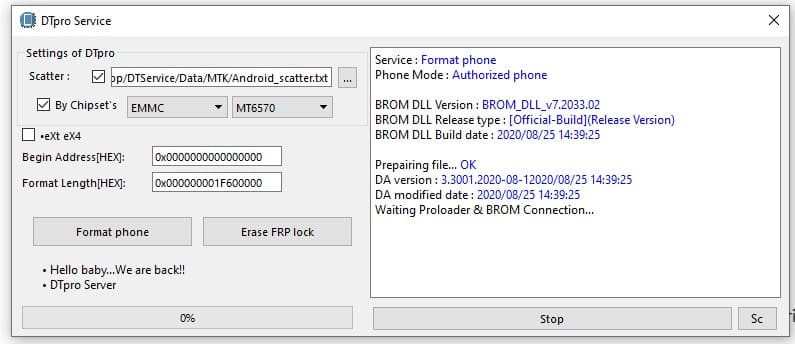
DT Pro Tool Erase FRP
Step 4. Put Your Device into EDL Mode:
- Power off your device completely.
- Holding Volume Up + Volume Down and then connecting the USB cable will force the device into EDL mode.
Step 5. Click Start in DT Pro Tool to execute the FRP bypass task. Do not touch or disconnect the device until the log shows a “Process Finished,” “FRP Erased Successfully,” or similar completion message.
Step 6. Once the process is complete, disconnect your phone and hold the power button to reboot it. The device will start up normally, and you will be able to proceed through the setup wizard without being asked for the previous Google account.
Best Alternative to DT Pro Tool – DroidKit
While DT Pro Tool is undeniably effective, its cost, complexity, and technician-focused nature make it unsuitable for the average user. If you need to bypass an FRP lock without dealing with driver installations, test points, and complicated steps, a more user-friendly tool like DroidKit is the best alternative available.
As a comprehensive Android solution designed for everyone, DroiKit simplifies complex procedures like FRP bypass into a series of clear and guided steps. It is clean and secure software that eliminates the risks and hassles associated with professional tools.
Why choose DroidKit as the recommended alternative:
- Features a clean, intuitive interface with clear on-screen instructions that guide you through the entire process. No technical skills are required.
- 100% free of malware. You don’t have to disable your antivirus or worry about your data’s security.
- Provides tailored solutions for each supported brand and Android version, including the latest Android OS. Ensures a high success rate in FRP bypass.
- Also supports unlocking all types of screen locks, recovering lost data, repairing system issues, and more.
Steps to bypass FRP with DroidKit:
Step 1. Download DroidKit and install it on your Windows or Mac computer.
Free Download * 100% Clean & Safe
Step 2. Launch DroidKit and select the FRP Bypass feature from the main screen.

DroidKit FRP Bypass
Step 3. Connect your FRP-locked device to the computer via USB and click the Start button. Then choose your device brand from the list.
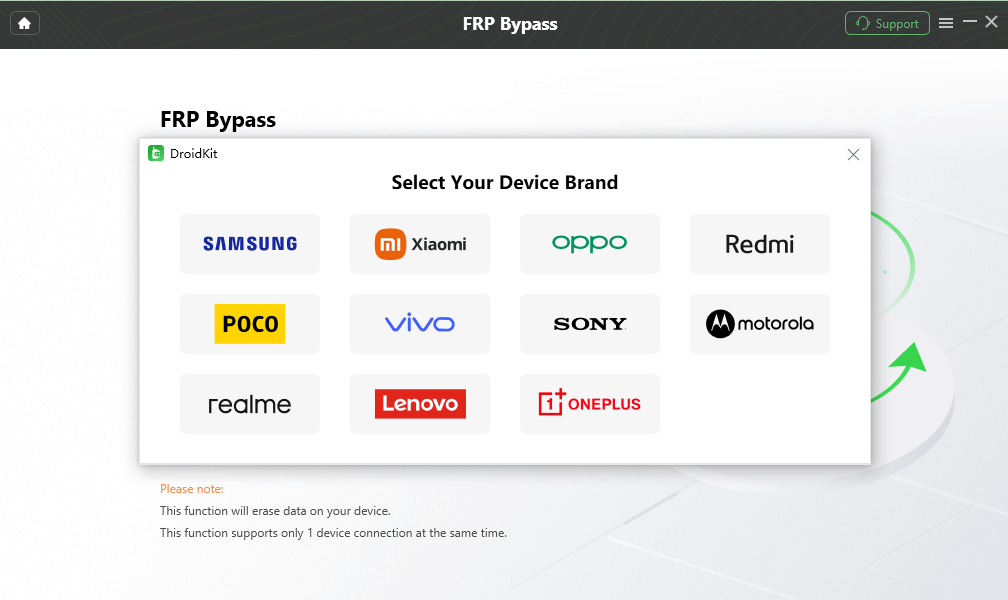
Select Correct Brand
Step 4. DroidKit will analyze your device and start preparing the necessary firmware package. Follow the instructions to put your device into Recovery Mode.
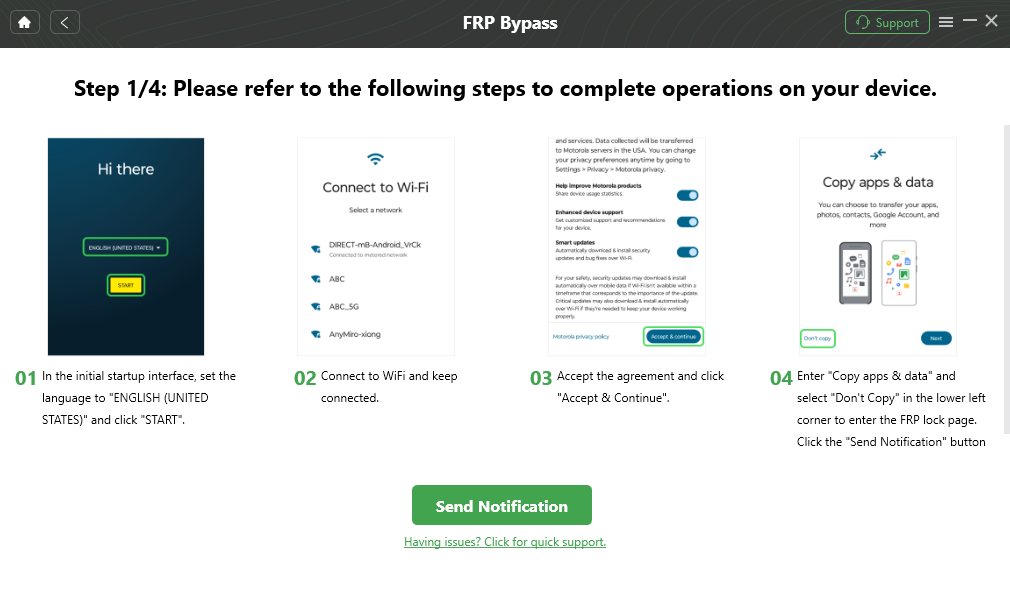
Follow the Bypass Steps
Step 5. All settings are done, start bypassing FRP and wait for the process. Once the process is finished, the device will restart, and the FRP lock will be gone.

FRP Bypass Complete
FAQs About DT Pro Tool
1. Is DT Pro Tool free to use?
No, DT Pro Tool is not free. It requires activation with the purchased code and enables the features. The price ranges from $25 to $39, according to your choice.
2. What brands are supported by DT Pro Tool?
DT Pro Tool supports Huawei, Honor, Xiaomi, Nokia, LG, Oppo, Realme, ZTE, Infinix, and Tecno devices.
Conclusion
For professionals who need to service a wide array of devices, DT Pro Tool is a robust and reliable choice for bypassing FRP locks in 2025. Its powerful features and consistent updates justify its place in a technician’s arsenal. However, the path to using it involves a complex and technical procedure, which can be troublesome for beginners. For the average Android user, a simpler, safer, and more accessible solution like DroidKit is a better option, allowing you to resolve FRP issues quickly and securely.
Free Download * 100% Clean & Safe



Senior writer of the iMobie team as well as an Apple fan, love to help more users solve various types of iOS & Android-related issues.
Product-related questions? Contact Our Support Team to Get Quick Solution >
