What Is FRT Tool & How to Use?
Here is the professional and understandable review on FRT Tool: what it is, how it use and its best alternative. Let’s start to read!
In case you have FRP locks, pattern locks, or software malfunctions on your Android device, you can try using FRT Tool 2025. This all-in-one utility is highly regarded by technicians for its extensive device compatibility and robust unlocking capabilities.
Here, we will discuss what the FRT Tool is, list its main features, give you instructions on how to download and install it, and tell you the advantages and disadvantages of this software. Additionally, we will present you with a bonus alternative – DroidKit, which is compatible with Android 6 to 15 and allows you to unlock FRP even more easily. Let’s get started!
Part 1. What Is the FRT Tool?
1. FRT Tool Overview
FRT Tool 2026—also known as the Flash Repair Tool, is an all-in-one solution that suits perfect for Android technicians and tech-savvy users. It is a custom-made product for the tasks of handling, fixing, flashing, and unlocking Android smartphones with first support for MediaTek (MTK) and Qualcomm chipsets. If you plan to bypass FRP locks, perform factory resets, extract firmware, or flash custom ROMs, the FRT Tool provides a comprehensive set of utilities in one package.
It’s primarily used by mobile repair shops run by professionals, who appreciate it due to its frequent updates, easy-to-use interface, and ability to perform complex tasks quickly. FRT Tool has the backing of the freshest Android versions and models, and it is poised to lead the game in 2025.
2. Key features
FRT Tool 2026 is excellent and features numerous capabilities that make it highly useful for a wide range of tasks, from simple resets to complex firmware operations. Whether you’re dealing with a bricked device, a locked phone, or a corrupt partition, this tool is like a good friend that will not let you down. Here are some of its most prominent functions:
- FRP Reset: A single-click solution to bypass the Google Factory Reset Protection (FRP) lock, making it easy to access locked Android phones without the original Google account details if they are unavailable.
- Factory/Hard/Soft Reset: The user can reset the phone in different ways via this feature, which alters the situation each time. The factory reset is the most suitable choice if you want to completely erase all data from the device and restore it to its original state.
- Firmware Flashing: Upgrade the official software, custom ROMs, or hacked pictures effortlessly. Due to its compatibility with MTK and Qualcomm-based devices, the tool can resolve various issues, including reboot loops and software bugs, and also assist with updating Android versions.
- Firmware Extraction: Download OFP firmware files directly from official packages, which support both MediaTek and Qualcomm. It comes in handy for those who want to back up the system or manually flash parts.
- Backup & Restore: Backup and restore functions make sure that your vital data is safe. From users’ data to firmware partitions, this function will make sure that you will not lose your sensitive data when repairs or system updates are performed.
- RPMB Features: The FRT Tool grants complete access to the Replay Protected Memory Block (RPMB), allowing users to perform backup, write (flash), or erase operations on RPMB data, tasks typically reserved for expert tools.
- Super IMG Packing: Create and flash Super IMG files effortlessly, allowing power users to merge multiple partitions into a single image for easy flashing and ROM development.
Reset Partition Tools: Offers various specialized repair tools for experienced users, such as Reset Persist, Reset Modem, Reset FRP, and Reset RPMB, which enable us to efficiently address not only network issues but also boot and storage-related problems. - Reset Partition Tools: Designed for more experienced users, this tool provides specialized repair tools such as Reset Persist, Reset Modem, Reset FRP, and Reset RPMB, which facilitate troubleshooting of network, boot, and storage issues.
- Qualcomm & MTK Enhancements: The new changes have also extended to an EMMC ISP, which now supports backup/flash/erase/FRP/password recovery in addition to providing a better network for devices that run on MTK6781, Oppo/Realme 8GEN, etc.
These features collectively make the FRT Tool an all-inclusive and powerful toolkit for unlocking, fixing, servicing, and tweaking Android devices, without the need for complicated scripts, paid modules, or multiple third-party programs.
Part 2. How to Download and Use FRT Tool | Stepwise Guide
Step 1. Download & extract
Get the latest version from the official FRT Tool site. Unzip the downloaded file using WinRAR or 7-Zip and place it in a folder that you can easily access.
Step 2. Install with admin rights
In the extracted folder, right-click on frt.exe and select “Run as Administrator”. Proceed with the installation wizard.
Step 3. Register & log in
Run the FRT Tool by clicking on its desktop shortcut. Sign up with your username, password, and activation code (default: admin/123456), then log in—changing the default password is preferred.
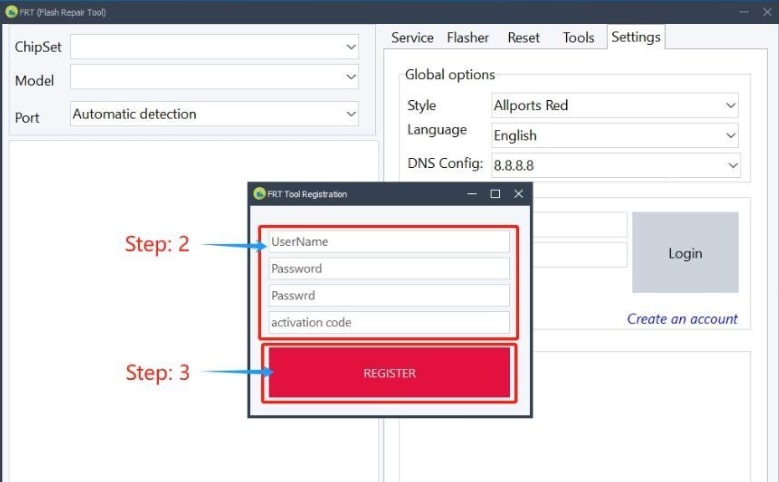
Register and Login
Step 4. Connect your phone
Use a USB cable that is compatible, and ensure that the USB drivers are installed. Connect your Android device so that FRT Tool can detect it.
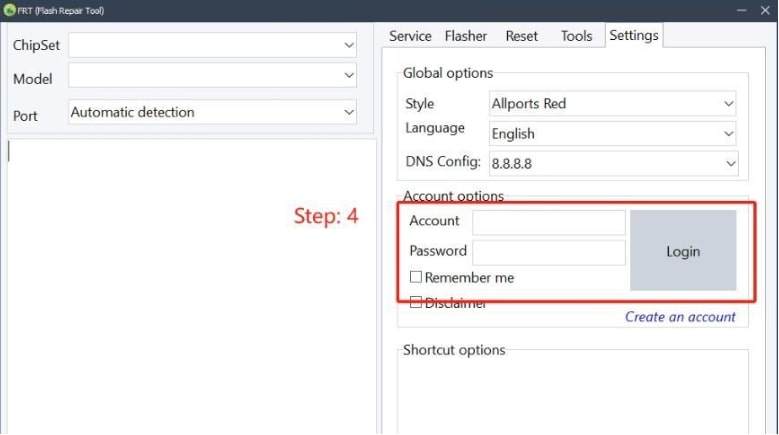
Connect Your Phone
Step 5. Choose & run the desired function
Select the operation you need (e.g., FRP Reset, Firmware Flash, Factory Reset) and confirm it step by step. The tool will do it for you after your device restarts.
Part 3. Pros & Cons of FRT Tool
Pros:
- All-in-one solution: Combines unlocking, flashing, resetting, and partitioning tools into a single interface.
- Supports major chipsets: Works with devices running most MediaTek, Qualcomm, and UNISOC chipsets, including models of 2025.
- FRP bypass made easy: Single-click FRP unlock is compatible with many Android phones, allowing technicians to continue with other tasks.
- Firmware extraction: It can retrieve OFP firmware files from both MTK and Qualcomm formats, a feature that few free tools offer.
- Advanced partition tools: Go into the details and reset the modem, persist, and RPMB partitions, thus solving complicated system and connectivity issues.
- Super IMG packing: Create and flash Super IMG files for customized firmware operations.
Cons:
- Windows only: This feature is currently limited to Windows PCs, with no support for macOS or Linux.
- Requires manual driver setup: The USB driver installation must be performed manually by the user, which can be challenging for those who are not tech-savvy.
Part 4. Bonus Tip. A Better Way to Unlock FRP [Android 6-15]-DroidKit Way
Although FRT Tool certainly equips users with a host of high-tech functionalities, it might not be the best choice for those who love a more personalized, easy-going experience. In such situations, DroidKit- an all-in-one Android Toolkit comes to mind, which provides a simpler yet safe way to remove Google Factory Reset Protection (FRP) from various Android devices, including the latest models up to Android 15.
Suppose you have acquired a second-hand device or forgotten your Google account details. In that case, DroidKit is here to help you regain access to your device in a trustworthy and easily manageable way, without the need for rooting or flashing.
Key features of DroidKit FRP Bypass
- Supports Android versions 6 through 15
- Compatible with a wide range of brands, including Samsung, Xiaomi, Redmi, OPPO, VIVO, Realme, OnePlus, and Motorola
- Removes Google account lock without requiring passwords
- No need to root the device
Free Download * 100% Clean & Safe
Step-by-step on-screen instructions for guided operation
Step 1. Download and install DroidKit on your PC. Open the program and select the FRP Bypass option from the home screen.

DroidKit FRP Bypass
Step 2. Connect the locked Android device to your computer with a USB cable. Press “Start” and then choose the device brand.
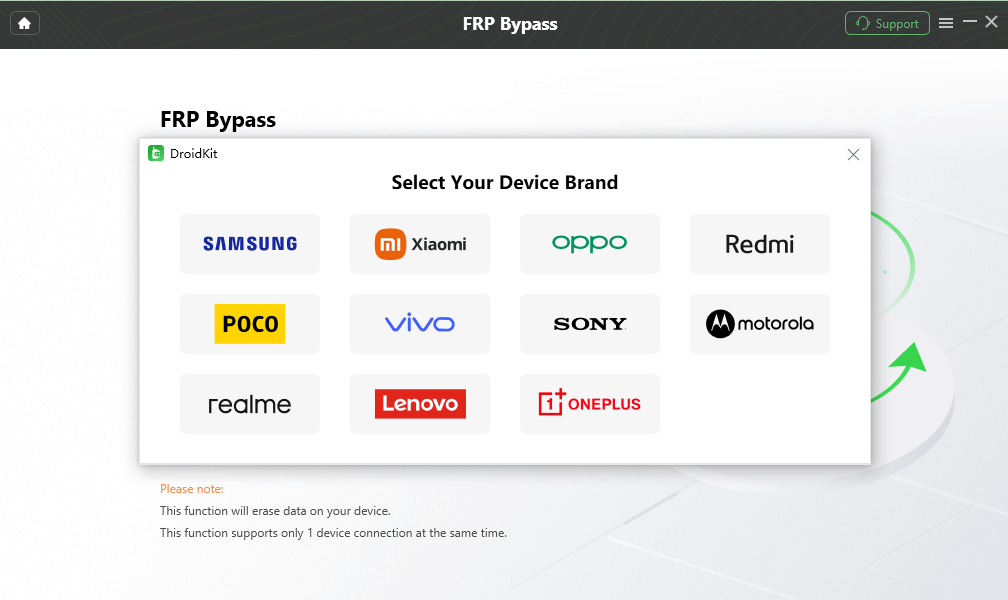
Select Correct Brand
Step 3. DroidKit will create the appropriate configuration file without your intervention based on the device model and Android version. . Wait for the configuration file prepared, and tap on the Start to Bypass.
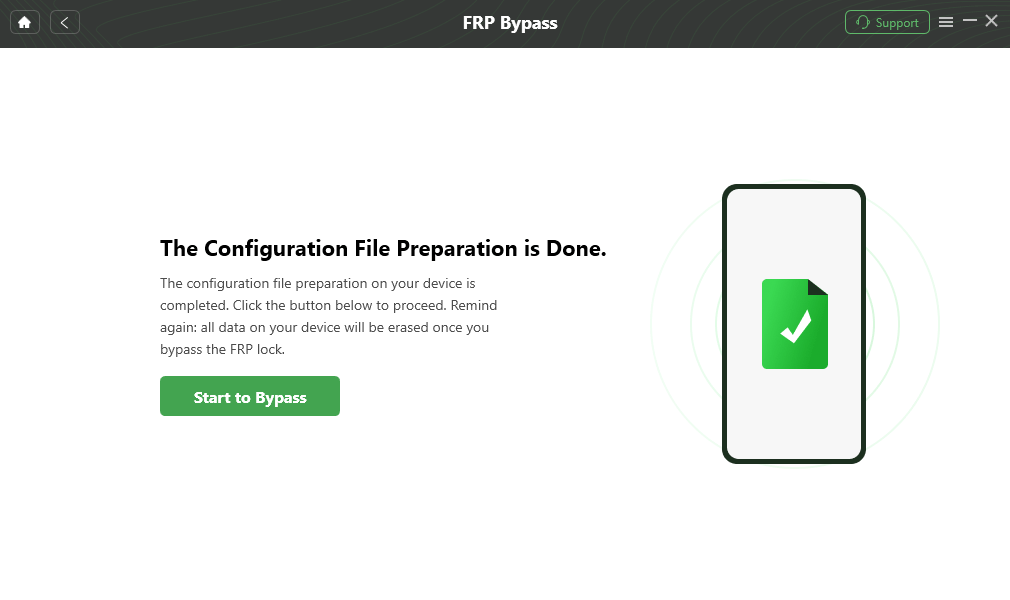
Click Start to Bypass
Step 4. Choose the Android version that is compatible with your gadget. Carry out the operations as they are explained in detail, e.g., if it is for Samsung, type #0#.
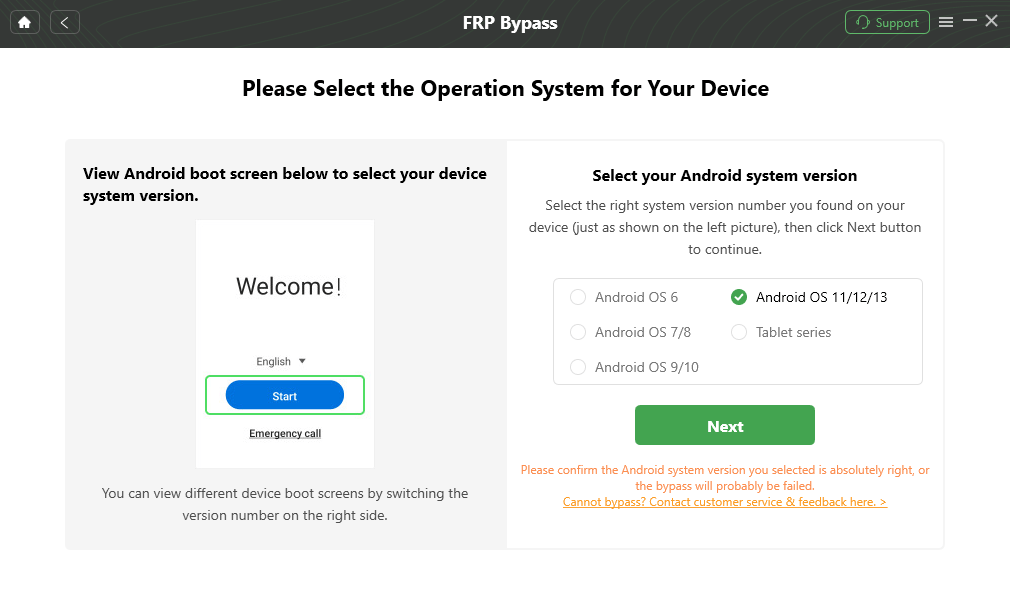
Select the Correct System Version
Step 5. Follow the instructions to complete the corresponding Settings.
After completing the steps above, the device will be restarted and the FRP Lock is also removed successfully.
Part 5. Conclusion
FRT Tool 2026 has been designed as a multifunctional and reliable software for Android developers, capable of performing a wide variety of tasks, such as FRP reset and firmware flashing, as well as carrying out RPMB operations and handling the Super IMG. Beyond its cross-functionality with MediaTek and Qualcomm chipsets, along with partition-level reset tools and firmware extraction, this software is the primary choice to perform deep servicing and repair of the device.
On the other hand, DroidKit is a safer and more user-friendly tool that can be employed for a simplified and more risk-free FRP bypass experience, while also supporting a wider variety of devices, including those running Android 15, and without resorting to complex technical procedures.
Free Download * 100% Clean & Safe



Senior writer of the iMobie team as well as an Apple fan, love to help more users solve various types of iOS & Android-related issues.
Product-related questions? Contact Our Support Team to Get Quick Solution >
