GSM Prime Tool Download 2026: FRP, MTP, Odin & Fixes
GSM Prime Tool users usually get stuck at four checkpoints: finding a trustworthy Windows package, extracting the ZIP or RAR file, getting the phone detected in the required connection mode, and choosing the correct FRP or firmware route. This guide explains those checkpoints, common MTP and Odin failures, and what to do when GSM Prime does not fit the device.
GSM Prime Tool is searched by users looking for a Windows utility for Android service workflows involving FRP, Samsung MTP connections, Download Mode, Odin-related firmware work, and some MTK or Qualcomm device routes. The difficult part is not simply finding a file named GSM Prime Tool. You also need to know whether the package source can be trusted, whether the phone is in the connection state expected by the workflow, and what the selected action is actually intended to do.
This guide focuses on searches such as GSM Prime Tool download, gsmprime, GSM Prime Tool APK, gsmprime mobiletechfrp tool, and download GSM Prime Tool. It does not assume that every menu shown in a GSM Prime build works on every Android phone. Device model, chipset, firmware, security patch, driver state, and connection route all matter.
Use FRP or service tools only on a phone you own or are authorized to service. If a reset phone is simply asking for a Google Account you control, account recovery may be a better first route than using a service utility.
Table of ContentsHide
Quick Answer: Is GSM Prime Tool a Good Fit?
What Is GSM Prime Tool?
GSM Prime Tool Download: Safety Checks
How to Download and Set Up GSM Prime Tool
Is There a GSM Prime Tool APK?
MTP, Download Mode, EDL, or Odin: Which Route Applies?
How a GSM Prime FRP Workflow Usually Starts
GSM Prime Tool Not Working: Common Fixes
When GSM Prime Is the Wrong Fit
FAQs About GSM Prime Tool
Conclusion
Quick Answer: Is GSM Prime Tool a Good Fit?
GSM Prime Tool may be relevant when you are using a Windows PC, understand the device and chipset you are working with, and can identify the connection or firmware route expected by the tool. It becomes a weaker choice when the archive source cannot be evaluated, the package will not extract, Windows never detects the phone, or you cannot tell whether the required route is MTP, Download Mode, EDL, MTK, or an Odin-based firmware process.
| Your Situation | GSM Prime Outlook | Check First |
| Samsung MTP FRP workflow | May be relevant if the device and build match the route | Samsung driver, USB prompt, MTP detection, and exact tool options |
| Samsung firmware or Odin route | Technical workflow | Exact model, binary/build, Download Mode, and firmware files |
| MTK or Qualcomm route | Device-dependent | Actual chipset, driver, supported service state, and tool build |
| GSM Prime ZIP/RAR will not extract | Do not proceed yet | Archive integrity, source, password information, and security scan |
| Phone is not detected | Do not start FRP or flashing actions | Cable, USB port, driver, and connection state |
| You found a “GSM Prime Tool APK” | Use extra caution | GSM Prime is primarily discussed as a Windows utility; verify why an APK is being offered |
What Is GSM Prime Tool?
GSM Prime Tool is a Windows-oriented Android service utility discussed in connection with FRP, Samsung MTP workflows, firmware-related operations, and some MTK or Qualcomm service routes. Different builds and guides may expose different menus, so a feature name in the interface should not be treated as proof that the connected phone is supported.
Users may encounter options or instructions involving:
- Samsung MTP or USB-based FRP workflows.
- Samsung Download Mode and Odin-related firmware routes.
- MTK or Qualcomm device communication.
- AP, BL, CP, or CSC firmware fields in Samsung-related procedures.
- Device detection through different USB or low-level connection states.
Compatibility checkpoint: Judge GSM Prime by the exact device, firmware, chipset, driver, tool build, and connection route. Do not infer support from the Android version or brand name alone.
This distinction matters because a Samsung MTP FRP route, an Odin firmware procedure, and a Qualcomm EDL workflow are not interchangeable. Choose the service path only after identifying what the connected device actually requires.
GSM Prime Tool Download: Safety Checks Before Installing
Download intent is central to this topic, but the filename alone does not establish whether a GSM Prime package is trustworthy. Third-party service utilities may be distributed as ZIP or RAR archives through different sites, and two similarly named downloads do not necessarily contain identical files.
| Download Check | Why It Matters | What to Do |
| Source | Repacked archives may contain modified or unrelated files | Evaluate where the package came from before opening it |
| Archive name and contents | A familiar filename does not prove package integrity | Check what files and version information the source actually describes |
| ZIP/RAR extraction | Repeated extraction errors can indicate an incomplete or damaged archive | Do not run files extracted from a broken package |
| Security scan | An unknown Windows executable deserves additional scrutiny | Scan the archive and extracted files before running them |
| Administrator permission | Service utilities may request elevated access for USB or driver functions | Run as administrator only after evaluating the source and files |
| Password-protected archive | Passwords may be normal for some shared archives, but unexplained nested packages add uncertainty | Do not disable security controls simply to force an unknown package to open |
Do not assume that the package with the largest version number or the words “latest download” is automatically the right one for your phone. The useful question is whether the build and instructions match the task you are trying to perform.
How to Download and Set Up GSM Prime Tool
The steps below focus on preparing the Windows environment without assuming a particular third-party download source.
Step 1. Obtain the GSM Prime package from a source you have evaluated. Check the archive name, tool build, included notes, and the functions the source says the package contains.
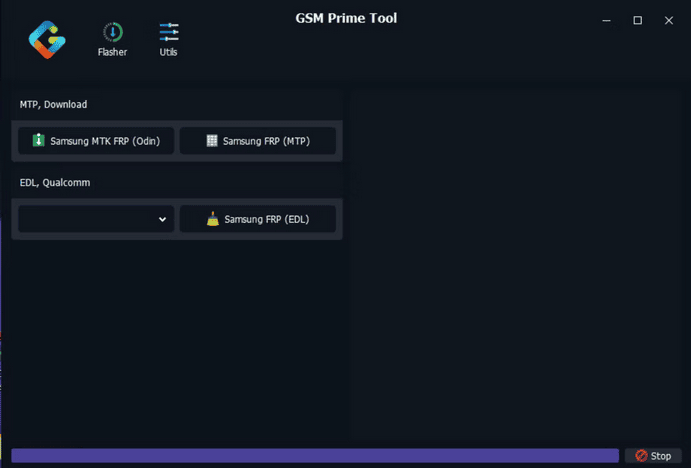
GSM Prime Tool Interface
Step 2. Save the ZIP or RAR archive on the Windows computer and scan it before extraction.
Step 3. Extract the package with a compatible archive utility. If the package is incomplete, repeatedly reports extraction errors, or requires information the source did not provide, stop before running the executable.
Step 4. Open the extracted folder and review the executable name, version information, driver instructions, and any package notes.
Step 5. Install only the USB or chipset drivers required by the device workflow you intend to use. Samsung, MediaTek, and Qualcomm routes should not automatically share the same driver setup.
Step 6. Open GSM Prime Tool only after you know the connection route required by the phone. Do not begin clicking MTP, EDL, Odin, FRP, or flashing options simply because they appear in the interface.
Is There a GSM Prime Tool APK?
Be cautious when a search result offers a GSM Prime Tool APK. GSM Prime is primarily discussed as a Windows service utility, so an Android APK using the same or a similar name should not automatically be treated as the same software.
Before installing any APK claiming to be GSM Prime, check:
- Why the workflow requires an Android APK instead of the Windows tool.
- Who provides the file and whether the source explains its purpose.
- What permissions the APK requests.
- Whether the APK is actually part of the device-specific instructions you are following.
If the source cannot explain how the APK relates to GSM Prime, do not install it merely because the filename matches your search query.
MTP, Download Mode, EDL, or Odin: Which Route Applies?
Many GSM Prime failures begin before the FRP operation itself because the phone and tool are not using the same connection route. MTP, Download Mode, and EDL describe different device states, while Odin refers to a Samsung firmware-flashing workflow rather than a connection mode by itself.
| Connection / Route | Typical Context | Main Checkpoint |
| MTP | Some Samsung USB or FRP workflows | Samsung driver, working data connection, and expected USB prompt |
| Download Mode | Samsung firmware and Odin-related procedures | Exact phone model, binary/build, and matching firmware |
| EDL | Some Qualcomm service workflows | The exact device must support the documented low-level route |
| MTK service route | Some MediaTek procedures | Actual chipset, MediaTek driver, and required device state |
| Samsung diagnostic/Test Mode | Some Samsung service or FRP instructions | The required diagnostic entry point must be available on that build |
| Odin firmware workflow | Samsung flashing procedures | Correct AP, BL, CP, CSC or other model-specific files |
If the GSM Prime procedure you are following requires Samsung firmware files or Odin, review the Odin FRP and firmware workflow guide before loading AP, BL, CP, or CSC files.
How a GSM Prime FRP Workflow Usually Starts
The screenshots and options shown in GSM Prime do not mean every device follows one universal FRP process. Samsung MTP, Samsung firmware, MTK, and Qualcomm workflows can require different drivers and device states. The steps below describe the common decision points rather than claiming one route works for every phone.
Step 1. Identify the exact phone model, chipset when relevant, Android build, and the FRP or service problem you are trying to solve.
Step 2. Determine the required connection route before connecting the phone. This may be MTP, Samsung Download Mode, a documented Qualcomm service state, or an MTK-specific route.
Step 3. Connect the phone with a stable USB data cable and wait for Windows and GSM Prime Tool to detect the expected device state.
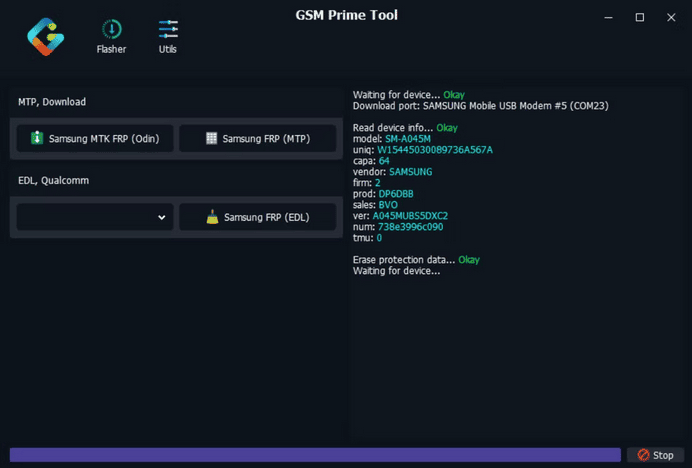
Check Device Detection Before Starting an FRP Route
Step 4. Select only the GSM Prime function that matches the documented device route. Do not switch between Samsung MTP, Odin, MTK, or Qualcomm options simply because the first action fails.
Step 5. Start the operation only after confirming the detected device, selected route, and any required files.
Step 6. Keep the USB connection stable while the operation is active. When the tool finishes, read the final status before deciding whether the process succeeded or needs troubleshooting.
- Data warning: Flashing, wipe, reset, or some FRP-related operations can erase data or make existing data inaccessible.
- Failure rule: If one route fails, identify the failure point before changing drivers, modes, firmware files, or tools.
GSM Prime Tool Not Working: Common Fixes
When GSM Prime fails, troubleshoot the layer that actually failed instead of downloading another package immediately.
| Problem | Likely Check | Next Action |
| GSM Prime Tool will not open | Archive, executable, runtime, or security warning | Recheck the source and package integrity before running it again |
| ZIP/RAR will not extract | Incomplete archive, corruption, or unexplained password | Do not run partial files |
| Phone is not detected | Cable, driver, USB port, or incorrect connection state | Fix device communication before selecting FRP actions |
| Samsung MTP or USB prompt does not appear | The phone is not in the setup state expected by the workflow | Recheck the exact Samsung procedure and firmware state |
| Odin-related route fails | Model, binary/build, firmware file, or Download Mode mismatch | Stop and verify the Samsung firmware workflow |
| MTK or Qualcomm route fails | Wrong chipset assumption, driver, or unsupported device state | Confirm the hardware and documented service mode |
| FRP verification remains after restart | The selected operation did not match the device or current security state | Identify whether the remaining problem is tool compatibility or Google account verification |
GSM Prime Tool Does Not Detect the Phone
Start with the physical and driver layer. Use a known-good USB data cable, try a direct USB port, confirm the appropriate driver is installed, and check whether the phone entered the connection state required by the instructions.
A phone that is not detected should not be subjected to random FRP or flashing commands. Detection and compatibility are separate checkpoints.
GSM Prime ZIP or RAR Will Not Extract
If the archive repeatedly fails to extract, do not run whatever partial files happen to appear in the folder. Recheck the package source, archive size, download integrity, and any password information supplied by that source.
An extraction problem is not an FRP problem. Solve the archive issue before connecting the phone.
Samsung MTP or USB Prompt Does Not Appear
An MTP-related GSM Prime route depends on the phone reaching the setup or USB state expected by the workflow. If the required prompt or connection never appears, do not assume another button inside GSM Prime will create it.
Recheck the exact Samsung model, firmware state, USB driver, and the instructions for that route.
Odin FRP Fails or the Firmware Does Not Match
If the procedure involves Samsung firmware and the model, binary, AP, BL, CP, or CSC files are unclear, stop before flashing. A nearby Samsung model or a package with a similar filename is not a safe substitute for a verified device-specific firmware procedure.
GSM Prime Finishes but Google Verification Remains
If the tool reports completion but setup still asks for a Google Account, identify whether the remaining problem is actually account verification. The Google login after factory reset troubleshooting guide covers cases where account credentials, recovery, or post-reset verification are the real blocker.
When GSM Prime Is the Wrong Fit: Compare a Guided FRP Workflow
GSM Prime is a better fit for users who understand drivers, device modes, chipset differences, and firmware-related service options. If your actual blocker is that the phone is never detected, you cannot identify the correct route, or the GSM Prime package itself cannot be trusted, switching tools before understanding the failure may simply move the same problem elsewhere.
If the device is detected but you prefer a guided FRP workflow for an available supported route, compare DroidKit FRP Bypass with other FRP bypass tool options.
| Situation | GSM Prime | Guided FRP Workflow |
| You know the exact MTP, Download, MTK, or Qualcomm route | May fit the task | Not necessarily needed |
| You cannot determine which GSM Prime route applies | Higher risk of choosing the wrong action | Useful if the device has a supported guided route |
| The archive source is questionable | Stop before running it | Use a source and workflow you can evaluate |
| Odin files do not clearly match the Samsung phone | Do not flash | Use another route only after checking device support |
| The phone is detected and you prefer on-screen instructions | Manual service-tool workflow | A guided interface may be easier to follow |
Step 1. Open DroidKit on the computer and choose FRP Bypass.

Choose FRP Bypass
Step 2. Connect the Android phone with a stable USB data cable and start the available device workflow.
Step 3. Select the device information requested by the software instead of assuming one Android route applies to every phone.
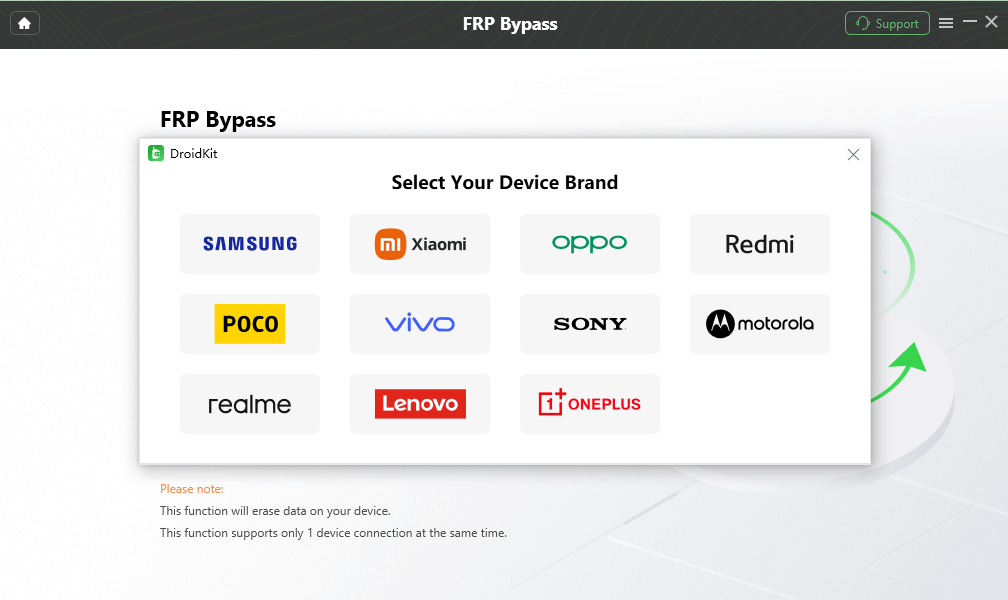
Select the Device Brand
Step 4. Follow the on-screen steps shown for the available supported route and keep the device connected until the workflow completes or provides the next instruction.
Compatibility checkpoint: A guided interface does not mean every device is supported. Check the available device route before proceeding.
FAQs About GSM Prime Tool
Is GSM Prime Tool free?
Download pages may describe GSM Prime packages differently. Check the exact source and package terms rather than assuming that every GSM Prime build is either free or paid.
What devices does GSM Prime Tool support?
Do not rely on one broad device list. Compatibility can depend on the phone model, chipset, firmware, security patch, driver, required connection state, and exact GSM Prime build.
Does GSM Prime Tool work on Mac?
GSM Prime is primarily discussed as a Windows-oriented service utility. A Windows executable should not be assumed to provide the same driver or low-level device environment on macOS.
Is there a GSM Prime Tool APK?
Be cautious with APK downloads using the GSM Prime name. GSM Prime is mainly associated with a Windows utility, so an APK should be evaluated independently and should not automatically be treated as the same software.
Why is GSM Prime Tool not detecting my phone?
Check the USB data cable, USB port, required driver, chipset when relevant, and the connection state expected by the exact workflow. Fix detection before running FRP or firmware operations.
Can GSM Prime Tool bypass Samsung FRP?
GSM Prime interfaces and guides may include Samsung FRP-related routes, including MTP or firmware-based workflows. Whether a route applies depends on the exact Samsung model, firmware, security state, driver setup, and tool build.
Does GSM Prime Tool erase data?
Some flashing, reset, wipe, or FRP-related procedures can erase data or make existing data inaccessible. Review the expected result of the exact operation before starting.
Is GSM Prime Tool safe?
Safety depends on both the package and how it is used. Evaluate the download source, archive integrity, executable, drivers, selected service route, and any firmware files before running an operation.
What should I use if GSM Prime Tool does not work?
Choose the next step from the failure point. A ZIP extraction error needs a package check, a detection failure needs USB or driver troubleshooting, an Odin mismatch needs firmware verification, and a remaining Google login screen may need account-recovery or FRP-specific guidance.
Conclusion
GSM Prime Tool is easiest to understand as a route-sensitive service utility rather than a universal FRP button. The important checkpoints are the package source, archive integrity, device detection, driver setup, connection state, and the exact action selected for the connected phone.
If the ZIP will not extract, solve the package problem first. If the phone is not detected, fix communication before using FRP controls. If an Odin route requires firmware you cannot confidently match to the device, do not flash it. And if the tool finishes but Google verification remains, determine whether the problem has shifted from a service-tool issue to account verification.
The best next step is the one that matches the failure you actually have, not simply another tool with more buttons.
More Related Articles



Joy Taylor is a seasoned technical writer with over a decade of experience in mobile technology. At iMobie, she specializes in producing in-depth content on iOS data recovery, iPhone unlocking solutions, and iOS troubleshooting.
Product-related questions? Contact Our Support Team to Get Quick Solution >
