How to Download & Use UMT Dongle for FRP Bypass [Updated]
UMT Dongle is a powerful hardware tool to unlock Android devices and bypass FRP locks. Simply plug it into a PC, choose the FRP module, and follow the prompts to remove the lock. For an easier FRP unlock with one click, consider the software-based DroidKit tool.
UMT Dongle is a professional tool in the mobile repair market with easy FRP removal, network unlocking, and advanced servicing support for multiple Android brands. Mostly helpful post-factory reset, where people get stuck on the Google verification screen as they cannot access their devices. However, you may face difficulty resolving the driver’s issue to get this thing to work properly. In this guide, we’ll walk you through how the UMT Dongle works for FRP bypass, its pros and cons, and also introduce a more reliable alternative to bypass Google verification without credentials effortlessly.
Introduction to UMT Dongle
UMT Dongle, known as Ultimate Multi Tool, is a phone repair dongle that technicians use to solve difficult Android issues. It provides multiple modules, such as Qualcomm, Samsung, and FRP, to address tasks like flashing official or custom firmware. This tool can unlock SIM or network restrictions and bypass Android FRP locks on supported devices. Moreover, UMT Dongle supports a wide range of brands and models for its universal utility in many repair shops.
With the help of a UMT Dongle, technicians can resolve multiple Android-related issues. Below are its core capabilities, followed by quick pros and cons lists.
Main Features of UMT Dongle:
- Reset Locks (Vivo): This feature is specifically designed to remove lock screens from Vivo phones. However, it works only with supported models and requires the correct platform for execution.
- Reset Pattern: Using this, you can remove pattern lock screens without wiping user data. This tool comes in handy when the pattern is forgotten, but data on the phone still needs to be preserved.
- Reboot to META: UMT Dongle helps you reboot the connected phone into META mode. You will need this feature for many UMT operations such as FRP bypass, IMEI repair, and factory resets.
- Repair Functions: Beyond unlocking, UMT offers a suite of repair utilities. It lets you read and write firmware binaries on the phone and reset corrupted partitions.
- Backup NVRAM: Through this tool, technicians can create a backup of the phone’s NVRAM partition. This backup utility is essential before making changes to prevent permanent loss of network functionality.
Pros:
- The interface of the UMT Dongle is simpler compared to other repair tools.
- UMT Dongle gets frequently updated to stay compatible with the newest mobile devices.
Cons:
- This tool requires a PC and a Dongle, and you have to install drivers.
- You have to pay for activation and purchase a dongle to get the work started.
- Steps of the UMT Dongle may not confuse regular users without technical skills.
- Some newer Android phones are not supported.
What Is the UMT Dongle Price?
UMT Dongle pricing is relatively affordable but varies by seller. In general, the dongle itself costs on the order of tens of dollars. For example, GSMServer lists the UMT Dongle at about $35 USD on its platform. Other vendors, such as AliExpress sellers, offer it for around $40 to $50 USD. However, you need to be aware that additional accessories, including USB cables for certain chipsets or activation packages, can raise the total cost.
Is the UMT Dongle Safe to Use?
Yes, when used correctly, the UMT Dongle is considered safe for device servicing. The software is widely used by mobile technicians to patch vulnerabilities. For utmost safety, always download UMT from a reputable source and follow the official setup instructions. Moreover, proper smartcard drivers are recommended for safer working. With the right drivers and care, UMT safely unlocks and repairs phones as intended.
How to Download and Use UMT Dongle for FRP Bypass?
To bypass FRP on Android phones, the UMT Dongle is indeed practical; before that, proper installation of both the software suite and smart card reader drivers is essential. Without these components, the tool may not detect your device or function correctly. Follow these steps to get the job done:
Step 1. Make sure you have installed the right Smart Card Reader drivers on your PC. If not, go to Device Manager to install the drivers.
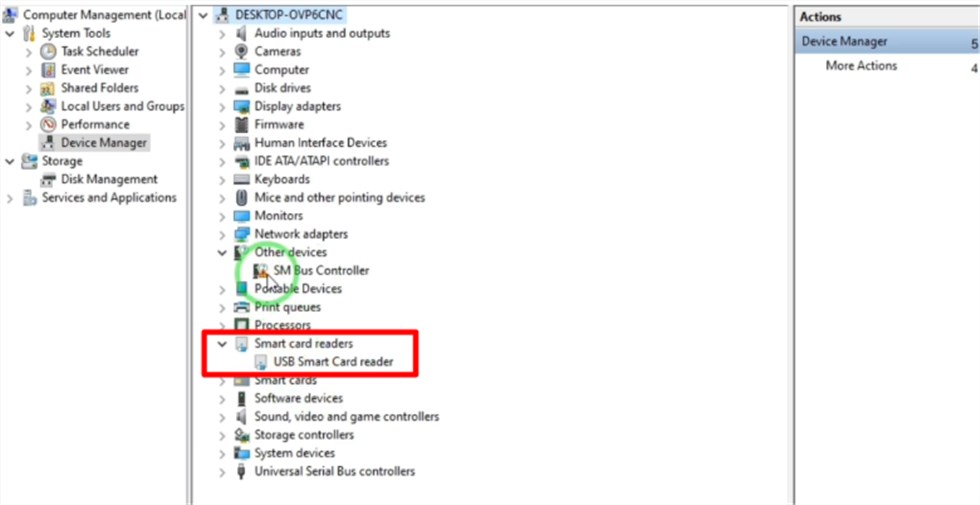
Install Smart Card Reader Drivers
Step 2. Now, access GSMOfficial to install UMT Support Access. On this site, tap on Direct to download its ZIP file.
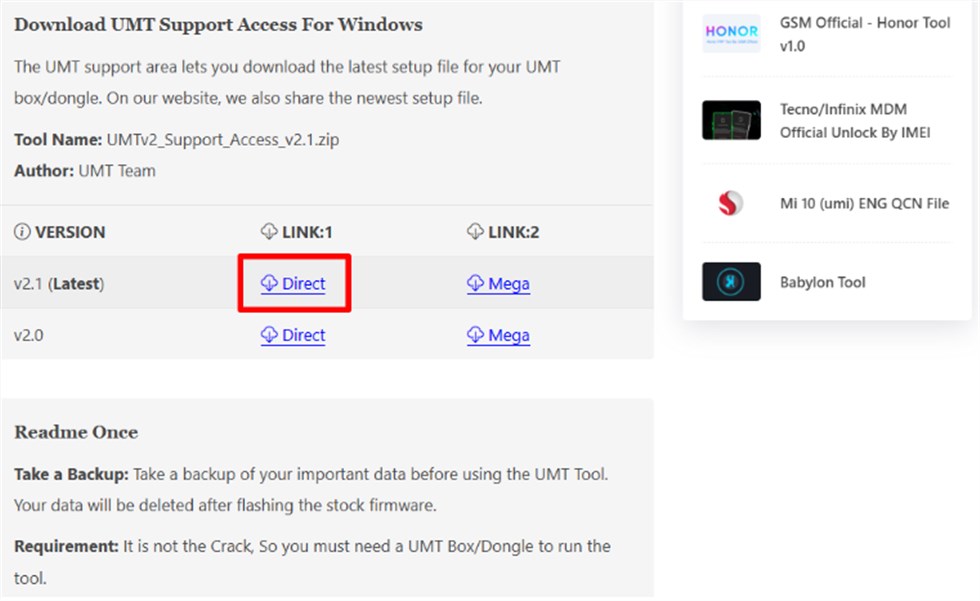
Download UMT Support Access
Step 3. Moving forward, extract the zipped file and run the setup to install the UMT Multi Tool on your PC.
Step 4. Upon installation, connect the dongle to your PC and launch its tool. From the main interface, access the Tools / FRP tab and then pick the device’s brand and model.
Step 5. Finally, tap the Reset FRP button, and the tool will prompt you to connect your phone. Then, UMT will automatically remove the FRP lock.
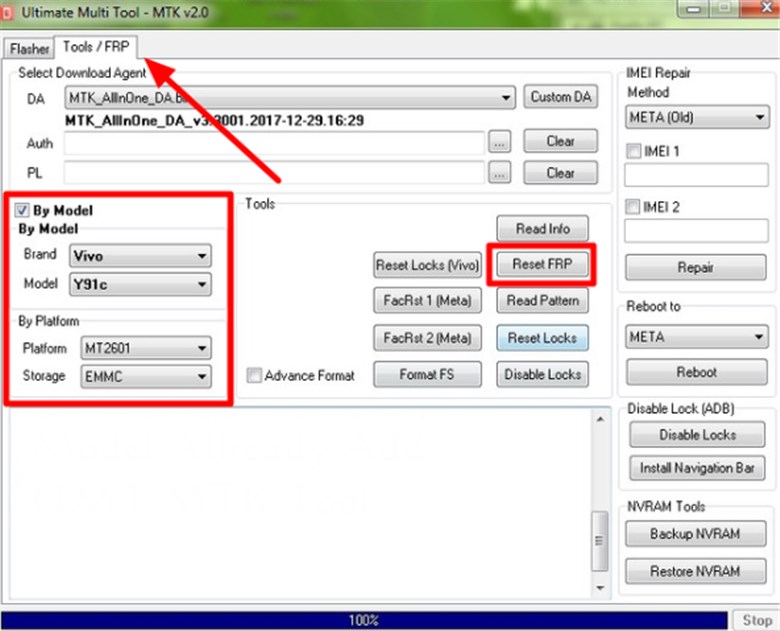
Reset FRP via UMT Dongle
Best UMT Dongle Alternative to Bypass FRP on Android
Given UMT Dongle’s hardware requirements, many users prefer a simpler solution for Android FRP removal. DroidKit stands out as a user-friendly and effective alternative. Compatible with both Windows and Mac, DroidKit allows you to disable Google FRP lock without needing the original Google account credentials. It supports a wide range of Android devices, including Samsung, Xiaomi, Redmi, OPPO, etc. This tool also avoids rooting or making permanent system changes, reducing the risk of data loss or device damage. With its step-by-step on-screen guidance, even first-time users can complete the process without any hassle.
Key Advantages of DroidKit:
- Support bypassing Google account verification on devices running Android 6 – 15.
- Fast FRP bypass process, regain access to your phone within minutes.
- Easy steps to bypass FRP on Android without Google account credentials.
- Also support screen lock removal, data management, and Android system issue fixing.
Free Download * 100% Clean & Safe
How to Use DroidKit to Bypass FRP on Android Easily and Securely:
Step 1. Free download DroidKit and install it on your PC. Choose FRP bypass mode.

Choose FRP Bypass
Step 2. Take the locked Android phone and plug it into your PC via a USB cable. Once the device is detected, click on the Start button.
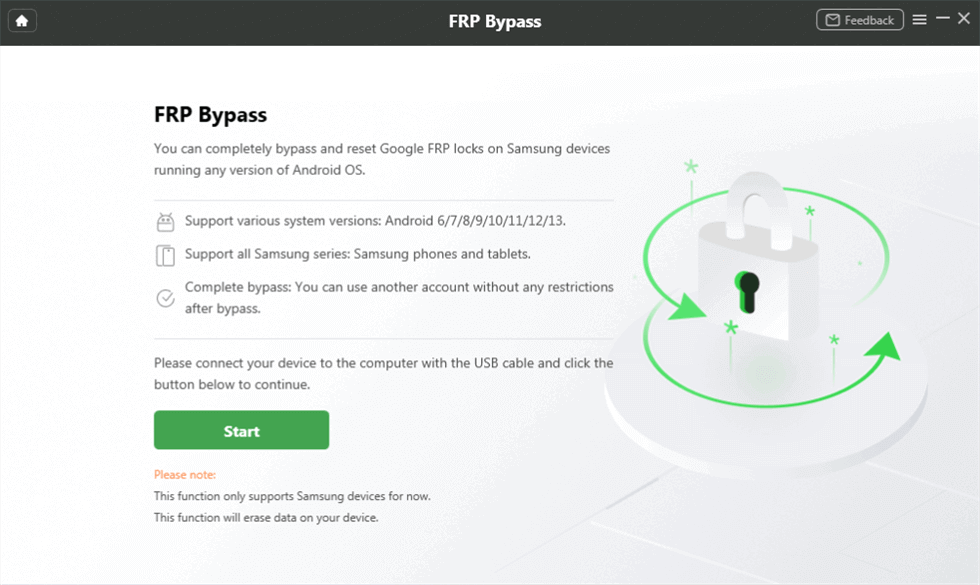
Connect Device and Click Start
Step 3. After the configuration file for the phone is prepared, click Start to Bypass.
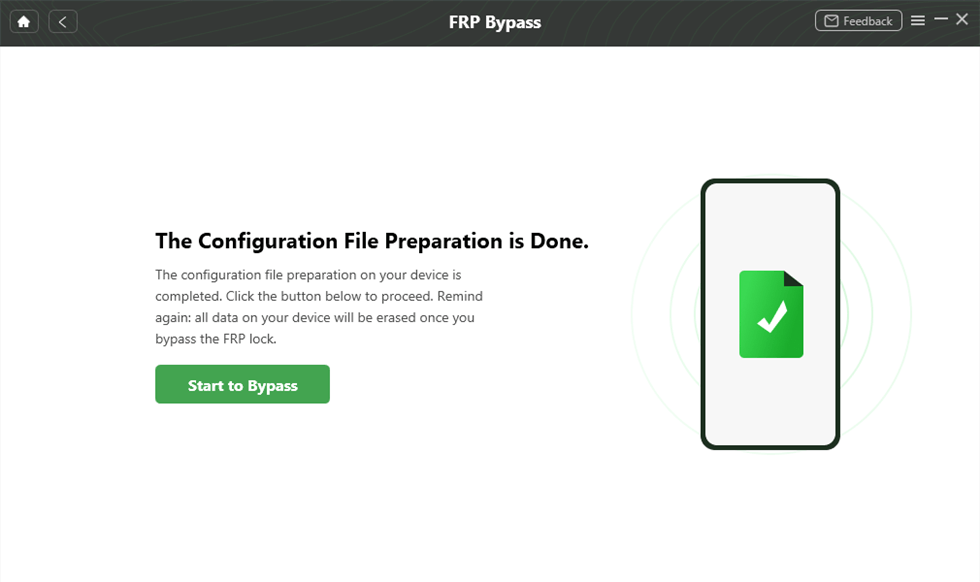
Preparing the Configuration File
Step 4. Follow the instructions to enter Recovery Mode and reset your Android phone.
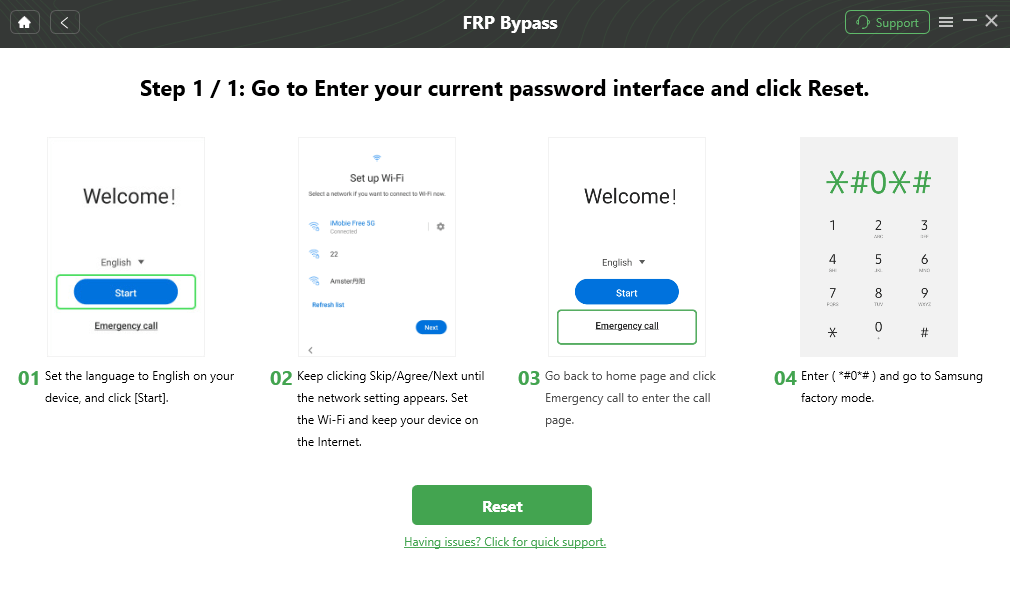
Go to Factory Mode
Step 5. After the process is completed, the phone will be restarted automatically.

FRP Bypass Complete
FAQs about UMT Dongle
Q1. Can the UMT Dongle Tool be used without an internet connection?
UMT Dongle Tool can be used without internet for basic features like unlocking and flashing modules. However, downloading updates or new modules must be done online.
Q2. Do I need a special license to use the UMT Dongle Tool?
Yes, UMT Dongle requires a license to operate. The license is typically associated with the physical dongle itself and a one-year activation. This means you need both the dongle and a valid activation to use its features.
Q3. Can I use the UMT old module after the 1-year activation expires?
No, once the UMT Dongle’s one-year activation period ends, the dongle must be renewed or updated. The modules will stop working after expiration.
Conclusion
In this guide, we explored UMT Dongle’s capabilities, including FRP bypass and unlocking with multi‑chipset support. Due to its hardware cost and complex steps, DroidKit would be a more hassle-free solution. It can help you disable Google FRP lock with a few clicks. No technical knowledge is needed. Try DroidKit to use your phone as much as you want without Google verification restrictions!
Free Download * 100% Clean & Safe



Senior writer of the iMobie team as well as an Apple fan, love to help more users solve various types of iOS & Android-related issues.
Product-related questions? Contact Our Support Team to Get Quick Solution >
