Can You Unlock FRP with IMEI Free? What Really Works
Searching for a free FRP unlock by IMEI? Learn whether an IMEI alone can remove Google FRP, how IMEI-based services differ, the risks of sharing your IMEI, and safer recovery options for a device you own.
Searching for “unlock FRP with IMEI free” usually means you are stuck at Google verification after a factory reset and hope the phone’s IMEI number can provide a quick way back in. You may also find websites that ask for an IMEI and claim they can generate a code, account, or remote FRP removal service.
The important point is this: an IMEI number by itself is not the Google credential Android normally uses to verify ownership after Factory Reset Protection is triggered. FRP is tied to device protection and previously used Google Account information, while an IMEI primarily identifies the mobile device on cellular networks.
That does not mean every service using an IMEI is automatically fake. Some paid repair or remote-service providers may use the IMEI to identify the exact device, look up service eligibility, or process a manufacturer- or tool-specific request. But that is different from saying that anyone can enter an IMEI into a free website and universally remove FRP.
Can You Unlock FRP with IMEI Number?
Not with the IMEI number alone in the normal Android FRP verification process. After a protected Android phone is reset, Android may require security information associated with a Google Account that was previously used on the device.
An IMEI, or International Mobile Equipment Identity, serves a different purpose. It is a unique identifier used for the phone itself, especially in connection with mobile networks, device records, loss or theft reporting, and carrier services.
| Information | What It Identifies | Role in FRP |
| IMEI | The mobile device | May help a service identify a model or service request, but is not itself the Google Account credential used for normal FRP verification |
| Google Account | The user/account associated with Android services | May be required to verify ownership after a protected reset |
| Screen PIN / password / pattern | The device’s local screen lock | May be required before reset or for device verification depending on the situation |
| Proof of purchase | Evidence of legitimate ownership | May be requested by a manufacturer or authorized service center when helping with a locked device |
Why Do Some Services Ask for an IMEI?
A service asking for an IMEI does not necessarily mean the IMEI itself unlocks FRP. The number can be used to identify:
- the exact phone or cellular device;
- the manufacturer and model family;
- service eligibility;
- the correct device record for a repair request;
- whether a paid remote service supports that particular phone.
So a more accurate description is often “FRP service identified by IMEI” rather than “IMEI mathematically generates the FRP unlock.”
Do not confuse an IMEI with a Google Account password, screen PIN, network unlock code, or manufacturer account credential. These are separate identifiers and security systems.
How Do IMEI FRP Unlock Services Work?
Websites using phrases such as IMEI FRP unlock, FRP unlock code by IMEI, or remote FRP removal can describe very different services. There is no single universal workflow shared by all of them.
In practice, an IMEI-based listing may fall into one of these categories:
| Type of Service | What May Actually Happen | What to Check |
| Device lookup | The IMEI is used to identify the device and determine whether a service is available | Supported brand, model, country, carrier, and Android version |
| Paid remote service | A technician or service processes the request after receiving device information | Provider identity, refund terms, required access, and proof-of-ownership rules |
| Unlock code service | The provider claims a code or authorization is available for a specific device family | Whether this actually applies to Google FRP rather than SIM/network unlocking |
| Software/tool service | The IMEI may be collected as part of a desktop or technician-tool workflow | Software developer, supported devices, installation requirements, and data-loss risk |
| Lead-generation or survey site | The site collects information or sends the user through offers without providing a clear unlock process | Whether a real service, company, price, and support channel are disclosed |
This is why two sites using the same “FRP unlock by IMEI” wording can offer completely different things.
What About Huawei FRP Unlock Key Code by IMEI?
You may see searches for Huawei FRP unlock key code by IMEI free. Treat these claims cautiously. A service may use an IMEI to identify a Huawei or Honor device and sell a model-specific operation, but that should not be interpreted as proof that every Huawei FRP lock has a universal free code derived from the IMEI.
Before paying or submitting device information, make sure the provider clearly distinguishes Google FRP from SIM/network unlock codes, bootloader codes, Huawei account issues, and other unrelated locks.
Are Free IMEI FRP Unlock Sites Trustworthy?
The word free is where users should be especially careful. A page may advertise a free IMEI check but charge for the actual FRP service, require credits later, redirect to another provider, or request information before showing the real cost.
Rather than assuming a site is trustworthy or untrustworthy from its name alone, evaluate the specific service.
Check These Before Sharing Your IMEI
- Is the actual service explained? The site should tell you whether it provides a code, remote technician service, software, or only a device lookup.
- Is the real price visible? “Free check” and “free FRP unlock” are not necessarily the same thing.
- Is the supported-device list specific? Claims such as “all Android phones” or “all security patches” deserve extra scrutiny.
- Is there a real support or refund policy? Check this before paying for a result that may depend on device compatibility.
- What information does the provider request? An IMEI may be necessary for device identification, but unrelated Google passwords, payment credentials, or excessive personal data are a warning sign.
- Where does the software come from? Avoid executable files or APKs whose developer and source cannot be identified.
Your IMEI is a persistent device identifier. Do not post it publicly in forums, comments, screenshots, or social media while asking for FRP help.
Does “Free IMEI Check” Mean “Free FRP Removal”?
No. A free IMEI lookup commonly tells you information about a device. An actual FRP removal service, if offered, may be a separate paid service with different requirements.
This distinction matters because many users search for “IMEI FRP unlock free” expecting the IMEI itself to produce an instant unlock. That is not how Android’s normal Google Account verification works.
What to Try Instead of a Free IMEI FRP Unlock
If the Android phone belongs to you, use the least risky ownership-recovery path first.
Option 1. Use a Google Account Previously Synced to the Phone
If you know one of the Google Accounts that was on the phone before the factory reset, try that account during Android setup.
Make sure:
- the phone has a working Wi-Fi or mobile-data connection;
- the email address is correct;
- you can sign into the same Google Account on another phone or computer;
- you are using the current account password.
Option 2. Recover the Google Account
If you know the email address but forgot the password, use Google’s account recovery process. Google also advises waiting after a recent password reset before performing or completing certain reset-related verification flows.
If the phone is specifically asking for an account previously synced before reset, the problem is a Google Account verification issue rather than an IMEI issue.
Option 3. Contact the Seller or Previous Owner
For a second-hand device that still requires another person’s Google Account, contact the seller or previous owner. A phone that remains FRP locked after resale may not have been prepared correctly before it changed hands.
Option 4. Ask the Manufacturer or Authorized Service Center
If you can prove ownership but cannot complete account verification, contact the device manufacturer or an authorized repair channel. Support requirements differ by brand and region, and proof of purchase may be required.
Option 5. Use a Supported FRP Tool on a Device You Own
If official account recovery does not solve the problem, a dedicated FRP tool can be considered for an Android device you own or are authorized to service. Compatibility depends on the exact brand, Android version, model, and security patch.
Bypass FRP on a Supported Device with DroidKit
DroidKit FRP Bypass provides a guided computer-based FRP workflow for supported Android phones and tablets. Unlike an online IMEI service, the process is performed through DroidKit with the Android device connected to the computer.
Its current FRP page lists support across brands including Samsung, Xiaomi, Redmi, POCO, OPPO, Motorola, Lenovo, VIVO, Realme, SONY, and OnePlus. Device compatibility can still vary, so check the current product information before starting.
DroidKit – FRP Bypass Without an IMEI Unlock Website
- Uses a guided computer-based FRP Bypass workflow.
- Supports multiple Android brands and Android versions on compatible devices.
- Does not require you to submit the phone’s IMEI to a random online FRP website.
- Check current compatibility before starting.
- FRP removal can erase device data, so review the product warning first.
How to Use DroidKit FRP Bypass
Step 1. Open DroidKit on your computer and select FRP Bypass.

Choose FRP Bypass from the DroidKit interface.
Step 2. Connect the Android phone with a USB cable and follow DroidKit’s device-detection instructions.
Step 3. Choose the correct device brand and the information requested for your phone.
Step 4. Follow the device-specific instructions shown in DroidKit and continue when the software is ready.
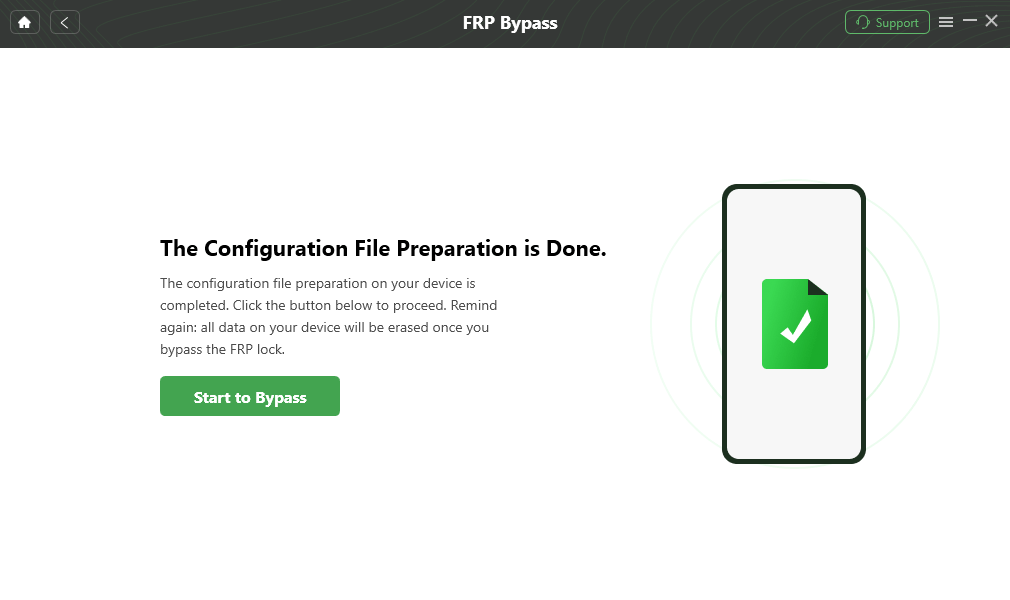
Continue with the device-specific FRP Bypass workflow.
Step 5. Complete the settings requested for the connected device.
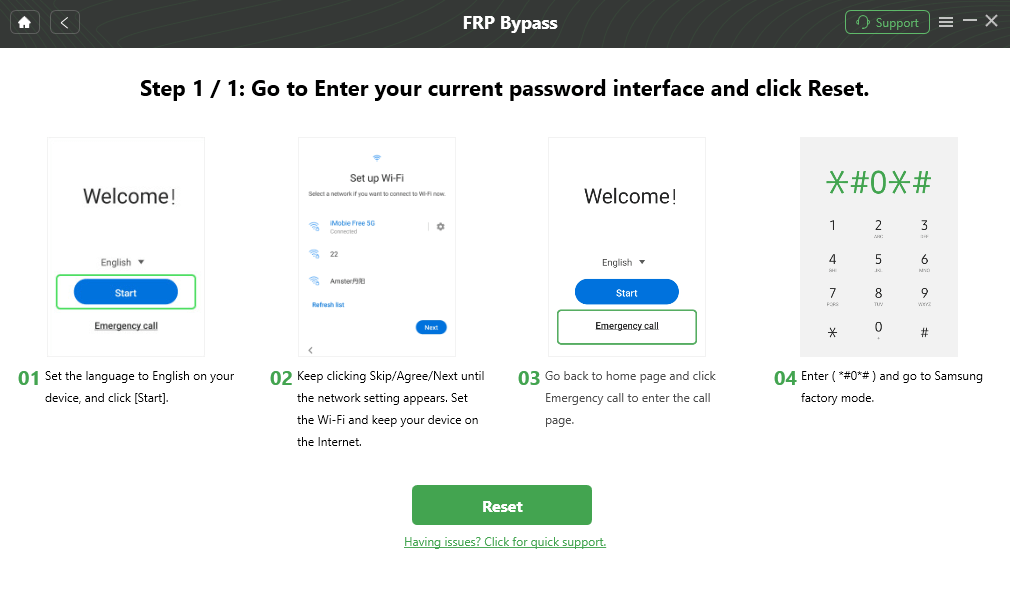
Follow only the instructions shown for the supported device.
Step 6. Keep the device connected until DroidKit reports that the FRP Bypass process is complete.

Wait for the FRP Bypass workflow to finish before disconnecting the device.
According to DroidKit’s current FRP product information, device content is erased after Google account removal succeeds. Back up anything still accessible and use FRP removal only on a device you own or are authorized to service.
FAQs About Unlocking FRP with IMEI Free
1. Can I unlock FRP for free with an IMEI number?
An IMEI by itself is not the normal Google credential used to pass Android FRP verification. Some services may use an IMEI to identify a device or process a separate repair request, but a universal free FRP unlock generated only from an IMEI should not be assumed.
2. Is there a universal FRP unlock code from IMEI?
There is no universal Android FRP code that should be assumed to work on every phone simply because you know the IMEI. Android FRP behavior depends on Google Account verification and can also vary by manufacturer, Android version, and security implementation.
3. Why do FRP websites ask for my IMEI?
An IMEI can help a provider identify the device, determine its model or service eligibility, or associate a repair request with a specific phone. That does not mean the IMEI itself is the FRP password.
4. Is it safe to give an FRP service my IMEI?
Share an IMEI only with a provider you have deliberately chosen and whose service, privacy terms, support, and pricing you understand. Avoid posting an IMEI publicly because it is a persistent identifier for the device.
5. Are IMEI.info or other IMEI sites free for FRP removal?
A site may provide a free device lookup while charging separately for an unlock or repair service. Always distinguish between a free IMEI check and a free FRP removal claim, and verify the current provider terms before submitting a request.
6. What is a Huawei FRP unlock key code by IMEI?
The phrase is used by some third-party services for Huawei or Honor-related unlock requests. It should not be interpreted as proof that every Huawei device has a universal free FRP key derived from the IMEI. Check exactly what lock the provider claims to address and which models are supported.
7. Can the previous Google Account unlock FRP without IMEI?
Yes. If you have access to a Google Account previously used on the device, that is the normal ownership-verification route to try first. The phone does not require you to obtain an IMEI-based service simply because FRP is active.
8. Is DroidKit an IMEI FRP unlock service?
No. DroidKit FRP Bypass is a computer-based Android FRP workflow for supported devices. It should be evaluated by device compatibility rather than treated as an online IMEI-code generator.
Conclusion
“Unlock FRP with IMEI free” sounds simpler than the real Android security process. The IMEI identifies the device, while Factory Reset Protection normally verifies ownership through the Google Account and security information associated with the phone before the reset.
If the phone is yours, start with the previously synced Google Account, Google account recovery, the seller or previous owner, or the manufacturer’s support route. Only then evaluate a compatible FRP tool or paid service if necessary.
When an online provider asks for an IMEI, find out exactly what it is using that number for. Do not assume that a free IMEI check is a free FRP unlock, and do not submit sensitive account credentials to an unknown service just because it promises an instant result.
More Related Articles


Roger Smith is a senior technical writer with years of experience in providing Android solutions. He loves to help users solve various problems such as Android unlock, Android data recovery, and Android system repair.
Product-related questions? Contact Our Support Team to Get Quick Solution >
