When You Should NOT Try Free FRP Bypass Methods
Thinking of using a free FRP bypass tool? Stop and read this first. Learn the 5 critical scenarios—including MDM-managed devices and security risks—where free Factory Reset Protection methods fail or cause more harm than good.
Free FRP bypass methods are widely available online, but they are not suitable for every situation. Many users search “how to bypass FRP lock for free” without understanding the technical, legal, and security risks involved.
Before attempting any factory reset protection bypass method, it is important to evaluate whether your device and scenario are appropriate for unofficial solutions.
1. When the Device Is Company or School-Managed
In most cases, no. Devices enrolled in Mobile Device Management (MDM) systems are controlled by administrator-level policies that override normal user permissions.
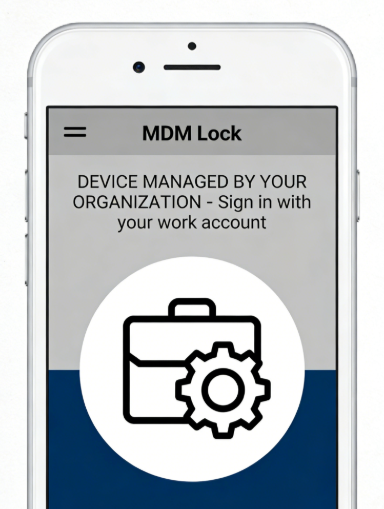
Typical signs your device is enterprise-managed:
- It asks for organization login during setup
- It automatically installs work apps
- It re-enrolls after every reset
- You see “Device managed by…” messages
Even if a Google FRP bypass method is attempted, the device may automatically reconnect to the management server. Only the organization’s IT administrator can officially remove the account restriction.
2. When You Are Unsure About Device Ownership
It is not recommended without verified ownership. Factory Reset Protection is designed to prevent unauthorised access to lost or stolen devices.
Before attempting any bypass, ask:
- Do you have proof of purchase?
- Can the original owner sign in remotely?
- Was the device properly signed out before reset?
If the answer is unclear, bypass attempts may fail repeatedly or raise additional security flags. FRP removal should only be performed on devices you legally own.
3. When Data Recovery Is Still Needed
Many free FRP bypass methods require flashing firmware, rewriting system partitions, or performing repeated resets.
These actions may:
- Overwrite recoverable storage blocks
- Reduce forensic recovery success
- Permanently delete recently erased files
If the device was reset recently and data has not been overwritten, attempting factory reset protection bypass first can eliminate any remaining recovery opportunity. Data recovery should be prioritized before unlock attempts.
4. When the Tool Source Is Unverified
Some unofficial FRP unlock tools shared on forums or file-hosting platforms contain hidden risks.
Common threats include:
- Malware bundled in executable files
- Background credential harvesting
- Remote access backdoors
- Adware or cryptocurrency miners
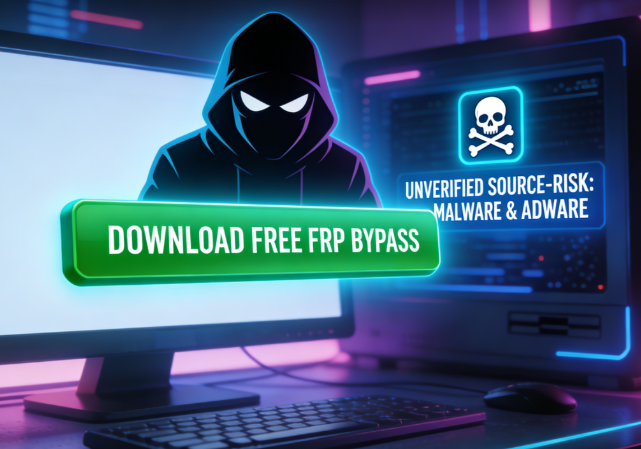
Because FRP bypass tools often require elevated system permissions, installing unverified software increases exposure. The security risk may outweigh the benefit of unlocking the device.
5. When the Android Version Is Too New
Modern Android builds include updated security patches that block previously known bypass paths.
Warning about downloading unverified free FRP bypass tools
- Setup Wizard cannot be exited
- ADB debugging is disabled
- Accessibility shortcuts are sandboxed
- System partitions are write-protected
If your device runs a recent Android version with an updated security patch level, most older Google FRP bypass tutorials will not function. Compatibility depends on firmware build and device model.
Summary — Not Every FRP Lock Should Be Bypassed Freely
You should avoid free factory reset protection bypass attempts if:
| Scenario | Risk Level | Success Probability |
| Company / School Device | Very High | Extremely Low |
| Ownership Unclear | Legal Risk | Not Recommended |
| Data Still Recoverable | Data Loss Risk | Conditional |
| Unverified Tool Source | Security Risk | Unpredictable |
| New Android Version | Technical Limitation | Version Dependent |
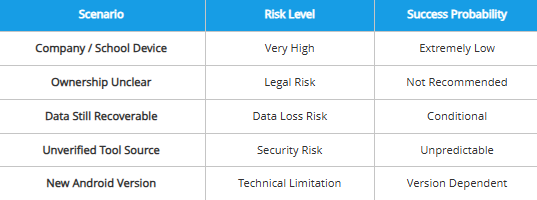
FRP removal feasibility is determined by multiple interacting factors: the device’s account binding state at the time of reset, its firmware version and security patch level, whether enterprise policies are applied, whether recoverable data still exists, and the trustworthiness of any tools involved.
Evaluating these conditions first helps distinguish between technical limitation, policy restriction, and avoidable security risk — rather than assuming the bypass method itself is ineffective.
DroidKit
As an all-round Android solution, DroidKit has multiple functions such as Android data recovery, screen password unlock, Google account lock removal, SD card data recovery, Android data management, etc., fully meeting the various needs of Android users.
Free Download for all windows & 100% safe
Free Download for all mac & 100% safe
Free Download 100% Clean & Safe


Roger Smith is a senior technical writer with years of experience in providing Android solutions. He loves to help users solve various problems such as Android unlock, Android data recovery, and Android system repair.
Product-related questions? Contact Our Support Team to Get Quick Solution >
