Full Review on 3Unlocker in 2026 & Its Alternative
3Unlocker helps remove iCloud activation lock on iPhones and iPads. You can download it on your computer, follow simple steps, and unlock your device safely. We also share a better alternative.
Purchasing a second-hand iPhone or iPad can lead to frustration if it’s locked by iCloud Activation. Tools like 3Unlocker promise to bypass this lock, allowing you to sign in with your own Apple ID. However, its questionable legitimacy, lack of an official website, and inconsistent performance make it risky. This comprehensive 2026 review examines 3Unlocker’s features, pros, cons, safety, and usability, while introducing AnyUnlock as a safer, more reliable alternative.
Part 1. What Is 3Unlocker?
1. Overview of 3Unlocker
3Unlocker is a lightweight desktop tool designed to bypass iCloud Activation Locks on iOS devices, including iPhones, iPads, iPods, and Apple Watches. It also claims to remove screen passcodes and Android FRP locks. Users connect their device to a computer, run the program, and follow on-screen instructions. Advertised as free, it lacks an official website, making downloads risky and success rates inconsistent. Tests on iPhone 6, 7, 8 Plus, X, and 11 often fail, with devices stuck at the “Uploading 3Unlocker to device” stage.
2. Pros & Cons
Pros:
- User-Friendly: Simple interface, suitable for beginners.
- Free to Use: No upfront cost for downloads (if found).
- Broad Compatibility: Claims support for iOS devices and versions (iOS 7–17).
- Lightweight: Minimal storage requirements.
- Multi-Device Support: Works on iPhones, iPads, iPods, and Apple Watches.
Cons:
- No Official Website: Downloads from third-party sites are often fake or malware-laden.
- Low Success Rate: Frequently fails, especially on newer models (e.g., iPhone 11+).
- Survey Scams: Many links require endless surveys, wasting time.
- Data Loss Risk: Unlocking may erase all device data.
- No Support: Lacks official customer support, relying on unreliable forums.
- Jailbreak Risks: Some features require jailbreaking, potentially voiding warranties or exposing security vulnerabilities.
3. Is It Possible to Download 3Unlocker?
Yes, you can download 3Unlocker, but it’s tricky. There isn’t a legitimate or verified official site, which means the vast majority of sites offering it are mostly scams or bursting with fake ads, surveys, and sometimes even malware. Despite completing these surveys, you may still not be able to access the software.
For one who wants to unlock from iCloud, it is better to look for proven alternatives than to risk everything on 3Unlocker.
Part 2. How to Download and Use 3Unlocker to Remove iCloud Activation Lock
Finding a legitimate 3Unlocker download is risky due to unverified sources. If you proceed, ensure antivirus protection and avoid sharing personal details. Here’s how to use it if you obtain a copy:
Step 1: Install 3Unlocker on your Windows PC (supports Windows 7/8/8.1/10). Launch and select “Erase iCloud Lock.”
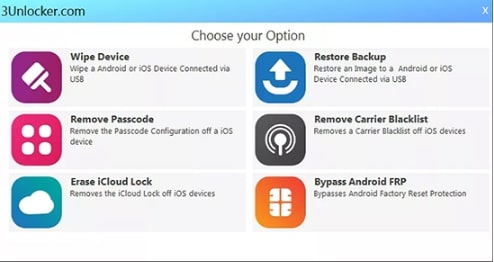
Select Erase iCloud Lock
Step 2: Connect your iPhone/iPad via USB. The tool may auto-detect; if not, select your device from the dropdown and click “Continue.”
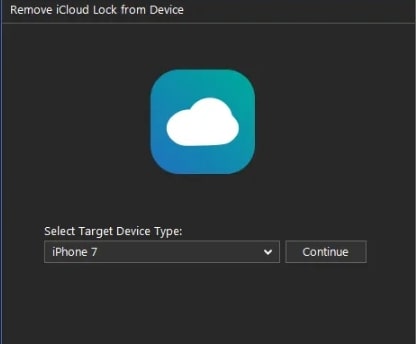
Click Continue
Step 3: Click “Upload” to transfer 3Unlocker to your device.
Many devices get stuck here, halting the process.
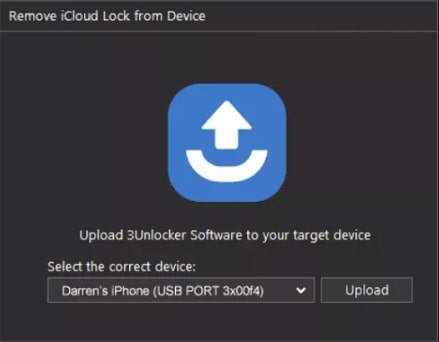
Click Upload
Step 4: If successful, click “Begin Setup” to bypass the Activation Lock.
Once the procedure is completed, you will be able to disconnect your device. You can now use your device normally if it worked.
Part 3. Is 3Unlocker Safe & Legit?
3Unlocker is popular, but it’s not completely safe. There is no official website, so finding a real download is hard. Many links online ask you to complete surveys or download suspicious files. Some of these files may contain malware, and several sites are scams.
User Reviews and Success
A few users report that 3Unlocker worked for older iPhone models, allowing them to remove the iCloud lock. But many others got stuck during the process, or the tool simply didn’t work. Overall, its success is inconsistent, and it doesn’t guarantee results.
Potential Risks
- Data Loss: Using the tool may erase some personal data.
- Malware: Make sure you only download from the official site to stay safe from viruses.
- Scams and fraud: Some websites try to trick you with surveys or fake links. They waste your time and can put your personal info at risk.
Safe Download and Payment
There is no verified official source for 3Unlocker. Even if a website looks real, it may not be safe. There’s no secure payment method or guarantee that the software works as promised.
Part 4. Easy Alternative to Unlock iCloud Activation on iOS – AnyUnlock
For a safer, more reliable solution, AnyUnlock by iMobie is a top choice in 2025. It bypasses iCloud Activation Locks, removes Apple IDs, screen passcodes, MDM locks, and more, with a high success rate across iOS 7–26 and iPhone models up to iPhone 17. Available on Windows and Mac, AnyUnlock offers official downloads and support.
Free Download * 100% Clean & Safe
Advantages of AnyUnlock
- Quick and Easy: You can get rid of iCloud lock in just a few clicks. No tech knowledge needed.
- Fast: The process only takes a few minutes.
- Helpful: Easily remove the Apple ID from your iPhone without needing the password.
- All-in-One: Works for iPhone passcodes, Apple IDs, MDM locks, and other restrictions, too.
- Windows & Mac: No matter which computer you have, it works on both.
Steps to Bypass iCloud Activation Lock on Windows PC
Step 1: First, download AnyUnlock and install it. Open the app and choose Bypass iCloud Activation Lock.
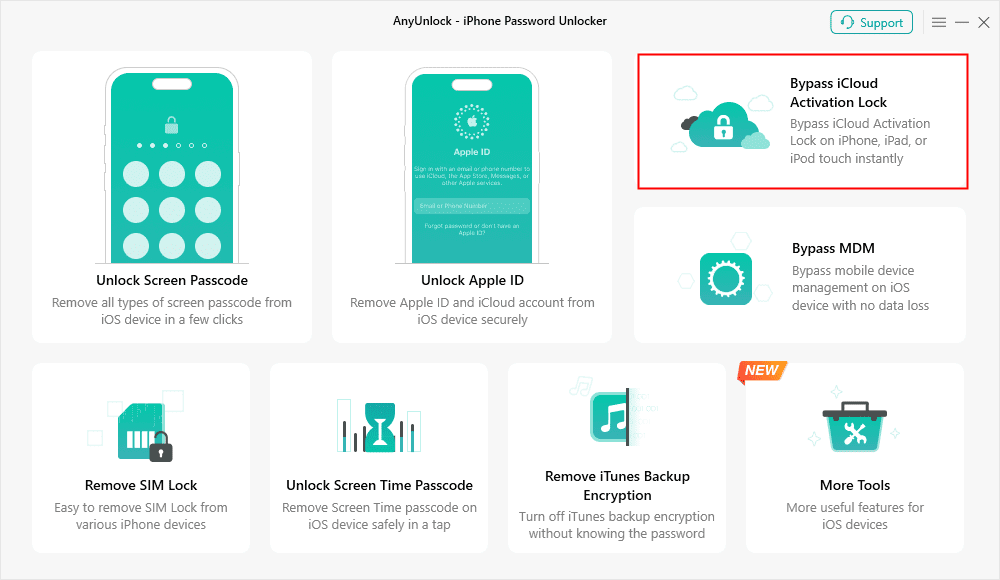
Bypass iCloud Activation Lock
Step 2: Plug your iPhone into your PC. Then click Start Now to move forward.
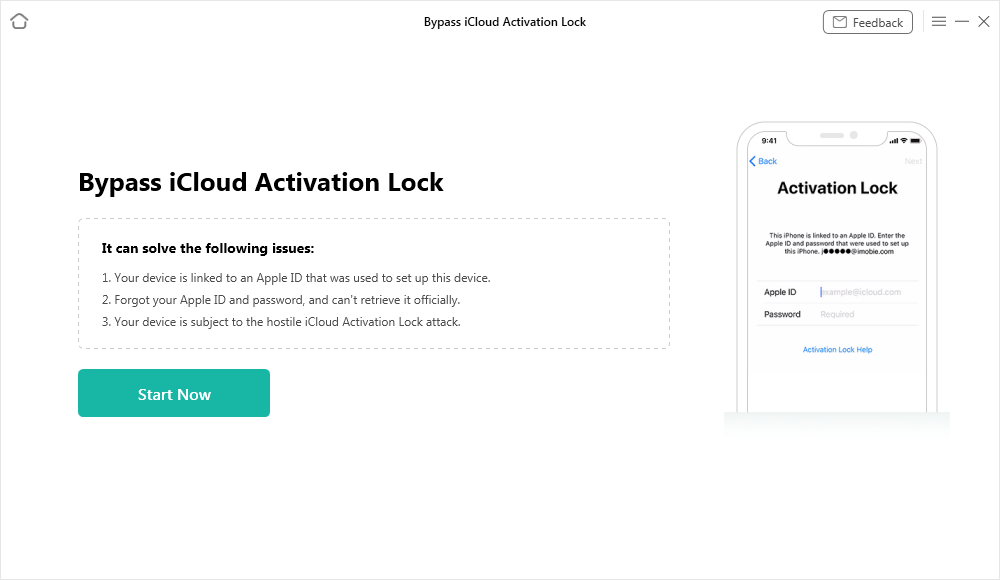
Connect Your iOS Device to the Computer
Step 3: Follow the jailbreak instructions on your device. When it’s done, tap Jailbreak now.
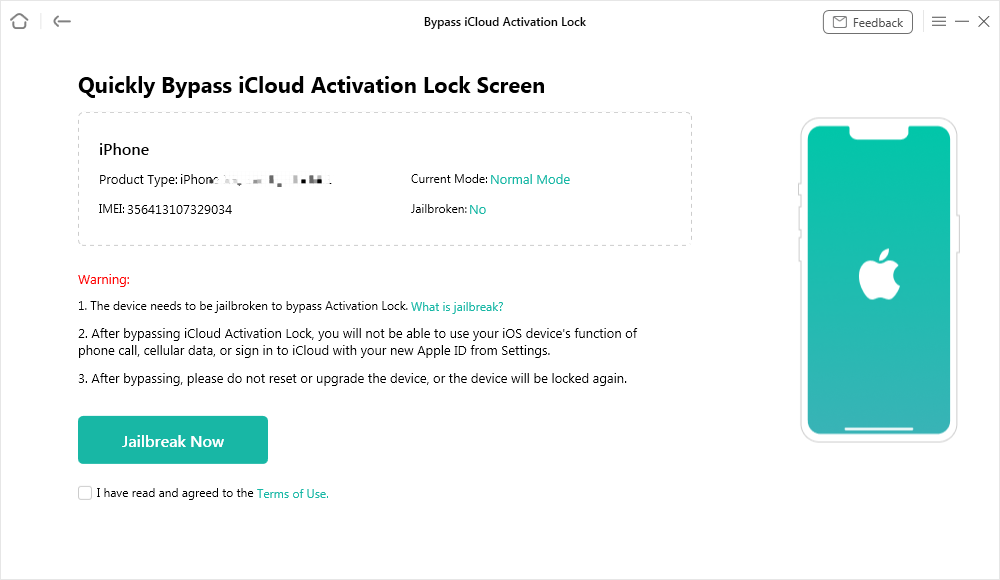
Jailbreak Your Device
Step 4: Hit start now again to begin unlocking iCloud.
Step 5: Just wait for it to finish. You’ll see a message pop up once the lock is removed.
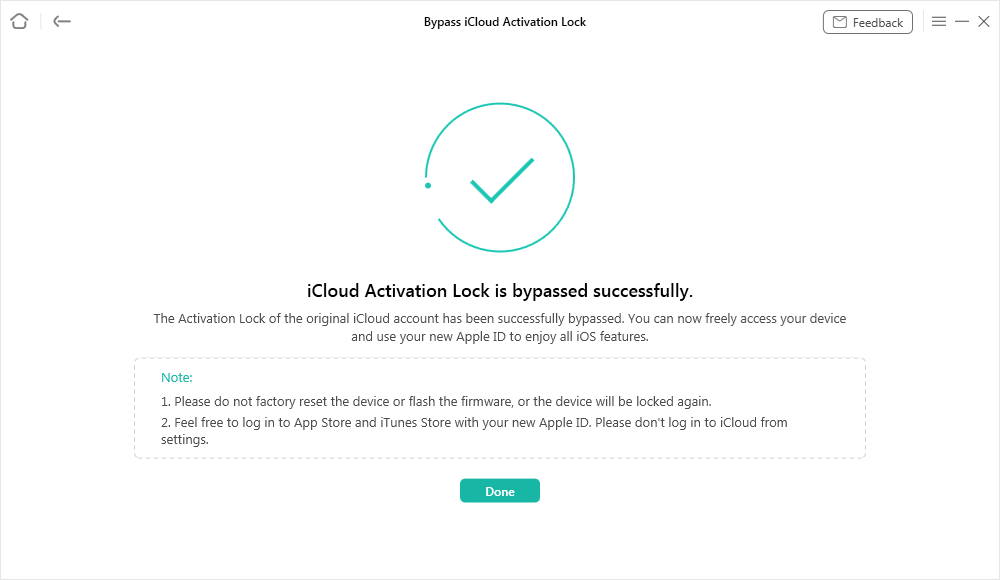
iCloud Activation Lock Is Bypassed Successfully
Part 5. Conclusion
3Unlocker is a tool that says it can remove iCloud Activation Lock, but it is not very safe. There is no official website, many download links are fake, and it may not work on all devices. A much safer and better option is AnyUnlock. iCloud lock can be removed quickly, it works on Windows and Mac, and it’s easy to use. Your iPhone or iPad can be unlocked safely and used without any problems.



Wanda Norris is a junior author in iMobie specializing in iOS tips and solutions. She keeps a close eye on every iOS update to provide practical, easy-to-understand guides that help users solve problems and master their Apple devices.
Product-related questions? Contact Our Support Team to Get Quick Solution >
