How to Jailbreak iPhone 5s 12.5.7: 2025 Updated Guide [With/Without Computer]
Learn simple steps to jailbreak your iPhone 5s running iOS 12.5.7, either with a computer for reliability or without for convenience. Gain root access to install tweaks, themes, and sideload apps beyond Apple’s restrictions. For secure iCloud Activation Lock removal on used devices, AnyUnlock offers a fast, hassle-free solution without needing the original Apple ID.
AnyUnlock – Jailbreak iPhone 5s Even Locked
Free download AnyUnlock to jailbreak iPhone 5s and remove the iCloud activation lock simultaneously! It supports the latest iOS 26.
If you still have your reliable iPhone 5s, running iOS 12.5.7, and would like to reveal its hidden capabilities, jailbreaking is the solution that can make your device work like new again. A jailbroken iPhone 5s is no longer limited by Apple’s rules — you can change the looks of your device by selecting different themes, install apps from other sources, and generally have full freedom and control over your iOS experience.
We will provide a guide on how to do the iPhone 5s jailbreak, whether on a computer or in a non-computer situation.
Part 1. Jailbreak iPhone 5/5s and Remove Activation Lock Easily
Purchasing a used iPhone 5s? If it’s stuck on iCloud Activation Lock due to a forgotten Apple ID, jailbreaking alone won’t help—you need to bypass it first.
iMobie’s AnyUnlock is a trusted, user-friendly tool that combines jailbreaking with Activation Lock removal, restoring full access without the original credentials (for legitimate owners only). It’s compatible with iPhone 5s on iOS 12.5.7 and works on Windows/Mac.
Key Features
- Simple 3-Step Bypass: Connect > Jailbreak > Remove Lock—no tech skills required.
- Broad Compatibility: Supports iPhone 5/5s, plus later models up to iPhone 17 on iOS 16.
- Cross-Platform: Free download for Windows/Mac with a 60-day money-back guarantee.
- Secure Process: Removes lock without data loss in most cases; no Apple ID needed for owned devices.
How to Bypass iCloud Activation Lock
Step 1. You need to download and install AnyUnlock – iPhone Password Unlocker on your PC or Mac.
Free Download * 100% Clean & Safe
Step 2. Open AnyUnlock and from the main window select “Bypass iCloud Activation Lock.”
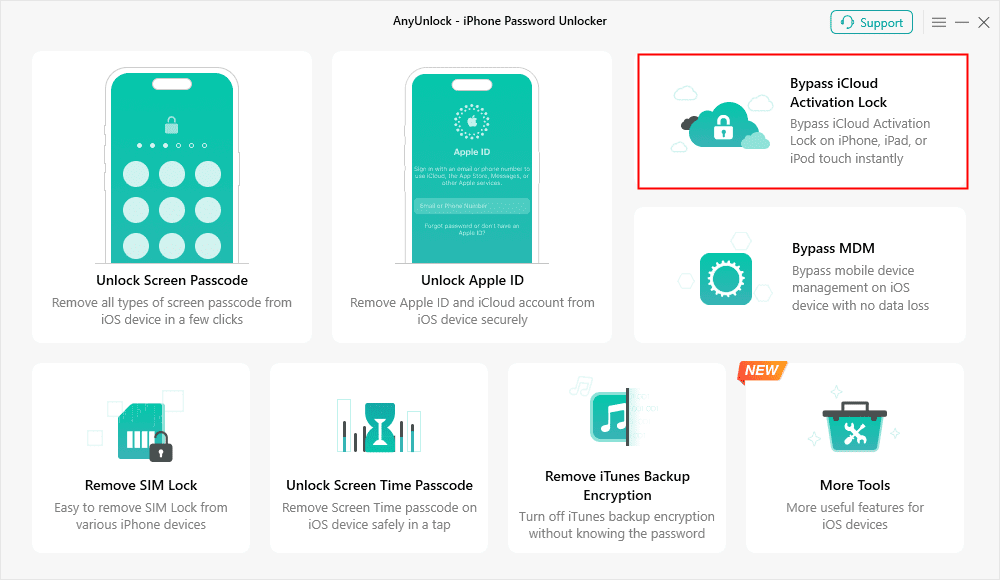
Step 3. Use a USB cable to connect your iPhone 5/5s to the computer. After the device is recognized, press “Start Now.”
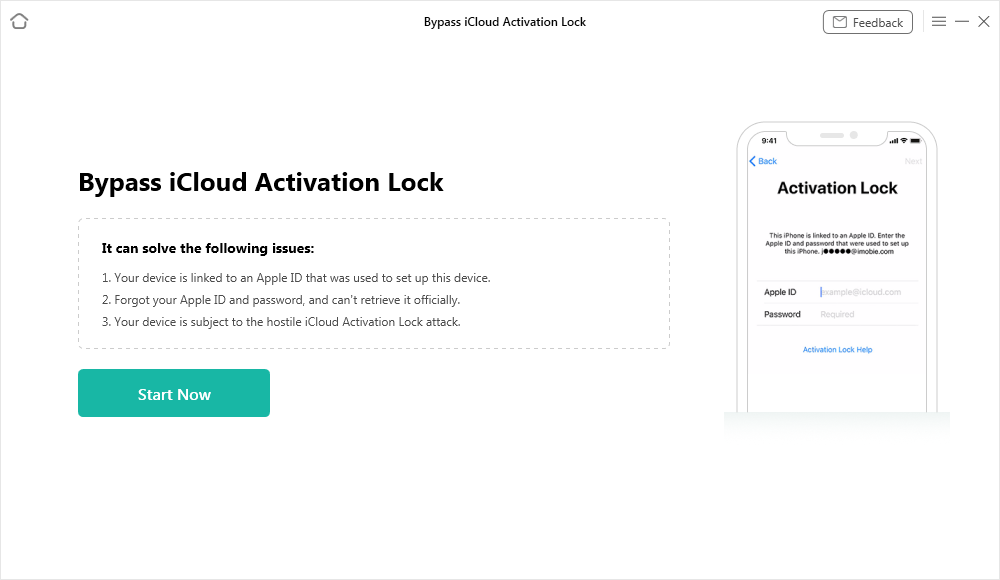
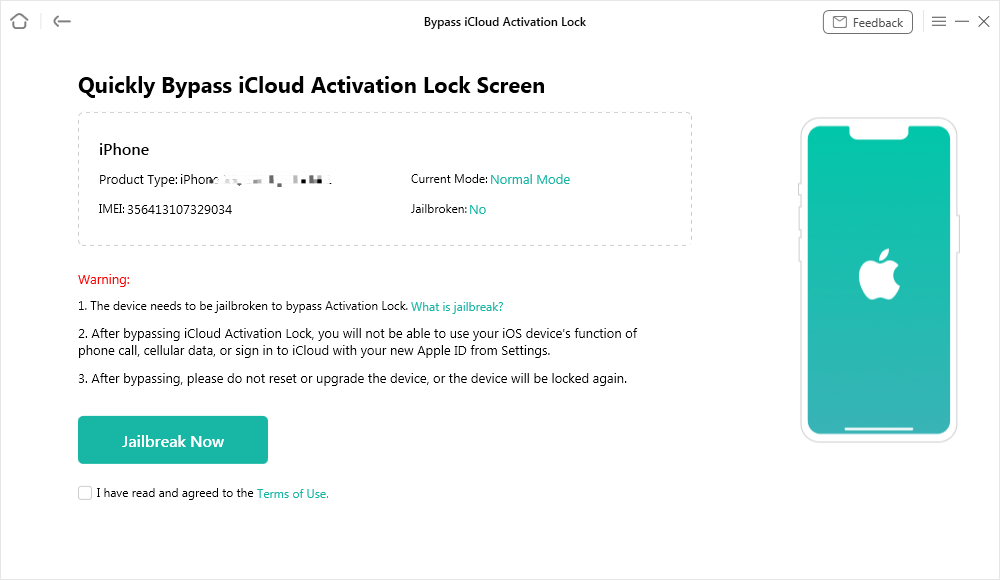
Step 4. Press “Jailbreak Now,” accept the terms, and follow the jailbreak steps.
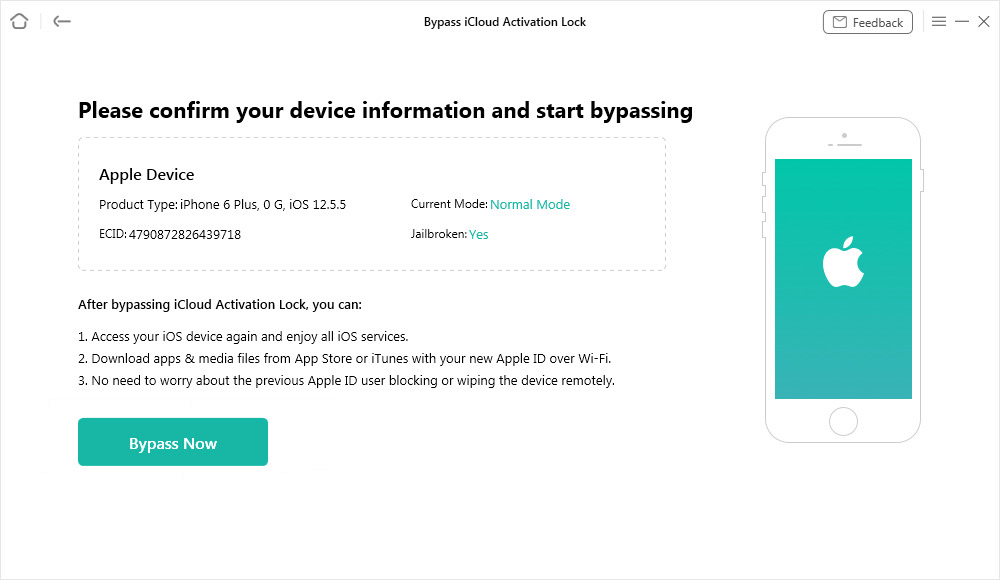
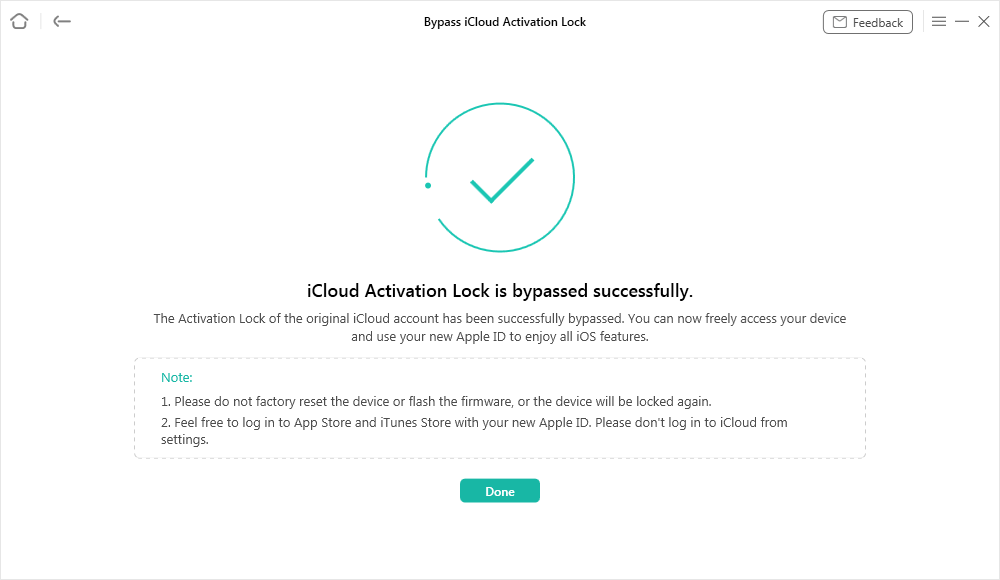
Step 5. Once the jailbreak is done, press “Next” to go on. To begin the removal of the iCloud Activation Lock, click “Bypass Now.” Do not disconnect your device until the operation is complete.
Step 6. Click “Done” after the status shows “Completed.” Your iPhone 5/5s will be usable, but it will be with some restrictions.
Part 2. How to Jailbreak iPhone 5s with Computer
If you prefer a more controlled and less risky method, the most dependable way to jailbreak your iPhone 5s is with a computer. For iOS 12.5.7 on iPhone 5s, we recommend platform-specific tools: 3uTools (Unc0ver-based) on Windows and Checkra1n on Mac. Both are free and community-vetted as of 2025.
How to Jailbreak iPhone 5s on Windows Using 3uTools
Windows users can hardly find a simpler and more reliable method than 3uTools when it comes to jailbreaking an iPhone 5s running iOS 12.5.7. It is a very approachable software that supports you with file management, installation of jailbreaking tools, and even fixing your system with minimal effort from your side. The stepwise procedure given below will help you to do it properly.
How to Jailbreak iPhone 5s Using 3uTools on Windows:
Step 1. Get 3uTools for your Windows computer from the official website and install it.
Step 2. In case the request appears, set up the necessary parts, like iTunes or device drivers, to be able to detect the device properly.
Step 3. Select “Repair Driver.” Then press the “Repair Now” button when the window appears.
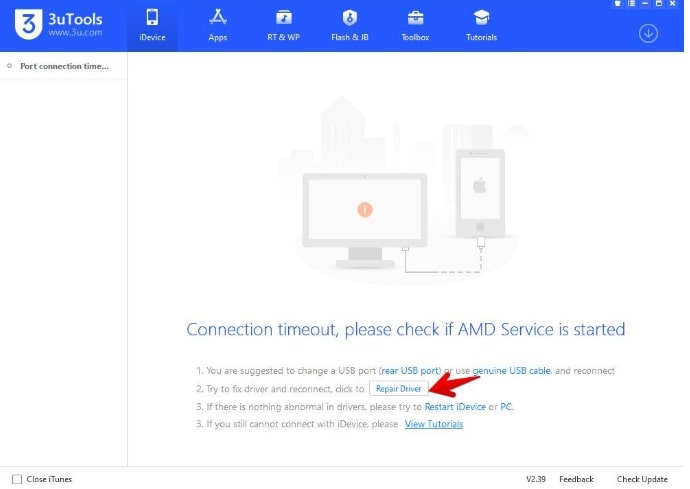
Step 4. You will be able to read the confirmation message once the repair operation is done correctly. iPhone should be reconnected as required. After that, press “Confirm”.
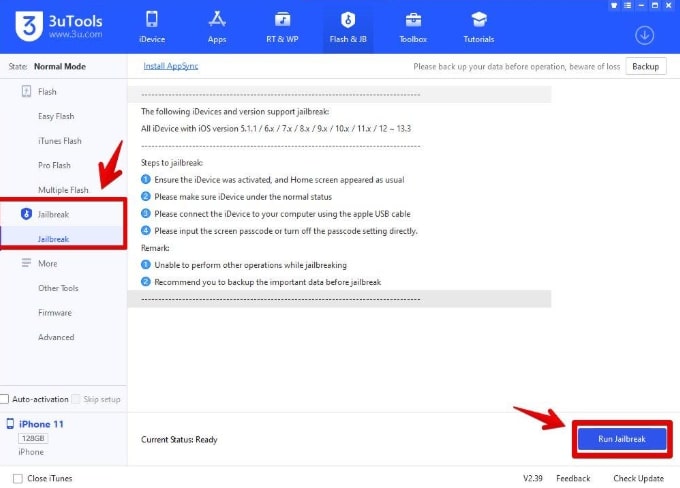
Step 5. Select “Flash & JB” from the 3uTools main menu and then “Jailbreak.” The procedure can be initiated by clicking “Run Jailbreak.”
Step 6. Navigate to Settings > General > Device Management. Then, tap on Developer App and Trust. Launch the Unc0ver application and tap the “Jailbreak” button.
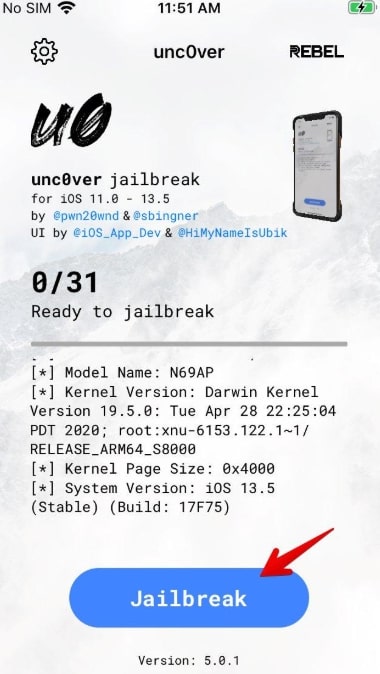
Step 7. After the jailbreak is complete, your phone will restart. You will know the jailbreak was successful if you see the Cydia icon on your device. If the Cydia icon is not present, run Unc0ver again.
How to Jailbreak iPhone 5s on Mac Using Checkra1n
Checkra1n leverages the checkm8 exploit for a reliable semi-tethered jailbreak on A7 devices like iPhone 5s.
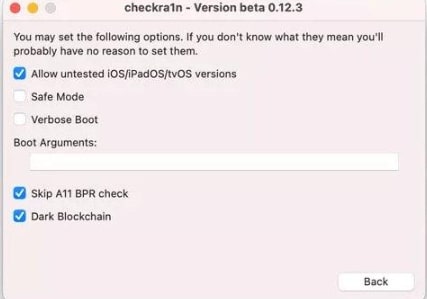
Step 1. Get the Checkra1n application installed on your Mac. Press “Start” in the Checkra1n window to continue with the jailbreak.
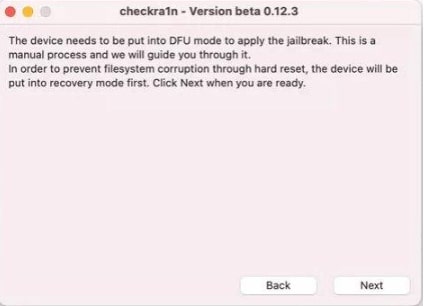
Step 2. You will be shown a warning message — don’t rush and check it thoroughly before tapping “OK.” After that, click “Next.” Then the Recovery Mode will be set automatically.
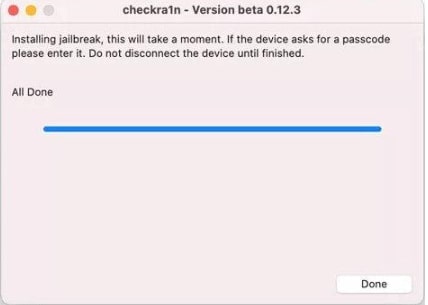
Step 3. Click “Start” and follow the instructions on the screen to put your device into DFU Mode. Click “Done”. Your iPhone 5s has been jailbroken successfully.
Part 3. How to Jailbreak iPhone 5s without Computer
For a no-PC option, use Unc0ver via an online signing service (e.g., zJailbreak or Scarlet) through Safari. This installs the IPA directly but risks certificate revokes—re-sign if needed. As of 2025, it’s viable for iOS 12.5.7 but less stable than computer methods.
Steps to Jailbreak iPhone 5/5s Without Computer:
Step 1. Find and install the jailbreak application
In Safari, visit a trusted signer like zJailbreak.store. Search for Unc0ver v6.1.2 (iOS 12 compatible), download, and confirm installation.
Step 2. Trust the developer certificate
Go to Settings > General > VPN & Device Management > Select Enterprise App > “Trust” > Confirm.
Step 3. Execute the jailbreak
Turn on Airplane Mode first and launch Unc0ver app. Hit the Jailbreak button.
Step 4. Finalize and verify the process
Unc0ver tries to use its exploits one after another. After the jailbreak is done, the device will restart by itself. Find the Cydia icon on your Home Screen – the icon is a visual confirmation of the jailbreak.
Part 5. FAQs
Q1. What can a jailbroken iPhone 5s do?
Install tweaks/themes, sideload apps, customize UI, unlock carrier restrictions, and access root-level features like advanced multitasking.
Q2. Is it worth jailbreaking an old iPhone?
Yes, an old iPhone can be given a new lease of life by jailbreaking it, and also new features can be brought in; nevertheless, the security aspect will be weak, and the warranty will be lost.
Q3. Is Bootra1n the best tool for jailbreaking iPhone 5s on iOS 12.5.7 from Windows?
Bootra1n is a good choice for Windows users who want to go through a stable Checkra1n-based jailbreak process.
Q4. How can I fix the “No Service” issue after jailbreaking?
Take out and insert the SIM card again, reset network settings, or reinstall Cydia Substrate. If it continues to be there, perform a restoration on your iPhone through iTunes.
Conclusion
By jailbreaking your iPhone 5s running iOS 12.5.7, you can unlock a whole new world of customization and enhanced control, which can be achieved either with or without a computer. AnyUnlock – iPhone Password Unlocker would be a better choice if your primary goal is to bypass the activation lock and use the device safely. This is a way to open your iPhone quickly, safely, and without any risks, even if you are technically completely ignorant. So, buy AnyUnlock if you want absolute liberty and very easy access to your device.
Free Download * 100% Clean & Safe



Wanda Norris is a junior author in iMobie specializing in iOS tips and solutions. She keeps a close eye on every iOS update to provide practical, easy-to-understand guides that help users solve problems and master their Apple devices.
Product-related questions? Contact Our Support Team to Get Quick Solution >
