How to Unlock iPhone SIM with Unlocky Tool
While Unlocky claims to unlock phones quickly and for free, it can be unreliable and risky, with hidden fees and privacy concerns. For a safer and more effective solution, AnyUnlock provides a secure way to unlock iPhone SIM lock with ease.
Unlocking a phone can feel risky, especially when many sites promise fast results. The Unlocky Tool says it can unlock iPhones and Android phones for free using your device’s IMEI. The site promises to remove SIM locks, passcodes, iCloud Activation Lock, and FRP in minutes. We examine how Unlocky Tool performs, expose the risks, and recommend a safer, proven alternative you can trust.
What Does Unlocky Tool Do?
Unlocky Tool is an online service that claims to unlock phones for free with IMEI number. It advertises itself as a fast and easy solution for users who want to remove various types of locks from their phones without high costs.
Here’s what the Unlocky Tool says it can do:
- Unlock your phone if you forget the passcode.
- Disable FRP lock on Android devices.
- Remove iCloud activation from iPhones, iPads, or iPods.
- Unlock phone SIM with IMEI number.
According to the website, the process is simple. You enter your phone’s IMEI number, and the tool supposedly generates a unique unlock code within minutes. It even claims to have helped unlock over 2 million devices and to be the #1 free unlocking service online.
Is Unlocky Tool Safe to Use?
When it comes to safety, Unlocky Tool raises several red flags. Although it looks convincing at first glance, real user experiences tell a different story. Many people have reported that the tool doesn’t actually unlock phones and may even involve hidden payment traps.
Security & Privacy Concerns
- Risk to personal data: Providing your IMEI number could reveal your phone’s unique identity to untrusted sources.
- Unclear payment process: Several users said they were charged small fees for verification, then asked to pay more later.
- No guaranteed results: Even after paying, some users never received a working unlock code.
- Possible scams: A few users reported deceptive billing practices, with some calling the site a scam.
What Users Say:
Here’s a summary of what Reddit users have shared online:
– “They don’t work. I tried with a Verizon-locked phone, paid $29, and then they asked for another $89.”
– “It’s a scam. They charge just to check your device and never send a code.”
– “Most of these services don’t work at all, especially for newer phones.”
– “It’s not safe. Better to ask your carrier they unlock it after two months of service for free.”
How to Unlock iPhone with Unlocky Tool
Unlocky Tool says it can unlock your phone quickly by creating a free unlock code using your device’s IMEI number. It claims to work with all major brands and carriers, allowing users to remove network restrictions and use any SIM card they want.
Steps to unlock iPhone carrier with Unlocky Tool:
Step 1: Visit the Unlocky Tool Website
Go to the official Unlocky Tool site and open the unlock page.
Step 2: Enter IMEI Details
Make sure you enter your IMEI number correctly before moving on.

How to check IMEI on iPhone:
- Open Settings>General>About. Scroll down and you will see the IMEI number.
- You can also dial *#06# on the phone app to show it instantly.
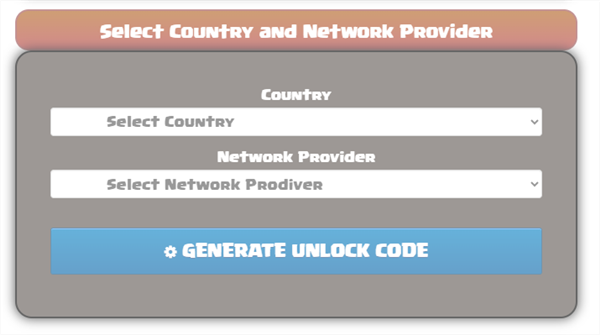
Step 3: Choose Country and Network
Pick your country and the carrier that locked your phone.
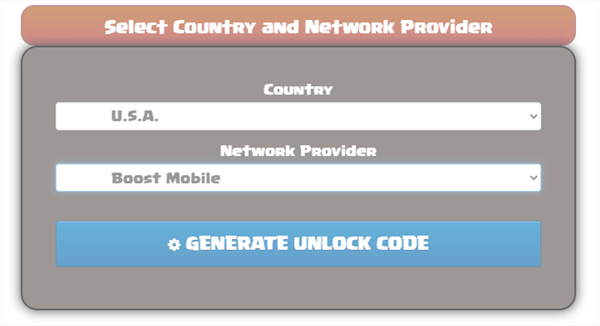
Step 4: Start the Unlock
Press the generate Unlock code and wait a few minutes while the code is prepared.
Step 5: Get the Unlock Code
Your unlock code will come with instructions on how to use it.
Step 6: Insert a New SIM
Take out your old SIM and insert one from another carrier. Enter the unlock code if asked.
Step 7: Restart and Confirm
Restart your phone. Hopefully, your device will now be able to use any SIM card.
Unlocky Tool Alternative for iPhone SIM Unlock
AnyUnlock is a superb application that makes it possible for users to unlock their iPhone SIM lock without fear of scams or hidden problems. The program can assist in removing SIM locks, Apple ID, screen passcodes, and MDM profiles in a few minutes via simple steps. The software is fast, secure, and user-friendly, but it’s still suitable for beginners. Since it runs directly on your computer, you have complete control while your unlocking is going on and it is a smooth and secure process.
Key Features of AnyUnlock:
- Unlock your iPhone SIM lock at home without calling the carrier.
- Fix SIM not supported or invalid SIM errors.
- Works with major carriers like AT&T, T-Mobile, Sprint, and Verizon.
- Switch to any local or international SIM easily.
- No passcode or Face ID needed to complete the unlock.
- Safe process with no data loss or technical steps.
Download AnyUnlock now to unlock your iPhone SIM without effort!
Free Download * 100% Clean & Safe
Steps to Unlock iPhone SIM Using AnyUnlock:
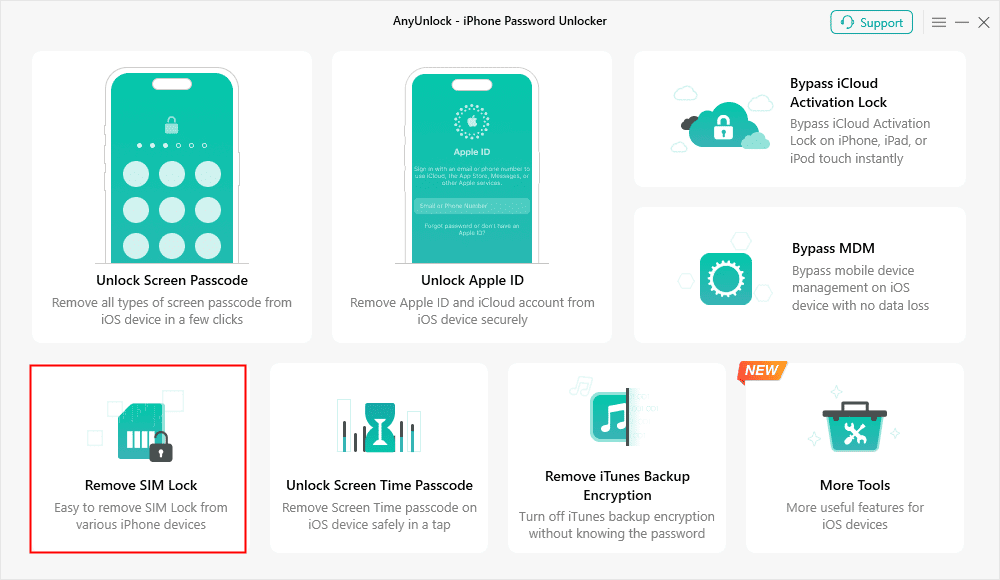
Step 1. Open AnyUnlock. Choose Remove SIM Lock. Connect your iPhone to the computer with a USB cable and click Start.
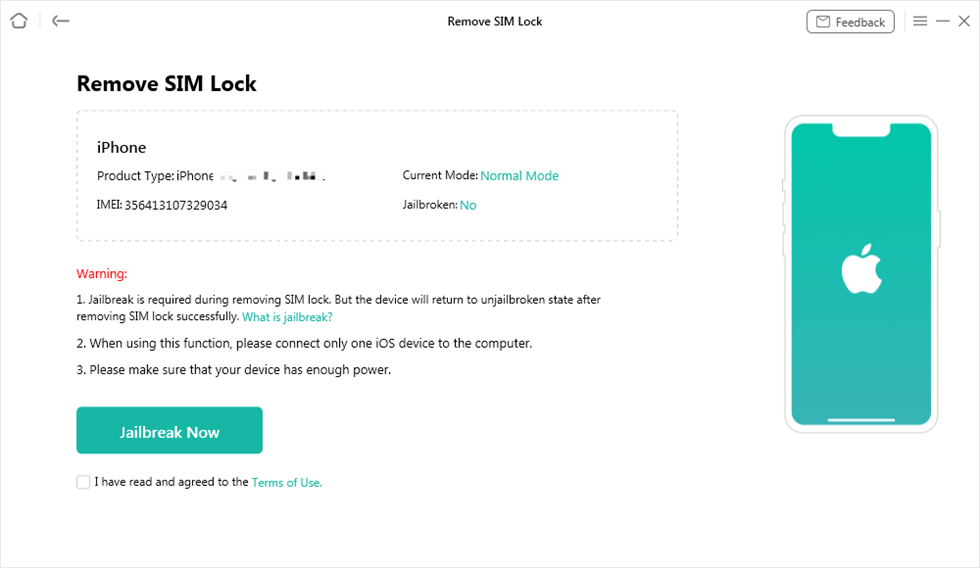
Step 2. When your phone shows up, click Jailbreak Now. On Windows, follow the jailbreak guide. On Mac, Checkra1n will download and finish the jailbreak for you.
Step 3. Remove the SIM card from your phone. Select the network, forget it, and then turn Wi-Fi off. Now replace the SIM card and press Continue.
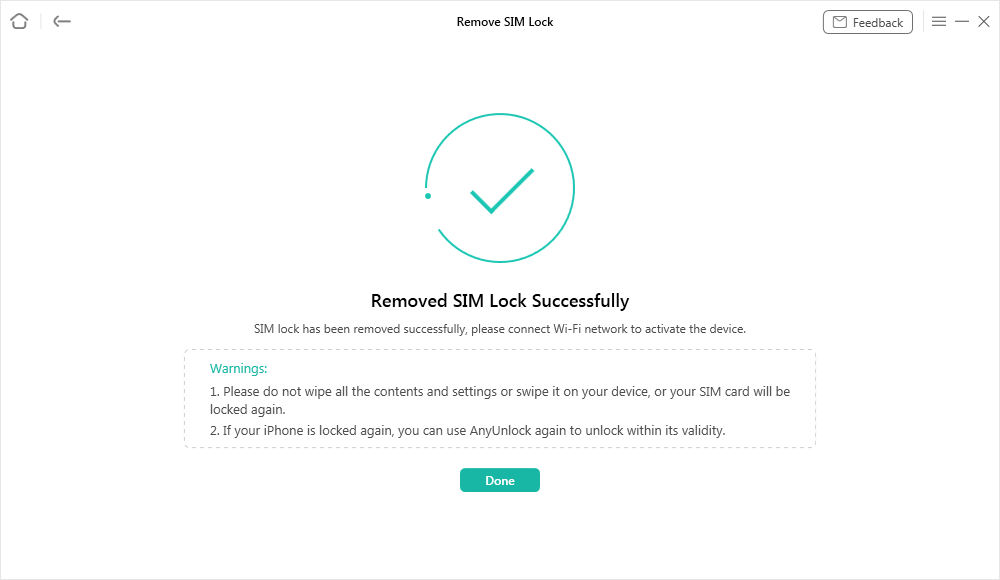
Step 4. Click Unlock to begin. Keep your phone connected until it’s done. You’ll see a message when the SIM lock is removed.
FAQs About the Unlocky Tool
1. What devices are supported by Unlocky Tool?
Unlocky Tool mainly supports Android phones and some iOS devices, but compatibility depends on the device model and software version.
2. Is Unlocky Tool free to use?
Unlocky claims that SIM unlocking is free on their website. However, users on Reddit and other forums say they were asked to pay before completing the process. It seems some features may be paid for, which makes people doubt the tool and consider it possibly a scam.
3. Does Unlocky Tool require jailbreaking?
No jailbreak is needed to use Unlocky Tool. It lets you unlock your phone with IMEI number.
Conclusion
In conclusion, programs like Unlocky tool can be used to unlock SIM-locked phones. Despite the tool’s stated free, some users have complained about payment demands or other reliability issues, so it’s crucial to proceed with caution. On the other hand, AnyUnlock is a safe and effective solution. It provides a straightforward and secure method to remove SIM locks and get full access to your iPhone in a few minutes.
Free Download * 100% Clean & Safe



Joy Taylor is a seasoned technical writer with over a decade of experience in mobile technology. At iMobie, she specializes in producing in-depth content on iOS data recovery, iPhone unlocking solutions, and iOS troubleshooting.
Product-related questions? Contact Our Support Team to Get Quick Solution >
