Resolving +234 WhatsApp Messages: Security Guide
Guide explains how to handle +234 WhatsApp spam by identifying scams, blocking and reporting contacts, tightening privacy settings, enabling security features, and avoiding suspicious links to protect your account safely.
Few things are as unnerving as your phone chiming repeatedly with unexpected messages from an unfamiliar +234 number. When you notice these texts or missed calls on WhatsApp, the immediate reaction is often a stressful blend of confusion and alarm. You might feel anxious about whether the contact is a legitimate wrong number or a potentially harmful actor trying to breach your privacy. This lack of certainty breeds a valid fear of falling victim to scams or fraud.
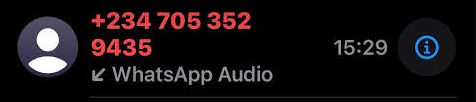
Finding a reliable, native method to handle these communications within the application is essential for your peace of mind. This guide provides practical, verified procedures to secure your digital presence. By examining the origins of these messages and how automated spam networks operate, you will learn tested solutions to stop these intrusions. We will cover everything from identifying common scam scripts to locking down your group chat permissions, ensuring you regain total control of your messaging environment safely and permanently.
Replying—even just to type “Stop” or “Who is this?”—instantly signals to automated bot networks that your phone number belongs to an active, monitored account. This will guarantee you receive a massive surge in future spam. Furthermore, answering unexpected video or audio calls can expose your active status and profile details. Always avoid engaging with unknown international numbers.
Decoding the Origin: What is the +234 Country Code?
To remove the confusion surrounding these incoming communications, it helps to understand exactly where they originate. The “+234” prefix is the official international dialing code for Nigeria.
Whenever a mobile device registers for a WhatsApp account, it must use a standardized phone number format that includes its regional dialing code. If your device receives a text accompanied by the +234 prefix, it simply means the sender’s account was registered using a Nigerian cellular network.
Understanding country codes allows users to identify message origins quickly, but it is critical to keep this in context. Receiving a message from a +234 number does not automatically mean you have been specifically targeted by an individual in Nigeria. In the modern digital landscape, automated dialing software and random number generators cycle through vast sequences of global phone numbers daily. Performing a basic country identification check is the first logical step in your defense, but the real protection comes from understanding how these spam networks found you in the first place.
Why You Keep Receiving Messages from Unknown Accounts
If you are dealing with a sudden, frustrating influx of texts or calls from international numbers, you are likely wondering why your specific number was chosen. Typically, this happens because your contact information was swept up in a broader data scrape conducted by automated bot networks.
Scammers rarely type numbers in by hand. Instead, they use automated systems that constantly text thousands of randomly generated phone numbers to see which ones are active. They may also pull numbers from publicly leaked databases or data broker lists.
When a user replies to an initial message from these bots, the system immediately flags the phone number as “live.” This successful contact verification means your number is highly valuable. It is then passed along to human operators who will attempt to build a conversation and eventually extract money or personal information from you. Understanding this scraping mechanism makes it clear why ignoring the initial message is the single most effective method for reducing future unwanted contact.
Spotting the Red Flags: The “Wrong Number” Scam Scripts
Determining whether an unknown contact is legitimate requires careful observation. Scammers have moved away from obvious, poorly spelled threats. Today, recognizing suspicious text patterns is a necessary everyday skill to ensure your digital safety.
A highly common tactic used by fraud operations is the “wrong number” script. These messages begin with a generic, harmless-sounding greeting designed to prompt a polite correction from you. You might receive texts such as:
- “Hello, is this the tour guide we booked for tomorrow?”
- “I found your number in my old address book, how are you?”
- “Are we still meeting for lunch later, David?”
- “The dog grooming appointment is at 3 PM, right?”
These scripts rely on human politeness. If you reply to say, “Sorry, you have the wrong number,” the sender will apologize and attempt to build a casual relationship. (“Oh, I am so sorry for bothering you! You seem very nice, though. I am Alice, nice to meet you.”)
Over days or weeks, this casual conversation is carefully steered toward fraudulent investment opportunities, cryptocurrency schemes, or direct financial requests. Always remember that users should avoid engaging with unknown international numbers and never share personal information, no matter how polite or accidental the message appears.
The Group Chat Exploit: Stopping Crypto and Investment Spammers
While direct messages are an obvious nuisance, one of the most aggressive ways these numbers harass everyday users is through WhatsApp Groups. Many users find themselves unexpectedly added to random group chats focused on cryptocurrency trading, foreign exchange (Forex) investments, or fake job opportunities by administrators using +234 numbers.
This tactic allows scammers to target hundreds of people simultaneously. The groups are often filled with other fake accounts posting fabricated screenshots of massive financial returns to create an illusion of legitimacy.
If you are constantly being added to these groups, blocking the individual numbers is not enough, because scammers will simply create a new account and add you again. You must change your native application settings to block unknown numbers from adding you to groups entirely.
Step-by-Step Procedure to Secure Your Group Settings:
1. Open WhatsApp and navigate to Settings (located via the gear icon on iOS, or the three vertical dots in the top right corner on Android).
2. Tap on Privacy.
3. Scroll down and select Groups.
4. Under the “Who can add me to groups” section, change the selection from “Everyone” to “My Contacts”.
5. Optional but highly recommended: You can also select “My Contacts Except…” if there are specific people in your own contact list who frequently add you to annoying groups.
By applying this configuration, an unknown +234 number completely loses the ability to force you into a spam group. If they want to invite you, they are forced to send a private invitation link, which you can safely ignore and delete.
Immediate Action: How to Block and Report Suspicious Contacts
When you decide to handle these interactions directly, taking manual action within the app is the required procedure. After a user researches these scam tactics and understands the risks, the next vital step is to block the offending number.
Blocking and reporting suspicious contacts helps improve platform-wide security. When you submit a report, WhatsApp’s spam detection systems analyze the interaction data. If a number receives multiple reports, the platform restricts or bans the fraudulent network, protecting millions of other users in the process.
Execute the following steps to permanently block an unknown number:
1. Open the chat containing the suspicious message. Ensure you do not tap any external links, download any media files, or reply to the text.
2. Tap directly on the sender’s phone number at the very top of the screen to view their detailed contact profile.
3. Scroll down to the absolute bottom of their profile page.
4. Select the “Block” option, which is usually displayed in red text.
5. A prompt will appear asking if you also want to report the contact. Always check the box to “Report contact”, then confirm your choice by tapping “Block” again.
This straightforward, native technique completely resolves the immediate harassment. You actively contribute to overall online safety while instantly cleaning up your own inbox.
Optimizing Your Messaging Setup for Maximum Digital Safety
Hardening your native account setup is a highly effective method for maintaining long-term digital safety. When users implement these specific profile changes, they silently neutralize incoming threats before their phone ever rings.
Beyond group settings, enabling strict call and profile privacy reduces your exposure to unwanted data gathering. Scammers often check your profile picture and online status to confirm that the account belongs to a real, active person.
Procedure to configure your broader privacy settings:
1. Open the application and navigate to Settings.
2. Select the Privacy menu.
3. Scroll down and tap on the Calls section.
4. Toggle the switch for “Silence Unknown Callers” to the active position.
5. Navigate back to the main Privacy menu.
6. Locate the “Profile Photo” and “Last Seen and Online” options. Change both of these metrics from “Everyone” to “My Contacts”.
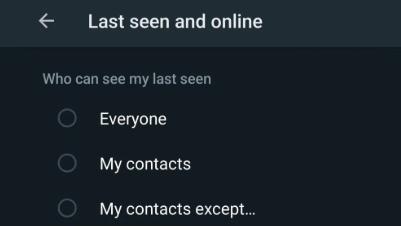
This exact configuration ensures that your phone will not ring or vibrate when a suspicious number attempts an audio or video call. Instead, the call will silently appear in your “Calls” tab, allowing you to review the information and block the number safely. Furthermore, hiding your profile photo and online status starves bots of the verification data they desperately seek.
A More Reliable Uber GPS Spoofing Solution: Fonelora Location Changer
As mentioned earlier, desktop-based tools are generally the most dependable option for modifying GPS location on Uber. Compared to mobile apps that rely on easily detectable “Mock Location” settings, desktop solutions tend to deliver a more stable and consistent signal.
If you’re looking for a simpler and more reliable alternative, Fonelora Location Changer is a solid option to consider.
Instead of relying on basic spoofing techniques, Fonelora changes your device’s GPS location through a computer connection. This approach helps minimize common problems like location jumping (rubber-banding) and reduces the likelihood of immediate detection.
Why Choose Fonelora Location Changer?
Fonelora focuses on stability and realistic movement—two key factors when modifying location-based apps like Uber:
- Change GPS location instantly with one click
- Compatible with both iOS and Android devices
- No need to root or jailbreak your phone
- Built-in movement simulation for more natural behavior
- Adjustable speed and customizable routes
- Helps reduce sudden location resets or “snapping”
It’s especially useful for:
- Drivers aiming to position themselves in high-demand areas
- Users testing location-based features or scenarios
- Anyone seeking a smoother alternative to mobile spoofing apps
How to Use Fonelora to Change GPS Location on Uber
Follow these simple steps to get started:
Step 1: Download and Install
Download Fonelora Location Changer from the official website and install it on your computer.

Step 2: Connect Your Device
Connect your iPhone or Android device using a USB cable.
- On iOS: Tap “Trust This Computer” when prompted
- On Android: Enable USB Debugging

Step 3: Choose a Location
Open the map interface in the software:
- Enter a specific location (such as an airport or busy area)
- Or select a point directly on the map

Frequently Asked Questions About International WhatsApp Spam
If you are still looking for clarity on resolving these messages securely, this section summarizes the most common inquiries regarding international messaging safety.
What is the 234 country code on WhatsApp?
The “+234” prefix is the designated international dialing code for Nigerian telecommunications. Any WhatsApp account registered with a phone number beginning with +234 is tied to a mobile carrier in Nigeria.
Why am I suddenly receiving messages from +234 numbers?
Automated software scripts generate sequential mobile numbers or use leaked databases to send bulk text messages globally. Receiving a text from an unknown international code usually means your number was scraped by a bot, not that you are being personally targeted by an individual.
What happens when I report a number on WhatsApp?
When you report an account, WhatsApp receives the most recent messages sent to you by that user, as well as information about your recent interactions. If the account is found to be violating the terms of service (such as mass spamming), WhatsApp will ban the account, improving security for everyone.
Regaining Your Peace of Mind
Handling persistent spam does not have to be an overwhelming experience. You no longer need to endure the anxiety of unexpected messages from +234 numbers. By understanding how bots scrape phone numbers and recognizing the deceptive scripts they use to start conversations, you remove the fear of the unknown.
The most powerful tools at your disposal are already built directly into your smartphone. By applying proactive security methods—such as restricting group chat permissions, silencing unknown callers, and consistently using the block and report features—you silently and permanently neutralize these threats. Keep your privacy settings strictly locked to “My Contacts,” never reply to unexpected international numbers, and you will maintain a safe, confident, and stress-free messaging environment.



Joy Taylor is a seasoned technical writer with over a decade of experience in mobile technology. At iMobie, she specializes in producing in-depth content on iOS data recovery, iPhone unlocking solutions, and iOS troubleshooting.
Product-related questions? Contact Our Support Team to Get Quick Solution >
