Facing a locked device or a sudden crash right at the Niantic splash screen is incredibly frustrating when you simply want to enjoy a game. If you have recently customized your iPhone, you will quickly notice that Pokémon GO has one of the most aggressive anti-cheat systems on iOS. Instead of loading your profile, the app detects your modified system environment and instantly crashes or refuses to let you log in.
Generic advice about downloading anonymous bypass tools is rarely helpful, as the developer updates their security checks almost weekly. To get past the launch screen, you need precise, working tweaks configured for your exact operating system version. This guide provides specific, tested methods to hide your modifications, complete with the exact tools and repositories you need to configure your device and return to playing smoothly.

Modifying kernel-level processes and bypassing app security carries a real risk of account bans. Niantic actively targets modified devices. Always test these bypass methods on a secondary “dummy” account first. Ensure your configuration is secure and stable before logging into your primary gaming account.
Table of ContentsHide
Understanding Pokémon GO Security Detection in an iOS Environment
To successfully troubleshoot an app that will not open, it is important to first understand the underlying mechanics of the game’s anti-cheat system.
Mobile security analysts note that games like Pokémon GO include integrity checks to detect modified operating systems. Jailbreak environments can expose system-level changes that trigger these checks, leading the game to block access or crash during launch. Developers implement such protections to maintain fairness and protect the game’s ecosystem.
When you apply a jailbreak, you inherently alter the standard file structure and permissions of iOS. The game’s security protocols actively scan for these exact modified behavior patterns, looking for specific file directories (like Cydia or Sileo caches) or unauthorized code injection into the device memory. This rigorous app integrity verification is the direct cause of the sudden blockages users experience.
To play securely, your bypass tweaks must intercept these scans and feed clean, unmodified data back to the game’s servers. Understanding this underlying mechanism is crucial for diagnosing any future gaming limitations.
Navigating Solutions: Rootful vs. Rootless Jailbreak Environments
Before installing a bypass, you must understand your specific iOS environment. The tweaks that successfully hide your system depend entirely on whether your jailbreak is rootless or rootful. Applying the wrong tweak will result in an immediate crash.
Rootful Environments (unc0ver, checkra1n, older palera1n)
Rootful setups modify the core iOS root filesystem. Because these changes are deeply embedded, Pokémon GO can easily spot them.
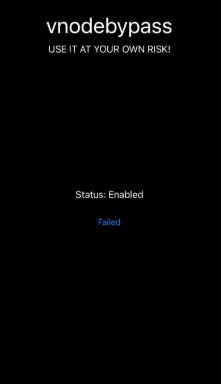
The Solution: You require heavy, kernel-level bypass tools. vnodebypass or KernBypass are the most effective options here. They work by temporarily hiding the modified system files entirely, making the device appear completely stock to any app that launches while the bypass is active.
Rootless Environments (Dopamine, newer palera1n)
Modern rootless setups do not modify the core root filesystem, making them inherently harder for apps to detect. However, Pokémon GO will still crash if it detects tweak injection (when customization themes or system adblockers try to hook into the game).
The Solution: You generally need a robust tweak restrictor. Choicy or Shadow are highly recommended. These tools stop background processes from injecting unauthorized code into the game’s memory space.
Step-by-Step Bypass Tutorial: Configuring Your iOS Setup
By carefully managing your tweak configuration and installing the correct bypass from a trusted repository, you can eliminate frequent crashes. Below are the specific installation procedures based on your environment.
Method 1: Using Choicy (Best for Rootless Environments)
Choicy is a powerful tweak restrictor that prevents other modifications from loading into Pokémon GO.
1. Open your Package Manager: Launch Sileo or Zebra.
2. Add the Repository: Navigate to your sources and add the official opa334 repository: `https://opa334.github.io/`
3. Install Choicy: Search for “Choicy” and complete the installation. Allow your device to respring (restart the home screen).
4. Configure Settings: Open your iPhone’s main Settings app and scroll down to the Choicy menu.
5. Disable Tweak Injection: Tap on “Applications,” find Pokémon GO in the list, and select it. Toggle “Disable Tweak Injection” to the ON position.
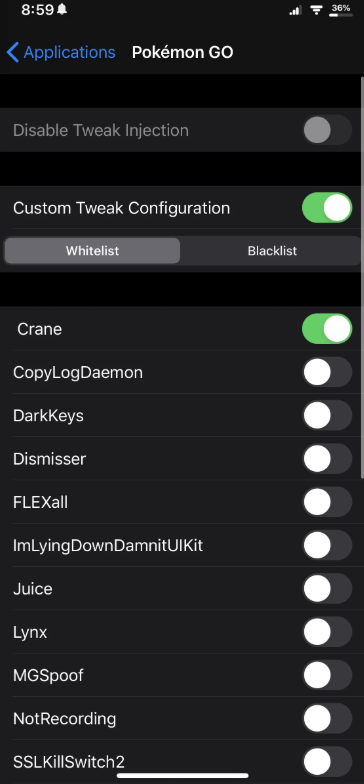
6. Launch the Game: Open the app. The game should now load without detecting your background themes or system modifications.
Method 2: Using vnodebypass (Best for Rootful Environments)
If Choicy does not stop the crashes, or if you are on a rootful setup, vnodebypass will temporarily unmount your modified files.
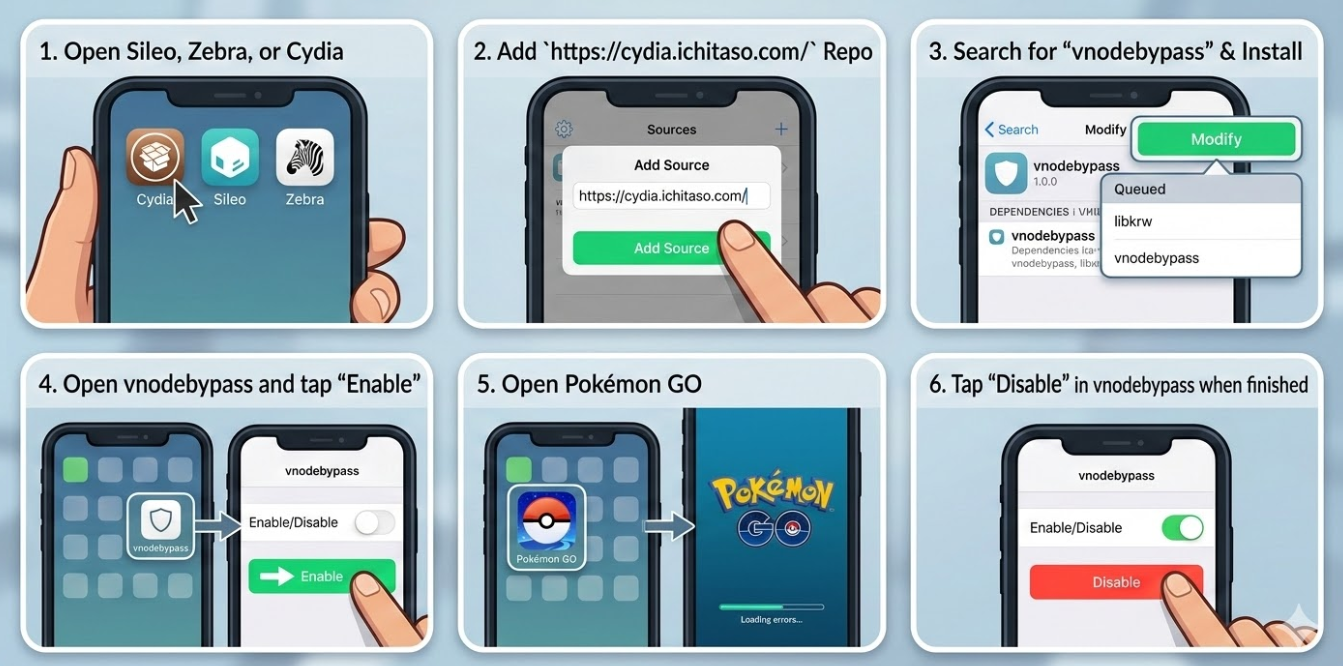
1. Open your Package Manager: Launch Sileo, Zebra, or Cydia.
2. Add the Repository: Add the ichitaso repository: `https://cydia.ichitaso.com/` (or the XsF1re GitHub repo, depending on your specific iOS version fork).
3. Install Dependencies: Search for “vnodebypass”. Your package manager should automatically queue “libkrw” or similar dependencies. Install all of them and respring.
4. Activate the Bypass: vnodebypass installs as a standalone application on your home screen. Open the vnodebypass app and tap “Enable”.
5. Launch the Game: Open Pokémon GO.
6. Deactivate When Done: Crucial step: Once you finish playing, return to the vnodebypass app and tap “Disable”. Leaving it enabled will break other standard system tweaks until it is turned off.
Troubleshooting Persistent Launch Crashes and Security Blocks
If you have applied Choicy or vnodebypass and still encounter a crash on launch, deeper troubleshooting is required. Resolving persistent issues usually involves identifying hidden conflicts within your software setup.
When adjusting your tweak configuration, you might find that the game continues to crash after a standard system update. As we discovered during our testing, updating core packages—like ElleKit or Substitute—is often what gets the game running normally again. This experience proves just how sensitive mobile games are to outdated system modifications.
Keep Core Dependencies Updated
Always ensure your core injection foundations are up to date. Open your package manager and check for updates to ElleKit (for Dopamine/rootless users) or Substitute / Substrate (for unc0ver/checkra1n users). An outdated injection framework often leaks data that the game’s security protocols catch instantly.
Clear the Application Cache
Occasionally, old security flags are stored in the application’s local cache. If you previously tried to open the game without a bypass, it may have permanently flagged your local install.
Download Apps Manager from the BigBoss repository.
Locate the game in the list and select “Wipe”. This clears out hidden cached files without forcing you to redownload the entire app.
Downgrade the Application Version
Niantic updates their software frequently, and underlying app integrity verification methods constantly change. If a brand-new game update breaks your current bypass method, the community needs time to catch up.
Install AppStore++ (from the CokePokes repository).
Press and hold the download button in the App Store to downgrade the game to the previous, functional version until bypass developers release an official patch.
Frequently Asked Questions: Pokémon GO on Modified iOS Devices
To consolidate the technical steps provided above, here are direct answers to the most common queries regarding iOS gaming on customized setups.
-
Can Pokémon GO run on a modified iPhone?
-
Yes, the application can run, but it requires specific tools like Choicy or vnodebypass to hide the modified system state from the application’s internal security checks.
-
Why does Pokémon GO detect my modifications?
-
The game actively scans for irregular folder permissions, unauthorized code injection, and specific Cydia/Sileo files. Developers perform these checks to prevent GPS spoofing and maintain a balanced ecosystem for all players.
-
Does modifying iOS affect the game’s performance?
-
Running multiple system-heavy themes simultaneously can drain the battery faster and cause minor latency. However, applying a clean tweak restrictor like Choicy actually improves stability, as it prevents background processes from interfering with the game’s memory.
Conclusion
Dealing with an app that refuses to launch no longer has to be a source of constant frustration. By identifying whether you are on a rootless or rootful system and applying the correct, specific tool—like Choicy or vnodebypass—you can stop those jarring security detection warnings.
Because mobile security analysts constantly refine integrity checks, occasional adjustments to your tweak configuration will be required. Rather than relying on generic advice when a new game update drops, we highly recommend bookmarking the official developer repositories and following community hubs like the r/jailbreak subreddit. Staying informed directly through developer update channels will ensure you can quickly adapt to new security patches, keeping your gaming experience completely uninterrupted.


Hot Topics
