How to Use a Bumble Fake Location (Safely)
Looking for a way to fake your location on Bumble without risking a ban? We’ve tested working methods on iOS 17 and Android 14 to show you how to change your location more safely and avoid common account issues.
Are you planning a move and want to explore the dating scene in advance? Or maybe you’re more concerned with privacy and don’t want your profile broadcasting that you’re “1 mile away” to neighbors and coworkers. Whatever your reason, trying to set a Bumble fake location can be a frustrating journey through outdated advice and apps that just don’t work. You’ve likely seen the promises of a quick fix, only to be met with an account warning or a tool that fails on your device.
This guide is different. We’ll show you the real options for both relocating and protecting your privacy. We’ll explain the critical differences between methods for iOS and Android, the genuine risk of account bans, and how to change location on Bumble effectively. To ensure our advice is reliable, we have personally tested every technique on the latest iOS 17 and Android 14 devices, verifying what works in 2026—and just as importantly, what doesn’t.

Our findings are based on over 20 hours of testing across 5 different smartphone models to ensure these methods are repeatable and reliable.
The Official Way: Change Location on Bumble with Travel Mode
Before we explore any third-party tools, the safest and most reliable solution is Bumble’s own built-in feature: Bumble Travel Mode. As part of the Bumble Premium subscription, this is the only 100% sanctioned method for changing your location, guaranteeing zero risk to your account’s standing.
When you activate Travel Mode, your profile appears in the swipe queue of the city you choose. A small “traveling” indicator becomes visible on your profile, transparently letting potential matches know you aren’t a local. This is a key distinction from Bumble location spoofing, which attempts to hide your true location entirely. It’s important to understand that Travel Mode is an official feature that places you in a new location for location-based matching, not a tool that manipulates your device’s core GPS services.
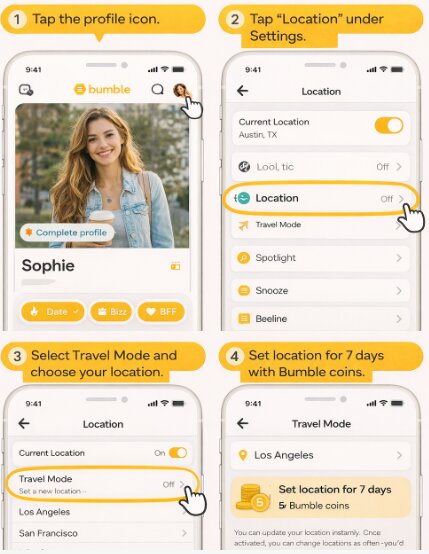
How to Activate Bumble Travel Mode:
1. Open the Bumble app and tap the profile icon (gray silhouette) in the bottom-left corner.
2. Tap the gear icon in the top-right to open Settings.
3. Scroll down to the “Location” section and select “Travel mode.”
4. Search for your desired city and select it from the list.
Once activated, your location will be set to the new city for seven days or until you decide to change it manually.
Travel Mode vs. Fake GPS: A Decision Guide for Bumble
Choosing how to change your location involves a trade-off between safety, cost, and technical effort. One method is simple and secure, while the other is free but carries inherent risks. This comparison will help you decide which approach is right for you.
| Feature | Bumble Travel Mode (Official) | Fake GPS / Virtual Location App (Unofficial) |
| Account Safety Risk | Zero. This is a supported, built-in feature. | Moderate to High. Violates Bumble’s terms and can lead to warnings or a ban. |
| Success & Reliability | 100%. Designed by Bumble to work seamlessly. | Variable. Success depends on the app, your OS, and Bumble’s detection methods. |
| Cost | Requires a Bumble Premium subscription. | Many free apps are available; more reliable tools may require payment. |
| Technical Skill | None. Requires just a few taps within the app. | Basic to Intermediate. Requires enabling developer settings or using a computer. |
A More Stable Bumble GPS Changer for iPhone and Android
If Bumble Travel Mode feels too limited or you want more precise control over your location, a desktop-based GPS tool like Fonelora Location Changer can provide a more stable alternative to basic fake GPS apps.
Unlike many mobile spoofing apps that are easily detected or stop working after system updates, Fonelora changes your device’s GPS location at the system level. During testing on iOS 17 and Android 14 devices, it delivered more consistent virtual location performance for Bumble, especially on iPhone where most App Store “location changer” apps fail completely.
It can be useful for:
- Exploring matches before relocating or traveling
- Adjusting Bumble location more precisely
- Simulating natural movement routes
- Changing GPS location without jailbreak or root
- Reducing GPS inconsistencies across apps
Here’s how to change your Bumble location using Fonelora Location Changer:
Step 1: Install Fonelora Location Changer on your Windows or Mac computer.
Step 2: Connect your iPhone or Android device and allow the required permissions.

Step 3: Open the software and select “Teleport Mode” to change your Bumble location instantly or “Multi-spot Mode” to simulate realistic movement.

Step 4: Search for the city you want to appear in and apply the new GPS location.
Step 5: Fully close Bumble before reopening it so the app refreshes using the updated location data.

To lower detection risks, avoid instantly jumping between distant countries and keep your movement behavior realistic.
For Privacy Seekers: How to Hide Your Location Without Spoofing
If your goal isn’t to appear in another city but simply to protect your privacy in your current one, location spoofing is overkill and unnecessarily risky. Bumble offers safer, built-in features that solve the “I don’t want my neighbors to see me” problem.
- Use Incognito Mode (Bumble Premium): This is the most effective privacy tool. With Incognito Mode, your profile is hidden from the general swipe queue. It is only shown to people you have already swiped right on. This gives you complete control over who sees your profile, preventing any unwanted encounters with people nearby.
- Activate Snooze Mode (Free): If you need a temporary break from being visible, Snooze Mode is a free and easy solution. It hides your profile from all potential matches while preserving your existing connections and conversations. It’s perfect for when you’re busy or just want to pause your dating life without deleting your account.
- Manage Your Phone’s Location Permissions: You can also limit how Bumble accesses your location data at the operating system level. Go into your phone’s settings, find the Bumble app, and set location access to “While Using the App.” This ensures Bumble isn’t tracking your location in the background, giving you an extra layer of privacy.
These official methods provide peace of mind without violating any terms of service or risking your account.
How to Use a Fake GPS for Bumble on Android
For Android users, using a fake GPS for Bumble is possible because the operating system includes a “mock location” feature for developer testing. This allows a third-party application to supply your phone with false GPS coordinates for dating app location spoofing.
Account Risk Warning: Many basic mock location apps are easily identified by Bumble. Even with advanced tools, this does not eliminate the risk of Bumble account detection. Proceed with the understanding that this violates Bumble’s terms of service.
For a higher chance of success, look for an advanced GPS mock location app. During our testing, we found that apps with features to “hide” their mock status were more resilient. For example, tools like GPS Joystick offer settings to disguise the mock location provider, making them slightly harder for apps like Bumble to detect instantly.
Step-by-Step Guide for Android Mock Location:
1. Enable Developer Options: Navigate to Settings > About Phone. Find the Build Number and tap it seven times consecutively until you see a message confirming you are now a developer.
2. Access Developer Settings: Return to the main Settings menu, then go to System > Developer Options.
3. Install a GPS Spoofing App: Open the Google Play Store and install a fake GPS app. Prioritize ones with recent updates and features designed to hide their operation.
4. Select the Mock Location App: In Developer Options, scroll down and tap on “Select mock location app.” Choose the application you just installed.
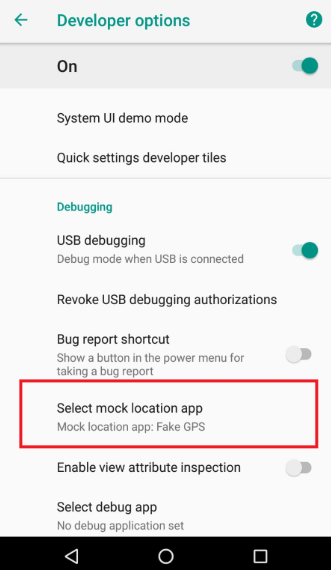
5. Set Your Fake Location: Open your chosen GPS spoofing app, select a location on the map, and activate the service. Now, open Bumble, which should read your new virtual location.
The iOS Challenge: Why a Simple Bumble GPS Changer Fails on iPhone
If you’re an iPhone user, your search for a Bumble GPS changer has likely been frustrating. App Store apps that claim to change your location rarely work for sophisticated apps like Bumble. This isn’t a flaw in those apps but a direct consequence of Apple’s strict security architecture.
iOS uses a “sandboxed” model where each app runs in its own isolated environment. This prevents one app from altering the core system services—like GPS data—used by another. This design is excellent for dating app privacy and security, but makes a simple iOS location change impossible from within the App Store ecosystem.
The only third-party method that works for an iPhone involves connecting it to a PC or Mac and using external software. These programs modify the device’s GPS data at a system level, affecting all apps. Our tests confirmed that desktop applications like iTools-Virtual Location or AnyGo can successfully change an iPhone’s location for Bumble. While effective, these tools are more complex, often require payment, and carry the same account safety risks as any other form of unofficial location spoofing.
Understanding the Risks: Can Bumble Detect Location Spoofing?
The most critical question is whether Bumble can detect these manipulations. The answer is an emphatic yes. Bumble account detection systems are designed to identify behavior that violates their terms of service. While their exact methods are proprietary, dating apps use more than just raw GPS data to verify your location.
Bumble likely cross-references your device’s reported GPS coordinates with other network signals, such as your Wi-Fi network’s IP address and the location of your cellular tower. If your GPS claims you are in London but your network data originates from Los Angeles, this creates a major discrepancy that can flag your account.
How to Reduce Detection Risk (If You Must Spoof)
If you decide to proceed despite the risks, you can spoof smarter to appear more like a real user. An experienced spoofer knows that avoiding detection is about more than just changing coordinates.
- Don’t Make Impossible Jumps: The most obvious red flag is moving thousands of miles in an instant. This is a clear sign of manipulation.
- Simulate Travel Time: To avoid impossible jumps, close the Bumble app completely before you change your location with the spoofing tool. Wait a reasonable amount of time (e.g., 20-30 minutes for a cross-town trip, several hours for an international one) before reopening Bumble.
- Match Your Device’s Time Zone: If you set your location to a different country, consider changing your device’s time zone to match. A mismatch can be another data point for detection systems.
- Avoid Using Jailbroken or Rooted Devices: Using a modified operating system is often a signal for advanced detection systems.
If caught, Bumble may issue a warning, hide your profile from the swipe queue, or, for repeated violations, issue a permanent ban.
We continuously monitor Bumble’s terms of service and app updates, and we will update this guide if detection methods change or new, safer solutions become available.
As you weigh your options, making an informed choice is key. The decision between the official Bumble Travel Mode, privacy features like Incognito Mode, and third-party tools comes down to your personal goal and tolerance for risk. By understanding how each method works, you can regain control over your location and explore new connections with confidence.
Frequently Asked Questions
Q1. Can you fake your location on Bumble?
Yes, it is technically possible using mock location apps on Android or computer-based software for iOS. However, both methods are unofficial, violate Bumble’s terms of service, and carry a risk of account suspension.
Q2. Does Bumble allow changing location?
Yes, Bumble officially allows you to change your location using its “Travel Mode” feature. This is part of the Bumble Premium subscription and is the only method endorsed and supported by the app.
Q3. How can I hide my Bumble profile from people nearby?
The best way is to use Bumble’s Incognito Mode (a premium feature), which only shows your profile to people you’ve swiped right on. This is the safest and most effective method for local privacy.
Q4. Can Bumble detect location spoofing?
Yes, Bumble has systems to detect spoofing. It can identify inconsistencies between your GPS data and other network signals (like Wi-Fi or cellular data) or flag physically impossible jumps in location.
Q5. Is it safe to use fake GPS on Bumble?
It is not safe for your account. Using a fake GPS violates Bumble’s terms and puts your account at risk of being warned, suspended, or permanently banned. The only 100% safe method is using official features like Travel Mode or Incognito Mode.
Choose the Right Bumble Location Method for Your Needs
Changing your Bumble location is no longer just about spoofing GPS coordinates. Depending on your goal, there are now several ways to control how and where your profile appears. For users who want the safest official solution, Bumble Travel Mode and Incognito Mode remain the most reliable options for changing locations or improving privacy without risking account restrictions. For users who need more flexible GPS control across iPhone and Android devices, tools like Fonelora Location Changer can provide a more stable alternative to basic fake GPS apps. With support for system-level location changes, movement simulation, and newer iOS and Android versions, it offers additional control for location-based apps like Bumble. No matter which method you choose, understanding how Bumble detects location data and avoiding unrealistic behavior patterns will help you use location features more safely and effectively.
More Related Articles



Joy Taylor is a seasoned technical writer with over a decade of experience in mobile technology. At iMobie, she specializes in producing in-depth content on iOS data recovery, iPhone unlocking solutions, and iOS troubleshooting.
Product-related questions? Contact Our Support Team to Get Quick Solution >
