How Do You Find Someone’s IP Address on Facebook? The Truth About Tracking
Can you really get someone’s IP address through Facebook? In most cases, the answer is no. This guide breaks down common misconceptions, explains why the platform doesn’t expose users’ IP information, and highlights the risks of so-called “IP finder” tools. You’ll also learn practical tips to safeguard your own privacy and prevent others from attempting to trace your online location.
Jason, a 29-year-old graphic designer, stared at his phone screen, his heart racing. The message in his filtered requests folder was brief but terrifying: “I know where you live. I have your IP.” Panic set in immediately. Like many users facing online harassment, Jason spent the night furiously searching, “How do you find someone’s IP address on Facebook?” asking himself if his safety was truly compromised.
If you are in a position like Jason’s, facing a threat or simply paralyzed by the fear of being tracked, the first step is to breathe. The internet is filled with conflicting advice, fear-mongering, and outdated “hacks.” You need clarity, not more confusion.
To provide a definitive answer, we analyzed Facebook’s current privacy architecture using an iPhone 15, Samsung Galaxy S24, and Windows 11 desktop. We monitored network traffic to see if an IP address could be extracted during a chat, a call, or a comment thread.
Can You See Someone’s Location on Facebook? The Technical Reality
The most common fear is that simply replying to a message on Messenger or commenting on a public post exposes your location. Here is the technical reality: Standard Facebook traffic does not reveal IP addresses to other users.
To understand why the threat Jason received—and the threat you may be worrying about—was a bluff, we must look at how Facebook routes data.
The Client-Server Model: Why You Are Hidden
When you send a message on Messenger, you are not connecting directly to the other person’s phone (a Peer-to-Peer connection). Instead, the connection works like a relay station:
- You send a message to Facebook’s Server.
- Facebook’s Server processes the data.
- Facebook’s Server pushes the message to The Recipient.
In this model, Meta (Facebook’s parent company) sees the IP addresses of both parties because they need that data to deliver the message. However, the users only see Meta’s server IP. There is no direct line between you and the person you are chatting with that would allow them to “grab” your IP. You are hidden behind Facebook’s massive digital wall.
Debunking the “Command Prompt” Myth
A popular search result often claims you can use the Windows Command Prompt (using the netstat command) to “sniff” a connection while chatting. You might see YouTube videos showing a user typing code and pointing to an IP address, claiming it belongs to their target.
This is false in the context of modern Facebook architecture.
If you run this command while chatting on Facebook, the IP addresses you see belong to Facebook’s content delivery networks (CDNs), Google (if you have background tabs open), or your own ISP—not the person you are chatting with.
The platform’s architecture is designed specifically to mask this data. If you see an IP address in your Command Prompt while on Facebook, you are likely looking at a server in Oregon, Ireland, or Singapore, not the home address of the person messaging you.
Reality Check: Facebook IP Address Locator Tools vs. Privacy Protection
In a moment of panic, you might consider searching for a “Facebook IP address locator” to identify a harasser or check if you can be found. This is a critical error that often leads to more harm than good. Most tools claiming to extract IP addresses from a Facebook profile URL are scams designed to capitalize on fear or curiosity.
If you encounter a tool promising to “find location from Facebook profile” or “track Messenger users,” apply this logic:
- Access Level: Does the tool claim to bypass Facebook’s encryption? This is impossible for public web tools.
- Cost: Does it ask for a survey, credit card, or software download? This is likely malware.
Method Comparison: Myths vs. Reality
We have compared the most common methods discussed on forums to show you the reality of the risk.
| Method | Success Rate | Reality | Risk to You |
| Online IP Trackers | 0% | Fake scripts generating random numbers to fool you. | High (Malware/Phishing) |
| Command Prompt (Netstat) | 0% | Shows Facebook/Meta server IPs only. | Low (Wasted time) |
| Social Engineering (Links) | Moderate | Requires the target to click a specific external link. | High (Illegal/Unethical) |
For most users, realizing that these “hacker tools” are ineffective provides relief. The threat of someone tracking you via a magic software button is statistically non-existent. The real risk lies in user interaction, specifically regarding social engineering via external sites.
The One Exception: How IPs Are Exposed Via External Links
While Facebook’s internal walls are secure, the platform cannot protect you if you leave it. The only functional method to find someone’s IP address on Facebook involves social engineering and external links. This isn’t a hack of Facebook’s code; it is a manipulation of human behavior.
Anatomy of a Link Trap
An attacker cannot get your IP just by messaging you. They need you to click a link that they control. They use services (like Grabify or generic URL shorteners) that log your data before redirecting you to a real site.
Here is what a trap message looks like in the real world. An attacker won’t send a raw link; they will wrap it in a context that makes you want to click immediately.
- The “Concerned Friend” Trap:
“Hey, is this you in this video? I can’t believe they posted this.” [Link: bit.ly/video-leak-fb]
- The “Vote” Trap:
“I entered a contest to win a new camera. Can you please vote for me? It only takes a second.” [Link: tinyurl.com/contest-vote-24]
If you click that link, you are briefly routed through a logging service. That split-second redirect captures the metadata and IP address of the device used to click the link before landing you on YouTube or a legitimate news site.
What Data Is Actually Captured?
If you fall for the trap, the logger captures:
- Public IP Address: This reveals your ISP and general area (City/Country), but rarely your exact street address.
- Device Type: (e.g., iPhone 15, Windows 11).
- Browser Version: (e.g., Chrome, Safari).
Defensive Measures
To protect yourself against this specific technique, you must adopt cybersecurity basics:
- Inspect URLs: Be wary of shortened links (bit.ly, tinyurl) from unknown users.
- Use Link Expanders: Free tools allow you to paste a shortened URL to see the final destination without clicking it.
- Use a VPN: If you must click a link, a Virtual Private Network (VPN) masks your real IP address, showing the attacker a generic server location instead.
How to Protect Your Location and IP on Facebook (Step-by-Step)
Once you understand that the danger comes from links and permissions rather than “magic hacks,” you can take action. You can significantly reduce your digital footprint by adjusting specific settings on your device and within the app.
1. Disable Precise Location (iOS & Android)
Facebook does not need your exact coordinates to function. Limiting this prevents the app from collecting granular location data that could theoretically be accessed if your account were compromised.
- iPhone (iOS 15+): Go to Settings > Privacy > Location Services > Facebook. Toggle OFF “Precise Location.”
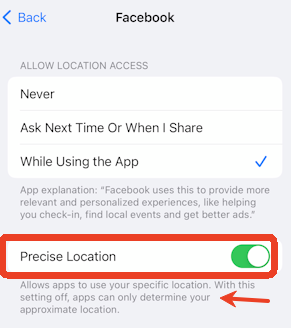
- Android (Android 12+): Go to Settings > Location > App Permissions > Facebook. Select “Approximate” instead of “Precise.”
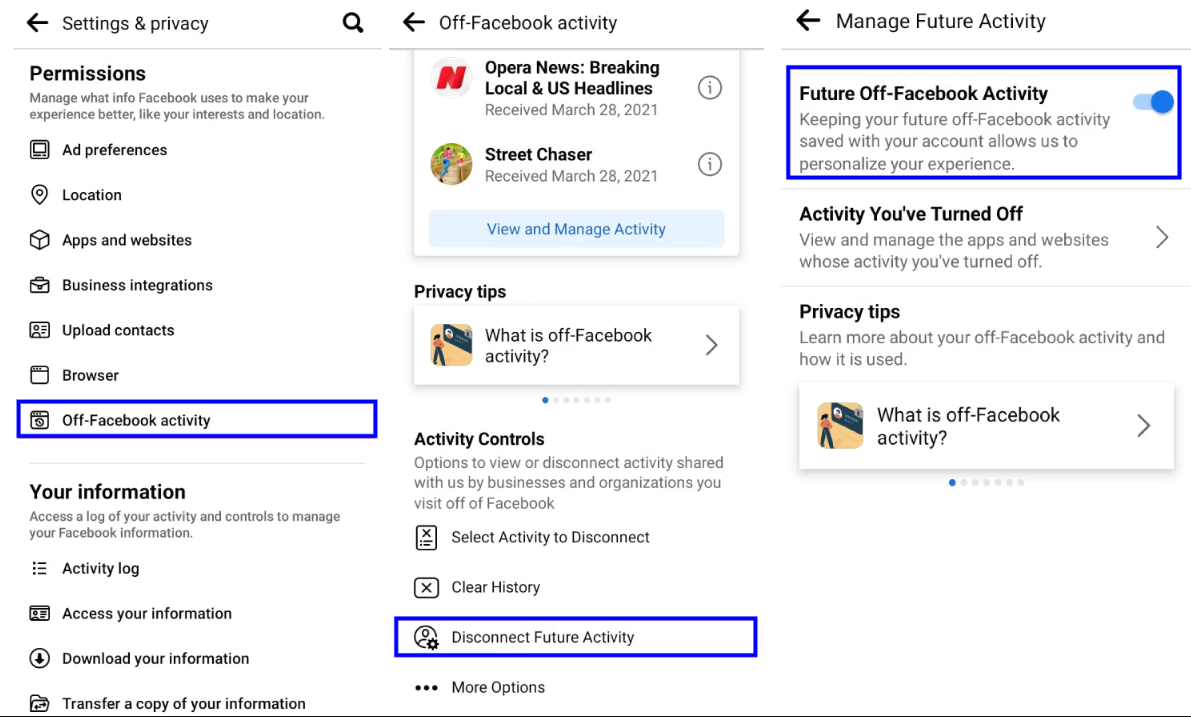
2. Manage Off-Facebook Activity
This setting controls data shared between Facebook and other businesses. If you browse a shoe store’s website, that data is often sent to Facebook.
- Navigate to Settings & Privacy > Settings > Your Information > Off-Facebook Activity.
- Select Disconnect specific activity or Clear History to break the link between your profile and external browsing habits.
3. Review Photo Metadata Settings (The Nuance)
There is often confusion about whether photos send your location. Here is the rule: When you upload a photo to Facebook or send it via standard Messenger chat, Facebook automatically strips the EXIF metadata, including GPS coordinates. You are safe in standard chats.
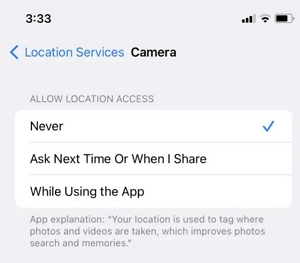
However, you should still disable “Location Tags” on your camera for one critical reason: File Transfers.
If you send a photo as a “File” or “Document” to preserve quality, or if you move the conversation to email or text, that metadata might remain intact. Disabling it at the source protects you across all platforms, not just Facebook.
- Samsung/Android: Open Camera App > Settings (Gear Icon) > Toggle OFF “Location tags.”
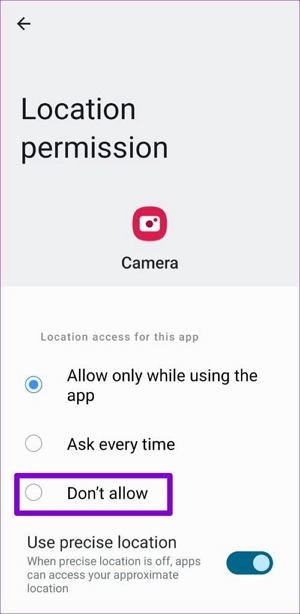
- iPhone: Settings > Privacy & Security > Location Services > Camera > Select “Never.”
Add an Extra Layer of Location Privacy with Fonelora Location Changer
If you want more control over how your location appears across social media apps, GPS-based tools like Fonelora Location Changer can help reduce the amount of real location data shared with apps on your device.
Instead of relying only on Facebook’s built-in privacy settings, Fonelora Location Changer allows you to modify your device’s GPS location directly on iPhone and Android without jailbreaking. This can be useful when protecting personal privacy, testing location-based features, or preventing apps from continuously accessing your real location.
Why Use Fonelora Location Changer?
- Change GPS location instantly on iPhone and Android
- No jailbreak or root required
- Works with Facebook, Instagram, Find My, Life360, Pokémon GO, and other location-based apps
- Supports teleport mode and route simulation
- Beginner-friendly setup for Windows and Mac
How to Change Your GPS Location with Fonelora Location Changer
Step 1. Download Fonelora Location Changer
Install Fonelora Location Changer on your Windows PC or Mac from the official website.

Step 2. Connect Your Device
Launch the software and connect your iPhone or Android device using a USB cable. Once connected, the map interface will load automatically.

Step 3. Choose a Virtual Location
Select “Teleport Mode” and search for any city, address, or GPS coordinate you want to use.
Step 4. Apply the New GPS Location
Click the “Move” button to instantly update your device’s GPS location across supported apps.

FAQs: Facebook Location Sharing and Privacy Myths
To fully resolve the confusion caused by misleading online claims, let’s address the most common questions regarding online anonymity and Facebook directly.
1.Can someone really find my IP address from Facebook?
No. Not directly through the Facebook platform. Facebook’s servers act as a middleman, masking your IP address from other users during chats, calls, and comments. The only way an IP is exposed is if you click a third-party link that takes you off Facebook.
2.Can I see someone’s real location on Facebook?
No. Unless a user voluntarily adds a location tag to a post (e.g., “Checked in at Starbucks”) or uses “Live Location” in Messenger, their real-time coordinates are not visible to you. Technical data like IP addresses remain hidden behind Meta’s infrastructure.
3.Does Facebook Messenger share location automatically?
No. Older versions of the app had features that were more liberal with location sharing, but current iterations require manual activation. You must actively choose to send your location in a chat for it to be visible.
4.Are those Facebook IP tracker tools real or scams?
They are almost exclusively scams. Any website claiming to find an IP address just by entering a Facebook profile URL is likely trying to serve you ads, steal your data, or install malware. Do not use them.
5.What if I see an IP address in Command Prompt?
As mentioned earlier, if you use netstat while chatting, the IP you see likely belongs to a massive tech company like Meta, Google, or Akamai. It is the address of the server delivering the content, not the person typing the message.
Conclusion: Reclaiming Your Peace of Mind Online
For Jason, the realization brought immediate relief: the “I have your IP” message was nothing more than intimidation built on misinformation. Facebook’s server-based architecture ensures that users are protected from direct IP exposure, meaning most of these threats rely more on fear than technical reality.
That said, digital safety is not just about understanding how platforms work—it’s also about proactively managing your privacy settings and limiting unnecessary location exposure across apps and services.
For users who want more control over how their device’s location is handled, Fonelora Location Changer offers a simple, non-jailbreak solution to adjust GPS positioning on iOS and Android. With a few steps—connecting your device, selecting a target location, and clicking “Move”—you can instantly modify your device’s location across supported apps, helping you better manage privacy in location-sensitive environments.
Once you understand what is real risk and what is digital noise, you can move online with far more confidence, focus, and control over your personal data.
More Related Articles



Joy Taylor is a seasoned technical writer with over a decade of experience in mobile technology. At iMobie, she specializes in producing in-depth content on iOS data recovery, iPhone unlocking solutions, and iOS troubleshooting.
Product-related questions? Contact Our Support Team to Get Quick Solution >
