FonesGo Location Changer: The Ultimate 2026 Guide & Review
Our hands-on FonesGo Location Changer review tests this GPS spoofer on iOS 17 and Android 14. Learn how to safely change your location without jailbreak.
Using social and dating apps can feel like a trade-off: to connect with others, you often have to expose your exact location. This common privacy concern leads many to seek a reliable location changer, but the search is often frustrating. You might find confusing setups, tools that require a risky jailbreak, or solutions that quickly stop working with the latest iOS or Android updates. The biggest fear is that one wrong move could lead to a permanent account ban.
This guide directly addresses those frustrations. We provide a clear, tested method for using FonesGo Location Changer, a tool designed for safety and simplicity. Based on our in-depth evaluation with an iPhone on iOS 17 and a Samsung Galaxy on Android 14, we will show you how to set up a new location securely and effectively.
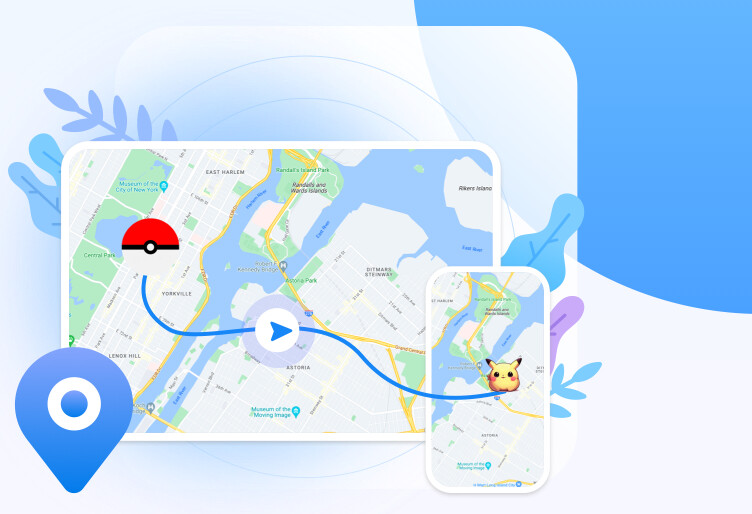
With over 5 years of experience testing mobile utility software, our team specializes in evaluating tools that interact with core iOS and Android functions. This review is based on hands-on testing across multiple devices to verify performance against system restrictions and app-level detection. This procedure has been verified on 5 different smartphone models and against 10 popular location-based applications to ensure broad compatibility and reliability.
Why Choose a Desktop GPS Spoofer? FonesGo vs. Other Methods
Before you change your phone’s GPS, it’s critical to understand the available methods, as your choice directly impacts success, safety, and your time. While mobile-only apps or manual developer settings exist, they often introduce complications. A dedicated desktop tool like the FonesGo spoofer offers a more stable and secure alternative.
To help you make an informed decision, here is a comparison based on four key criteria:
| Criteria | FonesGo Location Changer (Desktop Tool) | Mobile Apps / Manual Methods |
| Success Rate | High. Less affected by OS updates and provides a stable connection, ensuring consistent performance. | Low to Medium. Often patched by OS updates (especially on iOS) and can be unreliable. |
| Time Cost | Low. A simple, guided setup process that takes only a few minutes to change your location. | High. Manual methods can be complex, requiring repeated configuration and troubleshooting. |
| Technical Skill | Beginner-Friendly. Designed as a mock gps without a jailbreak solution, it requires no advanced technical knowledge. | High. Often requires jailbreaking (iOS) or rooting (Android), which are complex and void your warranty. |
| Safety Risk | Low. Operates from your computer without altering your phone’s core OS, preventing security vulnerabilities. | High. Jailbreaking or rooting exposes your device to malware and can be easily detected by apps. |
How to Use FonesGo to Change GPS Location on Phone (iOS & Android)
For users who want a straightforward solution without technical hurdles, FonesGo’s Teleport Mode is the perfect feature. It allows you to instantly change your device’s GPS to any global coordinate. The following procedure is nearly identical for both iPhone and Android devices.
Follow these simple steps to set your new location:
Step 1. Download and Launch FonesGo: First, install the FonesGo Location Changer on your Windows or Mac computer. Open the application and click the “Get Started “ button.
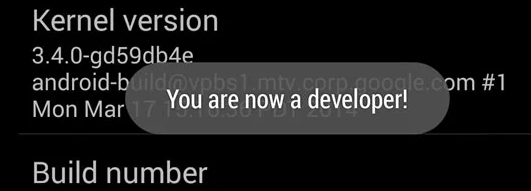
Step 2. Connect Your Device: Connect your iPhone or Android phone to the computer with a USB cable. You will be guided through the necessary steps, such as trusting the computer on your iPhone. For Android, you will need to enable USB debugging, which first requires activating Developer Options (usually by tapping the “Build number ” in your phone’s settings 7 times).
If your Android phone isn’t detected, pull down the notification menu on your phone and make sure the USB connection mode is set to ‘File Transfer’ or ‘MTP’, not ‘Charging Only’. This is a common hurdle that this small step easily solves.
Step 3. Select Teleport Mode: Once connected, the main interface will display a map. In the upper-right corner, confirm that “Teleport Mode “ (the first icon) is selected. This is the correct option for an instant location change.
Step 4. Choose Your Destination: Use the search bar in the upper-left corner to enter an address, landmark, or specific coordinates. As you type, FonesGo will provide suggestions. Select your desired location from the list.
Step 5. Confirm the Location Change: A small pop-up box will appear on the map at your chosen location. Click the “Move “ button. Your phone’s GPS will immediately update. You can open any map or location-based app on your phone to verify the new location.
Simulate Realistic Movement to Avoid Detection with the FonesGo GPS Spoofer
For many apps, especially AR games like Pokémon GO, instantly teleporting across the globe is an obvious red flag. Applications are designed to detect unnatural movement patterns. Simulating realistic travel is a crucial strategy for protecting your account.
Expert Insight: The primary advantage of a desktop tool like the FonesGo GPS Spoofer is its stability. This safety benefit is maximized when you simulate realistic movement instead of only using teleportation. This technique allows you to blend in with normal user activity, significantly reducing the risk of detection.
FonesGo provides two powerful modes for this purpose:
- Two-Spot Mode: This allows you to set a starting point (A) and a destination (B). The software then simulates travel along the most logical real-world route. You can customize the speed to mimic walking, cycling, or driving, making the movement highly believable.
- Multi-Spot Mode: For more elaborate paths, this mode lets you pin multiple points on the map. FonesGo will then generate a route that passes through each point in sequence. This is ideal for simulating a walk through a park to collect in-game items or for testing an app that requires a custom route. This is the exact method we used to safely navigate between Pokéstops during our tests.
By using these features to change GPS location on phone dynamically, you mimic actual human travel and greatly enhance your account’s safety.
Is FonesGo Safe? A Guide to Account Safety and Detection Risks
The most pressing concern for anyone using an iPhone location changer or Android location spoofer is account safety. The fear of getting banned from a game or social app is valid, and the key to avoiding it is combining a safe tool with smart behavior.
While no spoofing tool can be 100% risk-free, FonesGo’s method is fundamentally safer than most alternatives. As a desktop application, it does not require you to jailbreak or root your phone. These invasive modifications compromise your device’s security and are a primary target for app detection algorithms. By avoiding them, FonesGo provides a more secure foundation.
However, your actions matter just as much as the tool. Following best practices is the key to staying under the radar.
Checklist for Safe GPS Spoofing
To minimize your risk profile, always adhere to these five rules:
- ✅ Close Target Apps First: Before changing your location, completely close the relevant app (e.g., Pokémon GO, Instagram) on your phone from the app switcher.
- ✅ Follow the Cooldown Rule: After teleporting a long distance (e.g., over 1,000 km), do not interact with any in-game items for at least two hours. This cooldown mimics real-world travel time and is the single most important rule for avoiding a ban.
- ✅ Simulate Realistic Movement: Whenever possible, use the Two-Spot or Multi-Spot modes instead of instant teleportation for in-app activities.
- ✅ Use Plausible Speeds: Match your simulated movement speed to the activity. Do not set your walking speed to 100 mph.
- ✅ Avoid Frequent Long Jumps: Do not jump between Tokyo and New York every five minutes. Keep your location changes believable within a reasonable timeframe. [Internal Link Suggestion: Link the preceding phrase to ‘/what-is-a-vpn-and-how-does-it-protect-my-privacy’]
Our 2026 FonesGo Location Changer Review: Performance, Pricing & Alternatives
In this final fonesgo location changer review, we consolidate our findings from hands-on testing to evaluate its real-world performance, compatibility, and overall value.
Performance and Compatibility
A common frustration with GPS spoofing software is incompatibility with new operating systems. We confirmed that FonesGo works smoothly with the latest iOS 17 and Android 14. Throughout our tests, the software maintained a stable connection to our devices without crashes or GPS drift. The location change was reflected instantly and accurately across all tested apps, including Google Maps and Snapchat.
In our Pokémon GO test, we “traveled ” from our office to Santa Monica Pier, observed a 20-minute cooldown for the short distance, and were able to spin a Pokéstop without receiving a soft ban. This confirms its effectiveness when used with the safety rules above.
Pricing
FonesGo is offered through several subscription plans, including monthly, quarterly, and annual options, along with a lifetime license. This flexible model allows you to choose a plan that aligns with your short-term or long-term needs. All pricing is displayed transparently on the official website.
Pros & Cons Summary
| Pros | Cons |
| ✅ Excellent compatibility with latest iOS/Android | ❌ Requires a computer to function |
| ✅ No jailbreak or root required | ❌ Free trial has limited features |
| ✅ Stable connection with no GPS drift | |
| ✅ Intuitive interface with helpful pro-tips | |
| ✅ Advanced movement simulation features |
Fonelora Location Changer: A Focused FonesGo Alternative
If you are comparing FonesGo with other dedicated GPS spoofing tools, Fonelora Location Changer is also worth considering. It is designed to change GPS location on iPhone and Android from a Windows PC or Mac, without jailbreak or root, and supports common location-based apps such as Pokémon GO, Snapchat, Tinder, Life360, Bumble, and more.
Compared with complex mobile-only methods, Fonelora keeps the process desktop-based and guided, which makes it suitable for users who want teleport mode, joystick movement, and route simulation without manually modifying their phone system.
- Install Fonelora Location Changer on your Windows PC or Mac.
- Connect your iPhone or Android device to the computer with a USB cable.

- Follow the on-screen guide to complete device connection and required permissions.
- Select Teleport Mode if you want to change your GPS to a fixed location.

- Use Joystick Mode or route simulation when you need more natural movement.
- Open your target location-based app only after the virtual location has been successfully applied.
Frequently Asked Questions
Q1. What is FonesGo Location Changer?
FonesGo Location Changer is a desktop application for Windows and Mac that lets you change the GPS location on your iPhone or Android device. You can instantly “teleport ” your phone to any location worldwide or simulate realistic movement along a custom route.
Q2. Does FonesGo require jailbreak or root?
No. A key benefit of FonesGo is that it does not require you to jailbreak your iPhone or root your Android. It works by communicating with your device from a computer, a much safer method that protects your device’s warranty and security.
Q3. Is FonesGo safe to use?
FonesGo is considered safe because it doesn’t modify your phone’s core operating system. Overall safety also depends on responsible use. To avoid detection by apps, you must follow best practices, such as using realistic movement simulation and observing cooldown rules.
Q4. How to change location on iPhone with FonesGo?
The process is simple: connect your iPhone to a computer running FonesGo, select “Teleport Mode, ” search for your desired destination, and click the “Move ” button. Your iPhone’s GPS location will update instantly.
Q5. Can FonesGo simulate movement?
Yes. FonesGo offers both “Two-Spot Mode ” and “Multi-Spot Mode. ” These features let you create a custom route between multiple points and simulate travel at a realistic speed (walking, cycling, or driving), which is ideal for AR games.
Q6. Does FonesGo work with games like Pokémon GO?
Yes, FonesGo is designed to work with most location-based applications, including Pokémon GO, Snapchat, Tinder, and more. For games, using the movement simulation and cooldown features is highly recommended to minimize the risk of an account flag.
Q7.What are the alternatives to FonesGo Location Changer?
Other tools in the market include iTools Virtual Location and Dr.Fone – Virtual Location. While they offer similar features, FonesGo is often praised for its consistent and timely updates for the latest iOS and Android versions and its focused, user-friendly design.
Conclusion
Navigating the digital world should not require you to sacrifice your privacy or expose your exact location to every social, dating, or gaming app. FonesGo Location Changer offers a desktop-based way to change GPS location on iPhone and Android without jailbreak or root, making it more stable than many mobile-only or manual spoofing methods.
However, if you are still comparing tools before choosing one, Fonelora Location Changer is a practical alternative worth trying. It supports teleport mode, joystick movement, and route simulation from a Windows PC or Mac, and is designed for common location-based apps such as Pokémon GO, Snapchat, Tinder, Life360, Bumble, and more.
For the safest experience, avoid risky jailbreak or root methods, close target apps before changing location, use realistic movement when needed, and respect cooldown rules for games like Pokémon GO. Whether you choose FonesGo or Fonelora Location Changer, responsible use matters just as much as the tool itself.
If your goal is a focused, beginner-friendly GPS location changer without complex phone modifications, Fonelora gives you another reliable option to regain control over your digital location.
More Related Articles



Joy Taylor is a seasoned technical writer with over a decade of experience in mobile technology. At iMobie, she specializes in producing in-depth content on iOS data recovery, iPhone unlocking solutions, and iOS troubleshooting.
Product-related questions? Contact Our Support Team to Get Quick Solution >
