How to Get Around Geo-Blocking in 2026: A Practical, Tested Guide
If you’re blocked from accessing content due to your location, you’re not alone. This article explains proven ways to get around geo-blocking and the risks you should know before trying.
You’ve paid for a streaming subscription and are ready to watch your favorite show while traveling, only to be met with the message: “This content is not available in your region.” It’s a common and deeply frustrating experience. The search for a solution often leads to a maze of promotional articles offering advice that works on a laptop but completely fails on a smart TV. This guide is different. We’re here to explain how to get around geo-blocking with clear, unbiased instructions. To ensure our advice is reliable, we moved beyond theory. Everything you’re about to read is the result of hands-on testing on iPhone 15, Samsung Galaxy S24, Windows 11 PCs, macOS Sonoma MacBooks, and smart TVs including Apple TV 4K and Fire TV Stick. Our goal is to give you the knowledge to access geo-blocked content, regardless of the device.
Choosing Your Method to Bypass Geo-Blocking: A Quick Comparison
Before diving into setup instructions, it’s crucial to understand the three primary methods used to bypass geo-blocking: Virtual Private Networks (VPNs), Smart DNS, and Proxy Servers. Each technique has specific strengths and weaknesses. Instead of pushing one “best” option, this framework helps you choose the right tool for your specific needs, whether you’re on a phone, laptop, or smart TV.
Consider these factors when making your decision:
- Your Primary Goal: Are you trying to unblock a simple website or a sophisticated streaming app?
- Device Compatibility: Will you be watching on a computer, a phone, or a smart TV that doesn’t support apps?
- Need for Privacy: Is encrypting your connection as important as changing your location?
- Impact on Speed: How much of a speed reduction are you willing to tolerate for streaming?
Here’s a direct comparison of the most common solutions:
| VPN | Smart DNS | Proxy Server | |
| Best For | Laptops, phones, tablets, and general browsing; high-security needs. | Smart TVs, gaming consoles, and streaming devices (Apple TV, Roku). | Quick, low-stakes access to basic, region-locked websites. |
| Success Rate | High | High | Low |
| Speed Impact | Moderate | Very Low | High |
| Key Limitation | Can be complex to set up on devices that don’t support native apps (like some smart TVs). | Does not encrypt your traffic; only works with specific, supported services. | Unreliable for streaming, often slow, and offers no encryption or privacy. |
For most people, the choice comes down to a VPN or a Smart DNS. A VPN is the most versatile and secure tool, while a Smart DNS is a specialized solution for devices where a VPN isn’t a practical option.
How to Use a VPN to Access Geo-Blocked Content
A Virtual Private Network (VPN) is the most reliable and popular tool to access geo-blocked content. It works by creating an encrypted tunnel for your internet traffic and routing it through a server in a country you choose. This changes your public IP address location, making it appear to websites and apps that you are physically in that country. This method is highly effective because it alters the primary signal services use for geo-restriction.
Using a VPN on modern computers and smartphones is a straightforward process.
Step-by-Step Guide to Using a VPN:
Step1.Choose a Reputable VPN Service
Select a well-reviewed provider with a strict no-logs policy, a large network of servers in many countries, and fast connection speeds. Choosing a service can be overwhelming. Focus on providers known for their streaming performance, which we compare in our guide to the best streaming VPNs.
Step2.Download and Install the App
Go to the provider’s website or your device’s app store to download the official application for your Windows PC, macOS laptop, iPhone, or Android phone.
Step3.Log In and Select a Server
Open the application and sign in with the credentials you created during signup. Browse the list of available server locations and select a country where the content you want is available.
Step4.Connect
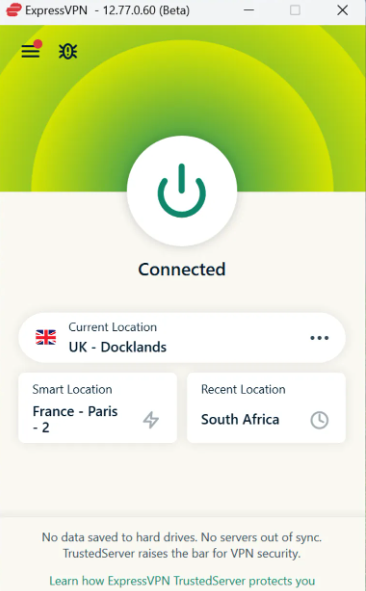
Click the “Connect” button. The app will establish a secure connection in seconds, and your device will now have an IP address from your chosen country.
Step5.Access Your Content
Open your web browser or streaming app. You should now be able to view the region-locked content as if you were there.
If you connect to a server and still see an error, try clearing your browser’s cache and cookies or connecting to a different server in the same country. Some streaming services block known VPN IP addresses, and reputable providers constantly add new ones.
How to Watch Geo-Blocked Content on Your Smart TV
This is where many guides become vague and unhelpful. You’ve been told a method works, but it fails on your living room TV. The reason is simple: many smart TVs (from brands like Samsung and LG), gaming consoles (PlayStation, Xbox), and streaming devices (Apple TV, Roku) do not allow you to install VPN apps directly.
For these devices, a Smart DNS service is the superior solution.
Unlike a VPN that reroutes all your data, a Smart DNS service only reroutes the specific network requests related to your geographic location—your DNS location. It intercepts the checks that streaming services use to see where you are and provides an address that matches the required region. This is a much more lightweight technique, which means it has virtually zero impact on your internet speed and is designed specifically to improve streaming availability.
Setting Up a Smart DNS: A Practical Guide
While it requires a few manual steps, setting up a Smart DNS directly solves the device compatibility problem.
Step1.Subscribe to a Service with Smart DNS
Many top VPN providers include a Smart DNS feature with their subscription. Check their features list before you buy.
Step2.Register Your IP Address
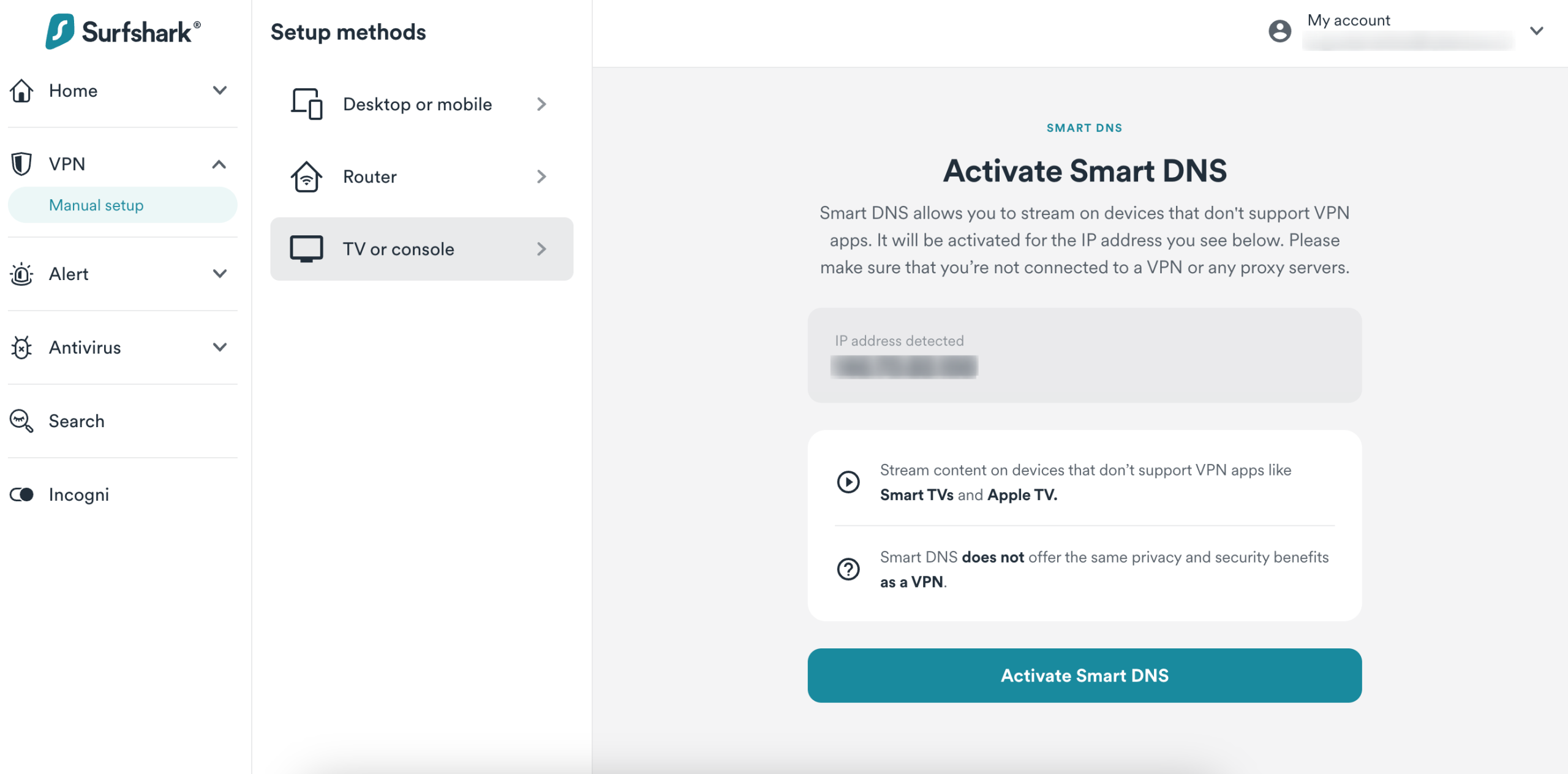
Log into your provider’s website on a computer or phone. In your account dashboard, find the Smart DNS or MediaStreamer section and register your current home IP address. This one-time step authorizes your network to use the service.
Step3.Find and Enter the DNS Addresses
This is the most critical step. You need to locate the network settings on your TV or streaming device and manually input the DNS addresses your provider gives you.
Finding DNS Settings on Popular Devices
Device menus can be confusing, so we’ve mapped out the exact paths based on our hands-on testing:
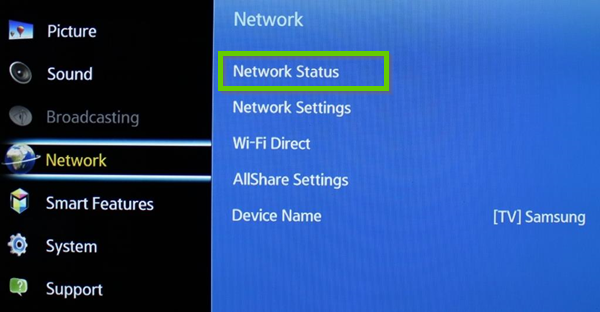
- Samsung Smart TV (Tizen OS): Go to Settings > General > Network > Network Status > IP Settings. Change DNS Setting from “Get Automatically” to “Enter Manually,” then input the new DNS addresses.
- Apple TV (tvOS): Navigate to Settings > Network > [Your Wi-Fi Network] > Configure DNS. Switch from “Automatic” to “Manual” and enter the new DNS address.
- Amazon Fire TV Stick (Fire OS): Fire TV devices don’t allow direct DNS changes on the device itself. You must apply the Smart DNS settings on your home router. This process varies by router brand but generally involves logging into your router’s admin panel and finding the DNS settings under the WAN or Internet tab.
- Roku: Similar to Fire TV, Roku forces you to change DNS settings at the router level.
After saving the new DNS settings, perform a full restart of your smart TV or streaming device. This ensures the new settings are active. You can now open your streaming apps and watch geo-blocked content.
If the content is still blocked after you restart your device, try restarting your Wi-Fi router as well. This forces a fresh connection for all devices on your network and ensures they are all using the new DNS settings you configured.
Why You’re Still Blocked: Understanding How Geo-Restriction Really Works
Have you ever used a tool to change your location and still received an error message? This is the point where most people give up, but the reason for failure is an expert insight many guides overlook: modern geo-restriction is a multi-layered system, not a single checkpoint.
Sophisticated streaming services don’t rely on just one signal. They often cross-reference at least three pieces of data to confirm your location:
- IP Address Location: This is your device’s public address on the internet. It’s the most common signal used for blocking and the one that VPNs and proxies are designed to change.
- DNS Location: When your device accesses a website, it makes a DNS request to translate a domain name (like netflix.com) into an IP address. These requests can also reveal your general location. A mismatch—where your IP is in one country but your DNS requests come from another—is a major red flag.
- Account Region: The country you selected when you first signed up for a service is permanently stored in your account details. Sometimes, a service will restrict access if your account’s region doesn’t match your current IP address location, regardless of any tools you use.
Failure happens when you only solve one piece of the puzzle. A low-quality free proxy might change your IP but leave your DNS location exposed, leading to a block. This is why comprehensive tools that manage both your IP and DNS location are far more effective.
Are There Risks When You Remove Geo-Restrictions?
It’s understandable to be concerned about potential consequences when you decide to remove geo-restrictions. The key is to distinguish between breaking a company’s rules and breaking the law. For personal use, like watching a TV show you’ve paid for, the risks are almost always non-legal and very low.
- Terms of Service Violation: The primary risk is violating the streaming service’s Terms of Service (ToS). These rules exist to comply with content licensing deals, which dictate where a movie or show can be broadcast.
- What Happens if You’re Detected? The most common outcome is simply that the service blocks you from watching, and the geo-block remains in effect. In extremely rare cases, a service might issue a warning, but terminating a paying customer’s account is highly unusual.
- Legal and ISP Issues: Facing legal action for personal viewing is exceptionally unlikely. These ToS are corporate policies, not laws. Your Internet Service Provider (ISP) is also generally unconcerned with this activity. An ISP is far more likely to engage in ISP throttling (slowing your connection) due to high overall data usage from streaming, not because you’re accessing content from another region.
Making an informed decision means using a reputable tool that protects your privacy and understanding that the main “risk” is the tool not working as the streaming service updates its blocking methods.
Alternative Solution for Location-Based Restrictions
Besides VPNs and other geo-blocking workarounds, some users may also benefit from changing their device’s GPS location, especially when using location-based apps and services.
FoneLora Location Changer is a location spoofing tool for iOS and Android that allows users to set a virtual GPS location anywhere in the world. It supports one-click location changes, route simulation, and customized movement, making it a convenient option for users who need greater control over their device’s location.

Your Questions About Geo-Blocking, Answered
Here are concise answers to the most common questions people have when trying to unblock region-locked websites and apps.
1.Why am I blocked from accessing content in certain regions?
You are blocked because of content licensing agreements. Media companies sell the distribution rights for their movies and shows on a country-by-country basis. Streaming services are contractually obligated to enforce these regional boundaries using geo-blocking technology.
2.What are the most common ways websites enforce geo-blocking?
The most common methods are checking your IP address location and your DNS location. Sophisticated services, especially for streaming, often verify both, and may also check your account’s registered country to ensure all three signals match.
3.Is there a difference between unblocking websites and streaming apps?
Yes. Basic websites often use simpler IP-based checks that are easier to bypass. Modern streaming apps are far more advanced and use multiple detection layers, requiring more robust tools like a high-quality VPN or Smart DNS to succeed.
4.Why do some methods work on my phone but not on my TV?
This is typically a device limitation. Your phone and computer can easily run VPN applications. However, many smart TVs and gaming consoles do not support these apps. For those devices, a different technique like Smart DNS, which is configured in the device’s network settings, is the required solution.
5.Can streaming services detect location changes?
Yes, they actively work to identify and block connections coming from known VPN and proxy servers. This cat-and-mouse game is why the effectiveness of a particular server can change. Using a premium service with thousands of regularly updated servers is key to long-term success.
6.Are there risks to getting around geo-blocking?
The primary risk is a violation of a service’s Terms of Service. This could result in the service continuing to block you or, in very rare cases, a warning on your account. Legal risks for personal, non-commercial viewing are extremely low.
7.What’s the most reliable way to access region-locked content today?
A high-quality VPN service remains the most dependable, all-around method. It effectively manages the primary layers of geo-blocking (IP and DNS), encrypts your connection for privacy, and works on the widest range of app-supported devices.
Take Back Control of Your Subscriptions
Geo-blocking can be frustrating, but there are several effective ways to access region-restricted content and services. Depending on your needs, solutions such as VPNs, proxy services, Smart DNS tools, or location-based solutions may help you overcome geographic restrictions.
For users who need more flexibility with location-dependent apps, FoneLora Location Changer can be a useful addition. It allows you to modify your device’s GPS location easily and manage virtual locations with greater convenience. By choosing the right solution, you can enjoy a more open and accessible online experience.
More Related Articles



Joy Taylor is a seasoned technical writer with over a decade of experience in mobile technology. At iMobie, she specializes in producing in-depth content on iOS data recovery, iPhone unlocking solutions, and iOS troubleshooting.
Product-related questions? Contact Our Support Team to Get Quick Solution >
