When I first downloaded Bumble to meet people nearby, I felt completely overwhelmed. Entering the world of online matchmaking can feel deeply frustrating, especially when you are staring at a screen trying to decipher unspoken rules. Early on, I actually messed up my algorithm visibility by swiping right on almost everyone, thinking it would increase my chances. I was also deeply confused about who could send the first message, and I constantly lost matches because I did not understand the strict expiration timers.
If you are experiencing this exact same confusion, you are absolutely not alone. After consulting dating app experts and spending months testing both the free tier and premium subscriptions, I learned that succeeding on this platform requires understanding how the software actually works behind the scenes.
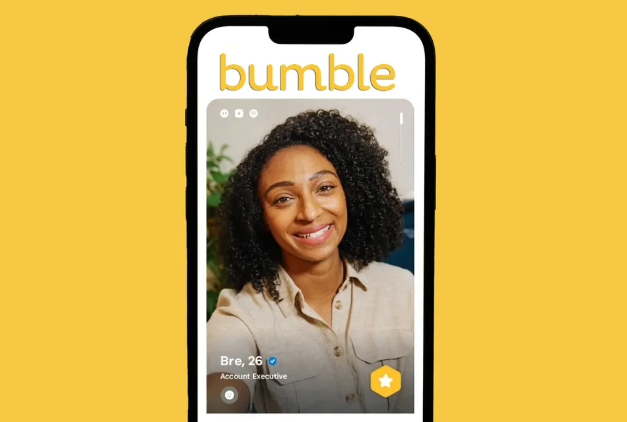
This guide strips away the marketing jargon to show you exactly what is happening in the app. By the end of this article, you will know how to optimize your profile for the matching algorithm, how to navigate the strict 24-hour timers, and how to troubleshoot real-world issues like shadowbans and vanishing matches. Let’s look at how to get your account set up for safer, more genuine conversations.
Table of ContentsHide
The Core Rule: Who Messages First and Bumble Swiping Rules Explained
To resolve the immediate confusion about who can message first, we have to look at Bumble’s foundational operating principle. The platform entirely differentiates itself through gender-specific communication guidelines.
In heterosexual matches, the strict rule is that women must send the first message. Even after a mutual connection is established and both people have swiped right, the male user cannot send the initial greeting. Dating app experts explain that the platform designed this rule to reduce spam and encourage thoughtful, intentional engagement. It addresses safety concerns while significantly cutting down on the overwhelming flood of initial messages women often receive on other platforms.
However, if you are in a same-sex match, a non-binary pairing, or using the BFF (friendship) and Bizz (professional networking) modes, this rule is lifted. In those scenarios, either connected person can send the first message.
Understanding how to match requires knowing the swiping interface. The basic swiping mechanics are straightforward:
- Swipe Right: Indicates you like a profile.
- Swipe Left: Indicates you want to pass on a profile.
- Swipe Up: This activates the SuperSwipe feature. (We will cover the strategy for this premium tool in the subscription section below).
Crucial Warning: Do not rapidly swipe right on every single profile you see. The system actively monitors your swiping behavior. Indiscriminate swiping tells the algorithm you are a spammer or a bot, which will instantly tank your visibility score. Be intentional with your swipes to improve your dating app algorithm score.
Bumble Profile Setup: Optimizing for the Match Algorithm
A common obstacle for new users is wondering why their profile is not getting shown to anyone. Simply uploading a few photos and hoping for the best is not enough. The algorithm strictly judges your profile based on location proximity, recent user activity, and profile completeness.
When your profile is sparse, the algorithm pushes you to the bottom of the stack. To get your profile seen, you need to understand how the system evaluates your data.
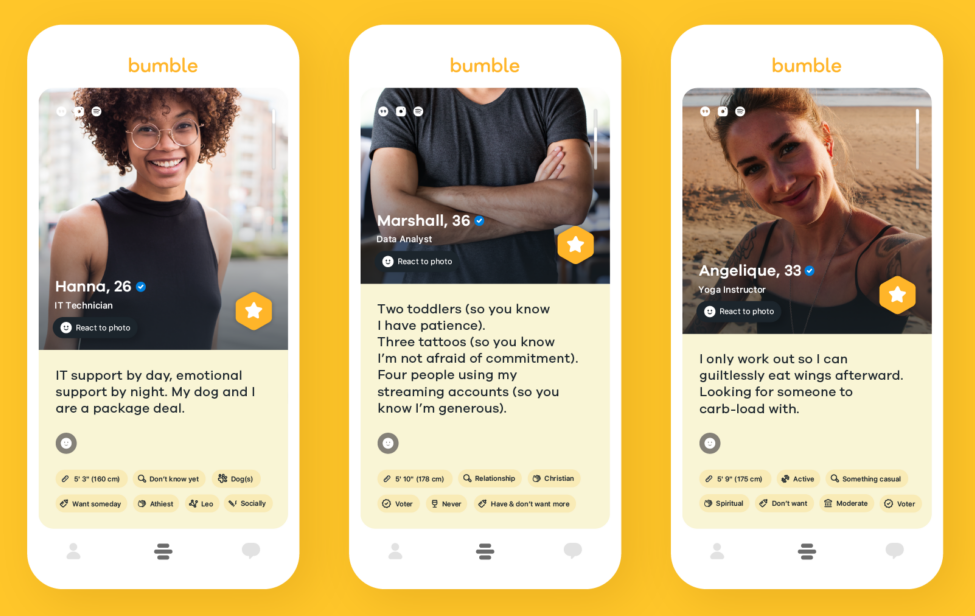
Follow these proven steps to optimize your account visibility:
1. Feed the Image Recognition Software: The app uses image recognition technology to verify if your photos are clear. Choose well-lit images where your face is entirely visible. Your primary photo must be a solo shot. If your first picture is a group photo, a blurry mirror selfie, or shows you wearing sunglasses, the algorithm will often deprioritize your profile.
2. Complete All Basic Info Badges: Fill out data points regarding your height, exercise habits, drinking preferences, and what kind of relationship you are seeking. The system relies heavily on this data to filter you into compatible feeds. A blank bio makes you practically invisible to users who rely on basic filters.
3. Secure the Verification Badge: This is mandatory. By taking a quick selfie that matches a system-requested pose, Bumble verifies your identity. Profiles with the blue verification badge receive a massive boost in visibility because the algorithm knows you are a real human, and other users feel safer interacting with you.
4. Use Text Prompts Strategically: Do not just give one-word answers to the profile prompts. Use them to showcase your hobbies and personality. Because women have to send the first message in heterosexual matches, giving them a clear, interesting prompt makes it incredibly easy for them to start a conversation.
When I stopped leaving my bio blank and finally verified my account, my visibility skyrocketed, directly leading to better, more frequent matches.
Decision-Making Guide: Free App Usage vs. Bumble Premium
Many users look at the premium features—Bumble Boost, SuperSwipes, and Premium—and wonder if they are worth the high price tag. Let’s look at an honest, strategic evaluation of the free version versus the paid tiers.
The free version of the application is highly capable. You can create a full profile, swipe on potential matches, secure connections, and message without spending a single dollar. If you live in a moderately populated area and check the app once a day, the free version is completely sufficient.
However, if you live in a densely populated city, or if you simply do not have the time to manually swipe for hours, the paid features offer strategic shortcuts:
| Feature Tier | Included Tools | Strategic Advantage | Best For |
| Basic (Free) | Standard swiping, messaging, profile creation, one daily match extension. | Costs nothing, but requires a higher time investment to manually find mutual likes. | Casual users who have the patience to swipe daily. |
| Bumble Boost | Unlimited swipes, Backtrack (undo accidental left swipes), extra time extensions. | Great for recovering from swiping mistakes and extending matches when life gets busy. | Highly active users who frequently run out of their daily free swipe allowance. |
| Bumble Premium | All Boost features, plus Advanced Filters, Incognito Mode, and the Beeline. | The Beeline shows you a grid of everyone who has already swiped right on you. | Busy individuals who want to skip the swiping process and instantly match with interested people. |
Understanding the SuperSwipe: As mentioned earlier, swiping up on a profile activates a SuperSwipe. This costs an in-app currency (Coins) and places a distinct star icon on your profile when you appear in that specific person’s feed. It signals strong intent.
The Strategy: Use a SuperSwipe only when you see a profile that heavily aligns with your specific interests. It is not a guaranteed match, but it guarantees they will notice your profile in their stack.
You do not need to pay to get dates. Premium features are simply time-saving tools. If you are struggling to get likes, paying for premium will not fix a bad profile. Always optimize your photos and bio first before deciding if a dating app subscription is worth the cost.
Need More Control Over Your Bumble Location?
Bumble is a location-based app, so where your phone reports you are can directly affect who appears in your swipe queue. For most users, the built-in distance filter and Bumble Travel Mode are enough. But if you are troubleshooting location refresh issues, previewing the dating pool before moving, or trying to understand why your profile keeps showing people outside your expected area, you may need more flexible device-level location control.
This is where Fonelora Location Changer can fit naturally into the workflow. It helps iPhone and Android users change the GPS location reported by their device from a computer without jailbreak or root access. Compared with random mobile fake GPS apps, FLC provides a cleaner desktop-based way to choose a location on the map and apply it to your connected phone.
For Bumble users, this can be useful when you want to test how matches refresh in another city, avoid repeatedly opening the app in a sensitive real-world location, or check whether your GPS position is being read correctly. The simple workflow is: install Fonelora Location Changer on your computer, connect your phone, choose a target city or neighborhood, apply the virtual location, and then open Bumble to see how the nearby profile stack updates.
Use location-changing tools responsibly. Bumble’s official Travel Mode is still the safest option when available. Fonelora Location Changer is best used for GPS testing, privacy control, or situations where you need more flexible device-level location management.
Managing the Bumble Match System: Expiration Rules and Troubleshooting
One of the most stressful parts of this platform is the swipe expiration rules. Unlike other apps where matches sit in an inbox forever, Bumble forces immediate interaction.
Here is exactly how the 24-hour countdown timer works:
1. The First Move: When a mutual match happens, a yellow 24-hour countdown ring appears around the person’s photo. The user with the initial messaging privilege has exactly 24 hours to send the first message.
2. The Reply Window: Once that first message is sent, the timer resets. The recipient now has exactly 24 hours to reply.
3. The Lock-In: The moment both users have sent at least one message, the timer permanently disappears. The connection is locked in, and you can message at your own pace.
Real-World Troubleshooting Guide
Sometimes the app does not behave as expected. Here is how to handle the most common issues:
1. The Vanishing Match (Did they unmatch or did time expire?)
If you look at your queue and a match is gone, two things could have happened. If the 24-hour timer ran out before a message was sent, the match simply expired. Free users get one free “Extend” per day to add another 24 hours to a match, which is highly recommended if you really want to talk to someone. Premium users can actually rematch with expired connections. However, if you were actively messaging someone and they suddenly vanished, they likely unmatched you, which removes them from your queue permanently.
2. Running Out of People in Your Area
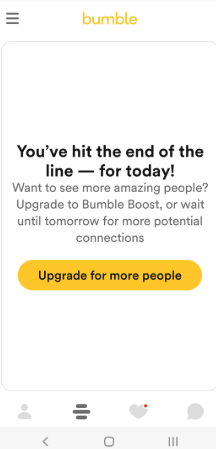
If you see a screen saying “You’ve hit the end of the line,” it means you have swiped through everyone within your current filter settings. Do not panic. Go to your settings and slightly expand your distance radius or age range. Closing the app and checking back the next day will also populate your feed with newly created accounts.
3. The Shadowban Warning
A shadowban is when your profile is secretly hidden from other users, meaning you can swipe, but no one will ever see you. This usually happens if you violate the terms of service. Crucial warning: A major cause of shadowbans is deleting your account and recreating it multiple times in the same week to try and get a “new user visibility boost.” The algorithm detects this as spam behavior and will silently penalize your account. If you want a fresh start, simply update your photos and bio.
Frequently Asked Questions About How to Use Bumble
To finalize our guide, here are straightforward answers to the most common questions regarding the platform’s mechanics.
- How does Bumble work?
- Bumble is a location-based matching application. You swipe right to like a profile and left to pass. A mutual right swipe creates a match, which triggers a strict 24-hour window for the two users to begin a conversation.
- Who can message first on Bumble?
- In heterosexual connections, women must send the first message. In same-sex connections, non-binary pairings, or non-dating modes (BFF and Bizz), either person can send the first message.
- What is Bumble Boost and how does it help?
- Bumble Boost is a paid subscription tier offering unlimited daily swipes, the ability to extend the time on expiring matches, and the “Backtrack” feature, which lets you undo accidental left swipes.
Conclusion
Mastering Bumble requires an understanding of its unique mechanics, but it does not need to feel like a full-time job. By moving away from random swiping and treating your profile with intention, you take back control of your algorithm score. You now understand exactly who messages first, how the 24-hour expiration timer functions, and how to tell if a premium subscription is actually right for your specific situation.
If your biggest issue is location-related, such as checking another city before traveling or troubleshooting how Bumble reads your device GPS, Fonelora Location Changer can provide a more flexible desktop-based option beyond Bumble’s standard location settings.
Do not let the app frustrate you. Treat it as a tool. Apply the photo and bio optimizations discussed above, verify your account, and start swiping intentionally. You are entirely capable of navigating this system to secure better, safer, and more meaningful matches today.


Hot Topics
