Quick Answer:
To evolve Inkay into Malamar in Pokémon GO, you must meet two specific conditions simultaneously:
- Collect exactly 50 Inkay Candy.
- Turn your physical phone completely upside down.
The question mark on the Evolve button is a hint for this hidden mechanic. Once your device is physically upside down and you have enough candy, the evolve button will unlock, the question mark will disappear, and you can trigger the evolution.
Step-by-Step: The Upside-Down Evolution Trick
Follow these exact steps to perform the upside-down evolution trick and add Malamar to your Pokédex:
- Open Pokémon GO and tap the Poké Ball icon to access your menu.
- Navigate to your Pokémon Storage and search for the Inkay you want to evolve.
- Ensure the candy counter shows you have at least 50 Inkay Candies ready.
- Turn your physical phone completely upside down.
- Watch the Evolve button. The greyed-out question mark will light up and change to an active, pink Evolve button.
- Tap the active Evolve button while continuing to hold the phone upside down.
Keep your device inverted until the evolution animation starts to ensure the game properly registers the action.
Why is Inkay Evolution Not Working? (Troubleshooting Checklist)
If you are holding your phone upside down and the Evolve button remains greyed out with a question mark, your phone’s hardware or settings are blocking the game from detecting the flip. Run through this quick troubleshooting checklist:
- Unlock Auto-Rotate: Your device’s screen orientation must be unlocked. If it is locked to portrait mode, the phone will not alert the game that a physical flip occurred.
- Disable Battery Saver Modes: Turn off your phone’s built-in system battery saver.
- Turn off Pokémon GO’s native Battery Saver, found in the game’s settings menu. Both of these modes can restrict background gyroscope detection to save power.
- Verify Gyroscope Hardware: Budget or older Android phones sometimes lack a built-in gyroscope sensor. Without this hardware, your phone physically cannot detect being turned upside down.
Workaround for missing gyroscopes: If your phone lacks the required sensor, the only way to trigger the evolution is to temporarily log into your Pokémon GO account on a friend’s newer, supported device, perform the evolution trick, and log back out.
The Next Challenge: Gathering 50 Inkay Candies Fast
Once you know the upside-down trick, you quickly realize the actual hardest part of getting Malamar is gathering the required 50 Inkay Candies. Outside of specific Psychic-type or Dark-type events, Inkay spawns are incredibly rare in the wild.
Traditionally, players must rely on setting Inkay as their Buddy Pokémon and walking miles in the real world just to earn one buddy candy at a time. You can also try hatching eggs, using Rare Candies from raids, or traveling to the best Pokémon GO locations, but these resources are often better saved for Legendary Pokémon. The reality is that physically walking miles every day for a single evolution is slow, exhausting, and for many players, highly impractical due to weather, time constraints, or a lack of local spawn points.
How to Farm Inkay Candy with Fonelora Location Changer
If physical walking limitations or a lack of local spawns are keeping you from gathering 50 candies, simulating your buddy route is a highly practical solution. Fonelora Location Changer is a guided desktop tool for supported iOS and Android devices that allows you to change location in Pokémon GO and simulate natural walking speeds, helping your game register buddy distance without leaving your house.
Fonelora Location Changer
Realistic GPS movement simulation, flexible route control, easy no-modification setup, and support for gaming, social, privacy, and location-based testing in one platform.
Using virtual location tools in location-based games carries account risks. To minimize these risks, always use Game Mode, strictly respect Pokémon GO cooldown rules, and be fully aware of the game’s terms of service before simulating movement.
How to simulate buddy walking with Fonelora Location Changer:
- Connect your supported iOS or Android device to your computer and open Fonelora Location Changer.

- Select Game Mode to ensure the tool provides game-oriented setup and cooldown context.
- Choose Multi-Spot Mode, or Single-Spot Mode, to create a custom walking route in your surrounding neighborhood.
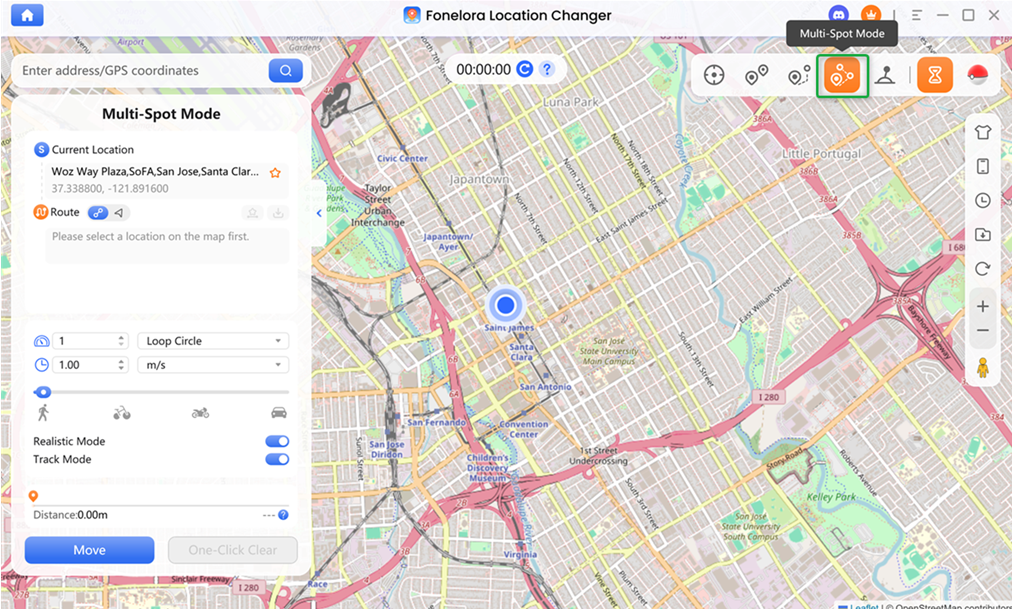
- Set your movement speed to a realistic walking pace, usually under 10 km/h, so the game registers the buddy distance correctly.
- Start the movement. Your in-game avatar will walk the route automatically, earning you the Buddy Candy needed to reach your 50-candy goal.
For players looking to catch Inkay directly during an active spawn event, you can also use Teleport Mode to jump to known coordinates where Inkay is spawning, utilizing the built-in Cooldown Timer to manage safe catch windows.
Frequently Asked Questions
- Why is there a question mark on Inkay’s evolve button?
- The question mark indicates a hidden evolution mechanic. Unlike standard Pokémon, Inkay requires you to physically hold your device upside down to unlock the Evolve button.
- Do I really have to turn my phone upside down to evolve Inkay?
- Yes. This is a hardcoded mechanic in Pokémon GO, directly referencing how Inkay evolves in the mainline Nintendo console games.
- Why is Inkay evolution not working when I flip my phone?
- This usually happens because your screen’s Auto-Rotate is locked, Battery Saver mode restricts your gyroscope, or your phone physically lacks a gyroscope sensor.
- How do I evolve Inkay without a gyroscope?
- You cannot evolve Inkay on a device without a gyroscope. You must temporarily log into your Pokémon GO account on a supported device, like a friend’s newer phone, evolve Inkay, and then return to your own phone.
- How do I get Inkay candy when it’s not spawning?
- You can set Inkay as your Buddy Pokémon to earn candy by walking. If physical walking isn’t an option, players often use simulated routing tools to generate buddy distance safely from home.
- What are the best coordinates to find Inkay in Pokémon GO?
- Inkay spawns rotate based on current in-game seasons and events. Players often look for the best places to spoof Pokémon GO to teleport to active coordinates during specific Psychic-type events.
Final Thoughts: Ready for Malamar?
Evolving Inkay into Malamar is one of the most unique experiences in Pokémon GO, but it requires knowing the hidden rules. To successfully trigger the evolution, you must gather exactly 50 Inkay Candies, unlock your phone’s screen orientation, and physically turn the device upside down.
If you find yourself stuck at 10 or 20 candies with no Inkay spawning nearby, remember that you don’t have to grind physical miles in bad weather to reach your goal. Using a virtual location tool can help bridge the gap. By simulating your buddy walking route with Fonelora Location Changer under supported conditions, you can farm the necessary candies efficiently. Verify your device compatibility, set up a realistic walking route, and get ready to add Malamar to your Pokédex.

Fonelora Location Changer
- Bluetooth Hardware Simulation for Safer GPS Spoofing
- Realistic Movement & Route Simulation
- No Root or Jailbreak Required
- All-in-One Solution for Games, Social Apps & Privacy
More Related Articles



