Quick Answer: The Umbreon Name Trick
If you are trying to get Umbreon for the first time, the fastest and easiest way is the classic naming trick. You do not need to walk 10km or wait for night time to use this method. If you are exploring other Pokémon GO resources, mastering this basic trick is a great starting point.
Here is how to do it in seconds:
- Rename your Eevee to “Tamao”: Tap the pencil icon next to Eevee’s name and type exactly Tamao.
- Check the silhouette: The evolve button should instantly change from a question mark (?) to a clear outline of Umbreon.
- Press Evolve: Spend 25 Eevee candy to get your Umbreon.
- Warning – One-time use only: This naming trick strictly works ONE time per account. If you have already used the “Tamao” trick in the past, renaming another Eevee will not work. You will need to use the 10km Buddy Method instead.
How to Evolve Eevee into Umbreon (The 10km Buddy Method)
If you have already used the “Tamao” name trick, you must use the official buddy walking method to get another Umbreon. This method is repeatable as many times as you want, but you must follow the requirements precisely to avoid accidentally getting a random Eeveelution.
Follow these exact steps:
- Make Eevee your active buddy: Tap your trainer profile, choose the Buddy option, and select the specific Eevee you want to evolve.
- Walk exactly 10km and earn 2 candies: You must walk at least 10km with that Eevee as your buddy. During this walk, you must also earn at least 2 Eevee candies from walking. Both conditions are absolutely required.
- Wait for in-game night time: “Night time” in Pokémon GO is determined by the game’s visual state. Look at the overworld map and sky—they must be dark. Do not rely solely on your local real-world clock.
- Keep Eevee as your active buddy: Do not swap Eevee out for another buddy! It must remain your active buddy walking on the map when you evolve it.
- Spend 25 Eevee candy to evolve: Once all conditions are met, go to that specific Eevee’s page, check the button, and press evolve.
Stop! Always Check the Evolve Button Silhouette First
Before you press the Evolve button and spend your 25 candy, you need to verify that your Eevee will actually turn into Umbreon. Niantic added a highly useful silhouette preview to the evolve button specifically to prevent evolution mistakes.
Run through this quick silhouette checklist before evolving:
- Question Mark (?): DO NOT EVOLVE. This means the 10km buddy requirements are not met. Evolving now will randomly give you Vaporeon, Jolteon, or Flareon.
- Espeon Silhouette: DO NOT EVOLVE YET. This means you successfully completed the 10km walk, but the game registers it as daytime. Wait until the in-game map turns dark.
- Sylveon Silhouette: DO NOT EVOLVE. You have earned too many buddy hearts (over 70) with this Eevee, which automatically overrides the Umbreon evolution. You must start over with a new Eevee.
- Umbreon Silhouette: SAFE TO EVOLVE. The requirements are perfectly met, and you are guaranteed to get Umbreon.
How to Get the 10km Buddy Distance Without Walking Physically
Walking 10km requires physical effort, good weather, and a significant time commitment. If bad weather, physical limitations, or a busy schedule make it difficult to complete the buddy walking requirement, utilizing a tool to change location in Pokémon GO via desktop software provides a practical workaround.
Instead of walking outside, Fonelora Location Changer allows you to simulate a virtual route on your desktop computer, helping you rack up buddy distance smoothly at realistic walking speeds for supported iOS and Android devices.
Fonelora Location Changer
Realistic GPS movement simulation, flexible route control, easy no-modification setup, and support for gaming, social, privacy, and location-based testing in one platform.
Here is how to use it to complete your 10km buddy requirement:
- Connect your device: Open Fonelora Location Changer on your Windows or Mac computer and connect your supported iPhone or Android device.

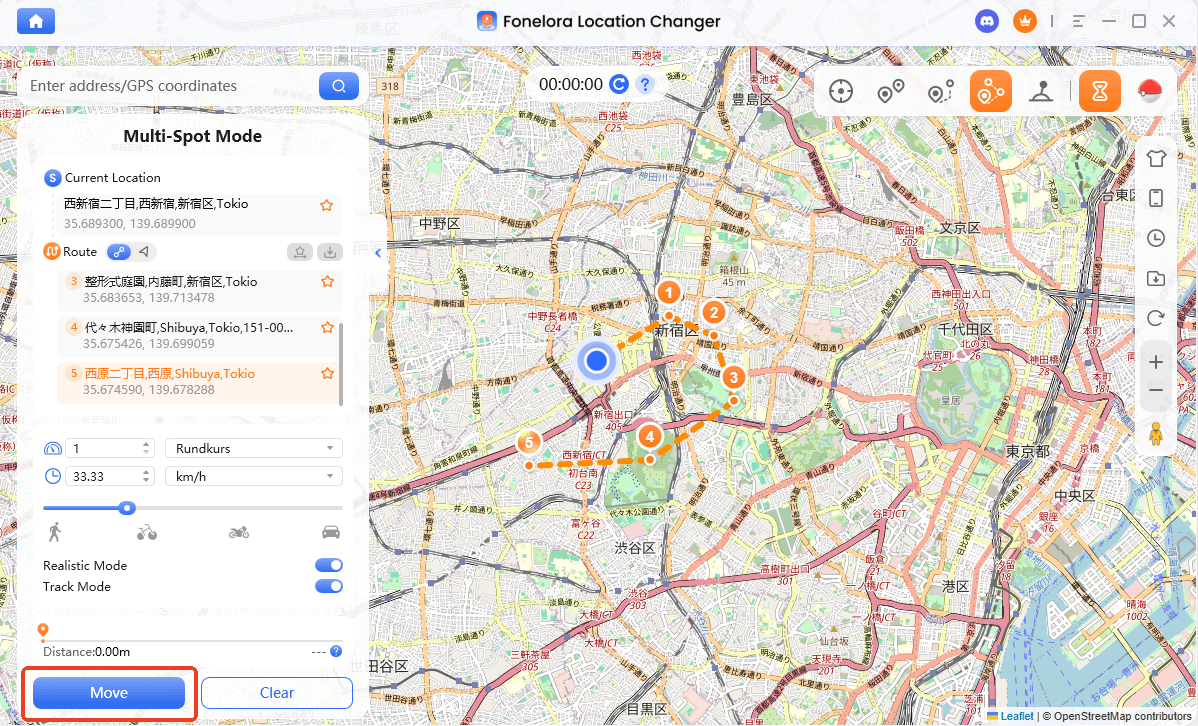
- Choose Single-Spot or Multi-Spot Mode: Select a movement mode to set up a virtual route spanning at least 10km across the map.
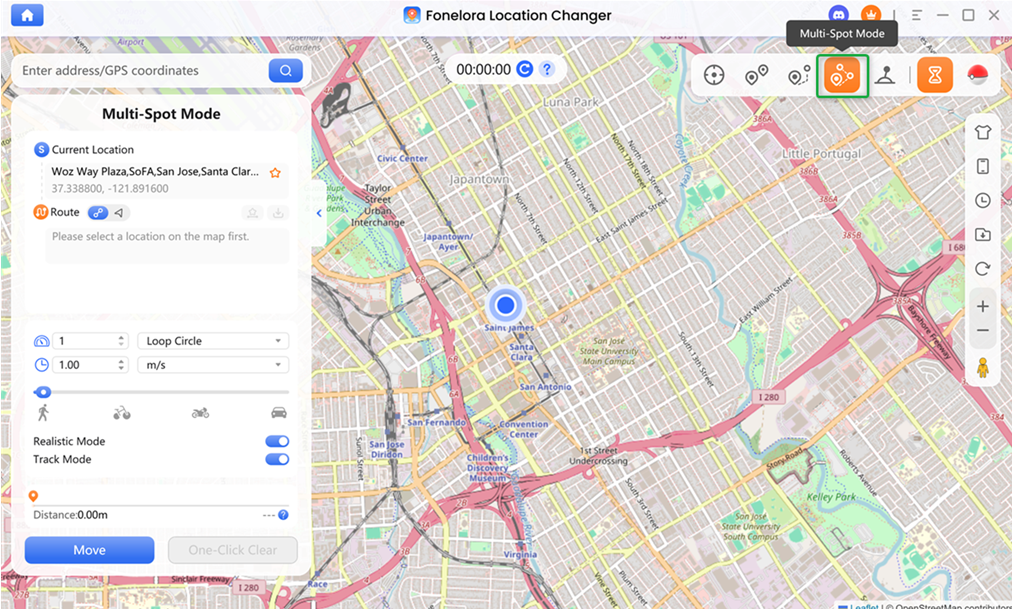
- Set a realistic walking speed: Adjust the speed slider to a natural walking pace, such as 3-5 km/h, to safely log buddy distance without triggering speed warnings in the game.
- Start the simulation: Let your in-game avatar walk the virtual route until you hit the 10km mark and earn your 2 Eevee candies.
Fonelora Location Changer is a desktop-guided route simulator intended for use under supported conditions. It is not a 100% undetectable bypass, so always check device compatibility, monitor cooldown rules, and keep app rules in mind.
Check Fonelora compatibility to start simulating your buddy walks today and easily complete your Eeveelution goals even when you are stuck indoors.
Troubleshooting: Why Did My Eevee Evolve Into Espeon or Sylveon?
It is incredibly frustrating to walk 10km only to get the wrong Eeveelution. Here is exactly why your evolution failed and how to fix it for your next attempt:
- Symptom: You got Espeon instead of Umbreon
- Why it happened: You evolved Eevee while the in-game map was in daytime mode.
- Solution: Pay attention to the in-game sky, not your real-world clock. Wait until the game map turns visibly dark and verify the Umbreon silhouette before evolving.
- Symptom: You got Sylveon instead of Umbreon
- Why it happened: You earned 70 or more buddy hearts with that specific Eevee. The Sylveon requirement automatically overrides the Umbreon requirement.
- Solution: You cannot get Umbreon with this specific Eevee anymore. You must pick a new Eevee, make it your buddy, and walk 10km without earning maximum buddy hearts.
- Symptom: You got Vaporeon, Jolteon, or Flareon
- Why it happened: You either did not complete the full 10km and 2 candy requirement, or you removed Eevee from your active buddy spot before pressing evolve.
- Solution: Keep Eevee as your active buddy during the actual evolution process. If the evolve button shows a question mark (?), do not press it.
Frequently Asked Questions About Umbreon
- Does the Umbreon name trick work more than once?
- No. The “Tamao” naming trick is strictly a one-time use per Pokémon GO account. Once you use it, you must rely on the 10km buddy walking method for all future Umbreons.
- How do I know if it is night time in Pokémon GO?
- Look directly at the overworld map and sky in the game. If the map is dark and stars are visible, the game considers it night time. Do not just look at your real-world clock.
- Do I have to keep Eevee as my buddy to evolve it?
- Yes. For the 10km walking method, Eevee must be your active buddy on the screen at the exact moment you press the evolve button. If you un-buddy it first, the requirement breaks.
- What is the Umbreon name trick?
- Naming your Eevee “Tamao” before evolving it will guarantee it turns into Umbreon, bypassing the 10km walking requirement for your first attempt.
- Can I use a Poffin to speed up buddy distance?
- Using a Poffin halves the distance required to earn a buddy candy, from 5km to 2.5km. However, you still need to fulfill the total 10km walked requirement to trigger the Umbreon evolution.
Final Thoughts on Guaranteeing Your Umbreon
Getting Umbreon in Pokémon GO does not have to be a guessing game if you know the exact requirements. For your first Umbreon, the one-time “Tamao” name trick is an unbeatable shortcut. For every Umbreon after that, the 10km buddy walk at night is the permanent, repeatable method you must follow.
No matter which method you use, the most critical step is always checking the evolution silhouette before spending your 25 Eevee candy. If it is not showing the Umbreon outline, do not evolve.
If you are struggling to find the time or weather to walk 10km physically, remember that simulating a virtual route at a realistic walking pace with Fonelora Location Changer is a highly practical workaround. By planning ahead and verifying your requirements, you will have your Dark-type Eeveelution added to your Pokédex in no time.

Fonelora Location Changer
- Bluetooth Hardware Simulation for Safer GPS Spoofing
- Realistic Movement & Route Simulation
- No Root or Jailbreak Required
- All-in-One Solution for Games, Social Apps & Privacy
More Related Articles



