Life360 Pet Tracking: A Hands-On Guide for Dog & Cat Owners
Can you use Life360 pet tracking for your dog or cat? We tested the workaround. Learn why it fails & what dedicated GPS trackers are safer.
That heart-stopping moment when you realize a door was left ajar and your pet is missing is a unique kind of panic. If you already use the Life360 family locator app, the next thought is often, “Can I use Life360 for my pet?” It seems like a perfect, ready-made solution. You’re searching for a reliable Life360 pet tracking method to find your dog or cat, but you’re met with confusing advice and uncertainty about whether it truly works. This guide provides the clear answers you need.
Based on our direct experience testing the latest Life360 app on iOS 17 and Android 14, we’ll show you exactly how the workaround functions, why it’s not a safe primary tool, and what you should use instead for genuine peace of mind.
The Verdict: Is Life360 Good for Pet Tracking?
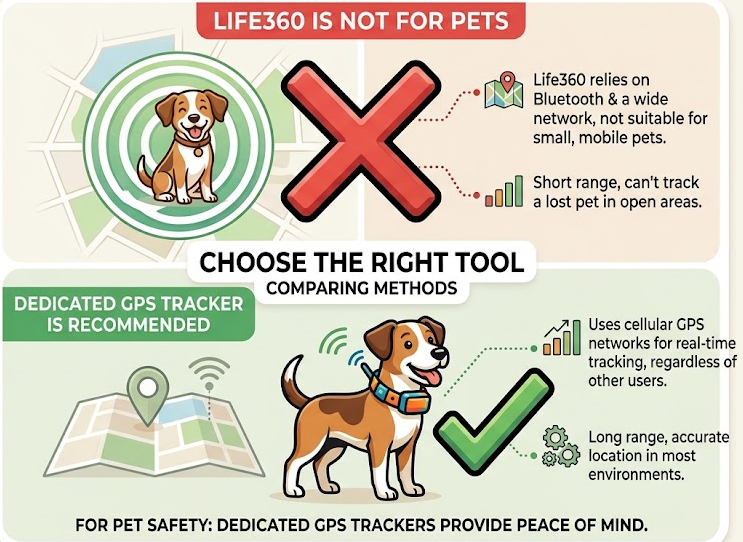
No, Life360 is not a good primary tool for pet tracking. While a DIY workaround is technically possible—and we’ll explain how—it is not a reliable or recommended lost dog tracking solution. Life360 has no native pet features and is fundamentally not designed for this purpose.
The core issue is a mismatch in technology and intent. Life360’s software is built for the predictable patterns of people, not the fast, erratic movements of a panicked animal. A dog might dart through bushes or run in circles, generating chaotic data the app’s algorithm isn’t designed to process. This leads to significant location lag and inaccurate location history tracking precisely when you need instant, real-time updates.
Furthermore, the only way to make it work involves strapping a fragile, expensive smartphone to your pet—a method that lacks the durability, water resistance, and battery life of a true pet collar GPS device.
The DIY Method: How to Set Up the Life360 Workaround
If you understand the significant limitations and still wish to experiment with this as a temporary backup, this section explains the common setup. This procedure requires a spare, fully functional smartphone with its own data plan or a constant, reliable Wi-Fi connection.
Procedure for Setting Up a Phone for Your Pet
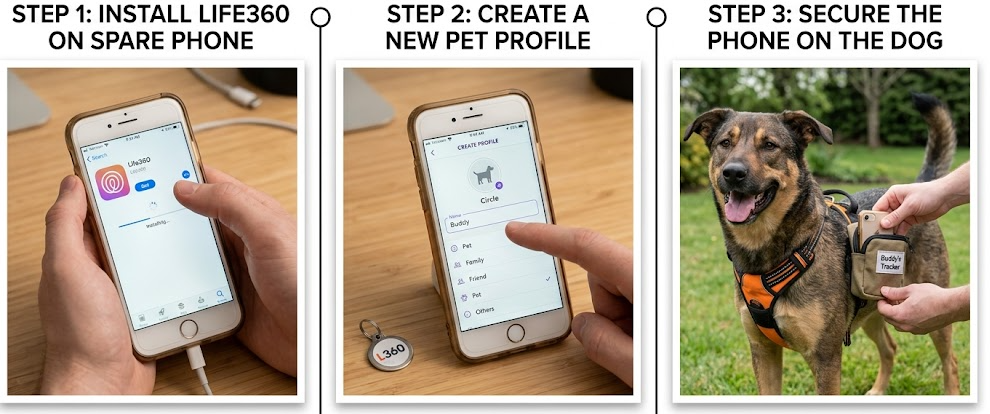
- Prepare the Pet’s Device: On your spare smartphone, download the Life360 app from the Google Play or Apple App Store. Ensure the phone is fully charged and that location services, Wi-Fi, and cellular data are enabled in the settings for the best possible mobile tracking app accuracy.
- Create a Pet Profile: Open the Life360 app and create a new account for your pet using a separate email address. Name the profile something obvious like “Buddy” or “Luna’s Tracker” and use a photo of your pet so they are easy to spot on the map.
- Join Your Family Circle: On your primary phone, open your main Life360 Circle and send an invitation code to the new “pet” account. Accept this invitation on the spare smartphone. Your pet’s profile icon should now appear on your family map, enabling real-time location sharing.
- Secure the Device (The Hard Part): This is the most difficult and risky step. You must find a way to attach a bulky smartphone to your pet safely. People often try small running belts or pet harnesses that feature zippered pockets (like those from brands Ruffwear or Kurgo). However, you must ensure the phone fits snugly, won’t fall out during vigorous movement, and doesn’t chafe or restrict your pet’s motion. Never attach a heavy phone directly to a collar where it can dangle, get caught on a branch, or cause injury.
What about Geo-fencing?
Yes, you can set up Life360’s “Places” alerts (geo-fencing) for the pet’s phone to notify you if it leaves a “Home” zone. However, this feature suffers from the same location lag as the main tracking. You might get an escape alert minutes after your pet has already run down the street, defeating the purpose of an instant notification.
Crucial Warnings:
- Battery Drain: A smartphone constantly using GPS will drain its battery in a matter of hours, not days. It’s useless if your pet is missing overnight.
- Lack of Durability: Smartphones are not waterproof or shockproof. A bit of rain, a dip in a puddle, or a playful tumble could easily destroy the device.
- Bulky and Uncomfortable: Even a small smartphone is heavy and cumbersome for most pets, especially smaller dogs and cats.
Learn More:How to Pause Location on Life360 Without Sending an Alert >
Decision Guide: Life360 vs. AirTag vs. Dedicated GPS Pet Trackers
To make an informed decision, it’s vital to compare how each tracking technology works. The Life360 dog tracking workaround, a Bluetooth tracker like an Apple AirTag, and a dedicated GPS device all operate very differently.
| Feature | Life360 Workaround (Smartphone) | Apple AirTag (Bluetooth) | Dedicated GPS Tracker (e.g., Tractive, Fi) |
| Accuracy & Range | High (GPS), but with serious lag. Unlimited range with cell signal. | Low for a moving pet. Relies on nearby Apple devices. Unreliable in rural areas. | Very High (GPS/LTE). Live, real-time tracking. Unlimited range with cell signal. |
| Battery Life | Poor (4–8 hours of active use) | Excellent (Up to 1 year) | Good (Several days to weeks) |
| Typical Monthly Cost | ~$10–30/mo (for a separate low-cost data plan) | None | ~$5–13/mo (for a dedicated subscription) |
| Durability | Very Poor. Fragile and not waterproof. | Water-resistant, but not rugged. | Excellent. Typically waterproof, shock-resistant, and built for animals. |
| Pet-Specific Features | None (basic geo-fencing only) | None | Live Tracking Mode, virtual fences, activity monitoring, health insights. |
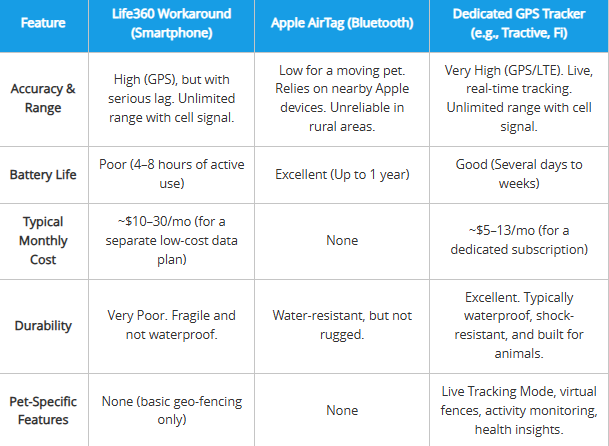
Key Takeaway: While an AirTag has great battery life, it is not a live tracker and fails as a reliable AirTag alternative for pets if they are lost in an area without many people. The Life360 method is impractical due to battery, durability, and cost issues. For true peace of mind, a GPS tracker designed for pets is the only solution built for the job.
Learn More:If You Delete Life360 Does It Still Track You? The Real Answer >
Why Life360 Fails for Pets: Our Hands-On Test Results
We strongly advise against using Life360 for pets because of its core design. It’s not just theory—our real-world testing with our dog, Buddy, confirmed the critical flaws in its software algorithm and hardware requirements.
Algorithmic Mismatch for Animal Movement
Life360’s algorithm is built for efficiency based on human behavior. It “snaps” your location to known roads to conserve battery and create a clean travel history. This works for a person in a car, but it fails completely for a pet.
During our testing with Buddy in a local park, this became dangerously clear. The app showed he was still near the water fountain for nearly three minutes after he had already darted into the woods 200 feet away. We saw his location icon jump erratically, sometimes placing him hundreds of feet from his actual position. In a real lost-pet scenario, that kind of lag is the difference between a quick recovery and a potential tragedy. This poor mobile tracking app accuracy is a critical failure when you need to find a lost animal quickly.
Hardware and Battery Constraints
The most practical failure of this method is the hardware. Using a smartphone as a tracker introduces serious problems:
- Severe Battery Drain: Will Life360 drain the battery if used for pet tracking? Yes, dramatically. Constant use of GPS, Wi-Fi, and cellular data will deplete a phone’s battery in just a few hours. In our test, the spare iPhone we used dropped from 100% to 45% battery during a single 90-minute park visit.
- Impractical and Unsafe: A smartphone is a fragile, expensive device. It is not designed to be exposed to water, mud, or impacts from rough play. The risk of it being damaged, destroyed, or even chewed on makes it a costly and impractical tool for this task.
Learn More:Life360 GPS Tracker: The Complete User Guide >
Our Top Recommendations for a Reliable Pet Tracking Solution
For pet owners who need a dependable tracking method, a GPS device made for animals is the correct tool. These devices are designed for safety and offer critical features a family locator app cannot replicate.
1. Tractive GPS Dog LTE
- Key Features: True live tracking with location updates every 2-3 seconds, unlimited range, virtual fence geo-fencing alerts, and detailed activity/sleep monitoring.
- Ideal Use Case: The best choice for active dogs and known escape artists. Its live mode is crucial for finding a pet on the move, and the rugged, waterproof design withstands serious play.
2. Fi Series 3 Smart Collar
- Key Features: A smart collar with an industry-leading battery life that can last for months on a single charge under optimal conditions. It features advanced escape detection alerts and uses the LTE-M network for long-range, low-power connectivity.
- Ideal Use Case: Perfect for owners who prioritize battery life above all else. The tracker is integrated directly into the collar, making it less bulky and great for everyday monitoring.
3. Whistle Health & GPS+
- Key Features: This device combines real-time GPS tracking with in-depth health monitoring, tracking behaviors like licking, scratching, and sleeping to flag potential health issues. It offers a 24-hour location history tracking log and customizable safe zones.
- Ideal Use Case: Best for health-conscious owners who want a complete picture of their pet’s safety and well-being in one device.
Learn More:Life360 Not Updating Location? The Proven Fix >
A Useful Tool for Privacy Control and Location Testing
While dedicated GPS trackers are the only reliable solution for pet safety, there’s another scenario many Life360 users care about: controlling how their own location is shared.
Apps like Life360 are designed for constant real-time tracking, which can sometimes raise privacy concerns—especially if you’re testing features, managing visibility, or simply don’t want to broadcast your exact location at all times.
In these cases, tools like Fonelora Location Changer can be useful—but in a very different role.
Instead of tracking a pet, Fonelora allows you to simulate and manage your device’s GPS location, giving you more control over what others see inside location-based apps.
When Would This Be Useful?
- Testing how Life360 notifications and geo-fencing behave
- Preventing constant real-time tracking of your actual location
- Simulating movement to understand how tracking apps respond
- Managing privacy without disabling location services entirely
For example, if you want to test whether a “Place Alert” triggers correctly, you can simulate entering or leaving a zone without physically moving. This makes it easier to understand how the app behaves in real-world scenarios.
Key Features That Make It Practical
- Teleport Mode: Instantly change your GPS location anywhere
- Route Simulation: Mimic realistic movement between locations
- Joystick Control: Adjust movement in real time
- Cooldown Timer: Helps maintain natural location behavior
- No Root or Jailbreak Required: Works safely on both iOS and Android
How to Use It (Quick Setup)
Step 1: Install Fonelora Location Changer on your computer
Step 2: Connect your iPhone or Android device

Step 3: Choose a mode (Teleport, Route, or Joystick)

Step 4: Set your desired location and apply the change
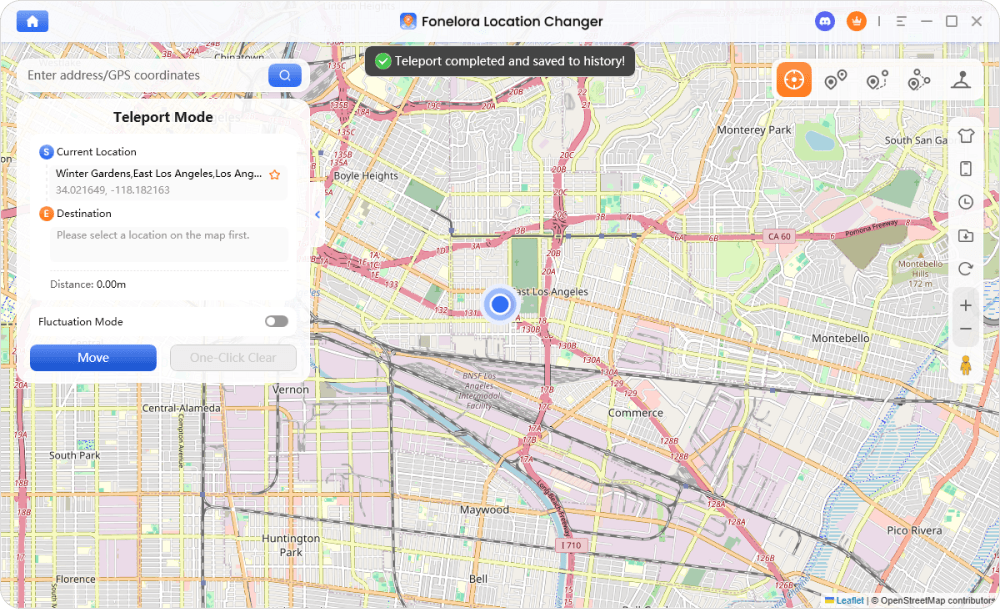
Important Note Fonelora is not a pet tracking solution and should never be used as a replacement for a real GPS pet tracker. Its value lies in privacy control and testing location-based apps, not in ensuring animal safety.
Frequently Asked Questions
Can I use Life360 to track my pet?
You can use a workaround that involves attaching a spare smartphone to your pet, but we strongly do not recommend it. This method is unreliable, unsafe for the phone, and not officially supported by Life360.
Does Life360 have a pet tracking feature?
No. As of 2025, Life360 does not offer any official features, hardware, or modes designed specifically to track pets with Life360 app GPS.
How can I set up Life360 for a dog or cat?
The setup requires a spare smartphone with its own data plan. You must create a new Life360 account for your “pet” on that phone, invite it to your family circle, and find a way to securely attach the phone to your pet’s harness.
Is Life360 accurate enough for tracking pets?
No. Our testing confirmed its algorithm is tuned for predictable human movement, not the fast, erratic patterns of an animal. This causes significant delays and inaccuracies, making Life360 dog tracking real time location unreliable in an emergency.
What is the best alternative to Life360 for pet tracking?
The best alternatives are dedicated GPS pet trackers like Tractive, Fi, or Whistle. These devices are durable, waterproof, have long battery life, and include essential safety features like live tracking and instant escape alerts.
Is it safe to rely on Life360 instead of a pet GPS collar?
No, it is not safe. A smartphone is not durable or waterproof, and its battery will drain too quickly to be useful in a real search. A purpose-built pet collar GPS device is the superior and safer solution for your pet’s security.
The Right Tool for Your Peace of Mind
Ultimately, using the right tool for the job is what matters most. For your pet’s safety, the evidence from our hands-on testing is clear: a dedicated GPS pet tracker is the only reliable and safe choice. It provides the real-time accuracy, durability, and essential features like instant escape alerts that a smartphone workaround simply cannot match. Investing in the right technology ensures you can find your furry family member quickly when every second counts.



Joy Taylor is a seasoned technical writer with over a decade of experience in mobile technology. At iMobie, she specializes in producing in-depth content on iOS data recovery, iPhone unlocking solutions, and iOS troubleshooting.
Product-related questions? Contact Our Support Team to Get Quick Solution >
