Looking for active Meta Lock codes and wondering how to redeem Meta Lock codes correctly? This guide gives you both: a verified list of working Meta Lock rewards and a step-by-step walkthrough showing exactly where to enter codes on mobile and PC.
Many Roblox players waste time using expired rewards or searching through outdated tutorials that never clearly explain how to redeem Meta Lock codes inside the game UI. To save you time, we tested every code and included precise redemption instructions below.
Table of ContentsHide
Active Meta Lock Codes (Real-Time Verified)
To solve the problem of sifting through inactive rewards, we test these codes manually. Think of this as your primary tool for securing free spins and in-game cash.
Since expiration dates are rarely announced by the developers, the smartest strategy is to redeem these the moment you see them.
- UPDATE350K – Redeem for 15 Free Spins (Verified working as of October 24, 2024, at 10:15 AM EST)
- SORRYFORDELAY – Redeem for 10 Free Spins and 5,000 Cash (Verified working as of October 24, 2024, at 10:15 AM EST)
- HALLOWEEN2024 – Redeem for 20 Free Spins (Verified working as of October 24, 2024, at 10:15 AM EST)
Pro-Tip: If you encounter a failure, check your spelling first. If a code has officially expired, please leave a comment so we can update our timestamped tracker.
Learn More:iAnyGo Not Working? The Real Fix for iOS 17 & Android >
How to Redeem Meta Lock Codes on Mobile and PC
If you are searching for how to redeem Meta Lock codes after claiming a new reward from Discord or Roblox events, the process only takes a few seconds once you know where the hidden code menu is located.
Finding the codes is only half the battle; applying them correctly in the UI is just as critical. Many generic guides will tell you to look for a “Twitter bird icon on the left side of the screen,” but if you actually play Meta Lock, you know that isn’t where the code redemption box is hidden.
Whether you are playing on a PC client or running the game on a mobile device (iOS or Android), the in-game menus function exactly the same. Here are the accurate, tested steps to claim your rewards:
- Launch the Game: Open the Roblox application and boot up Meta Lock. Wait for your character to fully load into the main menu area.
- Open the Locker: On the main menu screen, locate and click the ‘Locker’ tab.
- Find the Codes Button: Once inside the Locker menu, look toward the bottom right corner of your screen. You will see a blue button labeled ‘Codes’.
- Enter the Code: Click that blue button to open the text box. Carefully type your code into the blank field.
- Claim Rewards: Press the ‘Enter’ key or tap the confirm button on your mobile keyboard. If successful, your rewards will automatically be added to your account balance at the top of the screen.
Learn More:iMoveGo: The Ultimate Guide for iOS 17 & Android 14>
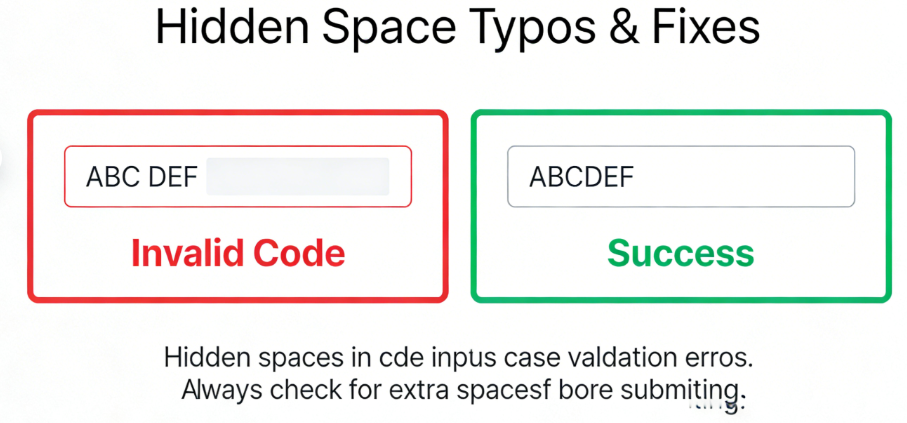
Crucial Warning: Meta Lock codes are strictly case-sensitive. You must type the code exactly as shown above—including all capital letters and numbers—to avoid an “Invalid” error.
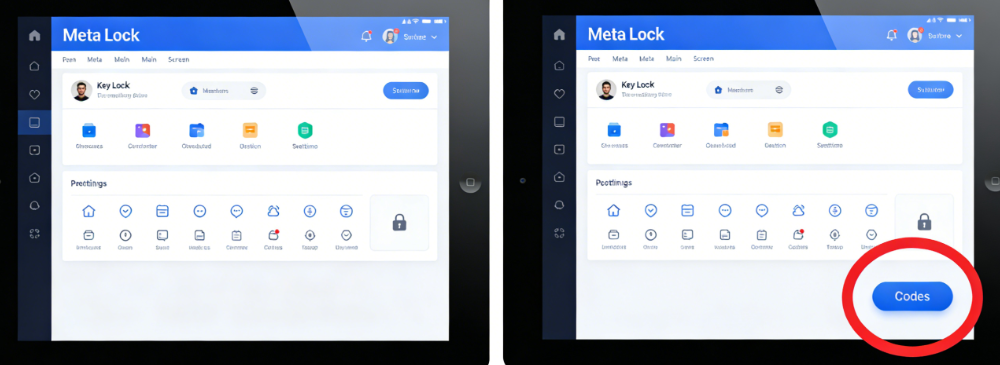
Where to Enter Meta Lock Codes
Many players struggle to find the exact location of the redemption menu. Unlike other Roblox games that place the code button directly on the home screen, Meta Lock hides the redemption option inside the Locker menu.
Expert Strategy: Maximizing Your Meta Lock Spins
Having a list of working codes is great, but understanding how to use your newly acquired resources is what separates average players from top-tier competitors. Because Meta Lock is heavily inspired by the hit anime Blue Lock, the abilities and traits you are spinning for directly correlate to the show’s iconic characters.
Do not spend your free spins haphazardly the moment you get them. The best strategy is to save your spins until you are ready to target specific, game-changing egoist traits that match your playstyle.
Traits Worth Spinning For
When you head to the trait roller, keep an eye out for these high-value abilities:
- Isagi’s Direct Shot: Perfect for players who want to capitalize on quick passes and finish plays with high accuracy inside the penalty box.
- Nagi’s Trapping: Exceptional for maintaining ball control under pressure. If you play a midfield or forward position where you receive a lot of contested passes, this trait is invaluable.
- Rin’s Accuracy/Puppeteer Traits: Ideal for strategic players who want to manipulate the field and score from challenging angles.
- Flow State: The ultimate goal. Entering Flow provides massive buffs to your speed, shot power, and overall field presence. Always keep a reserve of spins handy for when developers boost the drop rates for legendary traits like this.
By pooling the spins you earn from our code list, you can do massive batch-rolls, statistically increasing your chances of landing these top-tier abilities rather than settling for common, low-impact traits.
Learn More:How to Pause Snapchat Location: A Complete Guide >
Where to Find Official Meta Lock Code Drops
While bookmarking this page is the easiest way to get your codes without the hassle, it is highly beneficial to know where these codes originate. Many players struggle with a lack of guidance on where official announcements actually happen.
If you want to be on the front lines when a new patch drops, you should follow the developer’s official channels:
- The Official Discord: Join the Meta Lock Discord Server (Link opens in a new tab). Developers post new codes in the announcements channel, along with patch notes and sneak peeks at upcoming character traits.
- The Roblox Group: Join the Meta Lock Roblox Group to get updates directly on your Roblox feed. Developers occasionally lock special rewards behind group membership, so joining is a smart proactive move.
Anticipating the Release Schedule
If you understand the patterns behind code releases, you can predict when new drops will happen. This eliminates the fear of missing time-sensitive rewards. Look out for:
- Major Content Updates: Whenever the developers add a new map, a new game mode, or traits based on newly animated Blue Lock characters, a celebratory code is almost always released.
- Server Outages and Apologies: Roblox servers are notoriously fickle. If Meta Lock experiences unexpected downtime, the developers frequently issue compensation codes (like the “SORRYFORDELAY” code) shortly after servers return.
- Milestone Achievements: Keep an eye on the game’s “Likes” counter on Roblox. When the game hits major milestones (e.g., 350k, 400k likes), a new code is standard procedure.
Troubleshooting Expired Codes and Common Typos
Even with a perfect guide, errors occasionally happen. A major obstacle players face is entering a text string only to be met with a red error message. Understanding why these errors occur will help you troubleshoot the problem in seconds.
Learn More:How to Track Family Members on Google Maps >
“Expired” vs. “Invalid” Errors
If you receive an “Expired” notification, it means the code was real, but the promotional window has permanently closed. Unlike static websites that leave dead codes up for months, we actively remove expired codes from our list. However, if you are digging through old YouTube videos or forum posts, you will encounter this error frequently. There is no workaround for an expired code.
If you receive an “Invalid” error, the issue is almost certainly user-generated. This means the game does not recognize the code at all. If a code fails with this message, run through this quick diagnostic procedure:
- Check Capitalization: As mentioned, capitalization matters. The game registers “UPDATE350K” entirely differently from “update350k”.
- Watch Out for Auto-Capitalization on Mobile: If you are playing on an iPhone or Android device, your keyboard might automatically capitalize the first letter of a code that is meant to be lowercase, or add a period at the end.
- Look for Hidden Spaces: Make sure you haven’t accidentally copied a blank space at the beginning or end of the text string. This is incredibly common when copying and pasting from web browsers into the Roblox client.
By applying this simple troubleshooting technique, you ensure a smoother experience every time you interact with the game’s reward system.
Bonus Tool for Mobile Gamers: Fonelora Location Changer
While Meta Lock itself does not rely on GPS-based gameplay, many Roblox players also enjoy other mobile games and apps that use real-time location features. If you frequently test location-based experiences or want greater flexibility when managing GPS-dependent applications on your device, Fonelora Location Changer is worth considering.
Fonelora Location Changer allows users to simulate GPS locations on both iOS and Android devices without complex technical setups. In addition to changing your location instantly, it supports route simulation, multi-stop movement, and customizable movement speeds, making it useful for testing location-aware apps, exploring virtual locations, or simulating travel scenarios.

Frequently Asked Questions About Meta Lock Codes
To ensure you have all the information required to succeed on the field, we have compiled answers to the most common community queries.
- How do I redeem Meta Lock codes?
- To redeem Meta Lock codes, open Meta Lock inside Roblox, tap the Locker tab, then press the blue Codes button located in the bottom-right corner of the screen. Enter your active code exactly as shown and confirm to receive your free spins or cash rewards.
- How do I redeem my rewards in Meta Lock?
- To redeem your codes, launch the game, click on the ‘Locker’ tab from the main menu, and click the blue ‘Codes’ button located at the bottom right of your screen. Type your exact code into the box and hit enter.
- Why isn’t my code working?
- If a code fails, it is usually because it has expired, or there is a minor typo. Remember that these inputs are strictly case-sensitive. Check to ensure your mobile keyboard hasn’t added an accidental space at the end of the code.
Conclusion
Now that you know how to redeem Meta Lock codes correctly, you can avoid common issues such as invalid entries, hidden spaces, case-sensitivity mistakes, and expired rewards. Keeping this guide bookmarked ensures you always have quick access to the latest working codes, redemption instructions, and strategies for maximizing your free spins.
Instead of wasting time on outdated code lists or unreliable tutorials, you can focus on what really matters—building a stronger character and unlocking the traits that best match your playstyle. By combining active codes with smart spin management, you’ll significantly improve your chances of obtaining powerful abilities such as Flow State, Direct Shot, and other high-tier skills.
For players who enjoy Roblox alongside other mobile games and location-based applications, tools like Fonelora Location Changer can also help create a more flexible mobile gaming experience. With support for GPS location simulation, route planning, and virtual movement on both iOS and Android devices, it provides an easy way to manage location-based app testing and exploration from a single platform.
Take control of your progression today. Save this guide for future code updates, redeem rewards as soon as they become available, and share it with your teammates so your entire squad can stay ahead of the competition and climb the Meta Lock leaderboard together.


Hot Topics
