Quick Answer: Your Snapchat location does not stay on Snap Map forever. How long it remains visible depends on whether Snapchat can still receive fresh location data, whether the app has been opened recently, whether location permission is allowed, and whether Ghost Mode or other privacy settings are active. In many cases, friends may see your last active location for a period of time before it becomes outdated or disappears.
If you are wondering how long Snapchat location stays on Snap Map, the key point is this: Snap Map does not work like a constant live GPS feed for every user. It usually shows the last location Snapchat received from your device. That location may remain visible for a while after you close the app, then stop updating, expire, or disappear depending on your settings.
This guide explains how long Snap Map may show your location, whether Snapchat location disappears after 24 hours, why some users mention 8 hours, what happens after you close Snapchat, and how to control what friends can see.
How Long Does Snapchat Location Stay on Snap Map?
Snapchat location may stay on Snap Map as a last active location after you close the app. This means friends may still see the place where Snapchat last received your location, even if you are no longer there.
The exact behavior depends on several factors:
- Whether Snapchat was opened recently: Opening Snapchat can refresh your location if sharing is enabled.
- Location permission: If permission is limited, Snapchat may not keep receiving fresh location data.
- Ghost Mode: Ghost Mode hides your location from friends on Snap Map.
- Network and battery settings: Weak signal or battery restrictions can delay updates.
- Live Location: Live Location is different from regular Snap Map and can behave more actively during a shared session.
| Situation | What Friends May See | What It Means |
| You just opened Snapchat | Your Snap Map location may refresh. | Snapchat has recently received location data. |
| You closed Snapchat recently | Your last active location may still appear. | The map may show where you were when Snapchat last updated. |
| You have not opened Snapchat for a while | Your timestamp may become old or your location may disappear. | Snapchat may no longer have fresh location data. |
| Ghost Mode is on | Your location is hidden from friends. | This is a privacy setting, not a map error. |
| Live Location is active | A selected friend may see more active location sharing during the session. | Live Location is different from regular Snap Map. |
For the broader explanation of when Snap Map refreshes, read the main guide on when Snap Map updates.
Does Snapchat Location Disappear After 24 Hours?
Snapchat location can disappear after a period of inactivity, especially when Snapchat no longer receives fresh location data from your device. Many users search for whether Snapchat location disappears after 24 hours because they notice a friend’s location stops showing after the app has not been opened for a long time.
A 24-hour disappearance or expiration is usually related to limited location access, app inactivity, or privacy settings. It does not mean the person deleted Snapchat or blocked you. It usually means Snap Map does not have a recent location to show.
Important: Do not treat 24 hours as a universal countdown for every account. Snap Map behavior can vary depending on app activity, device permissions, background settings, and Live Location status.
Does Your Snapchat Location Turn Off After 24 Hours?
Your Snapchat location may stop showing after a long period without fresh location data. If you open Snapchat again and location sharing is enabled, Snap Map may refresh your location based on your current device settings.
Does Snap Location Disappear After 24 Hours?
It can disappear after inactivity, but the exact timing depends on permissions and app behavior. If Ghost Mode is on, your location is hidden regardless of timing.
Does Snap Map Turn Off After 8 Hours?
Some users see or search for 8-hour Snap Map behavior because older last-active timestamps or inactive locations may stop being useful after several hours. However, it is better not to think of Snap Map as one fixed 8-hour timer for everyone.
In practical terms, after several hours of inactivity, your Snap Map location may look outdated, stop updating, or eventually disappear. The map is showing the last location Snapchat received, not a guaranteed live location.
Why Do People Mention 8 Hours?
Users often mention 8 hours when they notice a friend’s location has not moved for a long time or when a last active location no longer seems current. This is usually about location freshness, not a manual setting you can control directly.
Does Your Snapchat Location Turn Off After 8 Hours?
Your location may stop appearing after extended inactivity, but the timing can vary. If you need privacy immediately, use Ghost Mode instead of waiting for Snap Map to stop showing a location on its own.
What Happens After You Close Snapchat?
After you close Snapchat, Snap Map may continue showing the last location Snapchat received. Friends may see a timestamp that indicates when that location was last updated. This is why someone can appear to be at school, work, home, or a previous place even after they have moved.
Several things can happen after closing the app:
- Your last active location may remain visible for a while.
- The timestamp may become older.
- Your location may stop updating.
- Your location may disappear after inactivity.
- Opening Snapchat again may refresh the location if sharing is enabled.
If your location is stuck even while Snapchat is open, that is a different problem. Use the guide to fix Snapchat location not updating.
Last Active Location vs Live Location
Regular Snap Map and Live Location are not the same. This distinction matters because it affects how long your location appears and how often it updates.
| Feature | Regular Snap Map | Live Location |
| What it shows | Your last Snap Map location based on app activity and settings. | More active location sharing with a selected friend during a chosen session. |
| Who sees it | Friends allowed by your Snap Map privacy settings. | The specific friend you choose to share with. |
| How it feels to others | May look like a last active location. | May look more active during the sharing period. |
| Best use | General Snap Map visibility. | Temporary coordination or safety sharing with trusted friends. |
If someone’s location appears to move in real time, they may be using Live Location. If their location is static with an old timestamp, you are more likely seeing their regular Snap Map last active location.
Why Someone’s Snapchat Location Disappears
If someone’s Snapchat location disappears from Snap Map, it does not always mean they blocked you. There are several normal reasons why a location may stop showing.
- They enabled Ghost Mode: Ghost Mode hides their location from friends.
- They stopped sharing location with you: Snapchat lets users customize who can see their location.
- Their phone is offline: Snap Map cannot receive fresh location data.
- They have not opened Snapchat recently: Their last active location may expire or disappear.
- They disabled location permission: Snapchat cannot update location without access.
- You may no longer be on their friend list: This can affect visibility depending on their settings.
If the location is visible but appears in the wrong place, read how to fix Snap Map wrong location.
How to Control How Long Your Location Shows
You cannot set a custom timer that says “show my Snap Map location for exactly this many hours.” But you can control location visibility through Snapchat and device settings.
Use Ghost Mode for Immediate Privacy
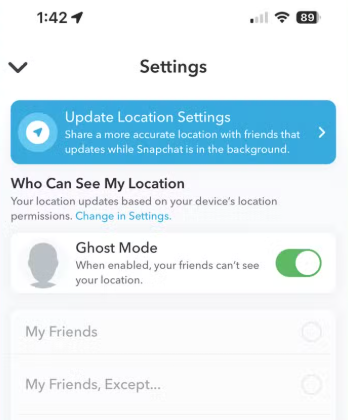
Ghost Mode is the most direct way to stop friends from seeing your location on Snap Map. It hides your location rather than waiting for your last active location to expire.
- Open Snapchat.
- Open Snap Map.
- Tap the Settings gear icon.
- Turn on Ghost Mode.
- Choose the duration Snapchat provides.
Limit Who Can See Your Location
Snapchat location settings let you choose who can see you on Snap Map. You can share with all friends, hide from selected friends, or share only with selected people.
Adjust Device Location Permission
On iPhone or Android, changing Snapchat location permission affects how the app can access your location. If you want more control, review the permission level in your phone settings.
For a full privacy-focused guide, see how to pause Snapchat location and freeze Snap Map.
Frequently Asked Questions About Snapchat Location Duration
Here are direct answers to common questions about how long Snapchat location stays visible, when it disappears, and what friends can see.
How long does Snapchat location stay on Snap Map?
Snapchat location may stay visible as a last active location for a period of time after the app is closed. It may become outdated, stop updating, or disappear if Snapchat does not receive fresh location data.
Does Snapchat location disappear after 24 hours?
It can disappear after extended inactivity or limited location access. The exact behavior depends on app activity, permissions, privacy settings, and whether Snapchat receives fresh location data again.
Does Snap location disappear after 24 hours?
Snap location may disappear after a long period without fresh updates. Opening Snapchat again can refresh it if location sharing is enabled and the app has permission to use your location.
Does your Snapchat location turn off after 8 hours?
Some users notice their location becomes old or disappears after several hours, but Snap Map should not be treated as one fixed 8-hour timer. Ghost Mode is the better choice if you want to hide location immediately.
How long does your location stay on Snap Map after closing Snapchat?
Your last active location may remain visible for a while after closing Snapchat. Over time, it may show an older timestamp or disappear if no fresh location data is available.
Does Snapchat location turn off after inactivity?
It can stop showing after inactivity if Snapchat does not receive updated location data. Privacy settings, permissions, and app activity all affect what friends see.
Does Snap Map only update when you open the app?
Regular Snap Map is strongly tied to app activity and permissions. For the detailed update behavior, read the guide on when Snap Map updates.
Can I make my Snapchat location disappear immediately?
Yes. Use Ghost Mode if you want to hide your location from Snap Map immediately. Waiting for a last active location to disappear is less predictable.
Why does someone’s location still show after they stop using Snapchat?
You may be seeing their last active location. Snap Map can keep showing the last place Snapchat received from their device until the location becomes outdated or disappears.
Does Live Location disappear the same way as regular Snap Map?
No. Live Location is a separate feature shared with selected friends for a chosen session. Regular Snap Map and Live Location do not behave exactly the same.
Conclusion
Snapchat location does not stay on Snap Map forever, but there is not one simple timer that applies to every user. Your last active location may remain visible after you close Snapchat, become outdated, or disappear depending on app activity, permissions, privacy settings, network access, and Live Location status.
If you want to hide your location immediately, use Ghost Mode. If you want to understand why a friend’s location still appears after they stopped using Snapchat, check the timestamp and remember that Snap Map often shows a last active location, not a guaranteed live feed.
If your goal is only to manage privacy, start with Snapchat’s built-in settings. If you need to test how your phone reports location or use a selected device location, Fonelora Location Changer can be used as an optional location utility, not Snapchat’s native duration or privacy feature.