Strava Cheats Explained: A Guide to Spotting & Reporting Unfair Activity
Frustrated by superhuman speeds? This guide on Strava cheats helps you spot fake GPS vs. honest glitches. Learn to identify and report unfair leaderboard activity.
It’s a familiar story for dedicated athletes like Julien, a cyclist from Seattle. After weeks of hard training, you conquer a local climb with a personal-best effort, only to check the leaderboard and see the top spot held by a rider with a superhuman average speed. This frustration is shared by millions who rely on Strava for motivation, only to suspect the leaderboards are filled with unfair results. You start to wonder about Strava cheats and whether the competition is even real.
This guide is for fair-play athletes who want to understand, identify, and responsibly report suspicious activities. We are not providing a tutorial on how to cheat. Instead, we’ll demystify the methods used, explain the difference between a deliberate cheat and an honest mistake, and show you how you can help maintain the integrity of the platform you love.
What Is a Strava Cheat? Intentional Acts vs. Honest Mistakes
Before flagging every fast time you see, it’s critical to understand the line between deliberate cheating and common technical errors. Many athletes fear that a simple GPS glitch could lead to a suspended Strava account, but the platform’s policies primarily target intentional manipulation. According to Strava’s Community Standards, the guiding principle is Strava fair play: earning your achievements honestly.
Here’s a clear breakdown to resolve the confusion.
Deliberate Cheating (Violations of Fair Play)
These are actions taken with the specific intent to deceive the system and manipulate the Strava leaderboard.
- GPS Spoofing: Using a fake GPS app or another tool to fabricate an activity log from a computer or phone without any physical effort.
- Data File Manipulation: Manually editing a GPX or FIT file to alter timestamps, increase average speed, or cut out rest periods before uploading it.
- Motor Pacing or Vehicle Drafting: Intentionally using a car, scooter, or motorcycle for drafting to gain an unfair aerodynamic advantage while recording it as a solo effort.
- Incorrect Activity Type: Knowingly logging a ride on an e-bike, in a car, or on a train as a standard bike ride or run to capture records on Strava segments.
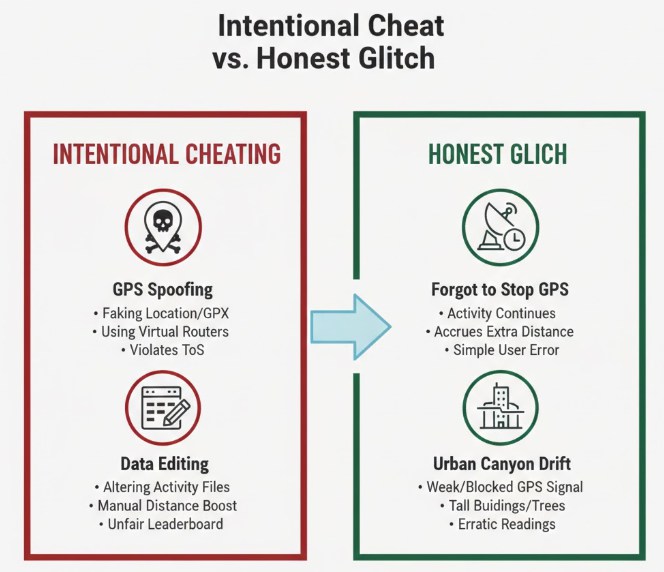
Honest Mistakes & Common Glitches
These are non-malicious errors that can still result in a flagged activity but are not considered cheating. They are the most common cause of a false Strava activity.
- Forgetting to Stop Your Device: The number one issue—finishing a run or ride and driving home with your GPS watch or phone still recording data.
- GPS Drift: In areas with tall buildings (“urban canyons”) or dense tree cover, your GPS signal can bounce. If your device consistently suffers from poor signal, a system repair tool for iOS can often recalibrate internal location services to minimize these jagged data spikes.
- Incorrect Device Settings: A miscalibrated wheel sensor on a bike or a faulty GPS setting on a watch can produce inaccurate speed and distance data.
Your Guide to Spotting Cheats, Glitches, and E-Bikes
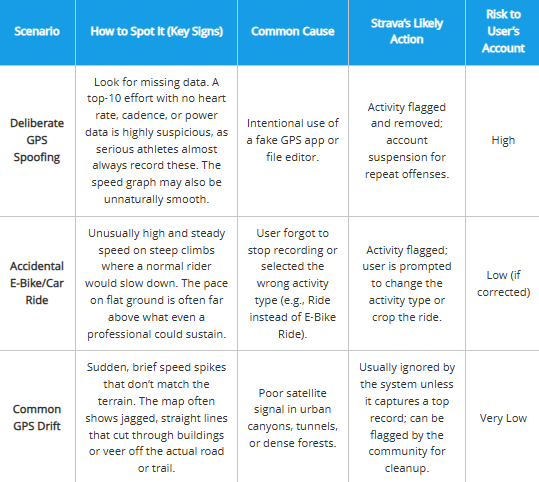
When you see a suspicious time on a leaderboard, it can be difficult to diagnose the cause. Was it deliberate GPS spoofing, an accidental car ride, or just a technical glitch? Each type of suspicious activity leaves behind distinct data patterns.
This table provides a clear comparison to help you become a more discerning observer of the data on your local leaderboards.
| Scenario | How to Spot It (Key Signs) | Common Cause | Strava’s Likely Action | Risk to User’s Account |
| Deliberate GPS Spoofing | Look for missing data. A top-10 effort with no heart rate, cadence, or power data is highly suspicious, as serious athletes almost always record these. The speed graph may also be unnaturally smooth. | Intentional use of a fake GPS app or file editor. | Activity flagged and removed; account suspension for repeat offenses. | High |
| Accidental E-Bike/Car Ride | Unusually high and steady speed on steep climbs where a normal rider would slow down. The pace on flat ground is often far above what even a professional could sustain. | User forgot to stop recording or selected the wrong activity type (e.g., Ride instead of E-Bike Ride). | Activity flagged; user is prompted to change the activity type or crop the ride. | Low (if corrected) |
| Common GPS Drift | Sudden, brief speed spikes that don’t match the terrain. The map often shows jagged, straight lines that cut through buildings or veer off the actual road or trail. | Poor satellite signal in urban canyons, tunnels, or dense forests. | Usually ignored by the system unless it captures a top record; can be flagged by the community for cleanup. | Very Low |
A Real-World Example: How to Spot a Misclassified E-Bike Ride
The theory is helpful, but let’s walk through a real-world example to show you exactly what to look for. Imagine you see a new KOM on a tough local hill, “Heartbreak Hill,” which has an average grade of 10%. The rider’s activity shows a speed of 18 mph up the entire climb. This is your first red flag.
Here’s how you’d investigate it like an expert:
- Check the Speed Profile vs. Grade: A human-powered cyclist will slow down significantly on a 10% grade. Their speed graph will show a clear dip on the climb. An e-bike, however, provides assistance, allowing the rider to maintain a much more consistent—and artificially high—speed. If their speed profile is nearly flat on a steep climb, it’s a strong indicator of motor assistance.
- Look for Corresponding Biometric Data: A true maximum effort up a steep climb will send an athlete’s heart rate soaring, often into their maximum zones. If the rider’s heart rate data is missing, or if it sits at a placid 95 bpm throughout the “all-out” effort, it doesn’t align with the performance. The effort and the physiological data should tell the same story.
- Analyze Power and Cadence (If Available): Many serious cyclists use power meters. On a steep climb, you’d expect to see very high and sustained power output (e.g., 300-400+ watts) and a cadence (pedal RPM) of around 70-90. If the activity shows a world-class speed but has no power data, or the power is strangely low and smooth, it suggests the watts aren’t coming from the rider’s legs alone.
When you see this combination—unrealistic speed on climbs, missing biometric data, and a mismatch between effort and physiology—you can be very confident it’s a misclassified activity, not a superhuman performance.
How Strava Detects Cheating: Automated Flags & Community Reporting
Strava employs a two-part system to maintain the integrity of its leaderboards: automated detection and community moderation. Understanding how this system works is key to alleviating the fear that a simple GPS error could put your account at risk.
First, Strava has automated algorithms that scan uploads for data that is statistically impossible. This includes flagging activities that exceed known human-powered speed or power output thresholds. If a ride segment shows an average speed of 80 mph, the system will automatically hide it from leaderboards. This is the first line of defense.
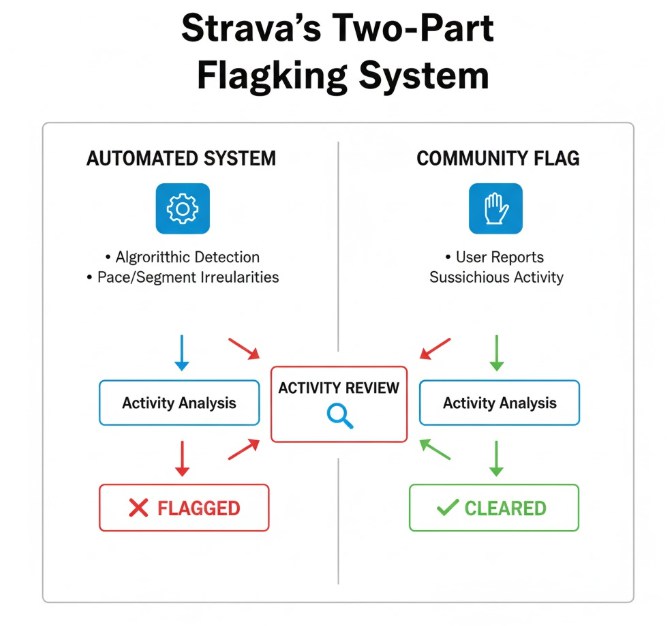
Second, and more powerfully, is the community flagging system. Any user can flag an activity they believe violates Strava fair play. Here’s a critical insight many users miss: the most common source of flagged data isn’t from sophisticated cheaters. It’s from mixed activities—like forgetting to stop your Garmin before a car ride or misclassifying an e-bike effort. These are far more frequent than deliberate attempts at GPS spoofing. This means the system relies on honest users to help correct errors, and an accidental flag on your activity is usually just a request to fix the data, not an accusation of cheating.
A Step-by-Step Guide to Reporting a Suspicious Strava Activity
If you’ve identified an activity that violates the spirit of fair competition, you can report it. Responsible flagging helps everyone. Always review the activity carefully first, and assume it’s an honest mistake unless there is clear evidence of intentional deception.
Flagging Etiquette: A Note on Community Courtesy
Before you click “Flag,” consider the social etiquette. The goal is to clean up the leaderboards, not to start a digital argument.
- To Comment or Not to Comment? For obvious errors like a car ride, there’s no need to comment; simply flag the activity. For borderline cases like a potential e-bike ride, a friendly, non-accusatory comment can be helpful. Try something like, “Hey, great ride! Just a heads-up, it looks like this might have been logged as a standard ride instead of an e-bike ride. That can happen sometimes!” This gives the user a chance to fix it themselves.
- Flag and Move On: If you’re not comfortable commenting or if the data is clearly fake, it is perfectly acceptable to just flag the activity and let the system handle it. You don’t need to engage.
- What If They Get Nasty? It’s rare, but some users may react defensively. Do not get into a back-and-forth. You have done your part by flagging the activity. Let Strava’s support team manage the interaction from there. Your role is to report, not to police.
Flagging on the Strava Mobile App (iPhone/Android)
- Navigate to the activity page you wish to report.
- Tap the three dots icon (…) in the upper-right corner. If your app feels sluggish or fails to respond to these commands, try optimizing your phone’s performance to ensure a smooth, glitch-free experience during community moderation.
- Select Flag from the menu that appears.
- Choose the reason that best fits the situation. The most common and effective choice for incorrect data is “Wrong Activity Type,” which covers car rides and e-bikes.
- Add a brief, objective comment if necessary and submit.
Flagging on the Strava Website
- Open the suspicious activity on the Strava website.
- Click the three dots icon located on the left side of the screen.
- Click Flag and select the appropriate reason from the list.
Once flagged, the activity is immediately removed from public leaderboards until it is resolved by the owner (by cropping or changing the activity type) or by Strava support.
How to Protect Your Account and Avoid an Unfair Flag
While the flagging system is designed to catch cheaters, honest athletes can sometimes get caught in the crossfire. The good news is that you can take simple, proactive steps to keep your own activities clean and protect your reputation on this popular sports app.
Here are the most effective techniques to prevent your activities from being unfairly flagged:
- Crop Your Activities: If you forget to stop your GPS watch and record part of a car ride, use Strava’s built-in crop tool. On the website or in the app, go to your activity, select the wrench icon (or three dots), and choose “Crop.” You can easily trim the motorized portion from the beginning or end of your workout. This simple action shows good faith to the community.
- Choose the Correct Activity Type: This is the most important step. If you ride an e-bike, log it as an “E-Bike Ride.” This keeps you off the standard human-powered leaderboards and is the number one way to ensure Strava fair play.
- Review Major GPS Glitches: If your device produces a file with a significant GPS error—like a straight line that cuts across a neighborhood for a mile—it’s often best to delete the activity. Uploading a clearly flawed file that snags a KOM clutters leaderboards and is very likely to be flagged by other users.
- Set Your Privacy Zones: To prevent others from seeing exactly where your rides start and end. For those who are highly sensitive about their movement history, mastering iPhone location privacy settings is the best way to keep your home address and office location completely secure.
By adopting these simple habits, you can all but eliminate the chances of having a Strava activity deleted or flagged by mistake, allowing you to focus on your training and a fair-minded community experience.
Strava’s community guidelines and flagging tools are periodically updated. We will continue to review and revise this article to reflect any significant changes, ensuring you always have accurate and relevant information.
Ultimately, maintaining the integrity of Strava leaderboards is a shared responsibility. Understanding the difference between cheating and honest mistakes empowers you to act as a positive force within the community. Instead of feeling frustrated by an unrealistic Strava speed, you now have the knowledge to identify the likely cause, the tool to report clear issues, and the techniques to keep your own record clean.
By responsibly flagging incorrect data and practicing good data hygiene, you directly contribute to the Strava fair play that makes the platform a valuable and motivating resource for everyone.
Frequently Asked Questions About Strava Cheats
Here are concise answers to the most common questions regarding fair play on the platform.
1. What counts as cheating on Strava?
Cheating is the deliberate manipulation of activity data to gain an unfair advantage. This includes using a fake GPS app, manually editing workout files to increase speed, or knowingly misrepresenting an activity type, such as logging an e-bike ride as a standard ride to appear on leaderboards.
2. Why are there impossible speeds on Strava segments?
The most common reasons for an unrealistic Strava speed are honest mistakes. These include users forgetting to stop their GPS device before driving, poor GPS signal causing data spikes, or incorrectly logging a motorized activity like a car or e-bike ride.
3. Can Strava ban or suspend my account?
Yes. While rare for first-time or accidental issues, Strava can issue a suspended Strava account for repeat offenders who intentionally and consistently violate the platform’s Community Standards and Fair Play policy.
4. How does Strava detect fake GPS or cheating?
Strava uses a combination of automated systems that flag statistically impossible performances and a community-based flagging system. Any user can report a suspicious activity, which is the primary method for identifying and correcting inaccurate data on the Strava leaderboard.
5. Could my activity be flagged even if I didn’t cheat?
Yes, and it’s quite common. An activity can be flagged for unintentional reasons like a GPS glitch or forgetting to crop a car ride from your workout. A flag is not an accusation; it’s simply a notification that the data appears incorrect and needs your review or correction.
6.How do I report a suspicious activity on Strava?
On the activity’s page (via the mobile app or website), click the three-dot menu and select “Flag.” Choose the most accurate reason, such as “Wrong Activity Type,” and submit your report. This removes the activity from leaderboards pending review.



Joy Taylor is a seasoned technical writer with over a decade of experience in mobile technology. At iMobie, she specializes in producing in-depth content on iOS data recovery, iPhone unlocking solutions, and iOS troubleshooting.
Product-related questions? Contact Our Support Team to Get Quick Solution >
