Quick Answer:
To get a Metal Coat in Pokémon GO right now, your primary method is to spin standard PokéStops and Gym Photo Discs. However, the drop rate for evolution items is extremely low—roughly 1%. Occasionally, you can also receive a Metal Coat as a reward for completing specific Special Research tasks or opening gifts, but spinning stops remains the most consistent official method. If you are looking through various Pokémon GO guides for a guaranteed shop purchase, you won’t find one.
Evolving your Scyther into Scizor or Onix into Steelix requires this rare, specialized item. Acquiring a Metal Coat comes down to patience, persistence, and understanding exactly how the game’s item drop mechanics work. Below, we’ll break down the real odds and how to farm more efficiently.
Does the 7-Day PokéStop Streak Guarantee a Metal Coat?
One of the most common myths among players is that completing your 7-day PokéStop spin streak will finally grant you the exact item you need.
Here is the reality: completing a 7-day streak does guarantee an evolution item drop. However, it guarantees a random evolution item. When you spin that seventh stop, the game rolls the dice across the entire pool of evolution items. You are just as likely to receive a Sun Stone, King’s Rock, Up-Grade, or Dragon Scale as you are a Metal Coat.
While hitting your 7-day streak is always a good practice for bonus XP and items, relying solely on this method to evolve your Scyther can leave you waiting weeks or even months. If you get the wrong item at the end of the week, the streak resets, and the long wait begins again.
The Math Problem: Why Finding a Metal Coat Takes So Long
The core difficulty of finding a Metal Coat isn’t a secret trick you’re missing—it’s simply a math problem.
Because evolution items have a drop rate of roughly 1% from standard PokéStops, players mathematically need to spin hundreds of stops to have a realistic chance of getting the specific item they want. If you spin 100 stops, you might get one evolution item, and even then, it’s subjected to the random pool mentioned earlier.
This highlights a severe physical limitation for many players. If you live in a rural area, have mobility limitations, or are simply stuck at home, you might only have access to one or two local PokéStops. Spinning the same two stops every five minutes takes an enormous amount of time to reach the required volume. To beat the RNG (random number generation) odds, players need a way to dramatically increase their daily spin volume.
How to Farm PokéStops Efficiently When You’re Stuck at Home
If you cannot physically walk to hundreds of stops, manual farming becomes incredibly inefficient. To beat the 1% odds, many players use route simulation tools to access dense PokéStop clusters virtually.
Here is how traditional rural walking compares to using a Pokémon GO location changer like Fonelora Location Changer on supported iOS and Android devices:
| Feature/Factor | Manual Rural Farming | Fonelora Location Changer (Multi-Spot Mode) |
|---|---|---|
| Available PokéStops | Very low (often 1-3 stops) | Very high (access major city parks globally) |
| Time Investment | High (waiting for 5-minute cooldowns) | Low (automated walking between hundreds of stops) |
| Physical Effort | High | None (guided desktop workflow) |
| Spin Volume | Dozens per day | Hundreds per hour |
Important Context: Fonelora Location Changer does not alter the game’s code, increase the official 1% drop rate, or guarantee a Metal Coat. Instead, it provides a practical workflow to safely change your GPS location to a dense area and simulate walking. By automating your route through a cluster of hundreds of PokéStops, you generate the massive spin volume required to finally get the drop you need.
Step-by-Step: Automating PokéStop Spins with Fonelora Location Changer
Setting up a high-volume farming route is straightforward. Once you have installed Fonelora Location Changer on your Mac or Windows PC, follow these steps to use Multi-Spot Mode:
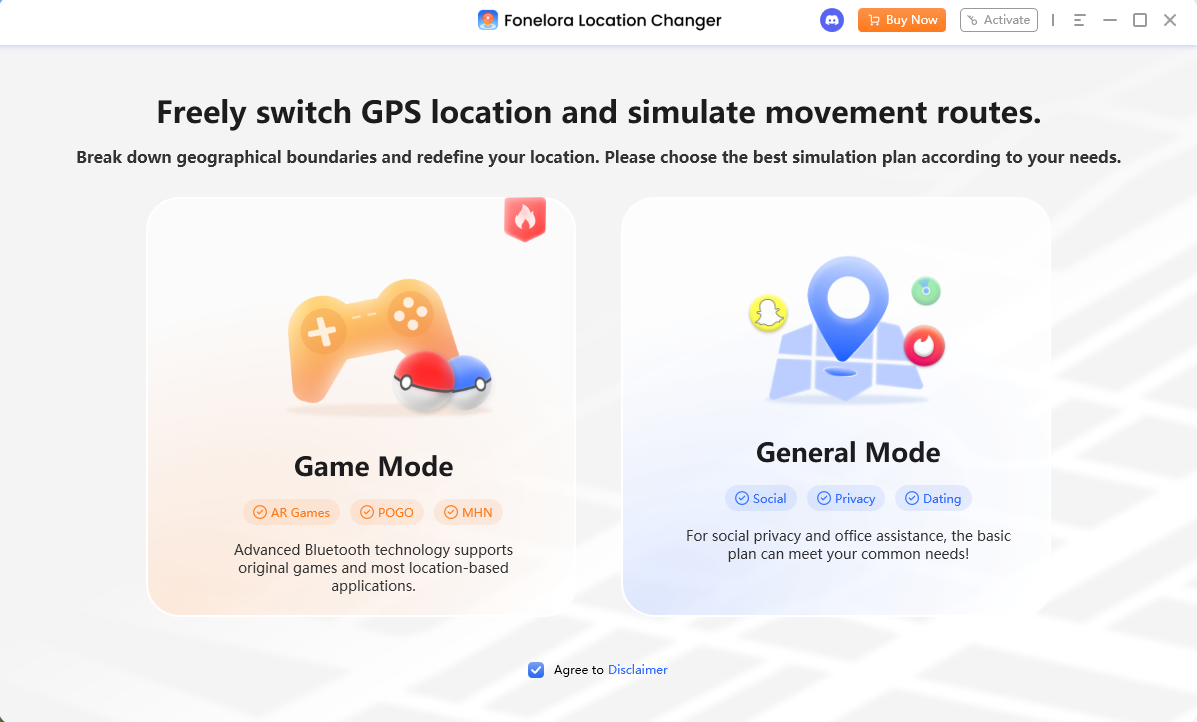
1. Connect your Device: Connect your supported iOS or Android device to your computer via a USB cable or Wi-Fi connection, then select Game Mode from the main interface.
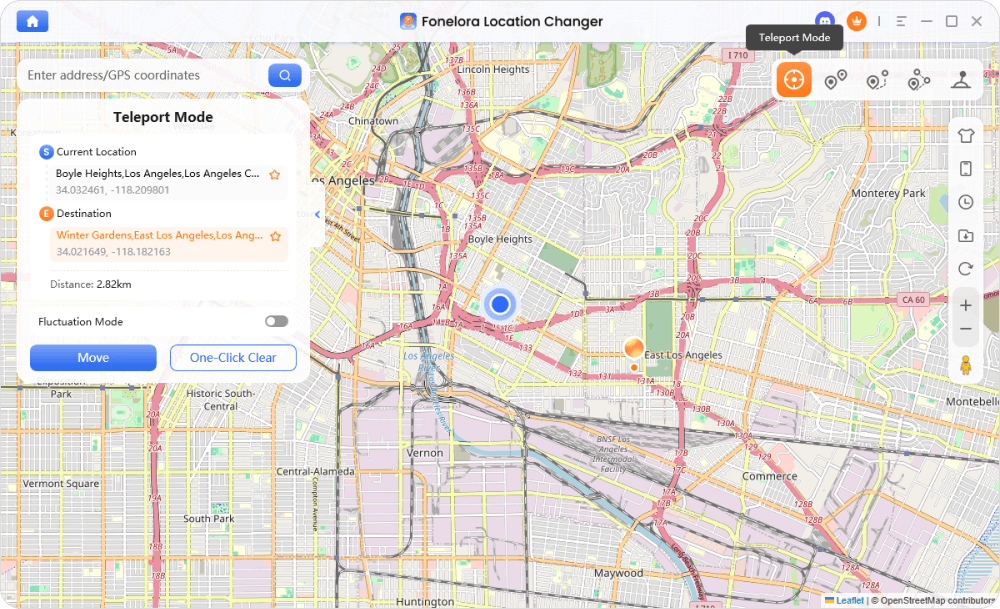
2. Teleport to a Dense Cluster: Use Teleport Mode to move your virtual location to a known dense PokéStop cluster (such as a major city plaza or one of the best Pokémon GO spoofing locations).
3. Set Up Your Route: Switch to Multi-Spot Mode. Click on various PokéStops along the map roads to draw a continuous, multi-waypoint walking route.
4. Adjust Speed and Start: Set the speed slider to a natural walking or slow cycling speed (e.g., 2 to 4 meters per second). Click “Move” to let the simulation run.
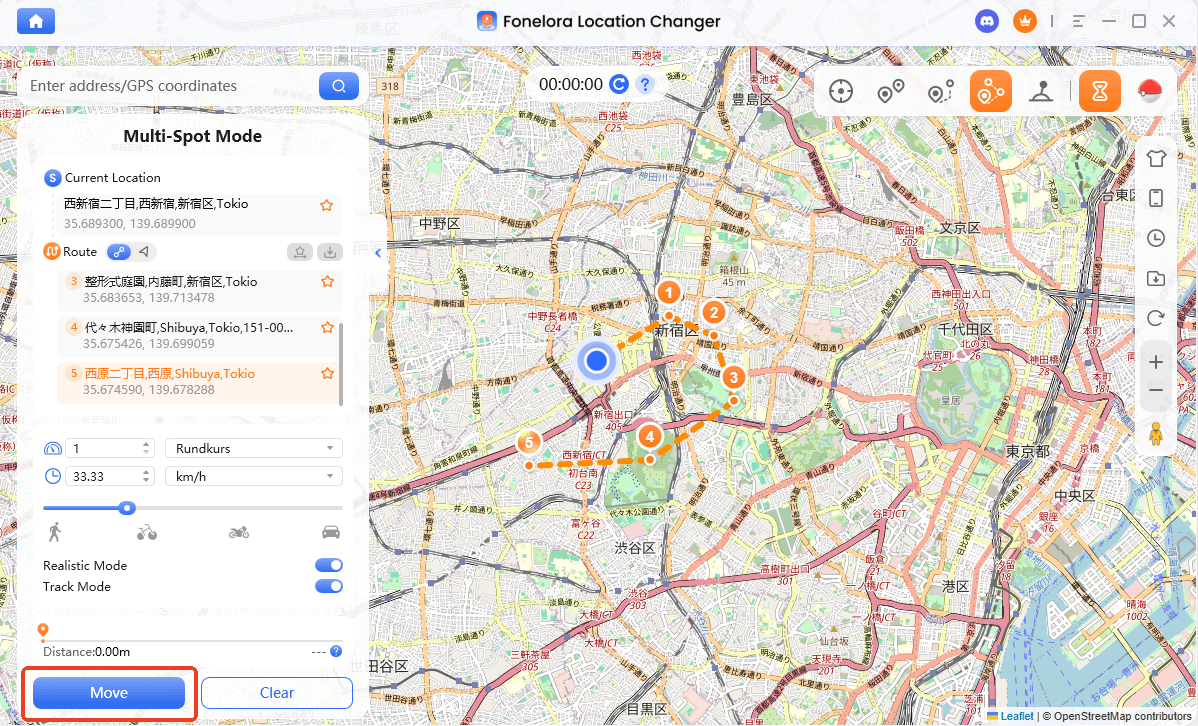
As your avatar walks the virtual route automatically, you can simply tap and spin each PokéStop you pass, easily hitting the hundreds of spins needed to secure evolution items.
Important Cooldown and Movement Rules to Follow
When simulating movement in location-based games, account safety should be your top priority. Long-distance teleports trigger a game mechanic called the Cooldown Timer. If you jump from New York to Tokyo and immediately try to spin a PokéStop, the stop will yield no items, and the Pokémon will flee—a temporary soft ban.
Before farming your Metal Coat virtually, review the Pokémon GO cooldown rules and follow this safety checklist:
- Obey the Cooldown Timer: Always wait the required time after a long-distance teleport before interacting with the game. A max jump usually requires a 2-hour cooldown.
- Use Realistic Speeds: When using Multi-Spot Mode, do not set the speed to extreme vehicle speeds. Keep it at a natural walking or jogging pace to mimic real human movement.
- Avoid Erratic Jumping: Don’t bounce between different countries in a single afternoon. Plan to farm in one specific city cluster for the day.
- Acknowledge the Risks: Be aware of common game risk controls like Error 12. No tool guarantees 100% account safety, so manage your virtual location responsibly and avoid using main accounts if you are testing new spoofing methods.
Frequently Asked Questions
Q1:Is there a guaranteed way to get a metal coat in Pokemon Go?
No. Aside from a few rare and specific Special Research lines (like “A Ripple in Time”), getting a Metal Coat relies heavily on RNG from spinning PokéStops and Gyms.
Q2: How rare is the metal coat drop rate?
The drop rate for any evolution item from a standard PokéStop spin is approximately 1%.
Q3: Can you get a metal coat from gifts or battles?
Yes, evolution items can occasionally drop from opening gifts sent by friends or as random reward bundles from winning in the GO Battle League, but the drop pool is wide and the chances remain low.
Final Thoughts: Farming Evolution Items Smarter
Acquiring a Metal Coat in Pokémon GO requires immense patience due to the 1% drop rate. While official methods like your 7-day streak and opening gifts are helpful, relying on them alone can leave you waiting weeks to finally evolve your Scyther or Onix.
For players who are blocked by their physical location and lack local PokéStops, automating virtual routes is the most practical way to overcome the math. By using a guided desktop workflow like Fonelora Location Changer, you can safely teleport to dense city clusters and automate your walking route. This allows you to generate the massive spin volume needed to beat the RNG odds—all while staying mindful of cooldowns and game rules. If you’re tired of waiting on luck, consider upgrading your farming efficiency today.

Fonelora Location Changer
- Bluetooth Hardware Simulation for Safer GPS Spoofing
- Realistic Movement & Route Simulation
- No Root or Jailbreak Required
- All-in-One Solution for Games, Social Apps & Privacy
More Related Articles



