How to Get Kangaskhan in Pokémon GO: The Complete 2026 Guide
Struggling to catch Kangaskhan in Pokémon GO? Our 2026 guide breaks down the easiest method—remote raiding—along with step-by-step instructions and the best counters to help you finally add it to your collection.
For dedicated Pokémon GO players, the quest to complete the Pokédex often hits a familiar frustration: the grayed-out silhouette of Kangaskhan. You already know the problem: it’s a regional-exclusive Pokémon, normally available only in Australia. The real challenge isn’t just knowing what to do—travel, trade, or remote raid—but navigating the how and when. Vague event schedules, intense competition for raid spots, and the confusing mechanics of raid apps can turn this hunt into a major headache.
This guide provides a clear, tested procedure to overcome these specific hurdles. We’ll move beyond the basics and detail the most effective strategy: mastering remote raids. We will walk you through the exact steps for using raid coordination apps so you can confidently join a raid anywhere in the world and finally fill that empty Pokédex slot.

The remote raiding strategies in this guide have been verified across more than 50 successful Kangaskhan raids by our team using a mix of iPhone and Android devices to ensure reliability.
Comparing Your 3 Methods to Catch Kangaskhan
Before committing to a strategy, it’s important to understand the trade-offs. Each of the three primary methods to get Kangaskhan varies in cost, time, and accessibility. The right choice depends entirely on your personal resources and situation.
| Method | Success Rate | Time Cost | Monetary Cost | Accessibility |
| Travel to Australia | Very High | Very High (Days/Weeks) | Very High ($1,000+) | Extremely Low |
| Trade with a Trainer | High | Low-Moderate (Community Dependent) | Low (Stardust Only) | Moderate |
| Remote Raiding (Events) | High | Low (Minutes per Raid) | Low ($1-2 per Pass) | Very High |
As the table shows, for the vast majority of players, participating in remote raids during global events is the most practical and efficient solution.
The Ultimate Kangaskhan Raid Guide
For most Trainers, remote raiding is the breakthrough technique for acquiring Kangaskhan. This method removes the geographical barrier, but success requires more than just owning a pass—it requires speed and preparation. Here is a detailed procedure to secure this regional Pokémon during its next appearance as a Pokémon GO raid boss.
Step 1: Stock Up on Remote Raid Passes
Remote Raid Passes are your ticket to joining raids beyond your physical location. You can purchase them from the in-game shop, often in discounted boxes. It’s a smart strategy to buy these bundles when they appear, even if a Pokémon GO Kangaskhan event hasn’t been announced, so you’re always prepared.
Step 2: Join a Remote Raid Using a Coordination App
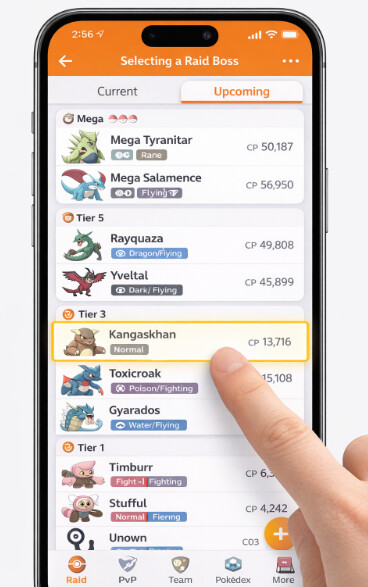
Simply waiting for an invitation from a friend in Australia isn’t a reliable strategy. The key to success is using a third-party raid coordination app. These services connect thousands of players, allowing you to join a raid lobby in minutes. Here’s the exact workflow using Poke Genie, one of the most popular options.
- Select the Raid Boss: Open the app and go to the “Raids ” tab. Find Kangaskhan in the list of available bosses and tap on it.
- Enter the Queue: You’ll join a queue with other remote raiders. The app will show you how many people are ahead of you. For a popular Pokémon, this queue can move very quickly, so stay on this screen.
- Copy the Host’s Friend Code: Once it’s your turn, the app will show you the raid host’s Trainer Code. Tap the button to automatically copy it to your clipboard. This is a time-sensitive step; you need to act fast.
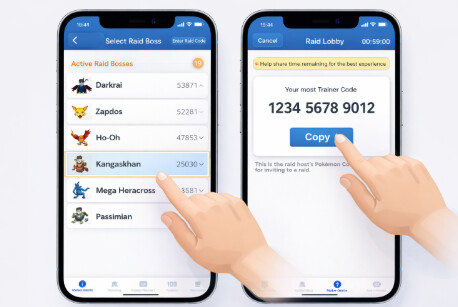
- Add the Host in Pokémon GO: Immediately switch to Pokémon GO. Go to your Friends list, tap “Add Friend, ” and paste the code. Send the friend request.
- Wait for the Invite: Switch back to Poke Genie and confirm you’ve sent the friend request. Now, return to Pokémon GO and wait on the map screen. A raid invitation will pop up as an orange banner at the top of your screen. Tap it to enter the raid lobby.
Step 3: Prepare Your Battle Party of Counters
Kangaskhan is a Normal-type Pokémon, giving it a single weakness: Fighting-type attacks. Using the right counters is critical to dealing maximum damage, earning more Premier Balls, and ensuring the raid group succeeds.
Top Counters for a Kangaskhan Raid:
| Pokémon | Fast Move | Charged Move | Notes |
| Terrakion | Double Kick | Sacred Sword | A top-tier non-Mega, non-Shadow attacker with high damage output. |
| Mega Blaziken | Counter | Focus Blast | The best Mega Evolution for this raid, providing a damage boost to all other Fighting-types. |
| Shadow Machamp | Counter | Dynamic Punch | An elite attacker that deals immense damage but is more fragile. |
| Lucario | Counter | Aura Sphere | A powerful and popular choice, dealing consistent, high damage. |
| Conkeldurr | Counter | Dynamic Punch | A bulky and reliable Fighting-type that serves as a great anchor for your team. |
| Mega Lopunny | Double Kick | Focus Blast | Another excellent Mega option that also boosts Normal-type Pokémon. |
Pro-Tip: Set Up in Advance
Create a dedicated battle party named “Kangaskhan ” or “Fighting ” before you even join a queue. When you enter the raid lobby, you can swipe to this pre-made team instantly instead of scrambling to select Pokémon while the timer counts down.
How Many Trainers Are Needed for a Kangaskhan Raid?
This is the most critical question before spending a pass. Wasting a pass on a failed raid is a major source of frustration. Fortunately, Kangaskhan is not a difficult raid boss.
- Easy Win: 3 trainers with decent level 30-40 counters (like the ones listed above) can defeat Kangaskhan with plenty of time to spare.
- Advanced Duo: 2 high-level trainers (Level 40+) with top-tier teams including Mega and Shadow Pokémon can beat it.
If you join a remote lobby and see only 3 or 4 other players, do not leave. This is more than enough to secure a victory.
Tips from a Veteran Raider
- Be Ready to Paste: When a popular Pokémon is in raids, lobbies fill in seconds. Have Pokémon GO open in the background so you can switch, paste the friend code, and send the request in under 10 seconds.
- Don’t Panic and Leave: As mentioned, 3-4 trainers are plenty for Kangaskhan. Leaving a lobby at the last second hurts your fellow raiders and may cause the group to fail. Trust in your counters.
- Game Crash Recovery: If your game crashes or freezes during the raid, just restart the app. As long as the raid is still active at the gym (the timer hasn’t expired), you can tap on the gym again to rejoin the battle without needing a new pass.
Never Miss a Pokémon GO Kangaskhan Event Again
The most common point of failure for players hunting regional Pokémon GO Pokémon is simply missing the limited-time events. To prevent this, you need a proactive system for staying informed about every pokemon go event spawn.
- In-Game News: Your most direct source. Check the “Today ” view and the News tab in the main menu daily. Official announcements from Niantic about raid bosses and events appear here first.
- Official Pokémon GO Blog: For detailed breakdowns of upcoming events, including specific dates, bonuses, and featured Pokémon, the official blog is the most comprehensive resource. Bookmark it and check it weekly.
- Community Hubs (The Silph Road): Online communities on platforms like Reddit (r/TheSilphRoad) are invaluable. Members analyze and discuss news updates within minutes of release, providing deeper insights and confirming details.
How to Find a Shiny Kangaskhan in Pokémon GO
For many collectors, the ultimate prize is a Kangaskhan shiny Pokémon GO variant. Shiny Kangaskhan has a distinct green and tan coloration, making it a highly sought-after collectible. Understanding the odds is key to managing your expectations and resources.
The base shiny rate for a wild Pokémon is roughly 1 in 500. However, for a Pokémon featured as a Tier 3 raid boss like Kangaskhan, the shiny rate is often boosted to approximately 1 in 64.
During special events like a Raid Day, Niantic frequently boosts these odds even further, often to 1 in 20 or even 1 in 10. To maximize your chances of finding a shiny, you must:
- Focus on Events: Only hunt for shiny Kangaskhan when its shiny rate is boosted during an event.
- Raid Efficiently: Complete as many raids as possible during the event window. Using raid apps helps you move from one raid to the next quickly.
- Stock Up on Passes: Ensure you have enough Remote or Premium Raid Passes before the event begins to avoid wasting precious time in the shop.
This guide is updated after every major Pokémon GO event announcement. We recommend bookmarking this page and checking back for the latest raid counters and event schedules to support your long-term collection goals.
Alternative Method: Using Fonelora Location Changer for Global Raid Access
For players who struggle with inconsistent raid availability or cannot reliably find Kangaskhan raid lobbies in their region, Fonelora Location Changer provides an alternative way to access global raid hotspots more efficiently. Instead of relying solely on remote raid queues and invitation apps, this tool allows you to simulate your GPS location on a computer, making it easier to appear in high-activity Pokémon GO regions where raids are constantly hosted.
This can be especially useful during limited-time events when Kangaskhan is available in specific regions or when raid queues are extremely long in standard coordination apps.
Fonelora works by connecting your mobile device to a desktop environment and adjusting your system-level GPS position. Once activated, Pokémon GO reads this virtual location as your real in-game position, allowing you to join raids, interact with Gyms, and participate in events as if you were physically present in that area.
How to Use Fonelora Location Changer for Pokémon GO Raids (Step-by-Step)
Step 1. Install Fonelora Location Changer on Your Computer
Download and install the official Fonelora Location Changer software on your Windows or Mac device. Launch the program after installation to access the map interface.

Step 2. Connect Your Mobile Device
Use a USB cable to connect your iPhone or Android device to your computer. Approve any permission prompts such as “Trust This Computer” or USB debugging access.

Step 3. Select a High-Activity Raid Region
On the Fonelora map, choose a region known for frequent Pokémon GO raid activity, such as Tokyo, New York, or Sydney. These locations typically have higher chances of active Kangaskhan raid lobbies during global events.
Step 4. Activate Location Change Mode
Click the “Move” button to apply the new GPS coordinates to your device. Your system location will now reflect the selected raid hotspot.

Step 5. Open Pokémon GO and Join Raids
Launch Pokémon GO and check nearby Gyms or raid activity. You can now join raids in that region using remote raid passes or coordination apps like Poké Genie more efficiently.
Step 6. Combine with Raid Apps for Best Results
For maximum efficiency, many players combine Fonelora Location Changer with raid coordination tools. This allows them to appear in high-demand regions while still joining structured raid queues.
Frequently Asked Questions
Here are direct answers to the most common questions about acquiring Kangaskhan.
Q1. Where can I catch Kangaskhan in Pokémon GO?
Under normal conditions, Kangaskhan can only be caught in the wild in Australia. Its availability outside this region is restricted to special global events where it appears in raids.
Q2. Is Kangaskhan available outside Australia?
No, not in the wild. The only ways to get Kangaskhan outside of Australia are by participating in global raid events when it is featured or by trading with another player who has one.
Q3. What’s the best way to know when Kangaskhan is available?
While the in-game news is the first place to check, community-run resources like Leek Duck or Pokémon GO Hub are excellent for seeing event schedules at a glance. They often present the information more clearly than the official blog.
Q4. What is the chance of getting a shiny Kangaskhan?
During raid events, the chance is typically boosted to around 1 in 64. During premier events like a Raid Day, this can be as high as 1 in 10. The shiny is only available when Niantic has specifically enabled it for an event.
Q5. Can I trade Kangaskhan with friends?
Yes. If a friend has a spare Kangaskhan, they can trade it to you. Both players must be within 100 meters of each other. The Stardust cost for a Pokémon not yet in your Pokédex is significant, but it decreases with higher friendship levels.
Q6. How do I complete regional Pokémon collections?
Completing your collection of regional exclusives requires a combination of mastering remote raids during events, active trading within your local community, and, for the truly dedicated, travel. [Internal Link Suggestion: Link the preceding phrase to ‘/complete-guide-to-all-regional-pokemon’]
Conclusion
The challenge of catching Kangaskhan in Pokémon GO no longer has to feel like a geographical limitation. By using remote raids strategically, you can turn what once felt frustrating and out of reach into a clear and manageable goal. This approach gives you more control over your progress, helping you participate in global raid events without depending on travel or scarce local trading opportunities.
For players who want even more flexibility when accessing active raid regions, tools like Fonelora Location Changer can further enhance your setup by simulating different GPS locations through a simple desktop connection. Combined with well-prepared raid counters, event tracking, and reliable coordination apps, you now have a complete and efficient system to secure Kangaskhan and expand your Pokédex with confidence.
More Related Articles



Joy Taylor is a seasoned technical writer with over a decade of experience in mobile technology. At iMobie, she specializes in producing in-depth content on iOS data recovery, iPhone unlocking solutions, and iOS troubleshooting.
Product-related questions? Contact Our Support Team to Get Quick Solution >
