PGSharp Premium APK: A Secure Guide to Unlocking Advanced Gameplay
This guide helps Android gamers safely install game tools, avoid malicious APKs, fix installation issues, and protect accounts while enhancing gameplay with secure alternatives and proper setup methods.
If you are an intermediate Android gamer playing location-based games like Pokémon GO, wanting access to premium features can quickly turn into a source of anxiety. Facing uncertainty about the legitimacy of APK files when you simply want to improve your gameplay is a significant obstacle. You might be struggling with the risk of downloading unsafe, modified versions, leaving you paralyzed by concerns about account safety, malware, and potential soft bans.
Furthermore, confusion between official releases and dangerous clones, coupled with installation failures due to device restrictions, only adds to the frustration. This guide provides a secure, hands-on solution. We will explore the exact steps to safely download and install the software directly on your mobile device, how to avoid common installation errors, and introduce alternatives to ensure your account remains protected while optimizing your gaming experience.
Navigating the Download: Safety and Spotting Fake Sites
When players look into downloading the PGSharp Premium APK, the sheer volume of unofficial sources can make anyone hesitate. The desire to unlock advanced settings without compromising your primary smartphone is incredibly common. Many gamers start this journey wanting enhanced spoofing tools, but they quickly encounter third-party app stores filled with broken links, aggressive pop-up ads, and highly suspicious files.
Through rigorous testing, the differences between legitimate releases and dangerous files become clear. Understanding these modified application risks is the first step toward a secure mobile gaming optimization strategy.
Users should be cautious when downloading premium APK files from unofficial sources. There are dozens of fake clone sites masquerading as the real developer. Always use the official website to avoid downloading malicious software that could compromise your Google account or device data.
By following a structured method, you can confidently secure the correct files. Ultimately, applying a strict security procedure ensures the app runs successfully with enhanced gameplay tools, and you will feel far more informed about safe usage.
Always download the application directly from pgsharp.com. Avoid “mod APK” aggregator sites entirely. This single habit drastically reduces the chance of encountering malware and ensures you receive the latest anti-ban security updates.
How to Manually Install the PGSharp Premium APK on Android
Executing a safe download and installation requires strict adherence to security protocols. When gamers navigate this process blindly, they often face the dreaded “App Not Installed” error or, worse, compromise their primary devices. You must follow secure installation methods and select the trusted source to avoid risks.
Here is an essential guideline for mobile gaming optimization: choosing the correct version for your device improves stability and reduces crashes. Always verify your system architecture before starting.
Step-by-Step Secure Installation Procedure
To successfully install PGSharp on your Android device, follow these exact, tested steps:
- Uninstall the Official Game: You cannot have the official Pokémon GO app from the Google Play Store installed at the same time as PGSharp. Locate the official app on your device, long-press it, and select Uninstall.
- Download the Official File: Open your mobile browser and navigate directly to pgsharp.com. Download the standard ARM64 version, as it is the architecture used by nearly all modern Android smartphones from the last five years.
- Verify the File Hash (Optional but Recommended): To ensure the file has not been tampered with, upload the downloaded APK to a free security site like VirusTotal.com. This acts as an automated SHA-256 hash check to verify the file is completely clean.
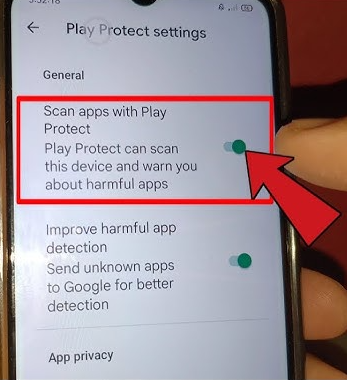
- Temporarily Disable Google Play Protect: Google Play Protect often falsely flags modified gaming apps. Go to the Google Play Store > Profile Icon > Play Protect > Settings (Gear Icon), and temporarily toggle off “Scan apps with Play Protect.” (Remember to turn this back on later).
- Adjust App Permissions: Navigate to your device Settings > Security (or Biometrics and Security), then select Install Unknown Apps. Toggle the switch to “Allow” for your specific web browser or file manager.
- Run the Installer: Locate the downloaded file in your File Manager’s “Downloads” folder. Tap the file to begin the installation process.
By thoroughly checking your download and managing your system settings correctly, you can securely access the premium tools without endangering your hardware.
Evaluating the Upgrades: Premium Features vs. Free Version
When deciding whether to upgrade, it helps to conduct a thorough comparison of the exact capabilities of the premium subscription against the standard free release. The debate often centers on the balance between convenience, automation, and control.
The free version provides basic spoofing, teleportation, and standard joystick navigation, which is usually sufficient for casual players. However, unlocking the premium tier provides extensive advanced settings. This includes tools like custom multi-spot routing, auto-walk, quick catch, and enhanced tools that automate repetitive in-game tasks.
Expert Insight: Understanding platform policies helps users avoid potential penalties. Using enhanced tools increases your digital footprint in the game environment, meaning you must use them responsibly to avoid soft bans.
Feature Comparison and Ban Risk Matrix
- Basic Joystick & Walking (Free Version): Low Risk. Allows manual movement control at realistic walking speeds (e.g., 9 km/h) without triggering automated speed alerts.
- Custom Multi-Spot Routing (Premium Version): Moderate Risk. Automates complex routes across different coordinates to hatch eggs or collect items. It is crucial to set realistic walking speeds to maintain a low profile.
- Quick Catch and Auto-Transfer (Premium Version): High Risk. These tools drastically alter standard interaction speeds, catching Pokémon in milliseconds. Overuse of these automation tools can easily trigger server-side flags from Niantic.
Whether using the free or premium version, you must respect the Cooldown Timer. If you teleport a long distance (e.g., from New York to Tokyo), you must wait a minimum of 2 hours before spinning a PokéStop or catching a Pokémon. Failing to wait will result in an immediate soft ban where all Pokémon flee.
A detailed feature comparison helps you determine if the premium access aligns with your gaming goals and risk tolerance.
Troubleshooting: Fixing the “App Not Installed” Error
If you frequently ask why your installation is failing, you are not alone. Many users experience deep frustration and device restrictions when attempting to run modified APK files, commonly resulting in an “App Not Installed” message. Understanding the technical reasons behind these obstacles can save you significant time.
The primary reason sideloading techniques fail is native Android operating system security updates and conflicting app data. Furthermore, premium features often enhance usability but may require stable device performance.
If you encounter installation failures, follow this strict troubleshooting checklist:
- Verify You Deleted the Original App: As mentioned, PGSharp shares the same package name as the official app. Ensure the original Pokémon GO is completely uninstalled.
- Clear Google Play Services Cache: Sometimes background services block unauthorized installations. Go to Settings > Apps > Google Play Services > Storage, and tap Clear Cache.
- Check Your Device Architecture: While most modern phones are ARM64, older or budget phones might be ARMv7. You can download a free app like Droid Hardware Info from the Play Store. Go to the “System” tab and check your “Instruction Sets”. If it says “AArch64”, use the ARM64 download link on the PGSharp website. If it says “ARMv7”, use the alternate download link provided on their site.
- Free Up Storage Space: Ensure you have at least 2GB of free internal storage, as the extraction and installation process requires temporary buffer space.
Alternative Solution: Using Professional Desktop Tethering
If you want to completely avoid the risk of downloading modified applications, or if you prefer to play from the comfort of your computer without altering your mobile device at all, a commercial desktop solution offers an alternative.
Tools like Fonelora Location Changer operate entirely differently than a standard Android APK. Instead of installing a modified game on your phone, you play the official version of the game while plugging your phone into your PC or Mac. The desktop software then feeds modified GPS coordinates directly to your device via USB.
Comparing Your Sideloading vs. Desktop Options
To make an informed decision, consider the following factors:
| Evaluation Criteria | Mobile APK Sideloading (PGSharp) | Professional Desktop Tool (e.g., Fonelora) |
|---|---|---|
| Playstyle | On-the-go. You can play anywhere directly from your phone. | Stationary. Requires being tethered or connected to your computer. |
| Success Rate | Depends on device compatibility and successfully following installation steps. | Near 100%, as it does not rely on modifying native Android game packages. |
| Safety Risk | Moderate. Requires careful cooldown management and trusting the APK source. | Very Low. Bypasses mobile security hurdles by leaving the official game and phone intact. |
| Technical Skill | Moderate. Demands familiarity with system permissions and file managers. | Low. Desktop software handles complex system processes automatically. |
While mobile APKs are the preferred choice for gamers who want freedom of movement, tethered desktop software is highly effective for users facing persistent installation failures due to device restrictions.
A More Reliable Uber GPS Spoofing Solution: Fonelora Location Changer
As mentioned earlier, desktop-based tools are generally the most dependable option for modifying GPS location on Uber. Compared to mobile apps that rely on easily detectable “Mock Location” settings, desktop solutions tend to deliver a more stable and consistent signal.
If you’re looking for a simpler and more reliable alternative, Fonelora Location Changer is a solid option to consider.
Instead of relying on basic spoofing techniques, Fonelora changes your device’s GPS location through a computer connection. This approach helps minimize common problems like location jumping (rubber-banding) and reduces the likelihood of immediate detection.
Why Choose Fonelora Location Changer?
Fonelora focuses on stability and realistic movement—two key factors when modifying location-based apps like Uber:
- Change GPS location instantly with one click
- Compatible with both iOS and Android devices
- No need to root or jailbreak your phone
- Built-in movement simulation for more natural behavior
- Adjustable speed and customizable routes
- Helps reduce sudden location resets or “snapping”
It’s especially useful for:
- Drivers aiming to position themselves in high-demand areas
- Users testing location-based features or scenarios
- Anyone seeking a smoother alternative to mobile spoofing apps
How to Use Fonelora to Change GPS Location
Follow these simple steps to get started:
Step 1: Download and Install
Download Fonelora Location Changer from the official website and install it on your computer.

Step 2: Connect Your Device
Connect your iPhone or Android device using a USB cable.
- On iOS: Tap “Trust This Computer” when prompted
- On Android: Enable USB Debugging

Step 3: Choose a Location
Open the map interface in the software:
- Enter a specific location (such as an airport or busy area)
- Or select a point directly on the map

Frequently Asked Questions
To finalize our guide, we have compiled concise answers to the most common questions regarding safety, modifications, and core definitions.
What is the PGSharp Premium APK?
It is an advanced, subscription-based modification for Android devices designed to alter your GPS location coordinates in games like Pokémon GO. It offers enhanced gameplay tools, such as auto-walking and custom routing, that are not available in the standard free release.
How do I install the software correctly?
To install the application, first uninstall the official version of the game. Next, download the file from the official source, temporarily disable Google Play Protect, and adjust your Android settings to allow installations from unknown sources. Finally, tap the downloaded file to install.
What features are included in the premium version?
The premium version includes custom routing, auto-walk, enhanced catching tools like auto-transfer, and a highly customizable built-in joystick.
Secure Your Mobile Gaming Optimization Today
Overcoming the uncertainty about the legitimacy of APK files does not have to compromise your device. By choosing the official source, verifying your download, and following exact troubleshooting steps, you eliminate the risk of downloading unsafe versions and bypass the installation failures that plague so many players.
Regain control of your gaming experience by securely managing your location data and respecting in-game cooldown rules. Whether you choose to manually install the APK for on-the-go freedom or utilize a desktop tethering tool for a stationary setup, you can now explore global content with complete peace of mind.



Joy Taylor is a seasoned technical writer with over a decade of experience in mobile technology. At iMobie, she specializes in producing in-depth content on iOS data recovery, iPhone unlocking solutions, and iOS troubleshooting.
Product-related questions? Contact Our Support Team to Get Quick Solution >
